
Got a tip for us?
Let us know
Become a MacRumors Supporter for $50/year with no ads, ability to filter front page stories, and private forums.
Is it possible for a school to track which websites you visit?
- Thread starter phungy
- Start date
- Sort by reaction score
You are using an out of date browser. It may not display this or other websites correctly.
You should upgrade or use an alternative browser.
You should upgrade or use an alternative browser.

psycoswimmer
macrumors 65816
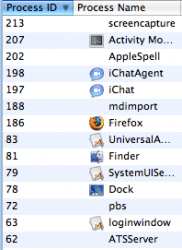
Did they install software on her MBP? If it's done through software, you could possibly disable it in Activity Monitor.

Did they install software on her MBP? If it's done through software, you could possibly disable it in Activity Monitor.
I searched through Applications but don't see anything fishy. Here is a screenshot of the MBP's Activity Monitor.
Attachments

ScrewzLuse
macrumors member
Is it possible? Yes. It involves logging traffic through their network. Not all that difficult. But I doubt they would install a logging application on your Macbook.

gnasher729
Suspended
My sister received a MBP through her fine arts school and they told her that they have the ability to track all the websites she visits.
My questions are:
1) Is this possible?
2) If so, what are my options to bypass this?
Thanks guys!
1. Yes. Whenever you visit a website, your Mac sends a request for that site to the nearest available server, which then passes it on. At home, my nearest server is my wireless router, and the next server is my ISP. Both will know exactly what webpages I am visiting. In your sisters case, the nearest server will be the school's server, and it is completely under their control. If they want to keep track of what sites she is visiting, they can do it.
2. Install remote access software on a computer at home. From school, log into your computer, then visit whatever you want via the computer at home. They will know that you are visiting your computer at home, but they won't know what you are doing there.
Or buy an iPhone. In the UK, there are mobile phones that you can connect to your computer and use for Internet access with something like 3GB per month limit for reasonable prices; that would be undetectable to the school.
There are lots of ways they could do it - the most obvious is to use a proxy server (we do this at work - the system even does automatic weekly reports of the top 10 mp3 downloaders, porn surfers etc 🙂 )
The only way to be totally sure you're not being monitored somewhere is to do a really indepth check of the system, or put parallels or similar on it and browse inside a virtual machine.
The only way to be totally sure you're not being monitored somewhere is to do a really indepth check of the system, or put parallels or similar on it and browse inside a virtual machine.
Interesting. So if she's at home using our personal router, then the school won't be able to keep track. It's only when she's connected to the school's server.
Has anyone heard of anonymouse.org? Supposedly it hides your IP when visiting sites, will this help when she's using the school's server?
Has anyone heard of anonymouse.org? Supposedly it hides your IP when visiting sites, will this help when she's using the school's server?

callmemike20
macrumors 6502a
Interesting. So if she's at home using our personal router, then the school won't be able to keep track. It's only when she's connected to the school's server.
Has anyone heard of anonymouse.org? Supposedly it hides your IP when visiting sites, will this help when she's using the school's server?
What does she have that is so secret anyway? Is porno her type of art? Does she have her own website? I mean, come on, what is the big deal if the school sees it? In fact, the RIAA is targeting colleges for the illegal downloading of music. They send lists to the deans to tell them who is downloading what, then the RIAA picks a few at random and sues them. The settlements are about $6,000.00, and if you don't settle, the lawsuit is usually $750.00 a song. It happened to a few kids at my college. Honestly though, if you want to listen to music, then pay for it. Otherwise there will be no more music because people won't be getting paid for it. Build the American economy and pay for it. How would you like it if you were selling your car and someone just stole it from you? That's the same concept.

CanadaRAM
macrumors G5
The only way to be totally sure you're not being monitored somewhere is to do a really indepth check of the system, or put parallels or similar on it and browse inside a virtual machine.
Eh? What possible difference would that make if router traffic was being monitored?
Has anyone heard of anonymouse.org? Supposedly it hides your IP when visiting sites, will this help when she's using the school's server?
Not much - these services are intended to hide your IP from the web server you are visiting - the school's router will still log the connection from her dorm to the outside site. Depending if they want to sniff packets, they could probably trace where the eventual destination site was that she was visiting. In normal circumstances, nobody'd care. Under legal pressure or search warrant, though, you can assume that they can and will be able to lay everything out in the open.
There are lots of ways they could do it - the most obvious is to use a proxy server (we do this at work - the system even does automatic weekly reports of the top 10 mp3 downloaders, porn surfers etc 🙂 )
The only way to be totally sure you're not being monitored somewhere is to do a really indepth check of the system, or put parallels or similar on it and browse inside a virtual machine.
A proxy server is even beyond what they need to tell when, how, and what sites someone is visiting. Any good (commercial grade) router will have these reports and any good sysadmin will know how to sniff packets and see what you're doing. (I should add that while most sysadmins can, most do not - they've got better things to do than see you update your facebook profile 40 times per hour.)
To give yourself cover, there are a number of things to do, but none of them really "out-of-the-box" easy. If it were me, I'd fire up a SSH tunnel to an outside-the-network computer and use VNC (remote control); This has the benefit of being encrypted via ssh as well. You can also use SSH as a "poor man's VPN" to tunnel all your traffic over a secured, outside connection. They can tell you're connected somewhere, but can't tell what it is other than being encrypted ssh traffic.
You'll need an outside internet connection and a computer (server) always running accepting connections. The setup isn't so bad, especially if you're using a Mac with all the UNIX tools built in.
Two caveats however:
1) If she's planning on doing things that they forbid for technical reasons, like downloading massive amounts of data, it still passes through their network using their resources. They may not be happy about this.
2) If there is software installed on her Mac to monitor traffic, this is all pointless. Confer with other students to see if this is the case, which I highly doubt.
Good Luck stickin' it to the man.
dacreativeguy
macrumors 68020
Wirelessly posted (Mozilla/4.0 (compatible; MSIE 6.0; Windows 98; PalmSource/Palm-D052; Blazer/4.5) 16;320x320)
fine arts school? I doubt anyone there would have the technical knowledge to do that. 🙂
fine arts school? I doubt anyone there would have the technical knowledge to do that. 🙂

taylorwilsdon
macrumors 68000
I told her to use the MBP for school purposes only and to use her MB for personal use. Everything is fine now 😛
Uh, that still isn't going to help any. If she uses either on the school network, they can see everything she does. If she uses it at home or a coffee shop, etc, they can't.
Most colleges dont even care what you are surfing and what you do.
My college for example lays down strict rules for the internet, but does not enforce it at all. Many colleges are the same way. I only know a handful of colleges where they actually are very strict on the usage and actually monitor and block certain traffic (ie: bittorrent). And even then they only became very strict after some kid got caught in their school by the RIAA or MPAA.
And to be honest, I dont know why you or your sister would even be so afraid of this. Your ISP at home can also track all your traffic if they wanted to. In fact, the MPAA and the RIAA was pushing congress to force ISPs to watch our traffic a few years ago, however of course that failed.
One of the best way if you really want to download (Im talking about legal stuff of course 😉) on campus is to download with a program called Direct Connect (A Mac version is Shakespeer). This sort of caught on when Napster was shut down and Kazaa was getting a lot of flak. Basically many college campuses have "hubs" where you can connect to and download from one another. What differs with this is that rather than connecting to the outside network (ie: the internet) you are connecting within the network which is A LOT less likely to be monitored. The only problem is, the material on the hub will be the same stuff because if nobody has the newest Justin Timberlake song (using him as an example, but I completely despise him and his music) then nobody will get it until someone gets it and shares it with the hub.
My college for example lays down strict rules for the internet, but does not enforce it at all. Many colleges are the same way. I only know a handful of colleges where they actually are very strict on the usage and actually monitor and block certain traffic (ie: bittorrent). And even then they only became very strict after some kid got caught in their school by the RIAA or MPAA.
And to be honest, I dont know why you or your sister would even be so afraid of this. Your ISP at home can also track all your traffic if they wanted to. In fact, the MPAA and the RIAA was pushing congress to force ISPs to watch our traffic a few years ago, however of course that failed.
One of the best way if you really want to download (Im talking about legal stuff of course 😉) on campus is to download with a program called Direct Connect (A Mac version is Shakespeer). This sort of caught on when Napster was shut down and Kazaa was getting a lot of flak. Basically many college campuses have "hubs" where you can connect to and download from one another. What differs with this is that rather than connecting to the outside network (ie: the internet) you are connecting within the network which is A LOT less likely to be monitored. The only problem is, the material on the hub will be the same stuff because if nobody has the newest Justin Timberlake song (using him as an example, but I completely despise him and his music) then nobody will get it until someone gets it and shares it with the hub.

scaredpoet
macrumors 604
Uh, that still isn't going to help any. If she uses either on the school network, they can see everything she does. If she uses it at home or a coffee shop, etc, they can't.
That's partially true. We do not know for sure if the fine arts school has set up a proxy or VPN on the MBP's network setings, in which case all traffic is being routed through the server of the school's choice regardless of what physical network she's connected to. Then, they can in fact track her traffic from home or from a coffee shop on that MBP.
Uh, that still isn't going to help any. If she uses either on the school network, they can see everything she does. If she uses it at home or a coffee shop, etc, they can't.
I should have been more clear, I meant she uses the MBP at school for school purposes and use the MB at home for personal use.

sushi
Moderator emeritus
AFAIK, it is possible to have an application run in the background and not show up on the Activity Monitor.I searched through Applications but don't see anything fishy. Here is a screenshot of the MBP's Activity Monitor.

iTeen
macrumors 65816
I'm not afraid of anything cause I'm not going to be using the MBP. My sister said she'd like some privacy when surfing the intarweb. 😀
sounds dirty
SavantEdge
macrumors newbie
First, this isn't really the right forum, but whatever.
Alright, let's take the worst possible scenarios here.
(LOCAL) SOFTWARE BASED MONITORING:
Assuming the school decided to go all out on the software front, and managed to get software that conceals itself (perhaps via rootkit technology which hasn't hit the press yet), then the solution is simple: download a secure wipe liveCD (Darik's Boot and Nuke is pretty good) on a trusted computer, make sure you check the MD5 sums (to ensure against both someone hijacking your download (possible, but takes a _lot_ of effort, and thus unlikely) and against damaged downloads/burns (actually surprisingly common)); and use it to wipe the hard drive clean. Then get some new MBP CDs from a trusted source (Apple Store, or a trusted friend with a non-school bought MBP), and install a new version of the OS. And don't install any other software the school provides.
After this is done, the only way the school is going to put software on your computer is with your permission, or via an exploit, and there aren't a whole lot of those for OS X (though they _do_ exist).
NETWORK BASED MONITORING:
This can be more or less complicated, depending on the school's sophistication. The best middle ground between security and ease of use I think is Tor. It's available at http://tor.eff.org. The details are all there, but basically Tor functions as a proxy, and instead of letting the school's servers connect you to websites, instead it uses the schools servers to forward your internet traffic to another, random, Tor-participating server, which in turn passes it to a second, random, Tor-participating server, which in turn passes it to a _third_, random, Tor-participating server, which then passes on your traffic to the actual destination. And then all the way back again. This is done in such a way that no server can tell both the originating and destination computer (everything's encrypted). So what this means is the school knows you're talking to <random computer #1>, but not what you're saying to them.
Cheers.
Alright, let's take the worst possible scenarios here.
(LOCAL) SOFTWARE BASED MONITORING:
Assuming the school decided to go all out on the software front, and managed to get software that conceals itself (perhaps via rootkit technology which hasn't hit the press yet), then the solution is simple: download a secure wipe liveCD (Darik's Boot and Nuke is pretty good) on a trusted computer, make sure you check the MD5 sums (to ensure against both someone hijacking your download (possible, but takes a _lot_ of effort, and thus unlikely) and against damaged downloads/burns (actually surprisingly common)); and use it to wipe the hard drive clean. Then get some new MBP CDs from a trusted source (Apple Store, or a trusted friend with a non-school bought MBP), and install a new version of the OS. And don't install any other software the school provides.
After this is done, the only way the school is going to put software on your computer is with your permission, or via an exploit, and there aren't a whole lot of those for OS X (though they _do_ exist).
NETWORK BASED MONITORING:
This can be more or less complicated, depending on the school's sophistication. The best middle ground between security and ease of use I think is Tor. It's available at http://tor.eff.org. The details are all there, but basically Tor functions as a proxy, and instead of letting the school's servers connect you to websites, instead it uses the schools servers to forward your internet traffic to another, random, Tor-participating server, which in turn passes it to a second, random, Tor-participating server, which in turn passes it to a _third_, random, Tor-participating server, which then passes on your traffic to the actual destination. And then all the way back again. This is done in such a way that no server can tell both the originating and destination computer (everything's encrypted). So what this means is the school knows you're talking to <random computer #1>, but not what you're saying to them.
Cheers.
iTeen
macrumors 65816
First, this isn't really the right forum, but whatever.
Alright, let's take the worst possible scenarios here.
(LOCAL) SOFTWARE BASED MONITORING:
Assuming the school decided to go all out on the software front, and managed to get software that conceals itself (perhaps via rootkit technology which hasn't hit the press yet), then the solution is simple: download a secure wipe liveCD (Darik's Boot and Nuke is pretty good) on a trusted computer, make sure you check the MD5 sums (to ensure against both someone hijacking your download (possible, but takes a _lot_ of effort, and thus unlikely) and against damaged downloads/burns (actually surprisingly common)); and use it to wipe the hard drive clean. Then get some new MBP CDs from a trusted source (Apple Store, or a trusted friend with a non-school bought MBP), and install a new version of the OS. And don't install any other software the school provides.
After this is done, the only way the school is going to put software on your computer is with your permission, or via an exploit, and there aren't a whole lot of those for OS X (though they _do_ exist).
NETWORK BASED MONITORING:
This can be more or less complicated, depending on the school's sophistication. The best middle ground between security and ease of use I think is Tor. It's available at http://tor.eff.org. The details are all there, but basically Tor functions as a proxy, and instead of letting the school's servers connect you to websites, instead it uses the schools servers to forward your internet traffic to another, random, Tor-participating server, which in turn passes it to a second, random, Tor-participating server, which in turn passes it to a _third_, random, Tor-participating server, which then passes on your traffic to the actual destination. And then all the way back again. This is done in such a way that no server can tell both the originating and destination computer (everything's encrypted). So what this means is the school knows you're talking to <random computer #1>, but not what you're saying to them.
Cheers.
jeeze get technical