
Isn't it crazy that Mac OS Tahoe 26.4 has a Burn button to customize the Finder's toolbar? Is there anyone who still burn CDs out there?



I can't believe this could be real.


When they release a new OS, they do not sift through every feature and button and only take what they still think is "useful". Removing something like this would take deliberate effort and has definite downsides, all for little to no gain.And can't believe some one at apple thought it would be useful to have a dedicated button in such modern OS. lol
Plenty of people burn CDs so they can play music in their car.What would someone record on a CD that wouldn't be possible to send trough some digital file transfer? Even for a DVD, it's so fast to send it anywhere....
There are more use cases than yours, mister laughing emoji man.I remember using CDs to send brochures for printing services. That time You would need to send the whole package containing the file, images, fonts, vector based illustrations and what else. But now you have PDF that is so easy to share. I really can't believe someone is still burning CDs or DVDs. 🤣😂🤣😂🤣

Is there anyone who still burn CDs out there?

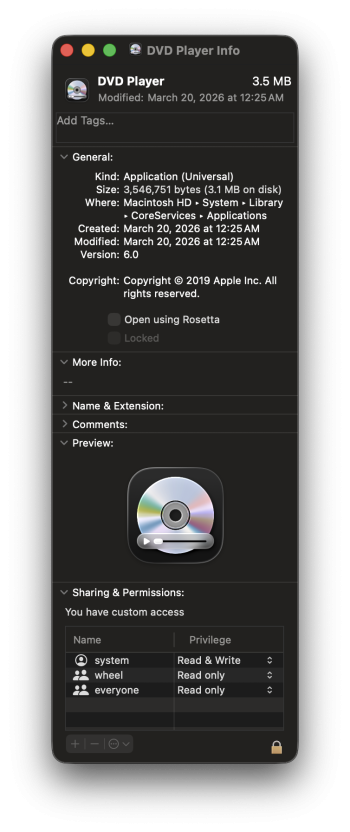
That is interesting, I do not have a DVD Player app on my M3 laptop Sequoia 15.7Presumably! The DVD Player app is still on Tahoe too, along with an updated icon.
Apple's one of the keener companies to abandon traditional technologies; I think it's fantastic they still support this stuff for people who do use it.
That is interesting, I do not have a DVD Player app on my M3 laptop Sequoia 15.7
Well now, that is interesting. Ha.DVD Player (along with other lesser-used utilities) have been stored by the system at "'/System/Library/CoreServices/Applications/" for the last while. (I don't know whether that would be true for your Mac, but it's one reason it doesn't always just show up.)
That is true, but most times more can still use an external CD/DVD player connected to the head unit (or receiver) via the USB port. I have a large stack original music CD's that I keep unused, and have made duplicate CD's to play at home, or when out in remote locations. Most older cars and trucks have CD players, too.most new cars don't even have cd players.

So you can add this button to your finder panel!I burn CDs to use on old computers.
it's so fast to send it anywhere....


Toast is an outstanding software (just read what it can do at the website), but I believe that it doesn't work with Sequoia and Tahoe. If it would I would certainly buy it.And that software is still over $100!
So why should I assume that all the people around me, or in the US, or in the world for that matter, don't have any use apps such as the one mentioned by the OP of this thread?
As this button shows, MacOS can do it!There is open source and free Burn app, does the job just fine, as I remember.

Yes, it is good to have such options available.Life is such a funny thing....
I could'nt spot those use scenerios in 202*, but reading the answers here I can see why people are burning CDs and DVDs. Thank you all for your insights.

Presumably! The DVD Player app is still on Tahoe too, along with an updated icon.
Apple's one of the keener companies to abandon traditional technologies; I think it's fantastic they still support this stuff for people who do use it.
That is interesting, I do not have a DVD Player app on my M3 laptop Sequoia 15.7
DVD Player (along with other lesser-used utilities) have been stored by the system at "'/System/Library/CoreServices/Applications/" for the last while. (I don't know whether that would be true for your Mac, but it's one reason it doesn't always just show up.)

 osxdaily.com

So in 2026 a Mac can still play a DVD but not a BluRay. Huh.The DVD Player app is still on Tahoe too, along with an updated icon.
Gosh. BluRay. Right up there with 3D TVs. 😏So in 2026 a Mac can still play a DVD but not a BluRay. Huh.

