


Hi,
I want iTunes to keep my audiobooks and music in different folders within my iTunes Media folder BUT i want the audiobooks to be within 'artist' folder AND then an 'album' subfolder (within the artist folder).
This is how music files are organized:
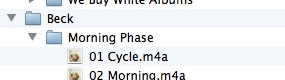
So the folder hierarchy is Artist > Album > file.
But audiobooks do this:
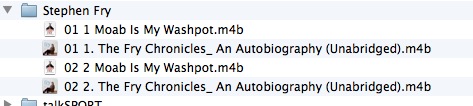
I want there to be a subfolder for each of the books, so 'The Fry Chronicles' is in it's own subfolder and 'Moab Is My Washpot' has it's own subfolder within the Stephen Fry.
Is this possible? I can't find a way to do this?
Thanks in advance,
R
I want iTunes to keep my audiobooks and music in different folders within my iTunes Media folder BUT i want the audiobooks to be within 'artist' folder AND then an 'album' subfolder (within the artist folder).
This is how music files are organized:
So the folder hierarchy is Artist > Album > file.
But audiobooks do this:
I want there to be a subfolder for each of the books, so 'The Fry Chronicles' is in it's own subfolder and 'Moab Is My Washpot' has it's own subfolder within the Stephen Fry.
Is this possible? I can't find a way to do this?
Thanks in advance,
R
Last edited:
