
Got a tip for us?
Let us know
Become a MacRumors Supporter for $50/year with no ads, ability to filter front page stories, and private forums.
LG UltraFine 5K - Owners Thread
- Thread starter iBrooker
- Start date
- Sort by reaction score
You are using an out of date browser. It may not display this or other websites correctly.
You should upgrade or use an alternative browser.
You should upgrade or use an alternative browser.

hollandog
macrumors regular
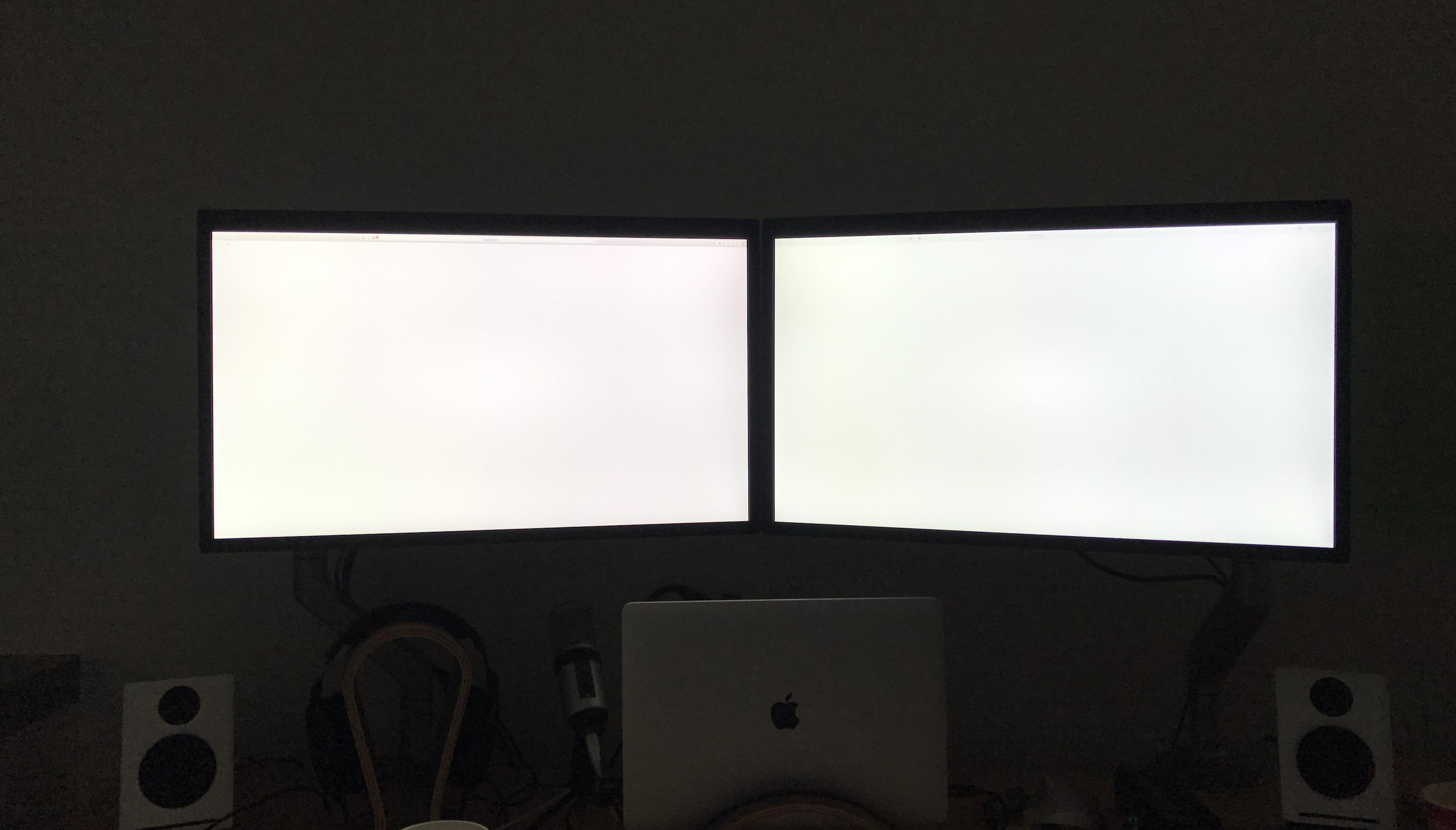
So just today I noticed an issue with my dual setup. One of the displays (one on the left) seems to have a very slight pinkish hue to it. The one to the right has a relatively whiter / greener hue (when compared to the left display).
Has anyone else noticed this?
Mine has little green tint from factory. Try hardware calibrate them.
Picked up my displays from the Apple Store on Thursday and just got them hooked up on two monitor mounts in my office. Haven't had a chance to really use them so can't comment on how responsive it is yet.
One thing I don't like is that I have to use both sides of the MacBook to connect the displays -- would have so much cleaner to just have everything connected on 1 side.
I'm running a BTO MBP with 2.6 GHz / 460 Graphics / 512GB SSD.

Is this a standing desk?
Anyone know if the monitor will output sound through one of the USB-C ports through a USB-C to 3.5mm audio adapter? I was initially thinking it would, but am not sure it'll work. Was hoping to remove one more cord (the 3.5mm audio plug) from my MBP and have it plugged into the display. Bought one of the adapters, but it doesn't seem to work and I'm not sure if I'm doing something wrong or it's just not a viable option.
Yes it works - I have one of the usb-c ports going to a usb hub and the sabrent usb to 3.5mm adapter plugged into the hub. It works fine, however I hear crackling sometimes. I am thinking of getting a bluetooth set of speakers instead which have subwoofer outputs:
KEF EGG Wireless Digital Music System - White or Ruark Audio MR1 Active Bluetooth Speakers - The Martin Buttrich Edition (White) (both award winners)
As an Amazon Associate, MacRumors earns a commission from qualifying purchases made through links in this post.
Yup, though it is a little hard to see from the photo.Is this a standing desk?
Would a tint like this be considered normal? Have you tried calibration? It's so annoying to see white windows side by side and not have them match (at least it is when working on designs)Mine has little green tint from factory. Try hardware calibrate them.
hollandog
macrumors regular
Yup, though it is a little hard to see from the photo.
Would a tint like this be considered normal? Have you tried calibration? It's so annoying to see white windows side by side and not have them match (at least it is when working on designs)
I believe so. I calibrated mine with x-rite.

rtkane
macrumors regular
So just today I noticed an issue with my dual setup. One of the displays (one on the left) seems to have a very slight pinkish hue to it. The one to the right has a relatively whiter / greener hue (when compared to the left display).
Has anyone else noticed this?
Mine is pretty even.. don't have the same issues you seem to be having. Maybe a calibration will help as others have said.
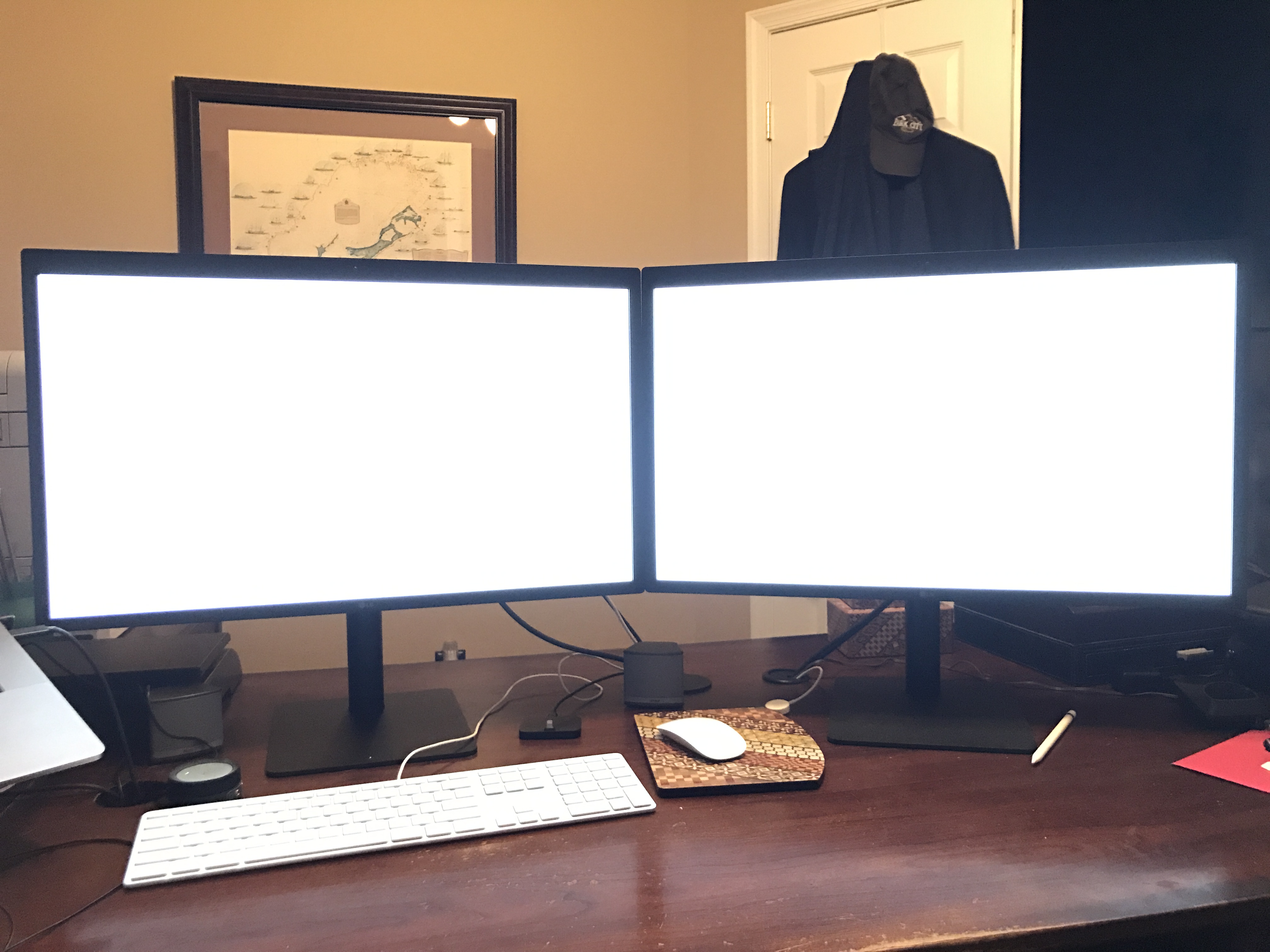
However, when I turned up the brightness my right monitor now has 1/3rd of the display that will not adjust any longer.
I think they're going to have to replace it, unfortunately (unless anyone here has any ideas. Low res vid just so you can see the changes in the screen when I move the brightness slide back and forth. The right side remains constant (even though in the video it looks like it brightens--just the exposure on the camera causing this).

Mine is pretty even.. don't have the same issues you seem to be having. Maybe a calibration will help as others have said.
However, when I turned up the brightness my right monitor now has 1/3rd of the display that will not adjust any longer.
I think they're going to have to replace it, unfortunately (unless anyone here has any ideas. Low res vid just so you can see the changes in the screen when I move the brightness slide back and forth. The right side remains constant (even though in the video it looks like it brightens--just the exposure on the camera causing this).
Yikes -- that's pretty bad about the brightness not responding correctly. It looks like a hardware issue IMO. How do you plan to get it replaced? Just return / repurchase?
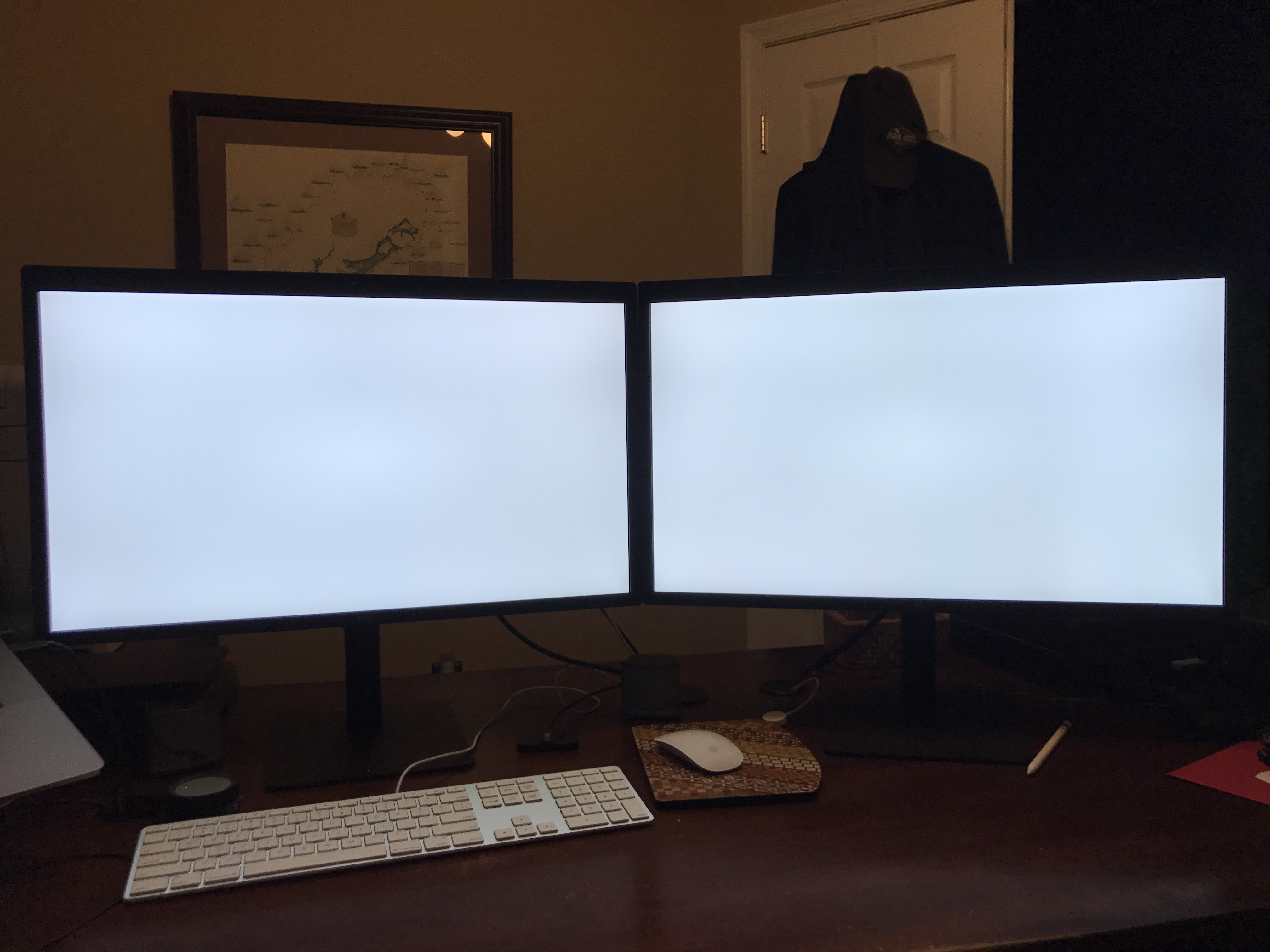
And thanks for taking the shot with the whites -- it's a little hard to make out since the iPhone over exposed the screens, though -- any chance you can retake it but tone the exposure down (just tap to focus, then swipe down)?
After your calibration, were you able to get rid of all of the greens?I believe so. I calibrated mine with x-rite.
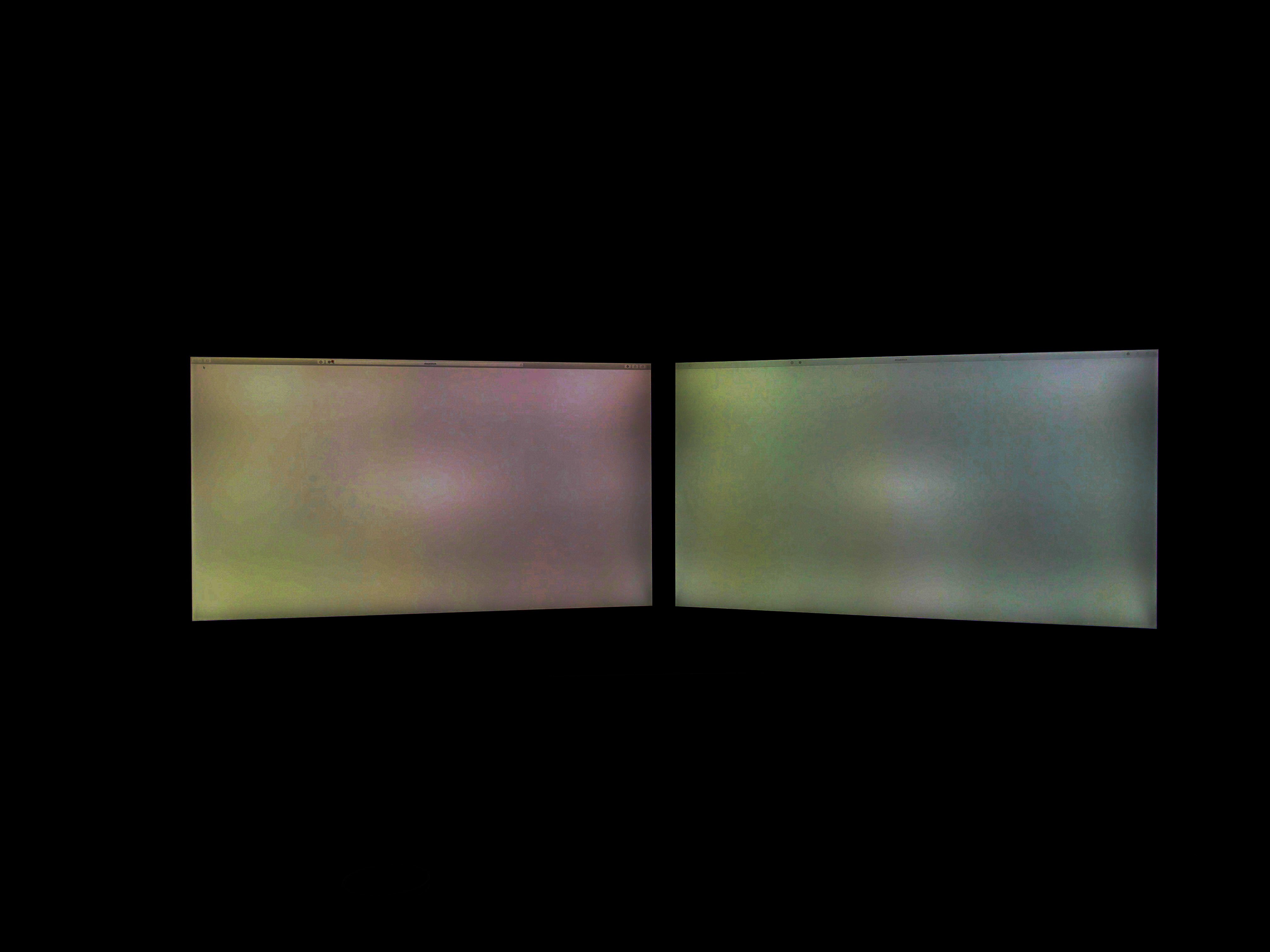
[doublepost=1483506853][/doublepost]I just took a moment to adjust the exposure / contrast on my original photo showing the pink tint. When i do this, I can see that theres a very obvious delineation in the screens where the two display channels are "glued" together -- the first display seems to have a yellow / pink tint, and the second a green / gray.
rtkane
macrumors regular
Yikes -- that's pretty bad about the brightness not responding correctly. It looks like a hardware issue IMO. How do you plan to get it replaced? Just return / repurchase?
And thanks for taking the shot with the whites -- it's a little hard to make out since the iPhone over exposed the screens, though -- any chance you can retake it but tone the exposure down (just tap to focus, then swipe down)?
After your calibration, were you able to get rid of all of the greens?
[doublepost=1483506853][/doublepost]I just took a moment to adjust the exposure / contrast on my original photo showing the pink tint. When i do this, I can see that theres a very obvious delineation in the screens where the two display channels are "glued" together -- the first display seems to have a yellow / pink tint, and the second a green / gray.
OH yeah... I mean to post this pic:

jimthing
macrumors 68020
Yikes! Are you returning / replacing both these then?Yikes -- that's pretty bad about the brightness not responding correctly. It looks like a hardware issue IMO. How do you plan to get it replaced? Just return / repurchase?
And thanks for taking the shot with the whites -- it's a little hard to make out since the iPhone over exposed the screens, though -- any chance you can retake it but tone the exposure down (just tap to focus, then swipe down)?
After your calibration, were you able to get rid of all of the greens?
[doublepost=1483506853][/doublepost]I just took a moment to adjust the exposure / contrast on my original photo showing the pink tint. When i do this, I can see that theres a very obvious delineation in the screens where the two display channels are "glued" together -- the first display seems to have a yellow / pink tint, and the second a green / gray.
Yup, though it is a little hard to see from the photo.
I know this is off-topic, but what desk is it? How much do the monitors wobble when the desk is extended?


jimthing
macrumors 68020
Lots of great/important posts above!How low can it go? Can someone measure the distance from desk to bottom of where the screen starts please? I have my current screen at ~ 4 inches.
Thanks.
After testing two of these things (when they finally arrive sometime in Jan!), for both picture issues (see others posts above), and for connectivity possibilities (inc. extra display with MBP+2x LG 5K's; works?)... if they still perform properly then I will likely mount the two on some kind of, erm, mounting device (geez, have you checked the prices for some of these mounts – anywhere from £50 to hundreds of quid for super twirling-whirling ones!).
I think it makes the most sense for physical desk space, anyway (especially if you have more than one display) to cut down on possible wobbly-stand issues, and for general space considerations.

Outrigger
macrumors 68000
Lots of great/important posts above!
After testing two of these things (when they finally arrive sometime in Jan!), for both picture issues (see others posts above), and for connectivity possibilities (inc. extra display with MBP+2x LG 5K's; works?)... if they still perform properly then I will likely mount the two on some kind of, erm, mounting device (geez, have you checked the prices for some of these mounts – anywhere from £50 to hundreds of quid for super twirling-whirling ones!).
I think it makes the most sense for physical desk space, anyway (especially if you have more than one display) to cut down on possible wobbly-stand issues, and for general space considerations.
not only that, but much more versatile if you want to position the monitors to whatever direction.
jimthing
macrumors 68020
Just did this post it scribble-drawing, with pole mount option (1) or shelf option (2):not only that, but much more versatile if you want to position the monitors to whatever direction.
...I know, I'm great at art, lol! 🙄
Attachments

jimthing
macrumors 68020
Haha... rather than quick post-it notes, I really should find a way of doing this digitally in future – Apple Pencil usage (don't own a suitable iPad yet), or otherwise! 😳Just did this post it scribble-drawing, with pole mount option (1) or shelf option (2):
...I know, I'm great at art, lol! 🙄
Anyone have any shipping updates?
Here in the UK every Apple Store is showing stock to be collected on the 2nd Feb. Before now it would always be a month from the date you placed the order, so it would have said 5th Feb for example. That suggests to me this will not be hard to get by the end of the month.
However it doesn't mean that my monitor will be here any sooner than my 10th-23rd window specially as no one of the 5-19 window has said theirs has shipped yet... so maybe they are now working towards the end of the windows.
Here in the UK every Apple Store is showing stock to be collected on the 2nd Feb. Before now it would always be a month from the date you placed the order, so it would have said 5th Feb for example. That suggests to me this will not be hard to get by the end of the month.
However it doesn't mean that my monitor will be here any sooner than my 10th-23rd window specially as no one of the 5-19 window has said theirs has shipped yet... so maybe they are now working towards the end of the windows.
_themilkman
macrumors member
Anyone have any shipping updates?
Here in the UK every Apple Store is showing stock to be collected on the 2nd Feb. Before now it would always be a month from the date you placed the order, so it would have said 5th Feb for example. That suggests to me this will not be hard to get by the end of the month.
However it doesn't mean that my monitor will be here any sooner than my 10th-23rd window specially as no one of the 5-19 window has said theirs has shipped yet... so maybe they are now working towards the end of the windows.
Still 10th-23rd for me. Although when I ordered originally, it was 4-6 weeks and got bumped up to 2-4 weeks the next day.
The 4k version is now available for next day delivery on Apple.com and available for pickup in most stores, so i'm hoping the 5k version will follow it's lead and be available sooner.
I tend to find everything I order online becomes available for in store pick up weeks earlier than my delivery, so crossing my fingers the same thing happens with this!
Anyone have any shipping updates?
Shipped as of 6pm EST today, ETA is tomorrow (Thursday)!
Last edited:

digitalm3
macrumors member
Shipped as of 6pm EST today!
UPS, tracking details not available yet.
That's encouraging, looks like they're shipping towards the beginning of their shipping window..
Monitors do have a very slight wobble (even when the desk is at a sitting height) but its not very noticeable. I think this is due more to the arms than anything. I'll look at what the desk model is, but I got it from my workplace.I know this is off-topic, but what desk is it? How much do the monitors wobble when the desk is extended?
Outrigger
macrumors 68000
Anyone have any shipping updates?
However it doesn't mean that my monitor will be here any sooner than my 10th-23rd window specially as no one of the 5-19 window has said theirs has shipped yet... so maybe they are now working towards the end of the windows.
I'm in the 5-19 window and it shipped this afternoon and will be here tomorrow.
Monitors do have a very slight wobble (even when the desk is at a sitting height) but its not very noticeable. I think this is due more to the arms than anything. I'll look at what the desk model is, but I got it from my workplace.
Thanks. That has been one of the things holding me back from getting a standing desk. Once I get over having spent all this money on a MBP and 5k, maybe I'll reconsider.
[doublepost=1483588339][/doublepost]
I'm in the 5-19 window and it shipped this afternoon and will be here tomorrow.
Nice. I'm in the 6-20 window and it still says "Processing".