
Got a tip for us?
Let us know
Become a MacRumors Supporter for $50/year with no ads, ability to filter front page stories, and private forums.
Lockscreen: LockMS - Rough Draft Release
- Thread starter mschindelh
- Start date
- Sort by reaction score
You are using an out of date browser. It may not display this or other websites correctly.
You should upgrade or use an alternative browser.
You should upgrade or use an alternative browser.
lollydesign, think you could post the changes you made to make it all fit on the screen? thanks in advance.
+1. I have been trying to figure out how to center the month.
lollydesign
macrumors newbie
i just used the coding from the second page people.
i cut out the perfect pattern for my slider too so its invisible
i cut out the perfect pattern for my slider too so its invisible


lollydesign
macrumors newbie
why the slider doesnt work for my iphone
everything change as expected but the slider remain unchanged as default.
Do u guys have any idea?
anyway, thx for the good work🙂
get mario mushroom slider
open up the files , change the mushroom .png to a snippit on you background!
once it is all put together you cannot notice the slider 🙂
maconlysource
macrumors newbie

woahitsreeo
macrumors newbie
Yes I know this pic is from Android, but anyone have any idea how to mimic the style of the clock at the very least on an iOS jailbroken device:
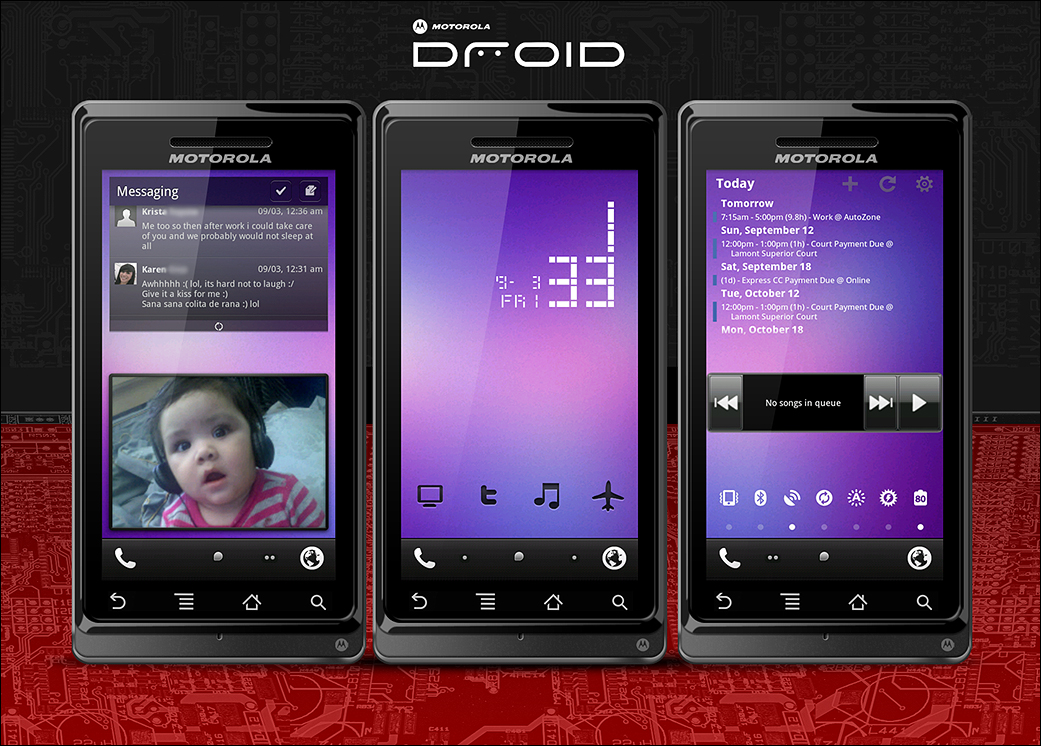
or this:
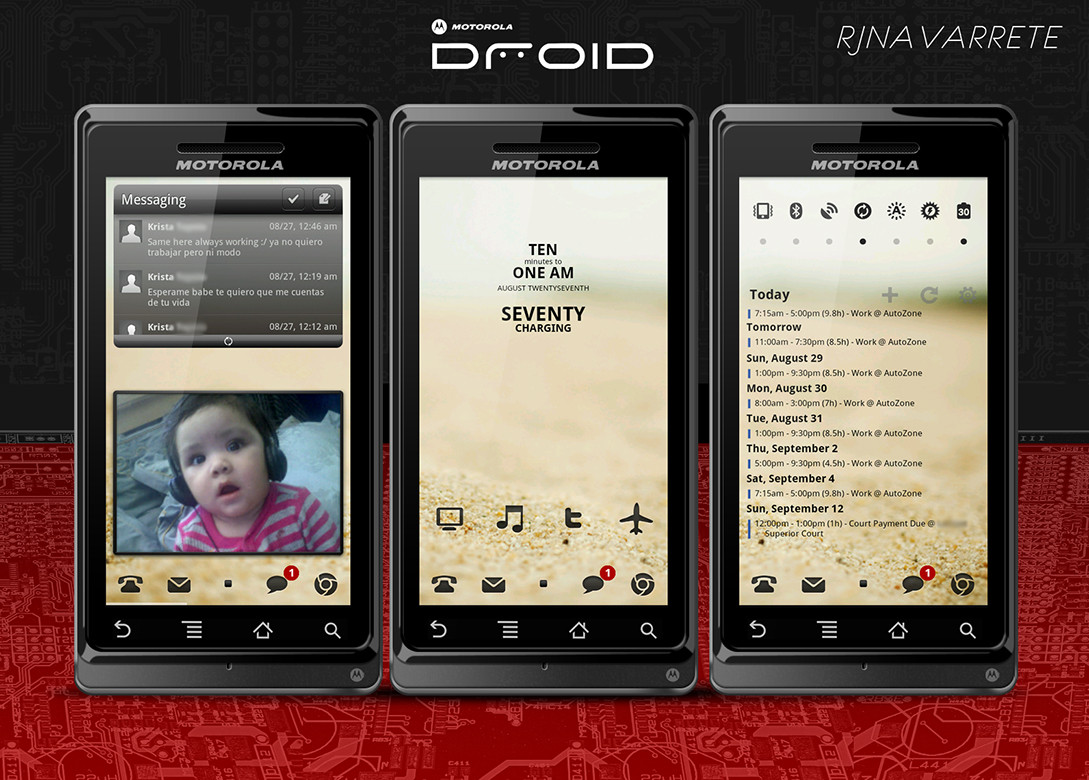
I barely started jailbreaking and customizing again, so I wouldn't know where to even get started, but maybe these android customizations will inspire someone.
For reference here are the Android (hacks?) that they used:
LP Message
Picture Frame
LED Clock Widget
Pure Calendar
Music Mod
SwitchPro
Wireframe Icons
Custom Dock
or this:
I barely started jailbreaking and customizing again, so I wouldn't know where to even get started, but maybe these android customizations will inspire someone.
For reference here are the Android (hacks?) that they used:
LP Message
Picture Frame
LED Clock Widget
Pure Calendar
Music Mod
SwitchPro
Wireframe Icons
Custom Dock
OK - After much hand-wringing, hours of hacking, countless resprings, and more than a few 'sad face' displays, I was able to combine the LockMS theme into the existing iWeather Widget. As much as I like LockMS, I really wanted some kind of forecast added to the weather and the iWeather theme has what I wanted (although on the Home screen not the Lock Screen).
It's got a three-day forecast, rotating wallpapers, leading zero supression, and center-justified days of the week.
It's got a three-day forecast, rotating wallpapers, leading zero supression, and center-justified days of the week.
Attachments

maconlysource
macrumors newbie
Can u share then?
Can u share then?
OK - After much hand-wringing, hours of hacking, countless resprings, and more than a few 'sad face' displays, I was able to combine the LockMS theme into the existing iWeather Widget. As much as I like LockMS, I really wanted some kind of forecast added to the weather and the iWeather theme has what I wanted (although on the Home screen not the Lock Screen).
Can u share then?

chelsea.tone
macrumors member

chelsea.tone
macrumors member
Ok guys, i need to know what to do to get the clock to show either the 12 hr clock correctly (2.59pm not 02.59pm) or the 24 hr clock correctly (14.59 not 02.59pm) any ideas? Ive tried true and false in the file.
Tony

Tony
maconlysource
macrumors newbie
Share?
Could you please upload your bars and theme?
Ok guys, i need to know what to do to get the clock to show either the 12 hr clock correctly (2.59pm not 02.59pm) or the 24 hr clock correctly (14.59 not 02.59pm) any ideas? Ive tried true and false in the file.
Tony
Could you please upload your bars and theme?
There's so many versions of this theme, it's really hard to tell you exactly what to do. Can you copy and paste the text from your LockBackground.html so I can see it? From there. it'll be easy to tell you what to modify.Ok guys, i need to know what to do to get the clock to show either the 12 hr clock correctly (2.59pm not 02.59pm) or the 24 hr clock correctly (14.59 not 02.59pm) any ideas? Ive tried true and false in the file.
Tony
Heres my version 🙂


Any tips you can share to change your lockscreen like that? And your folders?

Benji222
macrumors 65816
Any tips you can share to change your lockscreen like that? And your folders?
He is using categories and categoriesSB for folders.
The lockscreen is called LockMS and is all over the topics in the hacks section
Actually, THIS is the LockMS thread!The lockscreen is called LockMS and is all over the topics in the hacks section
chelsea.tone
macrumors member
There's so many versions of this theme, it's really hard to tell you exactly what to do. Can you copy and paste the text from your LockBackground.html so I can see it? From there. it'll be easy to tell you what to modify.
<!DOCTYPE html PUBLIC "-//W3C//DTD XHTML 1.0 Transitional//EN" "http://www.w3.org/TR/xhtml1/DTD/xhtml1-transitional.dtd">
<html xmlns="http://www.w3.org/1999/xhtml">
<head>
<meta http-equiv="Content-Type" content="text/html; charset=utf-8" />
<title>iPhone Lockscreen</title>
<script type="text/javascript"><!-- start
armonth = new Array("January", "February", "March", "April", "May", "June", "July", "August", "September", "Ocotber", "November", "December");
armonth = new Array("JAN", "FEB", "MAR", "APR", "MAY", "JUN", "JUL", "AUG", "SEP", "OCT", "NOV", "DEC");
arday = new Array("Sunday", "Monday", "Tuesday", "Wednesday", "Thursday", "Friday", "Saturday");
todaydate=new Date();
thisday = todaydate.getDay();
thismonth = todaydate.getMonth();
thisdate = todaydate.getDate();
thisyear = todaydate.getFullYear();
function dotime(){
theTime=setTimeout('dotime()',1000);
d = new Date();
dhr = d.getHours();
dmn = d.getMinutes();
dsc = d.getSeconds();
am_pm = 'PM'
if(dhr==0){dhr=12;am_pm='AM';}
if(dhr<12){dhr=dhr; am_pm='AM';}
if(dhr>12){dhr=(dhr-12);am_pm='PM';}
if(dhr<10){dhr='0'+dhr;}
mn = (dmn<10) ? '0'+dmn : dmn;
dsc = ( dsc < 10 ? "0" : "" ) + dsc;
document.getElementById('hourbox').innerHTML = dhr;
document.getElementById('minbox').innerHTML = mn;
document.getElementById('am_pmbox').innerHTML = am_pm;
document.getElementById('secbox').innerHTML = dsc;
}
//end -->
</script>
<script type="text/javascript" src="weather/configureMe.js"></script>
<script type="text/javascript" src="weather/Wallpaper.js"></script>
<style type="text/css">
body {
font-family:"American Typewriter Condensed";
background-color: #000000;
margin: 0;
padding:0;
height: 480px;
width: 320px;
background-image: url(/private/var/mobile/Library/SpringBoard/LockBackground.jpg);
background-size: 61%;
color:#OOOOCC;
}
div#hourbox {
position:absolute;
left:5px;
top:0px;
font-size:170px;
line-height:170px;
color:#CCFF00;
text-shadow: 5px 5px 5px #000000;
}
div#minbox {
position:absolute;
left:175px;
top:15px;
font-size:90px;
line-height:90px;
color:#CCFF00;
text-shadow: 5px 5px 5px #000000;
}
div#am_pmbox {
position:relative;
text-align:center;
left:60px;
top:100px;
font-size:50px;
line-height:50px;
color:#FFFF00;
text-shadow: 5px 5px 5px #000000;
}
div#secbox {
position:absolute;
text-align:center;
left:10px;
top:170px;
font-size:300px;
line-height:300px;
color:#FFFF00;
Opacity:.1;
text-shadow: 5px 5px 5px #000000;
}
div#daybox {
position:relative;
text-align:center;
top:10px;
left:120px;
color:#FFFF00;
font-size:20px;
line-height:50px;
text-shadow: 2px 2px 2px #000000;
-webkit-transform:rotate(270deg);
}
div#monthbox {
position:absolute;
text-align:center;
top:115px;
left:285px;
color:#FFFF00;
font-size:20px;
line-height:20px;
text-shadow: 2px 2px 2px #000000;
-webkit-transform:rotate(270deg);
}
div#datebox {
position:absolute;
text-align:center;
top:75px;
left:290px;
color:#99FF00;
font-size:20px;
line-height:20px;
text-shadow: 2px 2px 2px #000000;
-webkit-transform:rotate(270deg);
}
div#yearbox {
position:absolute;
text-align:center;
top:35px;
left:282px;
color:#FFFF00;
font-size:20px;
line-height:20px;
text-shadow: 2px 2px 2px #000000;
-webkit-transform:rotate(270deg);
}
/*WEATHER*/
#WeatherContainer{
opacity: 1;
margin: 50px 0 0 0;
background-color: INVISIBLE;
color: #FFFFCC;
}
#TextContainer{
float: left;
padding: 0;
margin: 0 0 0 20px;
font-family: "American Typewriter Condensed";
font-size: x-large;
text-shadow: 2px 2px 2px #000000;
}
#city{
text-transform: capitalize;
color:#99FF00;
text-shadow: 2px 2px 2px #000000;
}
#TextContainer p{
padding: 0;
margin: 0;
}
#desc{
position:absolute;
left:180px;
text-align:left;
top: 187px;
Float: right;
Z-index:2;
color:#99FF00;
font-style:italic;
font-size:20px;
font-weight: bold;
text-shadow: 2px 2px 2px #000000;
// display: none;
}
#weatherIcon{
height: 64px;
width: 64px;
float: right;
border: none;
padding: 0 0x 0 10px;
margin: 0 10px 0 0px;
}
</style>
<body>
<div id="hourbox">
<script type="text/javascript">
<!-- start
dotime();
//end -->
</script>
</div>
<div id="minbox">
<script type="text/javascript">
<!-- start
dotime();
//end -->
</script>
</div>
<div id="am_pmbox">
<script type="text/javascript">
<!-- start
dotime();
//end -->
</script>
</div>
<div id="secbox">
<script type="text/javascript">
<!-- start
dotime();
//end -->
</script>
</div>
<div id="daybox">
<script type="text/javascript">
<!-- start
document.write(arday[thisday].toUpperCase());
//end -->
</script>
</div>
<div id="monthbox">
<script type="text/javascript">
<!-- start
document.write(armonth[thismonth].toUpperCase());
//end -->
</script>
</div>
<div id="datebox">
<script type="text/javascript">
<!-- start
document.write((thisdate<10) ? '0'+thisdate+"," : thisdate+",");
//end -->
</script>
</div>
<div id="yearbox">
<script type="text/javascript">
<!-- start
document.write(thisyear);
//end -->
</script>
</div>
</body>
<script type="text/javascript" src="weather/configureMe.js"></script>
<script type="text/javascript" src="weather/Wallpaper.js"></script>
</head>
<body onload="onLoad()">
<script type="text/javascript">
<!-- start
if(showWeather){
document.write('<div id="WeatherContainer"><div id="TextContainer"><p id="city"></p><p id="temp"></p><p id="desc"></p></div><img id="weatherIcon" src=""/></div>');
}
//end -->
</script>
</body>
</html>
chelsea.tone
macrumors member
Could you please upload your bars and theme?
Not sure what else you want but the bars are iOS4 Rainbow Signal Bars 2.0 from Cydia. What else do you need ?
Tony

fisherking
macrumors G5
😱 u used my 12-second change to that background ("Fixed by the Dev-Team"). made my day LOL...
chelsea.tone
macrumors member
😱 u used my 12-second change to that background ("Fixed by the Dev-Team"). made my day LOL...
Lol, cool wallpaper 😀
maconlysource
macrumors newbie
miphone
Thanks or the code above.
How did u center the miPhone? Create text there?
Dud u use makeitmine?
Not sure what else you want but the bars are iOS4 Rainbow Signal Bars 2.0 from Cydia. What else do you need ?
Tony
Thanks or the code above.
How did u center the miPhone? Create text there?
Dud u use makeitmine?
maconlysource
macrumors newbie
Thanks or the code above.
How did u center the miPhone? Create text there?
Dud u use makeitmine?
Never mind...makeitmine....