
Got a tip for us?
Let us know
Become a MacRumors Supporter for $50/year with no ads, ability to filter front page stories, and private forums.
Looking for advice on a PC with Linux to install W10 instead
- Thread starter Huntn
- Start date
- Sort by reaction score
You are using an out of date browser. It may not display this or other websites correctly.
You should upgrade or use an alternative browser.
You should upgrade or use an alternative browser.

BrianBaughn
macrumors G4
Without another Windows machine you'll have to do something like this:

 itsfoss.com
and then start from the new W10 USB drive and proceed with reformatting and installing.
How to Create a Bootable Windows 10 USB in Linux
This tutorial shows you how to create a bootable Windows 10 USB in Linux with and without a GUI tool called Ventoy.
itsfoss.com
and then start from the new W10 USB drive and proceed with reformatting and installing.


Thanks for responding! I do have another PC and am currently creating a windows 10 media kit on an external USB drive. I'm wondering if I launch into Linux and then. select and launch this Windows 10 media creation file, will it offer me an option to boot into windows of this drive for the purpose of installing W10?Without another Windows machine you'll have to do something like this:
How to Create a Bootable Windows 10 USB in Linux
This tutorial shows you how to create a bootable Windows 10 USB in Linux with and without a GUI tool called Ventoy.
and then start from the new W10 USB drive and proceed with reformatting and installing.
Of do you have to hit whatever the F key is on start to pull up the console if that is the right word for it), to allow you to select this Media creation file to boot from?
I'll also look at this video. It might be just as easy to do in Linux, I do have 32GB thumb drive I can use.
Here is the situation. My grandson has a Windows PC running W10. It broke, his father gave this computer to a friend to fix, I have no idea what was fixed, but when it was returned, the tech has installed Linux on it off all things. This hardware was used to play PC games under Windows 10 so he is basically screwed over.
The grandson is visiting us with his computer and I'm trying to put W10. back on it. This maybe a bit premature, but I'm kind of hating Linux. I bought a wireless adapter and installed it, expecting Linux so say something like "new hardware" and offer to install drivers for it. But as it, it's not connected to the internet. I do have a CD that came with the wireless adapter, and an external CD drive, but when I plug it into the USB port (note it is a Mac superdrive), nothing happens. I can tell it's powered but it won't accept the driver CD.
Now I do have the Windows Media kit loaded onto an external USB hard drive, but and when I plug that in, it mounts on the desktop, but I can't run anything in that folder.
Is it possible on launch to hit F2 or F10 or escape to this drive can be loaded as the boot drive?
The grandson is visiting us with his computer and I'm trying to put W10. back on it. This maybe a bit premature, but I'm kind of hating Linux. I bought a wireless adapter and installed it, expecting Linux so say something like "new hardware" and offer to install drivers for it. But as it, it's not connected to the internet. I do have a CD that came with the wireless adapter, and an external CD drive, but when I plug it into the USB port (note it is a Mac superdrive), nothing happens. I can tell it's powered but it won't accept the driver CD.
Now I do have the Windows Media kit loaded onto an external USB hard drive, but and when I plug that in, it mounts on the desktop, but I can't run anything in that folder.
Is it possible on launch to hit F2 or F10 or escape to this drive can be loaded as the boot drive?

ActionableMango
macrumors G3
Is it possible on launch to hit F2 or F10 or escape to this drive can be loaded as the boot drive?
Unfortunately every PC vendor does it differently, so there's no one right answer to this. I've seen F1, F2, F8 and F10 so I'd give all of those a try. To be clear this is in the preboot environment before the OS starts booting.

velocityg4
macrumors 604
Did you create a USB installer with Windows Media Creation Tool?
If so, boot the computer off the USB. Which could be any number of keys you tap at boot to select a boot disk. Usually in the F8-F12 range. Although it could be any function key, del, ins, or esc. If there is no prompt at boot. I just start rapidly typing all those keys. You'll get it in a couple tries.
Go through the prompts to install. Choose custom install. If you don't know the Windows key skip it. Just choose the correct version Home/Pro. Ignore all the n stuff. if you choose the right version. It'll reactivate of the Microsoft servers. As long as the motherboard and CPU didn't change.
When selecting the drive to install on. Delete all partitions then install. It'll create the right partition map.
If there is more than one drive. Select the correct drive to install on.
If so, boot the computer off the USB. Which could be any number of keys you tap at boot to select a boot disk. Usually in the F8-F12 range. Although it could be any function key, del, ins, or esc. If there is no prompt at boot. I just start rapidly typing all those keys. You'll get it in a couple tries.
Go through the prompts to install. Choose custom install. If you don't know the Windows key skip it. Just choose the correct version Home/Pro. Ignore all the n stuff. if you choose the right version. It'll reactivate of the Microsoft servers. As long as the motherboard and CPU didn't change.
When selecting the drive to install on. Delete all partitions then install. It'll create the right partition map.
If there is more than one drive. Select the correct drive to install on.
I tried this yesterday several times with the WMCT. It bothered me that the installer saw 3 or 4 partitions Even though there was only one hard drive, and I tried deleting them using the tool. When it started to install I got several error codes during the setup process. So I created a bootable usb drive using a partition tool, that had me designate the Windows ISO file so I thought I’d be able to erase the extra partitions (I was able) but then I saw no option to launch the Windows installer. I created a bootable DVD and will try to see if I can get Windows to install that way.Did you create a USB installer with Windows Media Creation Tool?
If so, boot the computer off the USB. Which could be any number of keys you tap at boot to select a boot disk. Usually in the F8-F12 range. Although it could be any function key, del, ins, or esc. If there is no prompt at boot. I just start rapidly typing all those keys. You'll get it in a couple tries.
Go through the prompts to install. Choose custom install. If you don't know the Windows key skip it. Just choose the correct version Home/Pro. Ignore all the n stuff. if you choose the right version. It'll reactivate of the Microsoft servers. As long as the motherboard and CPU didn't change.
When selecting the drive to install on. Delete all partitions then install. It'll create the right partition map.
If there is more than one drive. Select the correct drive to install on.
@velocityg4 This morning when I try to install Windows I get the error code 0x8007025D asking me if all the files are available to install windows. I have created a bootable thumb drive using the Windows Media Creation Tool on two different 32GB thumb drives and this error appears. The next step is to use a partition tool to reformat the hard drive, then then I'll try a bootable DVD disk with the Windows iso file on it. This hard drive was working fine, when it had Linus on it.
For partitioning format, would MBR or GPT be better?
For partitioning format, would MBR or GPT be better?
Last edited:
I've created a bootable USB thumb drive using Rufus which includes a Windows.iso file and the Installer would start, but then give me a 0x8007025D error about not being able to access files, this was using MBR partition. But then on this page (https://www.windowstechit.com/16375/error-code-0x8007025d-solutions/) I read that Windows requires GPT partitions, so I changed the partition of the target drive to GPT, but now the Window installer tells me that it can't install on a GPT drive.
I'm confused. 🙁
I'm confused. 🙁
velocityg4
macrumors 604
@velocityg4 This morning when I try to install Windows I get the error code 0x8007025D asking me if all the files are available to install windows. I have created a bootable thumb drive using the Windows Media Creation Tool on two different 32GB thumb drives and this error appears. The next stip is to use a partition tool to reformat the hard drive, then then I'll try a bootable DVD disk with the Windows iso file on it. This hard drive was working fine, when it had Linus on it.
For partitioning format, would MBR or GPT be better?
This should be automatic. If you delete all partitions on a hard drive with the installer. Then create a new one using the installer. It will use MBR or GPT depending on if you are using UEFI or Legacy boot. It will only do this if you wipe all partitions before installing.
The Windows Media Creation Tool sets up the USB to be UEFI or Legacy bootable. You can modify this afterward so only one works. But that is another matter. You delete the UEFI or Legacy boot loader folder.
Not sure about that error. The installer's always worked for me. Although I create my installers using RUFUS and just use the media creation tool to download the ISO. When using RUFUS I have it create for UEFI only. Partition Scheme GPT and Target System UEFI (Non-CSM). I do this as I've found having a dual installer is sometimes troublesome. So, I carry a BIOS (Legacy) only and UEFI only Windows installer with me to job sites.
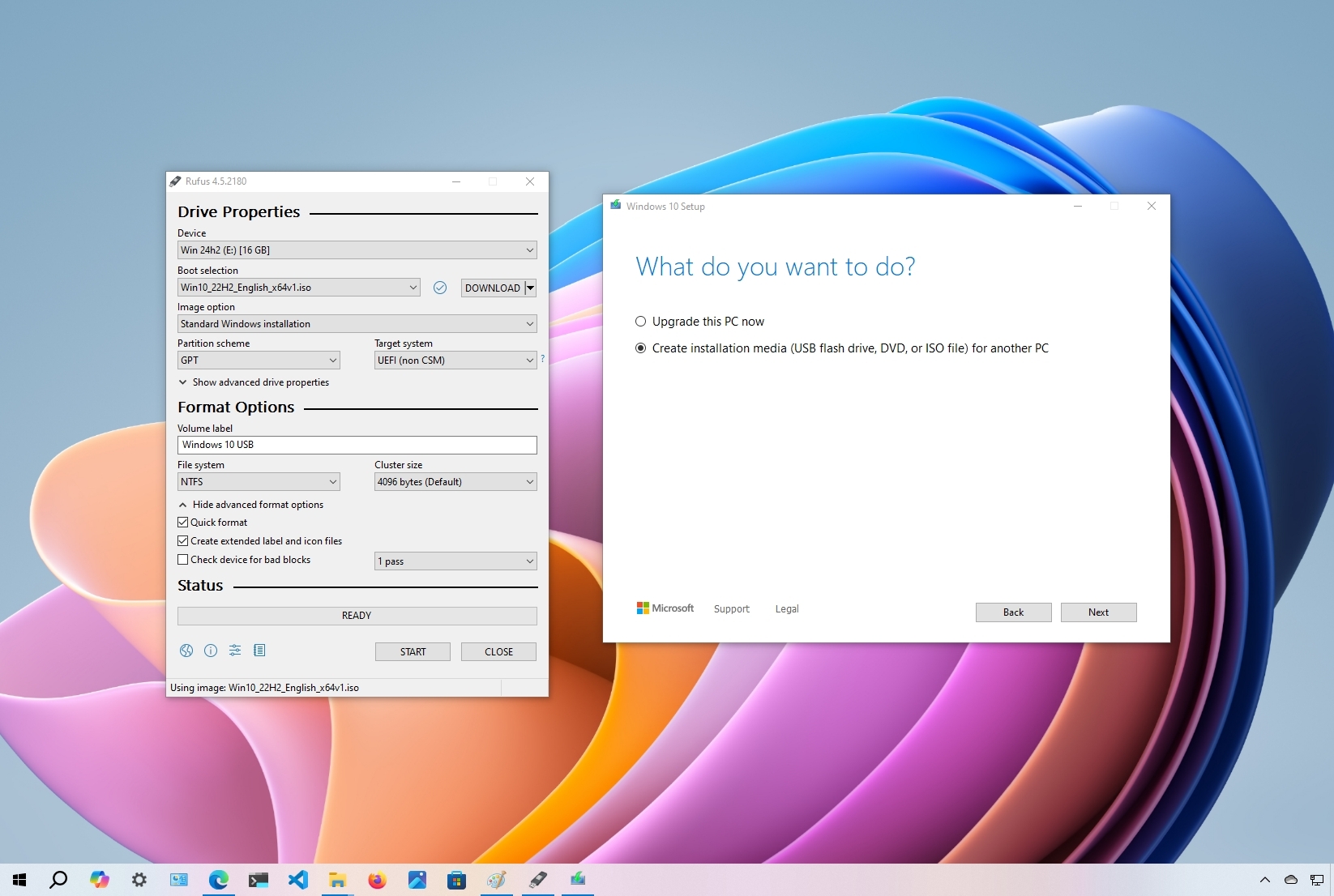
How to install Windows 10 from USB with UEFI support
These tools help create a compatible USB flash drive and install Windows 10 on a UEFI-based PC.
 www.windowscentral.com
Rufus - The Official Website (Download, New Releases)
Rufus is a small application that creates bootable USB drives, which can then be used to install or run Microsoft Windows, Linux or DOS. In just a few minutes, and with very few clicks, Rufus can help you run a new Operating System on your computer...
rufus.ie
Check your BIOS settings. Turn off legacy boot and only use UEFI boot. Just to make sure it tries to load the installer and Windows with UEFI. Plus that the installer uses GPT for the hard drive.
All else I could think is there is a partition not showing up in the installer when you are deleting them. Something created for Linux which the Windows installer doesn't see. You can always pull the drive and put it in another computer or boot the installer into repair mode to access the command prompt. Then run the clean command.

How to use DiskPart to clean and format drive not working on Windows 10
If a drive is causing problems on Windows 10, it could be a logical issue that can be fixed with a few commands.
www.windowscentral.com
The code seems that it could be bad ram or hard drive. Other instances are when upgrading not clean installing. You can run memtest86+ on the RAM. The installer has a RAM testing utility too I believe. I haven't tried accessing it but it would be mdsched from the command prompt. I always used memtest86+ from Hiren's Boot CD (RUFUS to USB instead of DVD now).
Last edited:
I ran Memtest 86 on the memory and it failed test 3, zeros and integers. Indicated so many failures that the test aborted. I used Partition Assistant to delete the partitions and reformatted the drive. I performed a sector test and no errors popped up. I may buy some replacement Ram for it, but I don’t want to spend a lot of moNye guessing what parts to replace.This should be automatic. If you delete all partitions on a hard drive with the installer. Then create a new one using the installer. It will use MBR or GPT depending on if you are using UEFI or Legacy boot. It will only do this if you wipe all partitions before installing.
The Windows Media Creation Tool sets up the USB to be UEFI or Legacy bootable. You can modify this afterward so only one works. But that is another matter. You delete the UEFI or Legacy boot loader folder.
Not sure about that error. The installer's always worked for me. Although I create my installers using RUFUS and just use the media creation tool to download the ISO. When using RUFUS I have it create for UEFI only. Partition Scheme GPT and Target System UEFI (Non-CSM). I do this as I've found having a dual installer is sometimes troublesome. So, I carry a BIOS (Legacy) only and UEFI only Windows installer with me to job sites.
How to install Windows 10 from USB with UEFI support
These tools help create a compatible USB flash drive and install Windows 10 on a UEFI-based PC.Rufus - The Official Website (Download, New Releases)
Rufus is a small application that creates bootable USB drives, which can then be used to install or run Microsoft Windows, Linux or DOS. In just a few minutes, and with very few clicks, Rufus can help you run a new Operating System on your computer...rufus.ie
Check your BIOS settings. Turn off legacy boot and only use UEFI boot. Just to make sure it tries to load the installer and Windows with UEFI. Plus that the installer uses GPT for the hard drive.
All else I could think is there is a partition not showing up in the installer when you are deleting them. Something created for Linux which the Windows installer doesn't see. You can always pull the drive and put it in another computer or boot the installer into repair mode to access the command prompt. Then run the clean command.
How to use DiskPart to clean and format drive not working on Windows 10
If a drive is causing problems on Windows 10, it could be a logical issue that can be fixed with a few commands.
The code seems that it could be bad ram or hard drive. Other instances are when upgrading not clean installing. You can run memtest86+ on the RAM. The installer has a RAM testing utility too I believe. I haven't tried accessing it but it would be mdsched from the command prompt. I always used memtest86+ from Hiren's Boot CD (RUFUS to USB instead of DVD now).
velocityg4
macrumors 604
I ran Memtest 86 on the memory and it failed test 3, zeros and integers. Indicated so many failures that the test aborted. I used Partition Assistant to delete the partitions and reformatted the drive. I performed a sector test and no errors popped up. I may buy some replacement Ram for it, but I don’t want to spend a lot of moNye guessing what parts to replace.
If RAM gets any errors at all. You should replace it. Whoever "fixed" the computer for you. Did not do a very good job. The RAM may be all that was wrong with it. No need to uninstall Windows or anything.
@velocityg4 I finally separated the two sticks of memory and one stick tests to 100% the other fails immediately.
Now that I think I am making progress and tt's a good possibility I'll be buying new RAM, I have pulled up this page from Parts Picker: MSI Z370-A PRO ATX LGA1151 Motherboard Compatible Memory - PCPartPickershowing compatible RAM with this motherboard.
There is a whole bunch of memory here. This is what I have:
Ram: GPB48GB2133C15DC GeIL EVO POTENZA 8GB Kit (2 X 4GB) PC4-17000 DDR4-2133MHz non-ECC Unbuffered CL15 (15-15-15-36) 288-Pin DIMM Memory.
Can you tell me what the significance of the memory's mhz speed? An MSI compatibility chart listed a long range of MHX speeds. However, should I be buying exactly what I have as far as the 2133MHz or can I buy any from the link?
Thanks!
Now that I think I am making progress and tt's a good possibility I'll be buying new RAM, I have pulled up this page from Parts Picker: MSI Z370-A PRO ATX LGA1151 Motherboard Compatible Memory - PCPartPickershowing compatible RAM with this motherboard.
There is a whole bunch of memory here. This is what I have:
Ram: GPB48GB2133C15DC GeIL EVO POTENZA 8GB Kit (2 X 4GB) PC4-17000 DDR4-2133MHz non-ECC Unbuffered CL15 (15-15-15-36) 288-Pin DIMM Memory.
Can you tell me what the significance of the memory's mhz speed? An MSI compatibility chart listed a long range of MHX speeds. However, should I be buying exactly what I have as far as the 2133MHz or can I buy any from the link?
Thanks!
Last edited:
velocityg4
macrumors 604
@Huntn 2133Mhz is just a basic option. It was probably the cheapest available. It can go up to 4000Mhz memory although 2667Mhz is the highest natively supported without enabling memory overclocking.
All the RAM should work. If you want RAM verified by MSI for that motherboard. Look at the QVL (Compatibility list). SPD is the base speed of the RAM. RAM speed is the RAM manufacturers XMP setting (tested overclock). Supported Speed is the speed MSI achieved when it enabled XMP.

 www.msi.com
Personally, I just go with Crucial as their RAM is quite reliable and has a high level of compatibility. They also make the memory themselves. So, you don't have to worry about one run using different parts than the next. 3200Mhz is the norm although 3600Mhz is gaining in popularity. RAM speed differences are more important on AMD Ryzen than Intel in general. Corsair is probably the most popular.
If I'm reading the model numbers correctly. This Crucial RAM is on the list. The only difference between this and the list is an additional 2K identifier. Looking at some other models 2K just simply seems to mean a matched set.
 pcpartpicker.com
Either of these two should also be fine. Even though not specifically on the list. The only variant on the model numbers looks to be a color designation code.
pcpartpicker.com
pcpartpicker.com
Be sure to enable XMP in the BIOS for the advertised speed. Otherwise they'll run at their SPD of 2666 Mhz.
All the RAM should work. If you want RAM verified by MSI for that motherboard. Look at the QVL (Compatibility list). SPD is the base speed of the RAM. RAM speed is the RAM manufacturers XMP setting (tested overclock). Supported Speed is the speed MSI achieved when it enabled XMP.
Z370-A PRO | Motherboard - The world leader in motherboard design | MSI Global
MSI Z370-A PRO gaming motherboard's AUDIO BOOST can reward your ears with studio grade sound quality for the most immersive audio experience, with leading heatsink design, for maximum cooling, EZ Debug LED can be easiest way to troubleshoot
www.msi.com
Personally, I just go with Crucial as their RAM is quite reliable and has a high level of compatibility. They also make the memory themselves. So, you don't have to worry about one run using different parts than the next. 3200Mhz is the norm although 3600Mhz is gaining in popularity. RAM speed differences are more important on AMD Ryzen than Intel in general. Corsair is probably the most popular.
If I'm reading the model numbers correctly. This Crucial RAM is on the list. The only difference between this and the list is an additional 2K identifier. Looking at some other models 2K just simply seems to mean a matched set.
Crucial Ballistix 16 GB (2 x 8 GB) DDR4-3200 CL16 Memory
pcpartpicker.com
Either of these two should also be fine. Even though not specifically on the list. The only variant on the model numbers looks to be a color designation code.
Crucial Ballistix 16 GB (2 x 8 GB) DDR4-3200 CL16 Memory
pcpartpicker.com
Crucial Ballistix 16 GB (2 x 8 GB) DDR4-3200 CL16 Memory
pcpartpicker.com
Be sure to enable XMP in the BIOS for the advertised speed. Otherwise they'll run at their SPD of 2666 Mhz.
That's a story I can't tell. It happened not under my supervision, however my impression is this "friend" who was fixing this computer for free on his own downgraded it from an i5 to an i3... with friends like that.If RAM gets any errors at all. You should replace it. Whoever "fixed" the computer for you. Did not do a very good job. The RAM may be all that was wrong with it. No need to uninstall Windows or anything.
I also hate top mention this, but this it was picked up with a side wall of the case missing. 😬 I don't want it running with a side open, and have no clue if this is something easily replaced, or if you run it with the side off, will the air flow tend to not be effective cooling the computer? My impression is that the fix required involved a fried CPU hence the reason it was downgraded to an i3. It has 2 fans one in and one out (airflow). I assume you need a sealed case to proper cpu cooling via the fans.
I've ordered a couple sticks of ram and a second hard drive (it's better to have 2 😉) I'll have them tomorrow (gotta love Amazon shipping) and I'll report back at the next decision point. Hopefully I'll have a functional computer and we are good to go.
Last edited:
velocityg4
macrumors 604
That's a story I can't tell. I happened not under my supervision, however my impression is this "friend" who was fixing this computer for free on his own downgraded it from an i5 to an i3... with friends like that.
I also hate top mention this, but this it was picked up with a side wall of the case missing. 😬 I don't want it running with a side open, and have no clue if this is something easily replaced, or if you run it with the side off, will the air flow tend to not be effective cooling the computer? My impression is that the fix required involved a fried CPU hence the reason it was downgraded to an i3. It has 2 fans one in and one out (airflow). I assume you need a sealed case to proper cpu cooling via the fans.
I've ordered a couple sticks of ram and a second hard drive (it's better to have 2 😉) I'll have them tomorrow (gotta love Amazon shipping) and I'll report back at the next decision point. Hopefully I'll have a functional computer and we are good to go.
I'd be absolutely shocked if the CPU was fried and the motherboard wasn't unless it was being overclocked. CPU are just too reliable and robust. I'm guessing what was thought to be a bad CPU was just that bad RAM module.
It may be run without the case cover. That cover is there to protect the parts inside from being touched while on. More of a danger for the parts than a person. Except getting cut by a fan blade. Thermally it'll likely do better without the cover.
Replacement will be a real pain. You'll have to contact the manufacturer and see if they even offer a replacement. It'll probably be easier just to get a new case.
At least it was a free repair. His friend was probably still just learning this stuff.
I might swing into local repair shop and see if they have some old parts laying around. 🙂I'd be absolutely shocked if the CPU was fried and the motherboard wasn't unless it was being overclocked. CPU are just too reliable and robust. I'm guessing what was thought to be a bad CPU was just that bad RAM module.
It may be run without the case cover. That cover is there to protect the parts inside from being touched while on. More of a danger for the parts than a person. Except getting cut by a fan blade. Thermally it'll likely do better without the cover.
Replacement will be a real pain. You'll have to contact the manufacturer and see if they even offer a replacement. It'll probably be easier just to get a new case.
At least it was a free repair. His friend was probably still just learning this stuff.

Erehy Dobon
Suspended
The most likely scenario is that this case had a tempered glass window that was shattered. Here is an example of a PC case with a window panel:That's a story I can't tell. It happened not under my supervision, however my impression is this "friend" who was fixing this computer for free on his own downgraded it from an i5 to an i3... with friends like that.
I also hate top mention this, but this it was picked up with a side wall of the case missing. 😬

NZXT H200 - Mini-ITX PC Gaming Case - Tempered Glass Panel -Enhanced Cable Management System - Water Cooling Ready - White/Black - 2018 Model
The H200 showcases the signature design introduced with the H-Series. The elegant all-steel construction embeds the iconic cable management system that streamlines building and upgrading your system. You can easily build a powerful system with plenty of options for storage and cooling. Includes t...
www.amazon.com
Personally, it sounds like this PC was heavily abused by a previous owner. It certainly has some dubious provenance.
It's a shame you have never bothered to post a photo of the unit in question.
Nah, you can run the computer fine without the side panel. Competitive overclockers don't even use cases, everything is laid out on a table or bench so they can easily pour liquid nitrogen, etc. onto the CPU or into their homemade cooling system.I don't want it running with a side open, and have no clue if this is something easily replaced, or if you run it with the side off, will the air flow tend to not be effective cooling the computer? My impression is that the fix required involved a fried CPU hence the reason it was downgraded to an i3. It has 2 fans one in and one out (airflow). I assume you need a sealed case to proper cpu cooling via the fans.
Note that all these PC components are developed and tested in labs without cases. If you look at photos or video of PC component manufacturing labs, all this stuff is laid out on workbenches for easy access. This is not a recent practice. Digital computers have been designed/built like this since at least the Fifties, maybe earlier. You stick it in a box when it is "finished."
In fact, some case manufacturers specifically market open air cases like this one:

Thermaltake Core P3 ATX Tempered Glass Gaming Computer Case Chassis, Open Frame Panoramic Viewing, White Edition, CA-1G4-00M6WN-05, Snow
Bring out the modder within you. The Core P3 Tempered Glass Edition Open Frame chassis sets a new benchmark in groundbreaking open frame chassis design. With full support for liquid cooling and Thermaltake PCI-e X16 Riser Cable included - the Core P3 is built from the ground up to make even the m...
www.amazon.com
This isn't specific to computer cases. There have been cars with exposed engines. Many motorcycles still have a number of exposed part that could easily be shrouded. High-end audiophile amps proudly flaunt exposed components (especially their tubes).
Look at the ISS. There are tons of exposed components and wiring. That's okay because there are only a handful of supremely qualified and careful individuals in proximity.
Stuff like that.
Generally speaking computer cases provide (in no particular order):
- Aesthetics
- Easy handling
- Protection against component damage
- Human safety (so people don't stick their fingers where they're not supposed to like fan blades, hot VRM heatsinks, capacitors, etc.)
- Sound reduction
- Pet safety (if you have any of those)
If you can determine who manufactured the case and the model, you might be able to order a replacement panel from the manufacturer.
Note that an average mid-size tower case might go for $60. They come in all different designs, colors, styles, etc. They aren't just beige boxes like back in the Nineties.
Since the case is already in a partly trashed state, this might be an opportunity for change.
Last edited:
As an Amazon Associate, MacRumors earns a commission from qualifying purchases made through links in this post.
Thanks all for the help! @velocityg4 Bad memory was the issue, new memory made installing W10 as easy as I remember it being. Memtest86 is a vital troubleshooting utility.
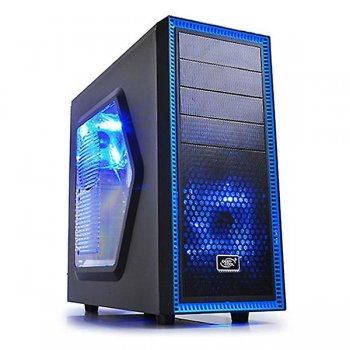
Tesseract Deep Cool
Delete Key works. 🙂Unfortunately every PC vendor does it differently, so there's no one right answer to this. I've seen F1, F2, F8 and F10 so I'd give all of those a try. To be clear this is in the preboot environment before the OS starts booting.
The most likely scenario is that this case had a tempered glass window that was shattered. Here is an example of a PC case with a window panel:
NZXT H200 - Mini-ITX PC Gaming Case - Tempered Glass Panel -Enhanced Cable Management System - Water Cooling Ready - White/Black - 2018 Model
The H200 showcases the signature design introduced with the H-Series. The elegant all-steel construction embeds the iconic cable management system that streamlines building and upgrading your system. You can easily build a powerful system with plenty of options for storage and cooling. Includes t...www.amazon.com
Personally, it sounds like this PC was heavily abused by a previous owner. It certainly has some dubious provenance.
It's a shame you have never bothered to post a photo of the unit in question.
Nah, you can run the computer fine without the side panel. Competitive overclockers don't even use cases, everything is laid out on a table or bench so they can easily pour liquid nitrogen, etc. onto the CPU or into their homemade cooling system.
Note that all these PC components are developed and tested in labs without cases. If you look at photos or video of PC component manufacturing labs, all this stuff is laid out on workbenches for easy access. This is not a recent practice. Digital computers have been designed/built like this since at least the Fifties, maybe earlier. You stick it in a box when it is "finished."
In fact, some case manufacturers specifically market open air cases like this one:
Thermaltake Core P3 ATX Tempered Glass Gaming Computer Case Chassis, Open Frame Panoramic Viewing, White Edition, CA-1G4-00M6WN-05, Snow
Bring out the modder within you. The Core P3 Tempered Glass Edition Open Frame chassis sets a new benchmark in groundbreaking open frame chassis design. With full support for liquid cooling and Thermaltake PCI-e X16 Riser Cable included - the Core P3 is built from the ground up to make even the m...www.amazon.com
This isn't specific to computer cases. There have been cars with exposed engines. Many motorcycles still have a number of exposed part that could easily be shrouded. High-end audiophile amps proudly flaunt exposed components (especially their tubes).
Look at the ISS. There are tons of exposed components and wiring. That's okay because there are only a handful of supremely qualified and careful individuals in proximity.
Stuff like that.
Generally speaking computer cases provide (in no particular order):
- Aesthetics
- Easy handling
- Protection against component damage
- Human safety (so people don't stick their fingers where they're not supposed to like fan blades, hot VRM heatsinks, capacitors, etc.)
- Sound reduction
- Pet safety (if you have any of those)
If you can determine who manufactured the case and the model, you might be able to order a replacement panel from the manufacturer.
Note that an average mid-size tower case might go for $60. They come in all different designs, colors, styles, etc. They aren't just beige boxes like back in the Nineties.
Since the case is already in a partly trashed state, this might be an opportunity for change.
Tesseract Deep Cool
As an Amazon Associate, MacRumors earns a commission from qualifying purchases made through links in this post.