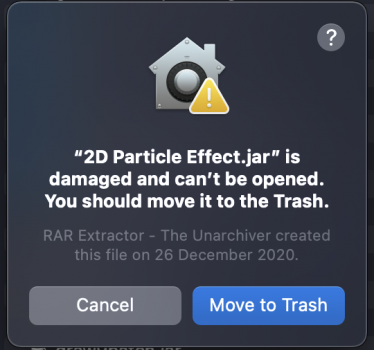
C cobapple macrumors newbie Original poster Apr 11, 2021 #1 Hi guys, I've many jar files (java applications) that can't be run on Macbook Air M1. Everytime I open it, it says the file is damaged an can't be opened (see screenshot below). How do I solve this? Thanks in advance Attachments Screen Shot 2021-04-12 at 09.31.27.png 154.5 KB · Views: 678
Hi guys, I've many jar files (java applications) that can't be run on Macbook Air M1. Everytime I open it, it says the file is damaged an can't be opened (see screenshot below). How do I solve this? Thanks in advance
Superhai macrumors 6502a Apr 11, 2021 #2 I guess it is being quarantined by macOS gatekeeper. In terminal try to run xattr -d com.apple.quarantine file.jar
I guess it is being quarantined by macOS gatekeeper. In terminal try to run xattr -d com.apple.quarantine file.jar
haralds macrumors 68040 Apr 18, 2021 #3 Try right-click open to see, whether it lets you override. Needless to say, Java must be installed.
fishkorp macrumors 68030 Apr 18, 2021 #4 Look at the message, it’s trying to extract it (since a JAR is essentially a zip file) not run it. Have you installed a JDK to actually run it? JDK doesn’t come with it by default. Reactions: Nermal
Look at the message, it’s trying to extract it (since a JAR is essentially a zip file) not run it. Have you installed a JDK to actually run it? JDK doesn’t come with it by default.
G Gerdi macrumors 6502 Apr 18, 2021 #5 I thought OpenJDK for M1 is still in beta? I know it is based on the Windows ARM64 OpenJDK, which merged into mainline last year.
I thought OpenJDK for M1 is still in beta? I know it is based on the Windows ARM64 OpenJDK, which merged into mainline last year.
J jdb8167 macrumors 601 Apr 18, 2021 #6 Gerdi said: I thought OpenJDK for M1 is still in beta? I know it is based on the Windows ARM64 OpenJDK, which merged into mainline last year. Click to expand... No, most of the JDKs of 8 and up are available. They don't say beta anyway. I have a couple installed via brew and a few downloaded from Azul.
Gerdi said: I thought OpenJDK for M1 is still in beta? I know it is based on the Windows ARM64 OpenJDK, which merged into mainline last year. Click to expand... No, most of the JDKs of 8 and up are available. They don't say beta anyway. I have a couple installed via brew and a few downloaded from Azul.
G Gerdi macrumors 6502 Apr 18, 2021 #7 jdb8167 said: No, most of the JDKs of 8 and up are available. They don't say beta anyway. I have a couple installed via brew and a few downloaded from Azul. Click to expand... Are you sure we are talking about native ARM64 versions? Of course i guess you can just run the x64 version under emulation just fine.
jdb8167 said: No, most of the JDKs of 8 and up are available. They don't say beta anyway. I have a couple installed via brew and a few downloaded from Azul. Click to expand... Are you sure we are talking about native ARM64 versions? Of course i guess you can just run the x64 version under emulation just fine.
J jdb8167 macrumors 601 Apr 19, 2021 #8 Gerdi said: Are you sure we are talking about native ARM64 versions? Of course i guess you can just run the x64 version under emulation just fine. Click to expand... Yes. These are are all native Aarch64. Some of the brew versions aren’t though. You have to check.
Gerdi said: Are you sure we are talking about native ARM64 versions? Of course i guess you can just run the x64 version under emulation just fine. Click to expand... Yes. These are are all native Aarch64. Some of the brew versions aren’t though. You have to check.
haralds macrumors 68040 Apr 20, 2021 #9 Azul is native, indeed. Download here. Use Firefox, Safari has trouble with Azul's version selector routine checking platform specs. Last edited: Apr 20, 2021
Azul is native, indeed. Download here. Use Firefox, Safari has trouble with Azul's version selector routine checking platform specs.