
Got a tip for us?
Let us know
Become a MacRumors Supporter for $50/year with no ads, ability to filter front page stories, and private forums.
Mac Pro 2009 (4.1)
- Thread starter Apolloza
- Start date
- Sort by reaction score
You are using an out of date browser. It may not display this or other websites correctly.
You should upgrade or use an alternative browser.
You should upgrade or use an alternative browser.

Amethyst1
macrumors G3
What are you planning/hoping to use it for?What’s the feelings in this system? Worth it? Skip?

Well, it can run up to 10.11 without any trickery. So start here.
Windows-wise, I think you're kind of stuck with 7 or 8. Not sure if it can run Win 10, due to it being locked at 10.11 on the macOS side, but I've been surprised many times.
Since it is somewhat modular, you could also set up a hard disk to run about any flavor of Linux you'd like.
Windows-wise, I think you're kind of stuck with 7 or 8. Not sure if it can run Win 10, due to it being locked at 10.11 on the macOS side, but I've been surprised many times.
Since it is somewhat modular, you could also set up a hard disk to run about any flavor of Linux you'd like.
Amethyst1
macrumors G3
It can.Not sure if it can run Win 10, […]

eyoungren
macrumors Nehalem
I have a 4,1. I upgraded it to a 5,1. I also dropped in 32GB ram (you can go 48GB), a 1TB SSD, 2x 6TB HDs and a 3TB HD. It's connected to six displays (two 30" Cinema Displays, two 23" Cinema Displays, one 20" Cinema Display and a 55" HDTV).HI mac fans. I have the option to buy a secondhand/used 2009 Mac Pro for roughly $90. Stock quad core spec.
There is some upgradability options.
What’s the feelings in this system? Worth it? Skip?
Running Mojave. I'm using Adobe CC21, Office 2019 and the latest version of the Vivaldi browser. I've got iCloud (iMessage, Facetime, Photos, etc). I can use Zoom and I have an external iSight camera connected via a FW400/800 adapter. Lastly, I'm sharing a 2TB external RAID to my home network.
I paid around $250 for mine in 2020.
It can.
Then my opinion is to run Win 10 on it and not look back.
Amethyst1
macrumors G3
You might also want to add that you run two flashed NVIDIA GeForce GT 640s to drive those six displays and provide Metal capability to make Mojave happy 🙂I have a 4,1. I upgraded it to a 5,1. I also dropped in 32GB ram (you can go 48GB), a 1TB SSD, 2x 6TB HDs and a 3TB HD. It's connected to six displays (two 30" Cinema Displays, two 23" Cinema Displays, one 20" Cinema Display and a 55" HDTV).
eyoungren
macrumors Nehalem
I was waiting for the question "How are you running Mojave?!" to be asked. Then you know, I'd suggest it was two flashed NVIDIA GeForce GT 640s. 😉You might also want to add that you run two flashed NVIDIA GeForce GT 640s to drive those six displays and provide Metal capability to make Mojave happy 🙂

mectojic
macrumors 65816
I had a 4,1 flashed to 5,1 (though now using a true 5,1). Put a good graphics card in, and Windows 10 / newer MacOS, and you've actually got a really good, cheap but reliable machine. Mine does modern games really well.

Thanks for all the feedback!
Might look at the 5.1 upgrade. Getting a graphics card down here in South Africa might be a challenge, but I’ll research that. (What cards are suggested?)
But seeing where I can expand with my geographical and budget constraints will be part of the fun I guess.
but basically if I can do some browsing, Lightroom and plex the box will be worth it.
Might look at the 5.1 upgrade. Getting a graphics card down here in South Africa might be a challenge, but I’ll research that. (What cards are suggested?)
But seeing where I can expand with my geographical and budget constraints will be part of the fun I guess.
but basically if I can do some browsing, Lightroom and plex the box will be worth it.
Amethyst1
macrumors G3
Generally speaking, if you want something reasonably modern that just works* and supports Metal, either AMD Polaris (Radeon RX 460/470/480 and 560/570/580 series) or newer AMD GPUs, or NVIDIA Kepler (GeForce GTX 600/700 series) GPUs come to mind. Newer NVIDIA GPUs aren't supported out of the box: Maxwell and Pascal (GeForce GTX 900 and 1000 series) GPUs require NVIDIA's Web Drivers which only work in macOS High Sierra or older versions. Newer NVIDIA GPUs (Turing etc.) don't work at all in macOS.(What cards are suggested?)
*"Just works" means that the GPU will be initialised and work in macOS out of the box, without the need to install or "flash" anything. However, you won't see anything on the monitor(s) connected to the GPU until the macOS login screen appears. If you need/want to see what happens before that, you need to look into "flashing" a GPU, buying a "pre-flashed" GPU (which can be pricey) or messing with e.g. OpenCore.
Last edited:

Quinten07
macrumors member
This is still one of my favorite machines apple made. I upgraded mine with a W3670 CPU, 3,2ghz and 6-cores on the cheap, 16GB ram, a flashed Radeon 7950 and a GTX 1060 for windows gaming. Also a lot of storage using all those expansion space. 90 bucks is definitely not to much, although after upgrading all of the above your total will more likely be around 300 bucks.
I currently run Windows 10 and MacOS 13.1 Ventura using OCLP. Not a complain in the world both run great!
I currently run Windows 10 and MacOS 13.1 Ventura using OCLP. Not a complain in the world both run great!
eyoungren
macrumors Nehalem
Here is the one I bought. Note that this link is from my early 2021 purchase. The same vendor seems to keep finding, flashing and selling these as every time I check there is at least one available. The primary reason I bought these is because they have 'boot screens'. That simply means you can see the Mac booting and can also interact with Open Firmware. Some other cards do support Metal, but do not do this.Thanks for all the feedback!
Might look at the 5.1 upgrade. Getting a graphics card down here in South Africa might be a challenge, but I’ll research that. (What cards are suggested?)
But seeing where I can expand with my geographical and budget constraints will be part of the fun I guess.
but basically if I can do some browsing, Lightroom and plex the box will be worth it.
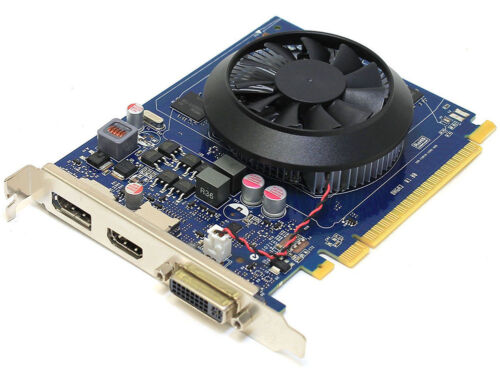
Nvidia GeForce GT 640 for Apple Mac Pro 1GB Displayport 4K 120 Supports Mojave! | eBay
Find many great new & used options and get the best deals for Nvidia GeForce GT 640 for Apple Mac Pro 1GB Displayport 4K 120 Supports Mojave! at the best online prices at eBay! Free shipping for many products!
www.ebay.com
MODS! THIS IS NOT MY AUCTION, I AM NOT SELLING ANYTHING AND I DO NOT BENEFIT FROM ANY SALE!

hwojtek
macrumors 68020
Windows-wise, I think you're kind of stuck with 7 or 8. Not sure if it can run Win 10.
Amethyst1
macrumors G3
FWIW if you have more than one graphics card, only one of them needs to have boot screens to show what’s going on before the login screen. The remaining cards fire up once the login screen appears.The primary reason I bought these is because they have 'boot screens'.

Michael.S
macrumors regular
How do I run multiple graphic cards in the Mac Pro?FWIW if you have more than one graphics card, only one of them needs to have boot screens to show what’s going on before the login screen. The remaining cards fire up once the login screen appears.
I have an AMD RX580 in it right now that of course doesn’t show the boot screen as it is not flashed. But I still have the old Nvidia GT 120 that WOULD show the boot screen.
How would that work when I connected both graphic cards?
Last edited:
Amethyst1
macrumors G3
It has two PCIe ×16 slots. Put one card in the first one, the other in the second one. However, as of macOS Mojave, AMD and NVIDIA cards cannot coexist anymore from what I've heard (I can't test it myself).How do I run multiple graphic cards in the Mac Pro?
Hook up the monitor you want to see the boot screens on to the GT 120 and your main monitor to the RX 580. Or use a monitor with two inputs, connecting one to the GT 120 and the other to the RX 580, switching between the inputs as necessary.How would that work when I connected both graphic cards?
Last edited:

mikiotty
macrumors 6502a
It has two PCIe ×16 slots. Put one card in the first one, the other in the second one. However, as of macOS Mojave, AMD and NVIDIA cards cannot coexist anymore from what I've heard (I can't test it myself).
Hook up the monitor you want to see the boot screens on to the GT 120 and your main monitor to the RX 580. Or use a monitor with two inputs, connecting one to the GT 120 and the other to the RX 580, switching between the inputs as necessary.
I have a monitor with more than two inputs. Can I put Radeon RX 580 for Big Sur, and NVDIA GeForce GTX 1080 for Ubuntu (Linux games) in Mac Pro 2012? Will it work?
I have a remote control for my 55-inch Dell monitor, so switching between many inputs is easy.
Quinten07
macrumors member
You can use a GTX 1080 fine in linux and Windows. The RX 580 will work with Big Sur. However, you can't use these two cards together at the same time. These cards draw to much power, you only have 2x6-pin PCI-E. I currently have a radeon 7950 3gb and a GTX 1060 together in my system, one for windows one for Mac. This is already on the edge of what this system can handle power wise.I have a monitor with more than two inputs. Can I put Radeon RX 580 for Big Sur, and NVDIA GeForce GTX 1080 for Ubuntu (Linux games) in Mac Pro 2012? Will it work?
I have a remote control for my 55-inch Dell monitor, so switching between many inputs is easy.
Bit of a update here, the seller was very eager to get rid of the unit, needs the cash, so he sold the graphics card inside the unit already, so without GPU he is now offering it to me for $60. Not going to risk it, cheapest GPU I can find that just works is about $150, so already an expensive start. Also no idea what OS its running or if I can get a replacement GPU working without another Mac.
Last edited:
Amethyst1
macrumors G3
Not quite as muchGoing to risk it, cheapest GPU I can find that just works is about $150, so already an expensive start.
(If you don’t need boot screens you can save even more.)

TheShortTimer
macrumors 68040
Bit of a update here, the seller was very eager to get rid of the unit, needs the cash, so he sold the graphics card inside the unit already, so without GPU he is now offering it to me for $60. Not going to risk it, cheapest GPU I can find that just works is about $150, so already an expensive start. Also no idea what OS its running or if I can get a replacement GPU working without another Mac.
$60? That's a steal, I'd risk it!
Or even the best price of all - free. 🙂
A friend gave me the PC version of a 4GB GT 630 - which will work in my Mac Pro and I can live without the boot screen. It's worth asking if any of your friends have PCs or PC graphics cards that they've retired/abandoned in case you can scavenge them for goodies which can be recycled into your Mac.