Become a MacRumors Supporter for $50/year with no ads, ability to filter front page stories, and private forums.

apfhex

macrumors 68030
Original poster
Mac Pro SMC Firmware Update, version 1.1, 970 KB. Just showed up in my Software Update, wasn't there yesterday. I can't find any info on the net so it must have just been posted?

Description:
"The SMC Firmware Update adjusts fan behavior in Mac Pro. The updater application will be installed in the /Applications/Utilities folder and will launch automatically. Please follow the instructions in the updater application to complete the process."

I just installed it and my SMC version is now 1.7f10. No problems or noticeable differences.
 
To update the SMC firmware on your Mac Pro:

1. Quit all other open applications.

2. Click Restart in the Mac Pro SMC Firmware Update window and wait for your computer to restart.

The SMC firmware update starts automatically. A status bar indicates the progress of the update. During the update your computer fans will run at full speed, but will return to normal once the update completes.

Important: Do not interrupt the update.

Your computer restarts automatically when the update is completed and opens the Mac Pro SMC Firmware Update.

3. Click OK. The SMC firmware is now up-to-date.

If these instructions appear on your screen again, the SMC firmware update was not successful. Repeat steps 2 and 3.
 
holy crap. i'd never cranked the fans up very high before. those suckers get loud (and the dust bunnies that didn't come out with compressed air a few weeks ago made their appearance to boot 😀 ).

cheers.
 
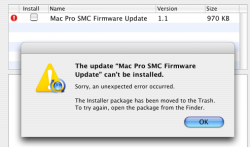
I try to install this update and it gives me an error message.

An unexpected error occured (0). Your firmware can not be updated.
See apple.com/support for more information.


Does anyone know what could be causing this?
I dont have SMCFanControl enabled. And I have 10.4.10.
 
May be your 8-core doesn't need it?

I installed it on my 2.66 and boy howdy. Those fans got a work-out for about 15 seconds.If that little spider is still in there he got toasted hehe.
 
May be your 8-core doesn't need it?

I installed it on my 2.66 and boy howdy. Those fans got a work-out for about 15 seconds.If that little spider is still in there he got toasted hehe.

Tell me about it, sounded like a jet had just taken off. Shows just how quiet the machine really runs normally 🙂.
 
May be your 8-core doesn't need it?

I installed it on my 2.66 and boy howdy. Those fans got a work-out for about 15 seconds.If that little spider is still in there he got toasted hehe.

Maybe - But my tower doesnt list the latest SMC firmware version in the Profiler.
 
I was wondering if this was a fix to the fan problem I had about a day ago.
I was in the bathroom taking a shower, when I came back my Fan was BLOWING hard, (hard I tell Ya). It was (I guess) because I had it on "sleep" mode, but iTunes was downloading some episodes of "Fallen."
SO when the computer was woken, the Fan stopped blowing.

It was pretty weird, so I ended up restarting.. I tried to recreate the same scenario, but nothing happened. I called Apple, because it conserned me that this would happen to a about 5 month Mac Pro Octa-core.
All they told me that if I was running the latest software updates, and that if I had any Video running on my system (like compressing or something like that)
Just troubleshooting. But all they suggested was to Keep my software up-to-date, and that they would document this problem for any future problems.

But I guess, this will fix it, sounds great Apple...

Anyone with this problem? (well, it not a problem anymore, or I don't know if it ever was...)
 
It's snowing!

Seriously, that was a lot of dust being blown out. Now I gotta go clean up my desk. Thanks Apple.
 
I try to install this update and it gives me an error message.

An unexpected error occured (0). Your firmware can not be updated.
See apple.com/support for more information.


Does anyone know what could be causing this?
I dont have SMCFanControl enabled.


Is your OS running from a RAID? If so, you cannot install firmware updates.
 
I can't get it to install either. I'm at 1.7f8 at the moment. Quad 2ghz, 2 GB RAM, all applications quit, I have a raid but I don't boot from that. Every time I run software update it tells me the SMC program is in the trash and to move it from the trash and run it... when I do that it just errors on me.
 

Attachments

  • Picture 3.png
    Picture 3.png
    33.1 KB · Views: 260
Mine sounded like a vacuum cleaner. I was feeding the cat during the installation and walked back in holding an open tin of cat food out of surprise at the noise.
😀
 
Wow, not to sound ungrateful, but this is the only Mac Pro update to speak of from Apple? No new Apple Cinema Displays, towers, front row, nothing, just a "hey guys, we didn't forget about the most expensive product in our line, we have a fan update for you." Whooooop dee doo Apple, thanks. 🙄
 
Mine sounded like a vacuum cleaner. I was feeding the cat during the installation and walked back in holding an open tin of cat food out of surprise at the noise.
😀

yea it scared me i thought the firmware screwed it all up (not a good history with firmware updates, at least on a PC)

and about the dust... my roommate asked if my mac pro had self cleaning🙄
 
So what exactly is the point of this upgrade, just to set the fans on max for 15 seconds? Should I clean them out first, I don't want to make a big mess...

And why is it ramping up the fans for 15 seconds? To clean them, to test? Will this happen on every reboot (mind-you that's not very often) or what?

Etc.
 
Quick and Easy

Just installed update on my Quad 3ghz MP and it was a breeze. Fan spun for about 10 seconds and then booted back into the OS.

I don't know...everything just seems snappier.😀
 
holy crap. i'd never cranked the fans up very high before. those suckers get loud (and the dust bunnies that didn't come out with compressed air a few weeks ago made their appearance to boot 😀 ).

cheers.

You're not kidding.... That was nuts. Makes me feel like I need to get some compressed air and give it a once over.
 
So what does this update do? After the update do your fans run faster now or slower?

I took a screenie of Hardware Monitor before and after the update, and the base speed of the PSU fan has increased by... 10RPM.

I can't really test how the fans speed up as the system heats up, but I would expect the fans to spin faster, sooner. Mac Pros are quite warm beasts. 🙂
 

Attachments

  • Picture 1.png
    Picture 1.png
    17.4 KB · Views: 245
  • Picture 2.png
    Picture 2.png
    16.5 KB · Views: 269
I took a screenie of Hardware Monitor before and after the update, and the base speed of the PSU fan has increased by... 10RPM.

I can't really test how the fans speed up as the system heats up, but I would expect the fans to spin faster, sooner. Mac Pros are quite warm beasts. 🙂

Thanks Elijahg.
 
Register on MacRumors! This sidebar will go away, and you'll see fewer ads.