Become a MacRumors Supporter for $50/year with no ads, ability to filter front page stories, and private forums.

MultiFinder17

macrumors 68030
Original poster
Just because I enjoy tinkering, I decided to play around with thermal pad modding my base 256GB Neo. I'm not expecting this to turn it into a powerful computer, it is more of an experiment because I was curious how it would perform. I do not recommend doing this to everyone. That said, I was quite surprised! I ran Cinebench on it with a couple different configurations.

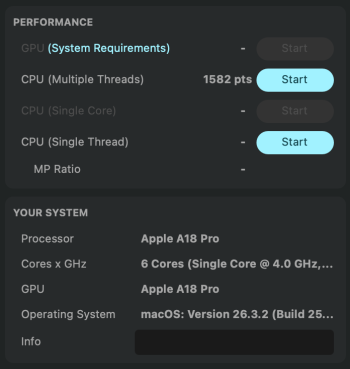
Stock
Screenshot 2026-03-12 at 6.24.21 PM.png

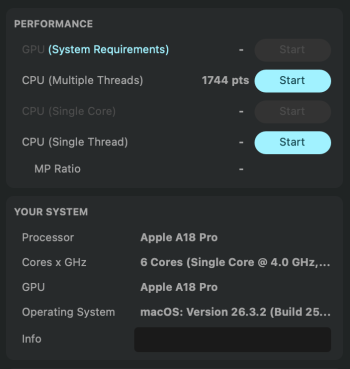
Small pad right over the CPU die
Screenshot 2026-03-12 at 6.48.13 PM.png

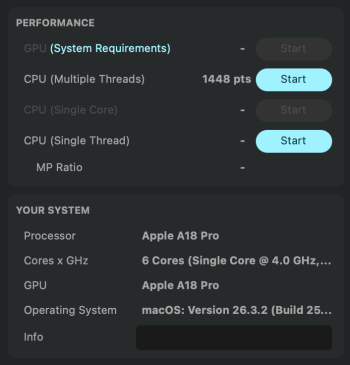
Pad covering most of the logic board
Screenshot 2026-03-15 at 8.54.40 PM.png

With the bigger pad, I ended up with about a 20% improvement in sustained performance overall! Slammed by Cinebench the package was able to sustain about 5.4W instead of immediately throttling down to 4W.

I probably won't keep the pads in here the machine is already snappy enough for my needs stock, but it was an interesting experiment! It's certainly not turning the Neo into a MacBook Pro, but it's still fun to push hardware to its limits.
 
Did you remove the graphite film / sheet or place the pad on top of it? I'm thinking of modding mine for science, but would be inclined to remove the sheet and any paste, and then pad directly on the chip.
I didn't, I wanted this to be completely reversible, but I'd imagine that it would work a bit better with the pads directly on the die and VRMs.
 
Would you recommend the mod? Is the heat on the bottom of the MacBook more or less noticeable with the bigger pad? What heat pad did you use?
 
Would you recommend the mod? Is the heat on the bottom of the MacBook more or less noticeable with the bigger pad? What heat pad did you use?
Check out the bold text in my original post 🙂

The heat is definitely more noticeable, as is the nature of these thermal pad mods. I'll check on the thickness at some point here.
 
Ouch, even 96C is way too hot for my liking
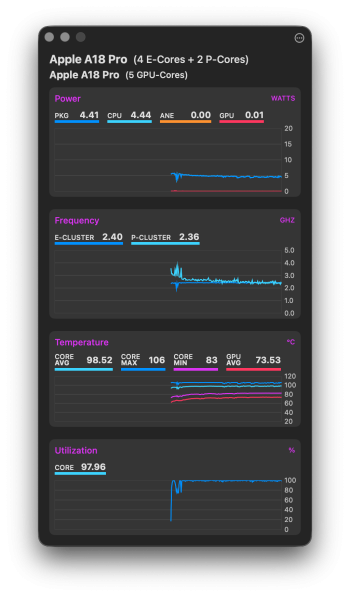
It's actually right about what the A18 Pro runs at flat out without the pad. It's just a toasty runner under full load. Again, that's the die temp, not the temp on the bottom of the laptop. The bottom is warm to the touch but not uncomfortably hot.

I've since taken the pads out, and here's what it looks like stock about three minutes into a Cinebench test.
Screenshot 2026-03-17 at 11.47.51 AM.png
 
It's actually right about what the A18 Pro runs at flat out without the pad. It's just a toasty runner under full load. Again, that's the die temp, not the temp on the bottom of the laptop. The bottom is warm to the touch but not uncomfortably hot.

I've since taken the pads out, and here's what it looks like stock about three minutes into a Cinebench test.
View attachment 2614343

I looks like Apple left a lot on the table with the GPU average temp of 73c. I presume the GPU Metal scores would have gone up a similar 20% with the thermal pads ?
 
  • Wow
Reactions: lapstags
That's really impressive. If the pads aren't causing any sort of issue, I would be tempted to just leave them in.
🙂
 
Great work. I did this back when I had an M1 MBA and it made a huge difference in sustained performance. Glad, albeit a bit perplexed, to see that this is still a thing. I understand why Apple doesn't do this stock (liability, nobody wants burns on their legs), but it would be nice to see them adopt a vapor chamber, or some other solution, at least in the MBA, if not the MBN, as it seems like with some clever engineering there's an easy performance win being left on the table.
 
What size thermal pad did you use? Do you have a picture of the two different size pads and placement that you did for your benches?
Zip Tie Tech did a video on the Neo and they confirmed a 2mm pad works fine. OP, if you used a different size let us know
 
  • Like
Reactions: Paul1964
Zip Tie Tech did a video on the Neo and they confirmed a 2mm pad works fine. OP, if you used a different size let us know

I saw that. I also so another post that used 3mm. If I hear otherwise I’ll be ordering 2mm. I so not want to put too much pressure on it but also want to make sure it’s touching the metal plate.
 
Apple purposely let's thermal throttling help delineate Pro line. The 14" pro with regular m series chip not pro or max performs just slightly better out the box but much better in sustained load.

If the Air or Neo had thermal pads or vapor chamber it would perform probably within slim margins to the Pro model. That would upset Pro users. It is also an added cost they don't need to make.

One could also argue that a laptop frame and body are already a huge heat sink compared to a phone? So just having a larger space may help sustained performance. Finally an iPhone chip runs hot and is made for passive cooling so a laptop without active cooling isn't a big deal.

Obviously there is headroom both in CPU/GPU performance and thermal headroom. If you improve thermal headroom it certainly helps performance but neither the air or Neo are designed for it. That being said I would guess the Neo would be better running without thermal pads or vapor chamber than an air would.
 
I have a range of thickness thermal pads. If you do not plan on removing the graphite sheet and existing paste, go with 1mm. If you plan to remove that area of the sheet and paste, go with 1.5mm.

I went with 1.5mm over the sheet for initial trials, and it was overly thick. Not TOO thick, but thick enough to bow out the bottom, but not to the point where metal rubs the surface before the feet do, but more than is necessary to ensure good contact. 1mm is the sweet spot, imo.
 
Register on MacRumors! This sidebar will go away, and you'll see fewer ads.