Hi, i want to get a new MacBook Pro late 2013 model. i'm an app developer so i mostly use xCode, Pixelmator, sometimes garageband, and the web simultaneously (the usual working scenario). I want to get the 15'' model as i much comfortable with bigger screens for programming (if you think the opposite tell me why?) i will upgrading from a 2010 macbook pro. So i'm lost between getting the low end or the high end. My only concern is the graphics. Will Iris Pro satisfy my needs as a programmer? is integrated graphics repairable in case of any issue? do you think i should upgrade for the high end model? Thank you!


Got a tip for us?
Let us know
Become a MacRumors Supporter for $50/year with no ads, ability to filter front page stories, and private forums.
Macbook pro integrated vs discrete graphics
- Thread starter hassoon
- Start date
- Sort by reaction score
You are using an out of date browser. It may not display this or other websites correctly.
You should upgrade or use an alternative browser.
You should upgrade or use an alternative browser.

I do the same things that you do in addition to Blender and such. just bought the "15 base model and was seriously considering the top end model. Couldn't be happier though. It does everything I need and the Iris Pro handles it easily. As much as I wanted the discrete graphics, you and I probably would never use the 750.
I do the same things that you do in addition to Blender and such. just bought the "15 base model and was seriously considering the top end model. Couldn't be happier though. It does everything I need and the Iris Pro handles it easily. As much as I wanted the discrete graphics, you and I probably would never use the 750.
Thanks for your input. really helped! actually i was somehow concerned about repairability. My current macbook pro has integrated and graphics. Nvidia is panicking when i use xcode and pixelmator together and the integrated Intel shows those crazy coloring bars when i use high graphics as well. wasn't an issue before until lately.
Thanks for your input. really helped! actually i was somehow concerned about repairability. My current macbook pro has integrated and graphics. Nvidia is panicking when i use xcode and pixelmator together and the integrated Intel shows those crazy coloring bars when i use high graphics as well. wasn't an issue before until lately.
Never had that issue, so I can't really comment. I came from programming on a MacBook 3,1 with terrible Intel graphics. Still ran Blender and Xcode fine though.
Thanks for your input. really helped! actually i was somehow concerned about repairability.
There are almost no laptops on the market which would be repairable in that regard. MacBooks are no exception. There is warranty to protect you from hardware defects.

If any chip is broken, they have to exchange the entire logic board anyway. There is no repaiability in the MBP. Even if the RAM has a fault you have to exchange the entire board with CPU, GPU and Thunderbolt chip and everything else. The SSD is the only part that is seperate.
Iris Pro will do just fine for all you have in mind.
Iris Pro will do just fine for all you have in mind.

Hi, i want to get a new MacBook Pro late 2013 model. i'm an app developer [...]
Thank you!
More repairable? Both are equally repairable by Apple. So either discrete or integrated makes no difference.
Programmer? You don't need discrete graphics for that.
All the above said, take the base 15" since you want a bigger real estate; otherwise, get the 13".
If any chip is broken, they have to exchange the entire logic board anyway. There is no repaiability in the MBP. Even if the RAM has a fault you have to exchange the entire board with CPU, GPU and Thunderbolt chip and everything else. The SSD is the only part that is seperate.
Iris Pro will do just fine for all you have in mind.
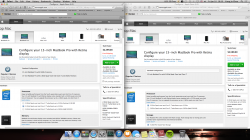
You do realize that the GT750M option is basically a free add-on.
Once you match the CPU, RAM and storage capacity options, they have exactly the same price, regardless of having the GT750M or not. So it's a no-brainer to buy the variant with GT750M (ME294LL/A).
In the screenshot, the one on the left is the variant without dGPU (ME293LL/A) and the one on the right is with dGPU (ME294LL/A)
Attachments
You do realize that the GT750M option is basically a free add-on.
Once you match the CPU, RAM and storage capacity options, they have exactly the same price, regardless of having the GT750M or not. So it's a no-brainer to buy the variant with GT750M (ME294LL/A).
In the screenshot, the one on the left is the variant without dGPU (ME293LL/A) and the one on the right is with dGPU (ME294LL/A)
The amount of TOLD in this post is very large. Thank you for a fine analysis.
However, getting a discrete GPU is still not in OP's best interests.
Yes I do.You do realize that the GT750M option is basically a free add-on.
Once you match the CPU, RAM and storage capacity options, they have exactly the same price, regardless of having the GT750M or not. So it's a no-brainer to buy the variant with GT750M (ME294LL/A).
In the screenshot, the one on the left is the variant without dGPU (ME293LL/A) and the one on the right is with dGPU (ME294LL/A)
But a) the base model has only Iris Pro
b) the dGPU has downsides too. Such as worse battery life on presentation duty (external always needs dGPU), the fact that you always have CMD+Q quit something like pixelmator to get battery savings and cannot leave it running in the background. Chrome Flash still needs to be forced to use the iGPU.
If you don't need the 750M for gaming, it is more annoying than helpful for someone whose primary use is programming.
Never had that issue, so I can't really comment. I came from programming on a MacBook 3,1 with terrible Intel graphics. Still ran Blender and Xcode fine though.
Problem is, cycles in blender doesn't support OpenCL. If you do more complex stuff, it may bite you in the back.
Yes I do.
But a) the base model has only Iris Pro
b) the dGPU has downsides too. Such as worse battery life on presentation duty (external always needs dGPU), the fact that you always have CMD+Q quit something like pixelmator to get battery savings and cannot leave it running in the background. Chrome Flash still needs to be forced to use the iGPU.
If you don't need the 750M for gaming, it is more annoying than helpful for someone whose primary use is programming.
You can leave Pixelmator running in the background without draining much battery, because there's gfxcardstatus to force it into Iris all the time (still doesn't work for forcing Iris on external displays because it's the way the GPUs are wired). Forcing the MBP into Iris with gfxcardstatus is not a mountain-moving task isn't it? And besides how often is the OP going to use an external display? It's always good to have something extra, plus it's free.

Thanks for your input. really helped! actually i was somehow concerned about repairability. My current macbook pro has integrated and graphics. Nvidia is panicking when i use xcode and pixelmator together and the integrated Intel shows those crazy coloring bars when i use high graphics as well. wasn't an issue before until lately.
It wouldn't make a difference as it's not like you can drop in a new gpu if you experience failing hardware. Pixelmator has been rewriting code to OpenCL, but it's a long process. Iris pro does a reasonable job with that kind of stuff anyway when compared to NVidia. I don't see a real reason to ignore intel there.
If you do any programming, you probably like to use an external screen for extra space while you are on the desk. Now that activates the dGPU because it has too. Every time you move away from your desk and want the battery life you need to restart the annoying apps to force the Iris Pro and restart some again once you go back to the dGPU. Apps forced to Iris Pro don't work to well after switching on the dGPU.You can leave Pixelmator running in the background without draining much battery, because there's gfxcardstatus to force it into Iris all the time (still doesn't work for forcing Iris on external displays because it's the way the GPUs are wired). Forcing the MBP into Iris with gfxcardstatus is not a mountain-moving task isn't it? And besides how often is the OP going to use an external display? It's always good to have something extra, plus it's free.
gfxCardStatus if you use it all the time also makes the dGPU kind of pointless and with the workflow I am used to with programming it is definitely annoying. The difference in speed for non gaming stuff is also small and shrinking with more apps moving to OpenCL and away from Cuda.
Almost everybody I know who codes a lot always has at least one cheap external screen at his desk. Space is just so convenient for the task and a standard external (23" or something) costs next to nothing compared to the notebook. Moving from stationary to mobile means usually that an external is attached or removed which does make gfxCardStatus an annoyance, the dGPU speed needs to be weighed against.
I don't, you may want to read more closely. Forcing Iris Pro after your external screen demanded the dGPU is not as easy as just clicking an "I want iGPU only button". It only is if it isn't necessary.
Everytime you move away and back to your desk you need to go through some hassle if you have one such offending app running.
Everytime you move away and back to your desk you need to go through some hassle if you have one such offending app running.
If you ever wanted to connect external monitors to your laptop then a discrete GPU comes in handy, let's say you want to plug a 4K monitor into your rMBP or need to connect 2 Full HD monitors, I think an integrated GPU might have trouble handling those options...
If you ever wanted to connect external monitors to your laptop then a discrete GPU comes in handy, let's say you want to plug a 4K monitor into your rMBP or need to connect 2 Full HD monitors, I think an integrated GPU might have trouble handling those options...
Matrox Parnelia which was released 12 years ago had no problems driving 2 2048 x 1536 displays. I assure you, a modern iGPU would eat a half a dozen full HD displays for breakfast, if you could connect them to it (as long as you don't try do do something silly like high-res gaming). Desktop composition is not as expensive as you might think - disregarding some pathological cases.
To be exact the GT3e chip has enough ROP performance to draw the pixels of 21 4k Monitors @ 60hz each second if it only had to draw each pixel once (In theory based on specs). Obviously there is plenty of overdraw in complex 3D scenes but on a 2D desktop even two 4k displays are well with in the Intel GPUs capabilities. Monitor resolution is mostly limited by the display output such as Displayport (1.1 vs 1.2).
In a synthetic ROP bench the Iris Pro chip actually beat the 650M by some margin.
Base on those numbers it is still the equivalent of eight 4k displays. Display resolution isn't the issue, everything else is.
In a synthetic ROP bench the Iris Pro chip actually beat the 650M by some margin.
Base on those numbers it is still the equivalent of eight 4k displays. Display resolution isn't the issue, everything else is.

I do the same things that you do in addition to Blender and such. just bought the "15 base model and was seriously considering the top end model. Couldn't be happier though. It does everything I need and the Iris Pro handles it easily. As much as I wanted the discrete graphics, you and I probably would never use the 750.
How many GBs of memory on yours? Is 8 enough to handle blender?
How many GBs of memory on yours? Is 8 enough to handle blender?
8GB is plenty. I don't get into animating much. I mainly make models to export, so YMMV. But in my opinion 8GB is plenty. Definitely wouldn't spend the extra ~$600 if all you're doing is Blender and Xcode...as much as I wanted to.

8GB is plenty. I don't get into animating much. I mainly make models to export, so YMMV. But in my opinion 8GB is plenty. Definitely wouldn't spend the extra ~$600 if all you're doing is Blender and Xcode...as much as I wanted to.
Blender 3-d
X-code
Maya
Adobe suite
Those are the programs to be used
Blender 3-d
X-code
Maya
Adobe suite
Those are the programs to be used
I know Maya uses up some RAM, but I've never used it. Honestly though, 8GB would still suffice for all of those applications for the next five years or so in my opinion. I doubt you'll be using all of those applications at once anyway. I still vote for the baseline model and saving $600.
I know Maya uses up some RAM, but I've never used it. Honestly though, 8GB would still suffice for all of those applications for the next five years or so in my opinion. I doubt you'll be using all of those applications at once anyway. I still vote for the baseline model and saving $600.
Ordered a refurbished with 16 GBs just in case
Register on MacRumors! This sidebar will go away, and you'll see fewer ads.