

Become a MacRumors Supporter for $50/year with no ads, ability to filter front page stories, and private forums.

MacRumors

macrumors bot
Original poster


macOS Tahoe 26.4 introduces a new security feature that warns Mac users if they paste certain commands in the Terminal app that may be harmful.

macOS-26-and-Terminal-Feature.jpg

For those unaware, the Terminal app allows you to enter text commands to perform tasks on your Mac. Terminal is primarily intended for advanced users and developers, but unfortunately casual users can be tricked into entering harmful commands that can permanently delete files, change user permissions, and cause other problems.

Here is what the warning says when it appears:
Possible malware, Paste blocked

Your Mac has not been harmed.

Scammers often encourage pasting text into Terminal to try and harm your Mac or compromise your privacy.

These instructions are commonly offered via websites, chat agents, apps, files, or a phone call.
There is a "Paste Anyway" option if you wish to proceed.

The warning was spotted by users across Reddit and X over the past week.
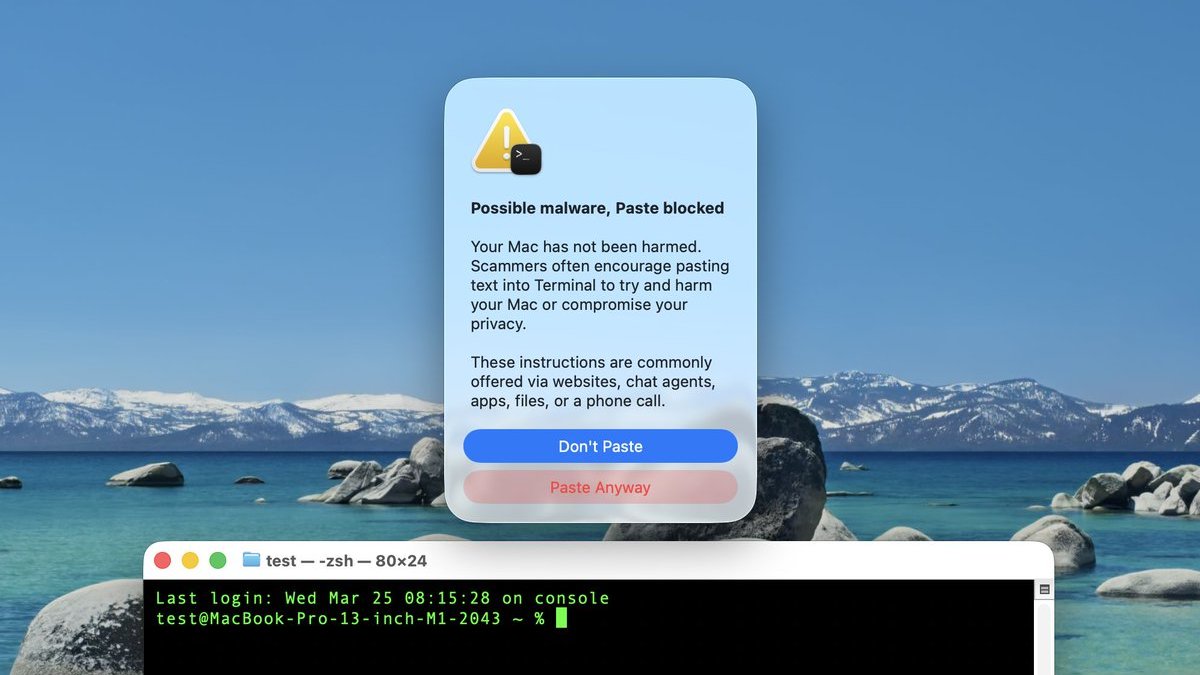
macOS-Tahoe-26-4-Terminal-Warning.jpg
Screenshot via "Mr. Macintosh"

We have yet to determine exactly which commands trigger the warning, which does not always appear. For this reason, always be careful. If you are unfamiliar with how Terminal works, it is probably best to avoid using it entirely.

macOS 26.4 was released earlier this week.

Article Link: macOS 26.4 Introduces New Security Feature for Terminal Commands
 
Last edited:
Good move, Apple. By definition, stopping malware / viruses is reactive more than proactive, but Apple does a good job of making it harder for to create nefarious problems in the first place and being quick to respond to issues.

Been using a Mac since 1986 without any issues (that I'm aware of).
 
Great idea and implemented well! Creating friction necessitating more thought on the user, but not outright disabling the feature itself. I'm sure at some point I might even get annoyed, but I'll understand the value. Maybe one awesome optimization would be right click → Paste should just do it, maybe with some kind of fading banner message similar to how right click → Open will bypass gatekeeper and open apps outside of your Mac's signed app policy.
 
  • Like
Reactions: Skyuser
This sounds a bit weird. I understand the logic of it - stopping people from copy and pasting something they saw on a website. I other words, not letting them run a command they possible don't understand.

But it very much reads as if, while it will block pasting in a terminal command, it won't stop the same commend being manually typed in. So, does it only scan text on the clipboard? Does that imply that people who type things out manually are more likely to know what they're doing?

I also appreciate the "are you sure?" thinking behind this, but will you be able to override the block, or are you stuck with this feature deciding that, no, you cannot run that command?

EDIT - no, I see that you can override the block and "paste anyway".
 
Last edited:
We have yet to determine exactly which commands trigger the warning
Presumably anything containing curl and/or a URL.
I'm sure some will complain but I think this is a great feature
It's annoying when you know what you're doing and these "security" features get in your way. I understand the vast majority of users don't understand terminal, but that doesn't mean you need to harm my experience.
Maybe one awesome optimization would be right click → Paste should just do it
Not really a good idea, I've found it's far more likely that the basic computer user uses right-click for copying and pasting. App launches are different as most people double-click.
 
It would be helpful if the dialog actually showed what is being pasted, so that the user could decide whether they want to “Paste Anyway”…

1774471787437.png


Since the clipboard can contain multiple contents with different mime types, and what exactly gets pasted depends on the receiving application, an accurate preview can be essential.
 
Last edited:
I remember a skilled sysadm blowing away the entire /etc directory on a production server. This protection is a good thing as long as long as you can run a command after thinking twice twice about it.
 
  • Like
Reactions: Kimba and artifex
Wonder if it has to be a fancy command (like the curl example above) or will it stop stuff like “sudo rm -rf …” style commands
 
Reactions:

• Seemingly well-intended to protect users.

• What happens when you know you know what you're doing? Is this going to bother you once in a while anyway?

• What kind of a Mac alert title is "Possible malware, Paste blocked"? A comma splice with incorrect capitalization?
 
+ Good to know they're on it.. it's only been over a month since this started getting bad..
/sarcasm
But honestly, good that they address it.

- The underlying issue(s) remain unaddressed. System recognises a process, IP, address, whatever as legit? Keeps on thinking it's legit, anything else can inject and pass through it, no stopping it. System often and purposefully wrongly conflates "unwanted" with "malware" because we make money from Store Apps and that entails things, such as but not limited to indirectly forcing users to go "extreme" in their ways, often without knowing the consequences. Could go on and on; funny stuff; only with consequences(tm).

- This may be me, but am getting more and more shocked.. perplexed..? Over what the "average Apple user" is like.
Someone has to take you by the hand? Tell you that the encrypted command you cannot decipher/understand, yes yes, the very one you just got from dodgy .cn/code stealer site is actually bad? That elevating prompt in order to run it is a SIGN? HELLO? For everyone else but you apparently? Apparently yes. Someone has to hold your hand for that 🤪
This matters. The more they gatekeep/go pro-active, the more they'll need to cut; and limit; and restrict. It's a matter of defining how low the bar needs be set.
Hence the extra minus here. The bar has now been set to a new all time low*; bodes not well for the future.

*Things even my mother knows not to do in Windows of all places (the most dangerous OS currently), at her age?
Folks over here need 'help' and 'guides' for.
Don't know how it was in the '90s (for Mac users), but again, am shocked at the level of sheer ignorance a vast number of Mac users display today.
You read through stuff posted and honestly shake your head. Just a (recurring admittedly) thought i had when reading about this.. implementation.

Before you think it, no, i'm not in software or in IT, nor an "enthusiast". This **** is ubiquitous by now, it's in our life, i thus merely took the time, whenever i could, to orient myself around said new landscape, the mere basics. Cannot understand how so many folks do not.
 
Last edited:
How about making these extra safety steps optional but default - and let the user toggle them in system preferences?

Would be nice to have some choice back instead of having to deal with pop-ups and sometimes totally misleading error messages in this current state of OS affairs (like the one that calls certain downloaded installer files broken when they are merely unsigned and not coming from the Appstore).

Not everybody grew up glued to an iPad FFS. 🤪
 
Reactions:

• Seemingly well-intended to protect users.

• What happens when you know you know what you're doing? Is this going to bother you once in a while anyway?

• What kind of a Mac alert title is "Possible malware, Paste blocked"? A comma splice with incorrect capitalization?
That last point is triggering me so hard. The English on this popup is atrocious.
 
Register on MacRumors! This sidebar will go away, and you'll see fewer ads.