I suppose it depends on exactly what pasted text triggers the message. I know personally I wouldn't paste such risky text often at all since if I did want to do something potentially risky on more than a rare occasion I would write a script and run that instead of pasting text. So a rare message I have to clear is okay.How about making these extra safety steps optional but default - and let the user toggle them in system preferences?
Would be nice to have some choice back instead of having to deal with pop-ups and sometimes totally misleading error messages in this current state of OS affairs (like the one that calls certain downloaded installer files broken when they are merely unsigned and not coming from the Appstore).
Not everybody grew up glued to an iPad FFS. 🤪

Got a tip for us?
Let us know
Become a MacRumors Supporter for $50/year with no ads, ability to filter front page stories, and private forums.
macOS 26.4 Introduces New Security Feature for Terminal Commands
- Thread starter MacRumors
- Start date
- Sort by reaction score
You are using an out of date browser. It may not display this or other websites correctly.
You should upgrade or use an alternative browser.
You should upgrade or use an alternative browser.
Charlie Bonesx
Suspended

Charlie Bonesx
Suspended
Perhaps if it uses curl to send certain files or folders to a remote site.nopePresumably anything containing curl and/or a URL
AppleCinco
macrumors newbie
No, they absolutely do not. Linux is made for power users who want a far more powerful/customizable OS. They don't want nagging prompts for a feature that any dev uses daily (and if they did want it, they could add it themselves). This is why sudo is a thing.Awesome feature. Now Linux distros really need to include this feature because Linux relies on the command line interface so much more than MacOS.
Does Apple really think a scammer isn't going to tell people to just "paste anyway"?! It's sad to see Apple waste resources to add more barriers to getting real work done.
Ugh. Gross. At this point they may as well just remove Terminal.app from the default install and add it as part of Xcode. That would protect users like my parents much better than this silly dialogue, and it would stay out of my way.
Apple: stop scolding me for using my computer as a computer, rather than a locked down appliance.
Apple: stop scolding me for using my computer as a computer, rather than a locked down appliance.
KoolAid-Drink
macrumors 68000
Ugh, yes. Looks very odd and definitely not Apple-like.• What kind of a Mac alert title is "Possible malware, Paste blocked"? A comma splice with incorrect capitalization?

turbineseaplane
macrumors Penryn
Apple: stop scolding me for using my computer as a computer, rather than a locked down appliance.
Agreed.
I’m honestly not sure they’re gonna stop until they have basically turned macOS into a close variant of iOS.

jsavvy
macrumors 6502
I hope there is a way to disable this. I’d prefer to use or mess up my computer on my own terms.

ProbablyDylan
macrumors 68040
Man just let me break my damn computer if that's what I desire. I paid for the damn thing.

Steve01234
macrumors regular

5aga
macrumors 6502a
Apple making linux more attractive by the day

IvyKing
macrumors 6502a
This brings back memories of a Stan Kelly-Bootle column from a mid-1980's issue of Unix Revue, titled "Enough Mollycoddling". One of his points was that rm -rf could be a very useful command allowing the user to do the equivalent of burning down of the entire Library of Alexandria without lighting one pagan match.
I can see myself getting very irritated by this feature.
I can see myself getting very irritated by this feature.

im_to_hyper
macrumors 65816


keksikuningas
macrumors 6502
if cURL with a random link that pipes into install.sh doesn't trigger it apparently, then I am not sure what it would alert on. sudo rm -rf on home folder?

I'm absolutely fine with this--it's a common vector for unaware users targeted by phone scammers, and if you have any business at all using Terminal you'll immediately understand why you're getting this popup and can click "paste anyway" easily enough. My only hope is that there's a cooldown timer or something between popups, although again, I've never personally been in a situation such that I was pasting more than one or two commands into Terminal--I'm much more likely to paste a URL or file path, and even that is more often by drag-and-drop.
On the other hand, I see I'm not the only one immediately triggered by whatever is going on with the grammar in the title. Incredibly-awkward-if-not-technically-wrong comma aside, it takes all of a moment to refer to Apple documentation and style guides that Paste is only capitalized when describing the menu command where it appears capitalized, as a verb it's not--how can you become a macOS UI programmer without knowing that?
An aside, maybe, just maybe, this will also help a bit with people asking LLMs questions on how to do X and then blindly pasting whatever commands it spits out into Terminal without having any understanding what it's doing. At this point that seems like as much of a risk as bad actors and targeted scams--I'm reminded recently of doing a search for how to do something in Windows and Google helpfully giving me a set of commands that would, technically, accomplish what I was asking for, but in the process also completely wipe and reformat the boot drive.
On the other hand, I see I'm not the only one immediately triggered by whatever is going on with the grammar in the title. Incredibly-awkward-if-not-technically-wrong comma aside, it takes all of a moment to refer to Apple documentation and style guides that Paste is only capitalized when describing the menu command where it appears capitalized, as a verb it's not--how can you become a macOS UI programmer without knowing that?
An aside, maybe, just maybe, this will also help a bit with people asking LLMs questions on how to do X and then blindly pasting whatever commands it spits out into Terminal without having any understanding what it's doing. At this point that seems like as much of a risk as bad actors and targeted scams--I'm reminded recently of doing a search for how to do something in Windows and Google helpfully giving me a set of commands that would, technically, accomplish what I was asking for, but in the process also completely wipe and reformat the boot drive.

DocMultimedia
macrumors 68030
Great feature imo. There are many websites where they just say "paste all this in your terminal" to fix yada issues. Many have no clue what the commands do or mean, but just followed the Google link (or AI statement).
Geeks like those here know there are many really good alternatives to the Apple terminal and can use those if interested. (does this block pasting in other terminals?... I'm traveling and won't update till I'm home again)
Geeks like those here know there are many really good alternatives to the Apple terminal and can use those if interested. (does this block pasting in other terminals?... I'm traveling and won't update till I'm home again)
Its too bad that MacOS won’t adopt Linux features like live patching.Awesome feature. Now Linux distros really need to include this feature because Linux relies on the command line interface so much more than MacOS.

phelms
macrumors newbie
It could very well be commands like the ones used in the ClickFix scam - here summarized by Microsoft: https://www.microsoft.com/en-us/sec...ng-the-clickfix-social-engineering-technique/
macOS Tahoe 26.4 introduces a new security feature that warns Mac users if they paste certain commands in the Terminal app that may be harmful.

For those unaware, the Terminal app allows you to enter text commands to perform tasks on your Mac. Terminal is primarily intended for advanced users and developers, but unfortunately casual users can be tricked into entering harmful commands that can permanently delete files, change user permissions, and cause other problems.
Here is what the warning says when it appears:There is a "Paste Anyway" option if you wish to proceed.
The warning was spotted by users across Reddit and X over the past week.
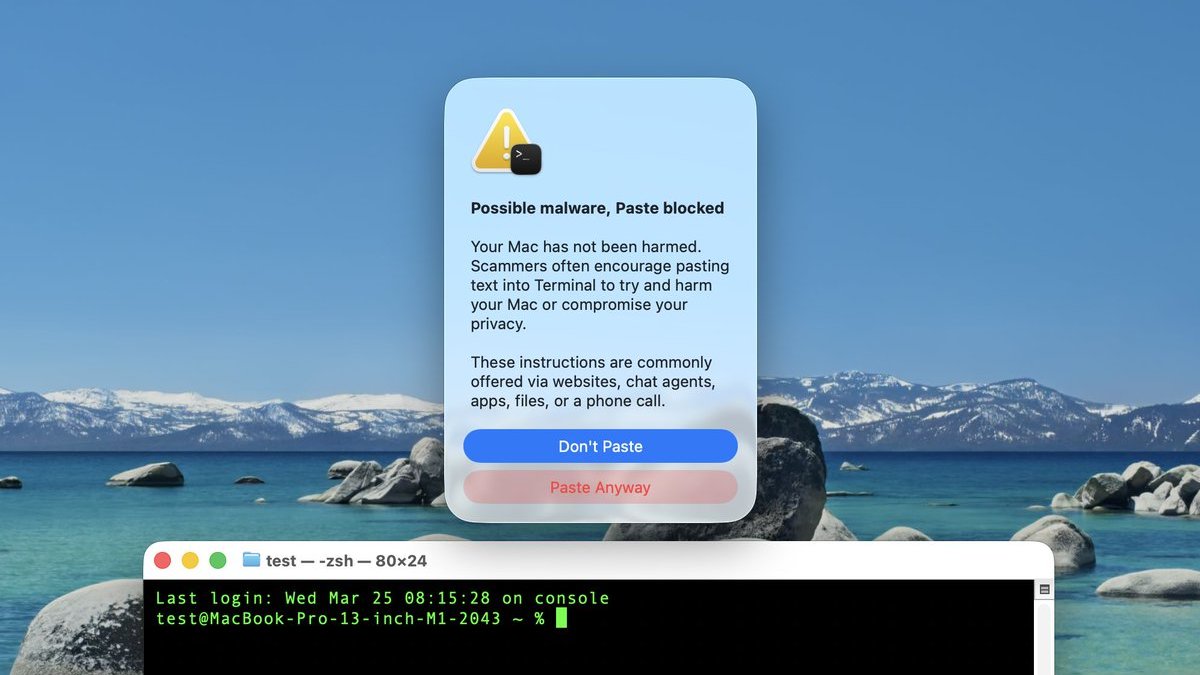
Screenshot via "Mr. Macintosh"
We have yet to determine exactly which commands trigger the warning, which does not always appear. For this reason, always be careful. If you are unfamiliar with how Terminal works, it is probably best to avoid using it entirely.
macOS 26.4 was released earlier this week.
Article Link: macOS 26.4 Introduces New Security Feature for Terminal Commands


bogdanw
macrumors G3
Fails to identify malware script being pasted, but XProtect (probably) blocks it from executing.
It's a good first step to stop the avalanche of infostealer malware on macOS.
Video
Threads
"BIG MAC VIRUS ON YOUTUBE BE AWARE !!"
https://forums.macrumors.com/threads/big-mac-virus-on-youtube-be-aware.2474389/
"Tinker Tool Malware Problem"
https://forums.macrumors.com/threads/tinker-tool-malware-problem.2463235/
It's a good first step to stop the avalanche of infostealer malware on macOS.
Video
Threads
"BIG MAC VIRUS ON YOUTUBE BE AWARE !!"
https://forums.macrumors.com/threads/big-mac-virus-on-youtube-be-aware.2474389/
"Tinker Tool Malware Problem"
https://forums.macrumors.com/threads/tinker-tool-malware-problem.2463235/

Superhai
macrumors 6502a
Ghostty have had this option for a long time already, but it is usually not triggered unless with an newline.Interesting… wonder if ghostty will get something like that. Been using that for a good while and love it.
This also is implemented in iterm2, and many of the Linux terminals, additionally bracketing pasted text can be done by the shell.
Last edited:

attila
macrumors 65816
Interesting… wonder if ghostty will get something like that. Been using that for a good while and love it.
I'd say, if you're savvy enough to install an alternative terminal viewer, then you don't need this protection.
**maestro**
macrumors member
Is anyone else seeing this on macOS Tahoe 26.4? Since updating, Reminders badges have stopped showing for me on both my Mac and iPhone, even though notifications still come through normally.