Same problem with my MBP14 M2 Max, apple store tried Revive and battery disconnection with no luck and ordered new logic board (luckily I have apple care). Going to try with Apple Configurator 2 way while I wait for the spare parts.
Just died after the first reboot with 26.4.

Got a tip for us?
Let us know
Become a MacRumors Supporter for $50/year with no ads, ability to filter front page stories, and private forums.
MacOS 26.4 update broke MBP
- Thread starter creativesmith
- Start date
- Sort by reaction score
You are using an out of date browser. It may not display this or other websites correctly.
You should upgrade or use an alternative browser.
You should upgrade or use an alternative browser.
Apple has agreed to repair my comatose MBP M1 Pro.
It required many phone calls and emails, but I was able to connect with a Specialist who a) understood, b) empathized, and c) claimed ownership of the case. Thanks to her, it appears that the logic board and at least one other component will be replaced. And for that I’m joyously appreciative.
Am still flummoxed, however, by the seemingly unpredictable manner in which these complex devices can be rendered useless by OS updates. (Flummoxed in the sense that… well, it shouldn’t happen.)
And am dismayed that that sort of failure isn’t covered, regardless of warranty status, by Apple. If, as was explained to me, the update may have merely been the final straw that broke the flawed hardware’s back, then that flaw should be addressed by its creator.
Ultimately, Apple appears to be doing the right thing. But what an effort to get there!
Am hoping that the repaired MBP M1 Pro comes ready to roll with MacOS Tahoe 26.4. The prospect of having to run that update again… is the stuff of nightmares.
It required many phone calls and emails, but I was able to connect with a Specialist who a) understood, b) empathized, and c) claimed ownership of the case. Thanks to her, it appears that the logic board and at least one other component will be replaced. And for that I’m joyously appreciative.
Am still flummoxed, however, by the seemingly unpredictable manner in which these complex devices can be rendered useless by OS updates. (Flummoxed in the sense that… well, it shouldn’t happen.)
And am dismayed that that sort of failure isn’t covered, regardless of warranty status, by Apple. If, as was explained to me, the update may have merely been the final straw that broke the flawed hardware’s back, then that flaw should be addressed by its creator.
Ultimately, Apple appears to be doing the right thing. But what an effort to get there!
Am hoping that the repaired MBP M1 Pro comes ready to roll with MacOS Tahoe 26.4. The prospect of having to run that update again… is the stuff of nightmares.

Glad they are helping out, but in the end it's an unnecessary repair. All you or Apple need to do is to flash the IPSW of the previously installed macOS version and the machine would work again. 🤷♂️

Fishrrman
macrumors Nehalem
OP wrote:
"Am hoping that the repaired MBP M1 Pro comes ready to roll with MacOS Tahoe 26.4. The prospect of having to run that update again… is the stuff of nightmares."
Simple (simplistic?) solution:
Wait for OS 26.5, and take your chances then...😎
I had a similar problem with my m1pro MacBook Pro. I was doing [what I thought would be a simple] OS update, and... it "went black" and wouldn't start up any more.
I took it to the Apple Store genius bar, and they got it revived, but only after upgrading from Monterey to Sonoma. I originally wasn't happy about that, but it's still doing fine on Sonoma 4 years later. I have no plans (at this time) to upgrade it further. It works well enough for me "as it is", so I'll just let it be.
"Am hoping that the repaired MBP M1 Pro comes ready to roll with MacOS Tahoe 26.4. The prospect of having to run that update again… is the stuff of nightmares."
Simple (simplistic?) solution:
Wait for OS 26.5, and take your chances then...😎
I had a similar problem with my m1pro MacBook Pro. I was doing [what I thought would be a simple] OS update, and... it "went black" and wouldn't start up any more.
I took it to the Apple Store genius bar, and they got it revived, but only after upgrading from Monterey to Sonoma. I originally wasn't happy about that, but it's still doing fine on Sonoma 4 years later. I have no plans (at this time) to upgrade it further. It works well enough for me "as it is", so I'll just let it be.
Glad they are helping out, but in the end it's an unnecessary repair. All you or Apple need to do is to flash the IPSW of the previously installed macOS version and the machine would work again. 🤷♂️
Yes, that's exactly my scenario, albeit they quoted you $2 less than they did for me. Do you recall your error message?Yup,
the EXACT same thing happened to my Macbook Pro M1Pro at the completion of the 26.4 update. it went Bricked. I finally got it into DFU mode with 2 different host MACs and both of them errored out at Step 4 of Revive and then when i gave up and tried Restore also . Apple Store couldnt either and were even using the wrong USB ports on my Mac for that and then said $698 for new logic board since then couldnt get even into DFU mode. (which i got that far later on my Mac Mini M4Pro )
Sounds like an ideal solution! If only I'd known about this before I took the MBP to the Apple Store. Why do you think, out of the many Apple specialists with whom I spoke, none of them thought to try this?Glad they are helping out, but in the end it's an unnecessary repair. All you or Apple need to do is to flash the IPSW of the previously installed macOS version and the machine would work again. 🤷♂️
Why should they? They are doing what they are trained for. After all, you'd expect a simple restore / revive to just work without picking a special IPSW version. And you can't blame them for not knowing that workaround to an issue that's fairly new. I probably wouldn't have that idea either if I wouldn't have red about it on the Macrumors forums.
Paradoxally
macrumors 68020
Sounds like an ideal solution! If only I'd known about this before I took the MBP to the Apple Store. Why do you think, out of the many Apple specialists with whom I spoke, none of them thought to try this?
They are not trained to do IPSW restores, because the first two cover almost all cases where the machine revives normally. I haven't done IPSW as a power user in over a decade, and that was for iOS restores not macOS.
As usual, online forums have far more information and knowledge than a training handbook.
Making an account just to say I also had this on my 2023 M2 Pro Macbook Pro 14 inch. I set the update downloading and when I came back, my machine was completely dead with no signs of life other than Magsafe showing orange and then green once fully charged.
Used A Mac Mini at work with apple config to revive - just some notes though i'd like to add for more detail for anyone who might need it, I was going off 3 different sets of notes to get enough detail for me.
1) get the IPSW file for 26.3.1 from here https://updates.cdn-apple.com/2026W...1973/UniversalMac_26.3.1_25D2128_Restore.ipsw
2) For DFU mode - I found a comment on reddit that had different instructions from Apple but apparently were more reliable. I got into DFU mode on my first try. Make sure the mac is not connected to anything first.
2.1 Press and hold the power button (Touch ID). (Make sure your mac is fully charged if it is a Macbook)
2.2 Immediately hold down these keys as well for 10 seconds:
Left Control, Left Option, Right Shift.
2.3 After 10 seconds, release the keys but continue to hold the power button (Touch ID) for another 8 seconds.
2.4 Plug in USB C cable into DFU port and connect it to your Mac with Apple configurator.
2.5 Drag the IPSW directly onto the Mac in the list on apple config, and click revive.
2.6 Wait. It took about 3-5 minutes, My mac then booted into recovery, I entered my password and it rebooted. The first reboot failed so I manually clicked Macintosh HD, entered my password again and then it worked.
Credit to u/Darthsilicrypt on Reddit for these instructions.
Used A Mac Mini at work with apple config to revive - just some notes though i'd like to add for more detail for anyone who might need it, I was going off 3 different sets of notes to get enough detail for me.
1) get the IPSW file for 26.3.1 from here https://updates.cdn-apple.com/2026W...1973/UniversalMac_26.3.1_25D2128_Restore.ipsw
2) For DFU mode - I found a comment on reddit that had different instructions from Apple but apparently were more reliable. I got into DFU mode on my first try. Make sure the mac is not connected to anything first.
2.1 Press and hold the power button (Touch ID). (Make sure your mac is fully charged if it is a Macbook)
2.2 Immediately hold down these keys as well for 10 seconds:
Left Control, Left Option, Right Shift.
2.3 After 10 seconds, release the keys but continue to hold the power button (Touch ID) for another 8 seconds.
2.4 Plug in USB C cable into DFU port and connect it to your Mac with Apple configurator.
2.5 Drag the IPSW directly onto the Mac in the list on apple config, and click revive.
2.6 Wait. It took about 3-5 minutes, My mac then booted into recovery, I entered my password and it rebooted. The first reboot failed so I manually clicked Macintosh HD, entered my password again and then it worked.
Credit to u/Darthsilicrypt on Reddit for these instructions.
Fishrrman
macrumors Nehalem
Re reply 34 above:
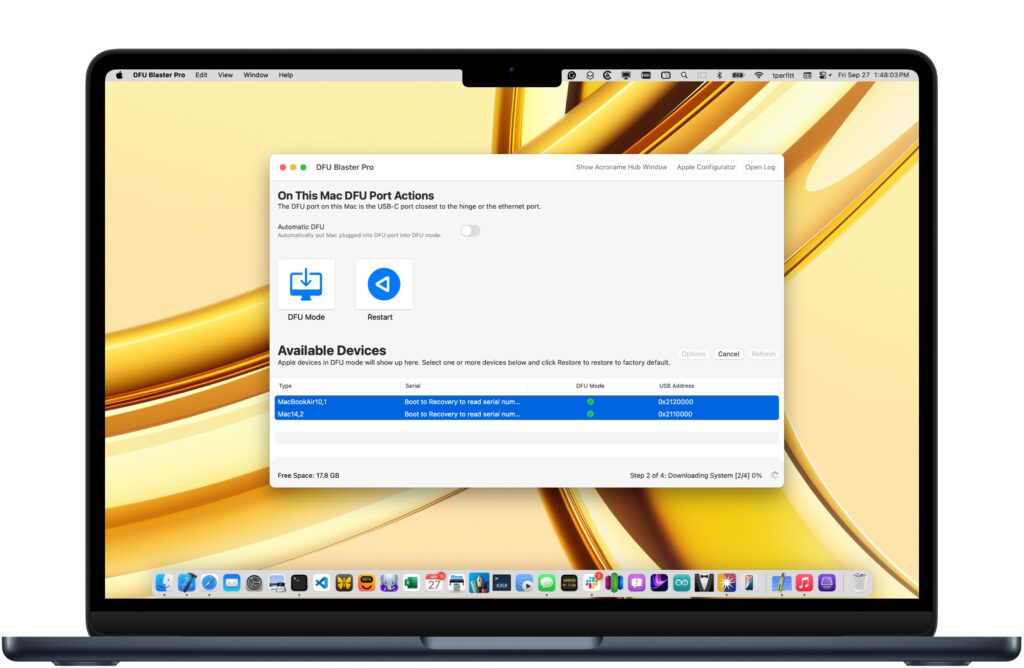
I think I mentioned this already, but if you're having trouble getting into DFU mode, download "DFU Blaster Pro" from here:
 twocanoes.com
It's "pay for" software BUT IT ALSO RUNS IN FREE MODE.
twocanoes.com
It's "pay for" software BUT IT ALSO RUNS IN FREE MODE.
The free mode is all you need, because it still permits you to connect a target and "blast it" into DFU mode.
It works.
Try it.
I think I mentioned this already, but if you're having trouble getting into DFU mode, download "DFU Blaster Pro" from here:
DFU Blaster Pro
twocanoes.com
The free mode is all you need, because it still permits you to connect a target and "blast it" into DFU mode.
It works.
Try it.
In my case, as I was using a work device I didn't want to install software that was unnecessary. I would have had I had issues getting it into DFU mode. But the method I posted would be quicker than installing the software - but definitely worth a try if you have issues.
I had the same issue on an 2023 M2 16" MBP and could not get it into DFU recovery mode no matter how many times I tried following the Apple instructions, however I was able to get it into the mode using the macdmtool on another connected Mac that also has Apple Configurator 2 installed.
 www.bkurtz.io
Once I used the utility to get the Mac into DFU recovery, I just performed the Revive operation using Apple Configurator and the machine came back to life (still running on 26.3.1a).
Perform DFU Restores on Apple Silicon Macs with macvdmtool | BK's Blog
I am a Client Platform Engineer. I like to use golang, config management, and open-source management tools. Views are my own.
www.bkurtz.io
Once I used the utility to get the Mac into DFU recovery, I just performed the Revive operation using Apple Configurator and the machine came back to life (still running on 26.3.1a).

maniac4mac
macrumors newbie
OS Tahoe 26.4 bricked my 2025 MBP14,2025.A cautionary note: Upgrading to MacOS 26.4 broke my M1 Pro MacBook Pro. (Broke it real good!—a machine that was four years old, in nearly pristine condition, and in superb working order.
On the day that Tahoe 26.4 was released, I backed up my MBP, initiated the process, waited. It lumbered along, was a large update. I waited and waited.
Eventually, at the very end of the process, the machine froze.
Couldn’t awaken or reboot the Mac. Tried to Revive it via connection to a second MBP and with the help of DFU (Device Firmware Update).
Another long process. Wait, wait, wait. Watch the progress bar until… it freezes again.
Next, tried a Restore rather than a Revive. A Restore wipes the SSD, etc. But no luck. Just mounting stress.
Brought the MBP to an Apple Store (hours away) where they performed the very same steps I had taken. Again, my Mac failed to respond. They kept it overnight, fiddled with it. The machine remained absolutely, stubbornly, irreversibly dead.
Because my MBP was no longer covered by AppleCare (because I was a jerk and forgot to renew it) the only course of action is a $700 replacement of the logic board. Wow! Because a system update went sideways? I swear, it was a healthy machine.
From Apple’s perspective, this clearly isn’t a big deal. From my perspective, seeing my four year-old machine succumb to a heart attack during an OS update… well, it was shocking. Call me naive. (No, please don’t.)
Why am I sharing this with you? It’s a cautionary note.
Be sure to have a full backup of your system before embarking on an OS update. I’m also writing because of how upsetting it is that Apple didn’t seem to care that the update process caused such a messy failure.
“Something must have been wrong with your MBP,” said each of several reps with whom I discussed this. “We can’t attribute it to the update. Must have been a problem with the machine. We can’t tell if it won’t boot.” But, but…
Here I am, fresh out of AppleCare (my mistake for forgetting to re-up it) and fresh out of any “human consideration” from Apple. Nothing along the lines of: We’re so sorry this happened, how can we help resolve this? Just: $700.
I’m not going to spend that $700 on fixing this Mac. The question now is whether I buy a new one, or look for something else.
Take care and take precautions with your software updates.
PS - I’ve been pumping money into Apple for decades. This is the first time I’ve felt that they truly just don’t care. And yeah, I know… dream on.
I managed through DFU mode to reinstall fresh copy of Tahoe. After several reboots, the machine os back to normal.

Bicycle
macrumors newbie
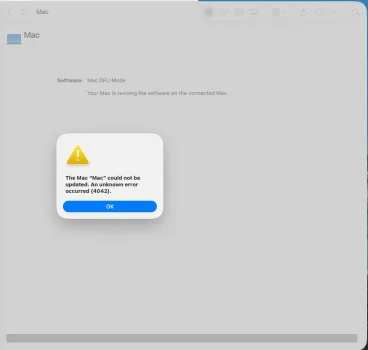
16" M2 Max. Updated to 26.4.1 on 2026-04-10. Used the machine for two 8-hour shifts, and I powered on and shut down my machine at the start and end of each shift. Then on the third shift I opened the lid and it didn't automatically start up like it normally does. After the usual troubleshooting on the web, I attempted two DFU revives that resulted in a pop-up error 4202. I still have AppleCare+ so I contacted support chat and that resulted in booking an appointment at a service location. But I asked Claude.ai (Opus 4.6) and "it" led me to this thread and I was able to get everything sorted out with an Apple Configurator DFU using the IPSW listed here. Having AppleCare+, I wasn't too concerned as I have other Macs, but it is super concerning that OS updates are bricking Macs. But I am super thankful for this thread!
Attachments
It's even more concerning that Apple still hasn't fixed this issue ins 26.4.1. Despite not being affected I submitted a bug report to Apple linking to all the reports about devices being bricked by 26.4.x updates. So they should be aware of the issue. Anyhow, as usual, the report was ignored so far and has not been linked to any other reports submitted by other users. 🙁

golfnut1982
macrumors 6502a
Unfortunately, Time Machine back up, as we know it, will eventually be deprecated by removing AFP client/server components and standardizing Time Machine over SMB. Tahoe is a transition release, with the next version no longer supporting the older AFP system. You can still manually plug in your external hard drive and make a back up anytime you want in all fairness.I agree that one should always do a backup before any OS upgrade or update. This goes for any operating system.
I do a Time Machine backup at minimum when updating my Mac's. I also backup my iPhone and iPad to my Mac mini before any updates.
THANK YOU for this!Make sure to revive or restore with an IPSW of the previously installed macOS version, not 26.4. There have been several reports of this issue accross multiple Apple Silicon models and usually this brought them back.
My 16-inch MacBook Pro with M2 Max died on me two days ago after updating to MacOS 26.4.1. I spent the better part of yesterday trying to revive/restore it, but I kept getting the following error from Apple Configurator 2:
The display would stay blank/black and Recovery Mode was unavailable. But after flashing the IPSW of 26.3.1 the machine came back to life. Next I did need to upgrade back to 26.4 because the machine kept telling me a Software Update was required to continue booting.Gave up waiting for device to transition from DFU state to DFU state.
After installing the macOS 26.4 ipsw I found on ipsw.me using DFU-mode, my machine was able to boot again and all my files were still there.

Non-Euclidean
macrumors 6502a
Can this thread be stickied?
This is critical information for a devastating scenario which appears to be more common than it should be.
Ideally, we need a "troubleshooting" forum which contains threads like this. It would consolidate solutions in one area.
This is critical information for a devastating scenario which appears to be more common than it should be.
Ideally, we need a "troubleshooting" forum which contains threads like this. It would consolidate solutions in one area.
Last edited:
Has anyone reported this to Feedback Assistant? It looks like more widespread that it appeared to be initially and 26.4.1 has not cured it. Only Apple is able to fix this...
It's even more concerning that Apple still hasn't fixed this issue ins 26.4.1. Despite not being affected I submitted a bug report to Apple linking to all the reports about devices being bricked by 26.4.x updates. So they should be aware of the issue. Anyhow, as usual, the report was ignored so far and has not been linked to any other reports submitted by other users. 🙁

chrfr
macrumors G5
Most people are not using Time Capsules or old AFP-only servers to do backups with Time Machine so Time Machine will continue to work just as it always has for the vast majority of users.Unfortunately, Time Machine back up, as we know it, will eventually be deprecated by removing AFP client/server components and standardizing Time Machine over SMB. Tahoe is a transition release, with the next version no longer supporting the older AFP system. You can still manually plug in your external hard drive and make a back up anytime you want in all fairness.
Only Time Capsule or old AFP server backups are going away. Local Time Machine backups have no relationship to AFP or SMB and are not affected in any way by this change. Additionally, network backups using Time Machine can still work to other Macs set up to share a volume over SMB for Time Machine without anything working differently than it did before.
Nonetheless, this is all tangential to this thread's topic.
I'm sorry and I totally get it. I have an M4 MBP and the update has crushed my battery life so I totally understand. I'd go back to Apple (either the store or on the phone with customer services) and ask for some kind of store credit. No update should completely brick an Apple Silicon machine.A cautionary note: Upgrading to MacOS 26.4 broke my M1 Pro MacBook Pro. (Broke it real good!—a machine that was four years old, in nearly pristine condition, and in superb working order.
On the day that Tahoe 26.4 was released, I backed up my MBP, initiated the process, waited. It lumbered along, was a large update. I waited and waited.
Eventually, at the very end of the process, the machine froze.
Couldn’t awaken or reboot the Mac. Tried to Revive it via connection to a second MBP and with the help of DFU (Device Firmware Update).
Another long process. Wait, wait, wait. Watch the progress bar until… it freezes again.
Next, tried a Restore rather than a Revive. A Restore wipes the SSD, etc. But no luck. Just mounting stress.
Brought the MBP to an Apple Store (hours away) where they performed the very same steps I had taken. Again, my Mac failed to respond. They kept it overnight, fiddled with it. The machine remained absolutely, stubbornly, irreversibly dead.
Because my MBP was no longer covered by AppleCare (because I was a jerk and forgot to renew it) the only course of action is a $700 replacement of the logic board. Wow! Because a system update went sideways? I swear, it was a healthy machine.
From Apple’s perspective, this clearly isn’t a big deal. From my perspective, seeing my four year-old machine succumb to a heart attack during an OS update… well, it was shocking. Call me naive. (No, please don’t.)
Why am I sharing this with you? It’s a cautionary note.
Be sure to have a full backup of your system before embarking on an OS update. I’m also writing because of how upsetting it is that Apple didn’t seem to care that the update process caused such a messy failure.
“Something must have been wrong with your MBP,” said each of several reps with whom I discussed this. “We can’t attribute it to the update. Must have been a problem with the machine. We can’t tell if it won’t boot.” But, but…
Here I am, fresh out of AppleCare (my mistake for forgetting to re-up it) and fresh out of any “human consideration” from Apple. Nothing along the lines of: We’re so sorry this happened, how can we help resolve this? Just: $700.
I’m not going to spend that $700 on fixing this Mac. The question now is whether I buy a new one, or look for something else.
Take care and take precautions with your software updates.
PS - I’ve been pumping money into Apple for decades. This is the first time I’ve felt that they truly just don’t care. And yeah, I know… dream on.
I'd lobby them for some kind of token compensation and get a M4 or M5 MBA.
Looks like I am in the same boat 🙁
I updated to macOS 26.4 a week before Easter and on the 6th I rebooted (to try and resolve an issue with a HDMI dialog box not closing). The MacBook Pro M2 Pro would not boot.
I took the laptop back to Apple on 8th and they were not able to do a DFU restore or a revive at the store.
So Apple have had to ship my laptop back to the repair centre, which I was notified that the laptop has been received on the 13th April. Fingers crossed Apple have a fix and they just need to apply a new Firmware.
I updated to macOS 26.4 a week before Easter and on the 6th I rebooted (to try and resolve an issue with a HDMI dialog box not closing). The MacBook Pro M2 Pro would not boot.
I took the laptop back to Apple on 8th and they were not able to do a DFU restore or a revive at the store.
So Apple have had to ship my laptop back to the repair centre, which I was notified that the laptop has been received on the 13th April. Fingers crossed Apple have a fix and they just need to apply a new Firmware.