

Become a MacRumors Supporter for $50/year with no ads, ability to filter front page stories, and private forums.

MacRumors

macrumors bot
Original poster


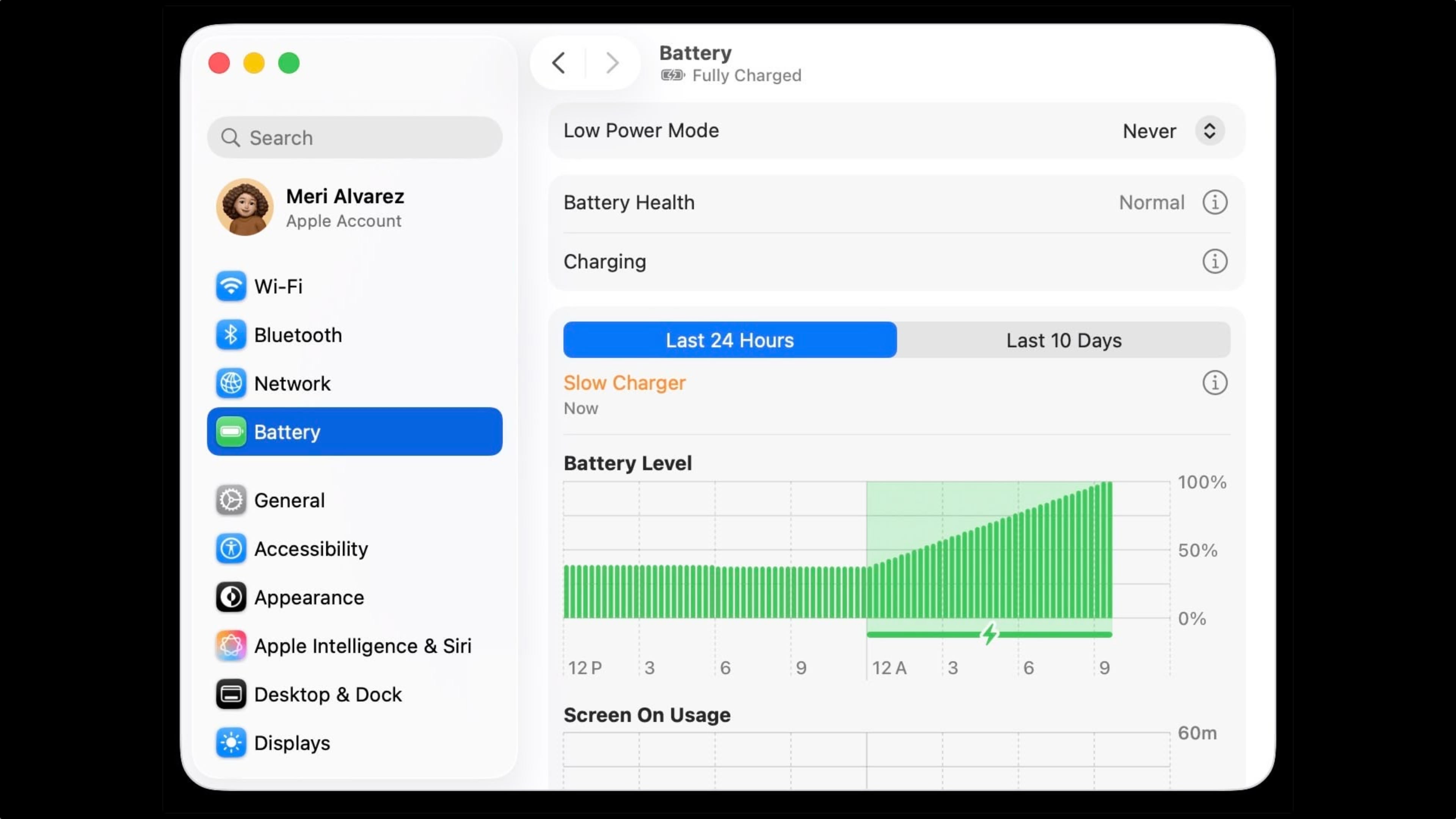
macOS Tahoe 26.4 includes a new slow charger indicator that tells MacBook users when their charging setup isn't delivering full power.
macos-slow-charger-warning@2x.jpg

As described in an updated Apple support document, a "Slow Charger" label now appears in orange text in the battery status menu and above the Battery Level graph in Battery settings. The indicator is accompanied by an info button for more details.

Apple says that to charge more quickly, users should use a power adapter and cable that deliver at least the minimum wattage recommended for their MacBook model.

The feature is similar to one Apple added to iPhone with iOS 18, where periods of slow charging appear as an orange bar in the Battery section of the Settings app.

The slow charger indicator is one of two battery-related changes in macOS 26.4. The update also adds a Charge Limit feature that lets MacBook users set a maximum charge level anywhere from 80 to 100 percent, with the aim of preserving long-term battery health.

macOS Tahoe 26.4 is available now via System Settings ➝ General ➝ Software Update.

Article Link: macOS Tahoe 26.4 Adds Slow Charger Indicator for MacBooks
 
Last edited:
  • Wow
Reactions: Z-4195
Where can I set the maximum charge level? I have an M4 MacBook Air and don't see anything relevant under System Settings > Battery under the new update.
 
Why did Apple hide setting the charge level action behind the information button ?? Also, setting mine to 80% was my first encounter with the "glass" slider control. Do not care so to criticize too much about Liquid Glass or 26 overall (run with transparency down and contrast up). However, the way the slider control turns to this transparent, barely visible, glass object really threw me at first. Very, very unintuitive. Hiding the battery level charger set-level action in an information dialog, though, is the worst UI decision I can recall. The slider button... sort of the cherry on top of the cake. Is this Craig's cake?? Who owns these decisions?? HTH, NSC
 
Why did Apple hide setting the charge level action behind the information button ?? Also, setting mine to 80% was my first encounter with the "glass" slider control. Do not care so to criticize too much about Liquid Glass or 26 overall (run with transparency down and contrast up). However, the way the slider control turns to this transparent, barely visible, glass object really threw me at first. Very, very unintuitive. Hiding the battery level charger set-level action in an information dialog, though, is the worst UI decision I can recall. The slider button... sort of the cherry on top of the cake. Is this Craig's cake?? Who owns these decisions?? HTH, NSC
There is a team of people making these decisions, its not down to one person no matter what anyone wants you to think. Anything else is just marketing speak.


macOS Tahoe 26.4 includes a new slow charger indicator that tells MacBook users when their charging setup isn't delivering full power.

macos-slow-charger-warning@2x.jpg

As described in an updated Apple support document, a "Slow Charger" label now appears in orange text in the battery status menu and above the Battery Level graph in Battery settings. The indicator is accompanied by an info button for more details.

Apple says that to charge more quickly, users should use a power adapter and cable that deliver at least the minimum wattage recommended for their MacBook model.

The feature is similar to one Apple added to iPhone with iOS 18, where periods of slow charging appear as an orange bar in the Battery section of the Settings app.

The slow charger indicator is one of two battery-related changes in macOS 26.4. The update also adds a Charge Limit feature that lets MacBook users set a maximum charge level anywhere from 80 to 100 percent, with the aim of preserving long-term battery health.

macOS Tahoe 26.4 is available now via System Settings ➝ General ➝ Software Update.

Article Link: macOS Tahoe 26.4 Adds Slow Charger Indicator for MacBooks
I wish MagSafe would turn green once it’s hit the desired charge limit, rather than staying orange.
 
I just got my first MacBook Pro. My current habit is I always shutdown after use. Does anyone know if I set the charge limit to 80% - Will that limit still hold even though it's shutdown? So if it's shutdown it will just go 100% either way. Or does the limit only work when I put it to sleep/simply closing the lid. I don't know if I phrase the question correctly.
 
  • Like
Reactions: reinem85 and jchap
There is a team of people making these decisions, its not down to one person no matter what anyone wants you to think. Anything else is just marketing speak.
No, there's always a "product owner" type of position for software this large. They're the person in charge, and the fall guy when things break. That they accepted the change and it's using an info button means they are either incompetent (and over-ruled their designer) or Apple intentionally does not want people to find this feature by the usual means of clicking around for discovery.
 
  • Like
Reactions: reinem85
it's sad that this functionality, together with the battery charging limitation, are not trickling down to older versions of macOS. I am tempted to downgrade to Tahoe from Sequoia, but I don't want to run the risk of ruining the experience, as many people are reporting
 
  • Like
Reactions: jchap and Matt713
I have no idea what to set this to, so I just left it at 100% and "optimize charging" on my Air. Is that correct or is there a better way? (I leave it plugged in most of the time.)
 
Will the Neo say “slow charging” with its 20W charger? Everyone who doesn’t own one says it’s a tragedy that it doesn’t ship with a 35W charger.
The support article says the resolution is using at least the minimum wattage recommended, and since that's what's included in the box, I say no.
I charge my mpb with a ~20 Watt charger. I was told it is better for the battery because it won't get hot. It might take longer to charge, but I am not in a hurry
Despite the arguments pro/con, I too prefer to use whatever charges my devices with the least heat. And besides using a charger many iPhone/iPad users already have, the Neo's battery will be a simpler replacement someday, if needed.
 
I just got my first MacBook Pro. My current habit is I always shutdown after use. Does anyone know if I set the charge limit to 80% - Will that limit still hold even though it's shutdown? So if it's shutdown it will just go 100% either way. Or does the limit only work when I put it to sleep/simply closing the lid. I don't know if I phrase the question correctly.
*UPDATE*

I have Optimized Battery Charging - enabled. I have put charge limit to 80% (Option available thanks to the MacOS Tahoe 26.4 update)

So I shutdown my MacBook Pro and charge it. Its battery level was at 65%

After I'd say 45 minutes of charging, I boot up MacBook Pro and it's now at 100%

So it didn't respect my charge limit. UNLESS...

I suspect that Apple rather wants us to use the sleep mode function than shutdown so the charge limit can work?
 
  • Like
Reactions: reinem85 and jchap
Why is the graphic different than it looks on iOS. On iOS, the slow charging portion is highlighted in orange instead of green all the way
 
*UPDATE*

I have Optimized Battery Charging - enabled. I have put charge limit to 80% (Option available thanks to the MacOS Tahoe 26.4 update)

So I shutdown my MacBook Pro and charge it. Its battery level was at 65%

After I'd say 45 minutes of charging, I boot up MacBook Pro and it's now at 100%

So it didn't respect my charge limit. UNLESS...

I suspect that Apple rather wants us to use the sleep mode function than shutdown so the charge limit can work?
It's either that or it's calibrating the battery for you.
 
  • Like
Reactions: dmtworld
Register on MacRumors! This sidebar will go away, and you'll see fewer ads.