Become a MacRumors Supporter for $50/year with no ads, ability to filter front page stories, and private forums.
Status
The first post of this thread is a WikiPost and can be edited by anyone with the appropiate permissions. Your edits will be public.

WilliApple

macrumors 68000
Original poster
wer.png

Release Date ― 20 April 2026
Build Number ― 25F5058e
Apple Silicon System Firmware Version ― Pending
T2 BridgeOS System Firmware Version ― Pending

New Features & Changes (Found something new? Please press "Edit" on the bottom of this post and add it here)
Resolved Issues
New Issues (If you are encountering any issues, please press "Edit" on the bottom of this post and add it here)
Remaining Issues

  • Alarms may not play when your display is asleep for a long period of time (FB10086690)
    • Workaround: Make your display not fall asleep in Settings > Lock Screen > Turn display off on ____ when inactive. You can turn your brightness off.
    • Issue present since macOS 13.0
Untested Issues
  • When filling your screen with the App Store, the title of the View may be wider than expected
  • On non notched devices, the volume indicator may have excessive padding in full screen (Present since 26.2 Beta 3)
Issues Information: When a new macOS release comes out, all issues automatically go to "Untested Issues" until they are moved by someone. Issues that stay in Untested for 3 releases (beta or smooth) will be removed from all future threads. When there is a new macOS release, please be sure to let us know about the issue's status by moving it to either "Remaining Issues" or "Resolved Issues"

Additional Notes
  • Updates might not show up in Settings as soon as it releases if you have Rosetta 2 installed. This is due to Apple not releasing Rosetta at the same time as macOS Tahoe Betas. Please wait up to an hour before you will be able to update.
  • If you are encountering a memory management issue (eg. a Memory Leak), please provide what app/process it is coming from (Using Activity Monitor) and what you were doing in that app.
  • macOS 26 Tahoe will be installed via a Delta Update in System Settings. Please be aware about this, as the update won’t install with an installer.
  • macOS 26 is officially supported on the following devices. If your device is not listed below, it has unfortunately been dropped by Apple. Any efforts of trying to get your Mac running macOS 26, including bugs should be discussed in this thread.
    • MacBook Air: M1, M2, M3, M4, M5
    • MacBook Pro: 2019 (16 Inch only), Intel 2020 (4 thunderbolt port only), M1, M1 Pro/M1 Max, M2, M2 Pro/M2 Max, M3/M3 Pro/M3 Max, M4/M4 Pro/M4 Max, M5, M5 Pro/M5 Max
    • MacBook Neo: A18 Pro
    • Mac mini: M1, M2/M2 Pro, M4/M4 Pro
    • iMac: 5K 2020, M1, M3, M4
    • Mac Pro: 2019, M2 Ultra
    • Mac Studio: M1 Max/Ultra, M2 Max/Ultra, M3 Ultra, M4 Max
  • macOS Tahoe 26.5 Release Notes
  • macOS Tahoe Overview
  • Apple Security Updates
  • Become an Apple Beta Tester
  • Full Installer (Direct Download) (Pending)
 
Last edited:
Uhh, again is Adguard at least the newest Beta is not working and the final. When its running causing this kind of error in all online Apps:
"There was a bad response from the server. (NSURLErrorDomain:-1.011)"
Switching Adguard off is solving all problems.
 
Last edited:
Uhh, again is Adguard at least the newest Beta is not working and the final. When its running causing this kind of error in all online Apps:
"There was a bad response from the server. (NSURLErrorDomain:-1.011)"
Switching Adguard off is solving all problems.
having the same problem
 
I noticed that my MagSafe light on my 14" M2 Max was green while holding the battery at 80%. When I told it to charge to full, it switched to amber. Normally, the light is amber anytime the battery is under 95% or so.
 
Yep, adguard screwed for me as well. Get an error about websites not allowing HTPS even though they are.
 
Uhh, again is Adguard at least the newest Beta is not working and the final. When its running causing this kind of error in all online Apps:
"There was a bad response from the server. (NSURLErrorDomain:-1.011)"
Switching Adguard off is solving all problems.
Having the same problem. I don’t have Adguard, but I have NordVPN threat protection on. I had to disable the threat protection for safari and mail to work again.
 
Beta 3 logs me out of FaceTime, iMessage and Telephone apps. Keeps asking for login credentials. Anyone else?

MacMini M4 Pro, MacBook Air M3
 
  • Like
Reactions: Jumpie
re: "There was a bad response from the server. (NSURLErrorDomain:-1.011)"

YMMV.. I found that tweaking the settings within Adguard solved the issue.
Adguard Settings > Network > Filtering Mode.
Change the mode from Network Extension to Automatic Proxy
 
Safari not working. I deleted AdBlock, disabled ExpressVPN, and disabled Norton 360. Nothing helps. Getting the same "There was a bad response from the server. (NSURLErrorDomain:-1.011"

FireFox works fine.

Newsfeed from the Stocks App also not working
 
Safari not working. I deleted AdBlock, disabled ExpressVPN, and disabled Norton 360. Nothing helps. Getting the same "There was a bad response from the server. (NSURLErrorDomain:-1.011"

FireFox works fine.

Newsfeed from the Stocks App also not working
Please see above, @dtheory found a "fix" until AdGuard corrects the issue. It'll work, but potentially not filtering as well, but better than no filtering.
 
It was Norton 360. Could not disable the filters or proxy settings. I uninstalled it and everything seems to work normally (so far)
 
  • Like
Reactions: MrRoberto
No internet connectivity at all. I suspect a conflict with Little Snitch. Disabling LS does not restore internet either. Removing LS, and internet works. The common thread of all these reports (Adguard, Norton etc) is they all employ network filters and/or extensions.
 
Safari, Messages, Mail, Teams, Adobe, nothing works.

opens google, but that's about it. removed Adblock, but still no access from anything, seems like even there's no connection even in system settings?
 
  • Like
Reactions: MrRoberto
A new version of AdGuard nightly this morning. I'm not on 26.5, beta 3, but hopefully this will help those w issues.

AdGuard for Mac
Version 2.19.0.2238 nightly
You are using the latest version of AdGuard.
CoreLibs version 1.20.101

DNSLibs version 2.7.6
 
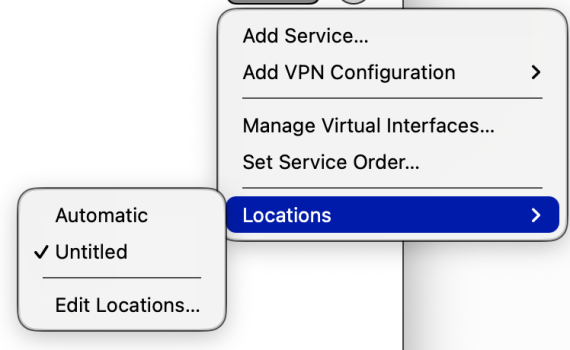
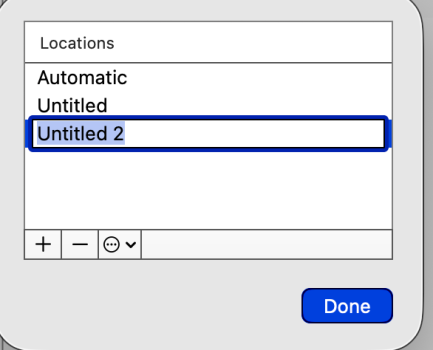
Perhaps, Systems Settings, Network, Add new location, fresh without and other Network VPN or trackers, restart, select the newly added location and test?
add location.jpg
 
picts
 

Attachments

  • Screenshot 2026-04-22 at 9.28.41 AM.png
    Screenshot 2026-04-22 at 9.28.41 AM.png
    124.1 KB · Views: 75
  • Screenshot 2026-04-22 at 9.29.06 AM.png
    Screenshot 2026-04-22 at 9.29.06 AM.png
    35.9 KB · Views: 76
Safari won't load any website except Apple.com (which works fine) and Craigslist. App Store runs barely and Mail appears to have troubles too. Brave works fine. I have attached the error message I get when I try to open most sites.

UPDATE
AdGuard seems to cause this.

Screenshot 2026-04-22 at 05.01.47.png
 
Last edited:
Register on MacRumors! This sidebar will go away, and you'll see fewer ads.