
Got a tip for us?
Let us know
Become a MacRumors Supporter for $50/year with no ads, ability to filter front page stories, and private forums.
macOS Tahoe Bug Causes Studio Display Flickering Issues
- Thread starter MacRumors
- Start date
- Sort by reaction score
You are using an out of date browser. It may not display this or other websites correctly.
You should upgrade or use an alternative browser.
You should upgrade or use an alternative browser.


daneoni
macrumors G5
Yep direct with original cable.And to all you who have issues: your ASD is connected directly with your Mac? No hub? And are you using the original ASD cable or another one?

NervousFish2
macrumors 6502
Studio M4 Max + ASD. Definitely seeing this. Seems more prevalent during daylight hours. Happens when switching from light to dark windows, etc. For example, from this window I'm using right now to type this message to the iMessage app with a fairly dark wallpaper running.


Backtothemac
macrumors 601

zach-coleman
macrumors 65816
Still to this day getting this happening on an iMac and a M4 MBA. Oddly, the Studio Display is the only one that doesn't have this problem.


^^BIGMac
macrumors 6502a

svenmany
macrumors 68030
I had an extreme flickering event just now. It was on my LG monitor. My other external Innocn monitor and my laptop's monitor were not flickering. Only Safari had the problem. This is the first time I've ever seen it flicker on just my dog's picture as Safari's background image, before I visited any website. This is also the first time I've seen flickering on something other than a dark image. I restarted Safari and it improved quite a bit and eventually stopped.

There is no Julie
macrumors newbie
Flickering/blinking on a relatively new MacBook Pro M4 here (no external display). Once every fifteen, twenty minutes, sometimes slightly more often. To be honest, if I hadn’t found this thread, I would just think that the screen is defective. I am not a specialist, but it just does not look like a software issue (which I hope it is!). Also, if it is a Tahoe bug, then too few people seem to report it.
The problem is that it’s not easily reproducible and I don’t know if I can just get somebody at an Apple store to stare with me at the screen for half an hour to prove this (the MacBook is still under warranty). Really stumped here (and the blinking is very annoying).
The problem is that it’s not easily reproducible and I don’t know if I can just get somebody at an Apple store to stare with me at the screen for half an hour to prove this (the MacBook is still under warranty). Really stumped here (and the blinking is very annoying).

BSoares
macrumors 6502
You might be the first I’m seeing report the issue with the built in monitor. I think all others see the issue only on the external monitor. My ASD does it but the Mac’s screen is fine. You might have a hardware issue.Flickering/blinking on a relatively new MacBook Pro M4 here (no external display). Once every fifteen, twenty minutes, sometimes slightly more often. To be honest, if I hadn’t found this thread, I would just think that the screen is defective. I am not a specialist, but it just does not look like a software issue (which I hope it is!). Also, if it is a Tahoe bug, then too few people seem to report it.
The problem is that it’s not easily reproducible and I don’t know if I can just get somebody at an Apple store to stare with me at the screen for half an hour to prove this (the MacBook is still under warranty). Really stumped here (and the blinking is very annoying).
There is no Julie
macrumors newbie
Still to this day getting this happening on an iMac and a M4 MBA. Oddly, the Studio Display is the only one that doesn't have this problem.
There is no Julie
macrumors newbie
I’ve seen flickering occasionally with my M3 iMac over the past month and a half.
I don't have a Studio Display, but I have noticed a flickering on my MacBook Pro (M1 2020) and its most common when scrolling a document or webpage. I thought my display was dying, after a quick search I found a tip that simply said restart the laptop. It worked. Fixed the issue for about a week, then it slowly started to come back again. A restart always seems to stop it for a while.
My MacBook Pro is running MacOS 26.2 and it still happens occasionally.
The lastest beta?Updated to the newest version of Tahoe. Flickering seems to be fixed on my Apple Studio?

Halbrand
macrumors newbie
No, the latest public, 26.2. I was noticing the flickering before a lot on white particularly when switching desktops. Haven't seen it all for hours now after updating.The lastest beta?

macaddiict
macrumors 6502
We've had to switch out the Macs to PCs in a few settings because this issues is still unresolved.
Even my personal Intel MBP from 2018 exhibits flickering the internal screen (usually green) when using adapters to HDMI or USB-C to VGA adapter (Apple branded model).
Can't believe this has not been worked out as of 15.7.3, but even on totally updated devices: it blinks the display at least once every quarter hour. Apple's gotta get their testing / qc on releases down, and speed up the responses to their errors when they do this.
Even my personal Intel MBP from 2018 exhibits flickering the internal screen (usually green) when using adapters to HDMI or USB-C to VGA adapter (Apple branded model).
Can't believe this has not been worked out as of 15.7.3, but even on totally updated devices: it blinks the display at least once every quarter hour. Apple's gotta get their testing / qc on releases down, and speed up the responses to their errors when they do this.
^^BIGMac
macrumors 6502a
WTF his going in Appleville?
Remarkable that these things go on and on. And tech support always says "really, I haven't heard about that"... 🙄
Remarkable that these things go on and on. And tech support always says "really, I haven't heard about that"... 🙄

s2eves
macrumors newbie
Just got my first taste of this after updating to 26.3. Sony INZONE M9 monitor flickers constantly when VRR is enabled.have you tested flickering with 26.3?
polyphenol
macrumors 68030
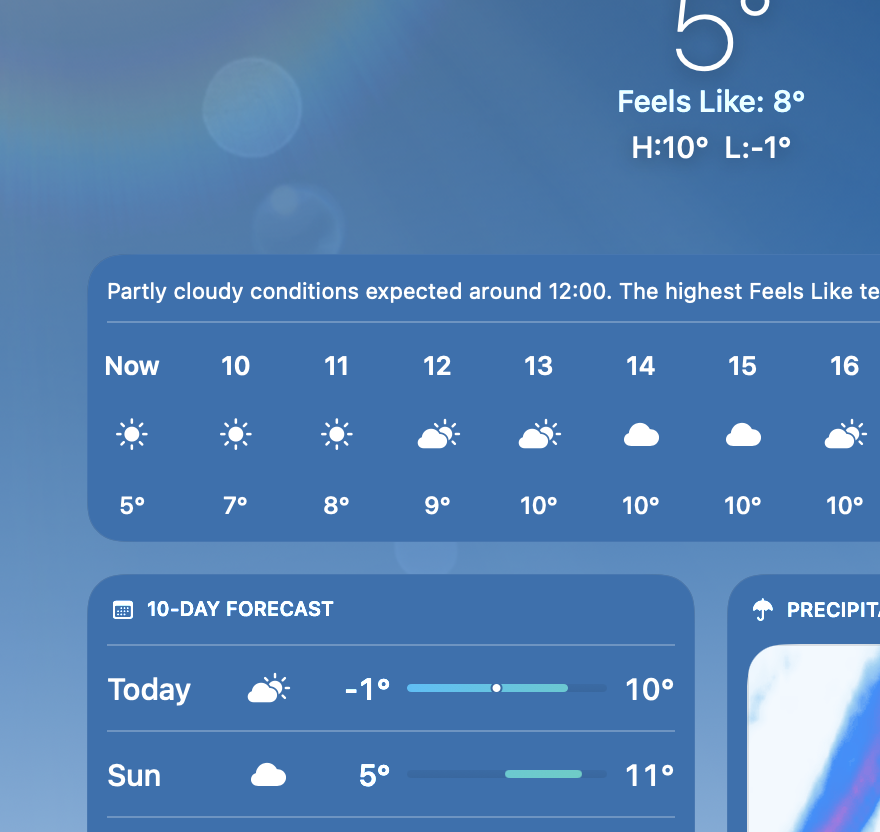
Am getting quite nasty flickering - but only in the weather app.
The hour-by-hour panel was flickering severely - like a failing fluorescent tube. Other panels like the 10-day forecast were much less affected.
The divider line has long tended to change in brightness a bit. But this flickering is an order or magnitude worse.
Happens on MBP M1 internal display and M4 mini with a very ordinary LG display.
This might have been happening to some minor degree on previous releases, but with 26.3.1, it has reached unbearable. I cannot leave the weather app visible as it is so annoying.
I strongly suspect the issue results from the interaction between glass transparency and the continually changing weather background used in the app. It has reduced somewhat as the background has slowed its rate of change (mid-morning rather than just past dawn).
So far, have not noticed flicker problems in any other apps.
The hour-by-hour panel was flickering severely - like a failing fluorescent tube. Other panels like the 10-day forecast were much less affected.
The divider line has long tended to change in brightness a bit. But this flickering is an order or magnitude worse.
Happens on MBP M1 internal display and M4 mini with a very ordinary LG display.
This might have been happening to some minor degree on previous releases, but with 26.3.1, it has reached unbearable. I cannot leave the weather app visible as it is so annoying.
I strongly suspect the issue results from the interaction between glass transparency and the continually changing weather background used in the app. It has reduced somewhat as the background has slowed its rate of change (mid-morning rather than just past dawn).
So far, have not noticed flicker problems in any other apps.
Turns out you called it.This means that apple is preparing for Studio Display 2