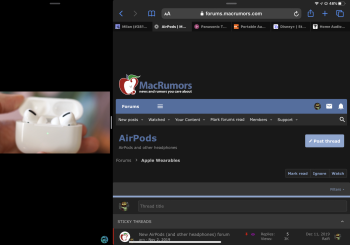
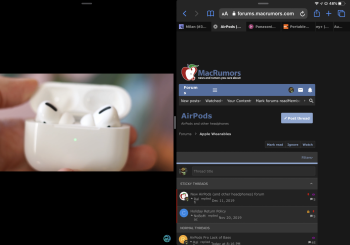
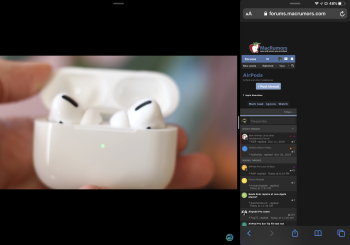
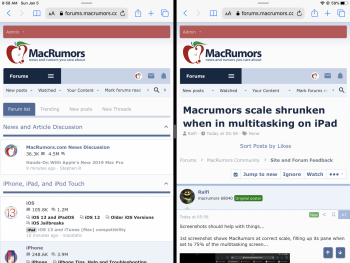
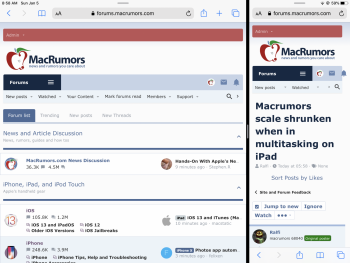
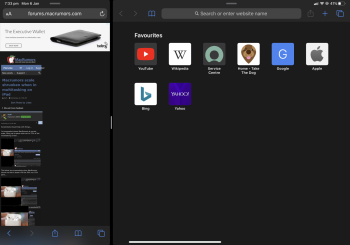
Ralfi macrumors 601 Original poster Jan 5, 2020 #1 Screenshots should help with things... 1st screenshot shows MacRumors at correct scale, filling up its pane when set to 75% of the multitasking screen... The below two screenshots show MacRumors shrunk so that it doesn’t fill the 50% nor 33% pane...
Screenshots should help with things... 1st screenshot shows MacRumors at correct scale, filling up its pane when set to 75% of the multitasking screen... The below two screenshots show MacRumors shrunk so that it doesn’t fill the 50% nor 33% pane...
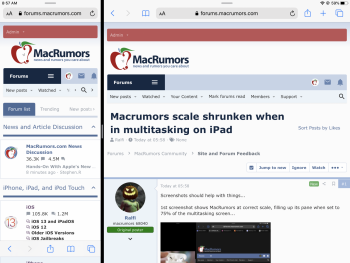
arn macrumors god Staff member Jan 5, 2020 #2 Oddly I’m not seeing that which iPad and os version? Attachments 30058C20-04FE-4579-B068-7D589534F613.png 1.6 MB · Views: 295 0E3D2836-A09E-4371-BC5F-571CE3226356.png 1.5 MB · Views: 238 92EA2668-B86E-4C44-918F-16FF4D4DCDF2.png 1.6 MB · Views: 220
Ralfi macrumors 601 Original poster Jan 5, 2020 #4 arn said: Oddly I’m not seeing that which iPad and os version? Click to expand... iPad Pro 11”. iPadOS 13.3. I’ve also tried it with Safari+YouTube, Safari+Twitter & Safari+Safari. All behaved similar. I7guy said: Hi, Try refreshing the page. 13.3.1 beta. Click to expand... Tried that. No go.
arn said: Oddly I’m not seeing that which iPad and os version? Click to expand... iPad Pro 11”. iPadOS 13.3. I’ve also tried it with Safari+YouTube, Safari+Twitter & Safari+Safari. All behaved similar. I7guy said: Hi, Try refreshing the page. 13.3.1 beta. Click to expand... Tried that. No go.
The Macedawg macrumors newbie Jan 6, 2020 #5 I have been able to replicate this using an iPad 11” iOS 13.3.1. The culprit appears to be the Google Advertisement at the top. Attachments ACD7B6C1-AA37-406B-BC08-C0AA93D4D415.png 1.3 MB · Views: 259
I have been able to replicate this using an iPad 11” iOS 13.3.1. The culprit appears to be the Google Advertisement at the top.
Ralfi macrumors 601 Original poster Jan 6, 2020 #6 The Macedawg said: I have been able to replicate this using an iPad 11” iOS 13.3.1. The culprit appears to be the Google Advertisement at the top. Click to expand... Ok, you’ve made me think about the content blocker setting I had enabled. I’ve disabled it, & things appear properly now, in all three multitasking scenarios. arn said: Oddly I’m not seeing that which iPad and os version? Click to expand... Although, looking at arn’s screenshots above, I don’t see any ads, so it appears content blocking doesn’t impact things there?
The Macedawg said: I have been able to replicate this using an iPad 11” iOS 13.3.1. The culprit appears to be the Google Advertisement at the top. Click to expand... Ok, you’ve made me think about the content blocker setting I had enabled. I’ve disabled it, & things appear properly now, in all three multitasking scenarios. arn said: Oddly I’m not seeing that which iPad and os version? Click to expand... Although, looking at arn’s screenshots above, I don’t see any ads, so it appears content blocking doesn’t impact things there?
arn macrumors god Staff member Jan 10, 2020 #9 I7guy said: This is from this morning.View attachment 887841 Click to expand... Ya... we are looking into this. arn [automerge]1578668967[/automerge] Ralfi said: Screenshots should help with things... 1st screenshot shows MacRumors at correct scale, filling up its pane when set to 75% of the multitasking screen... View attachment 886802 The below two screenshots show MacRumors shrunk so that it doesn’t fill the 50% nor 33% pane... View attachment 886801View attachment 886803 Click to expand... FYI. I think I fixed this issue. arn Last edited: Jan 10, 2020 Reactions: Ralfi and annk
I7guy said: This is from this morning.View attachment 887841 Click to expand... Ya... we are looking into this. arn [automerge]1578668967[/automerge] Ralfi said: Screenshots should help with things... 1st screenshot shows MacRumors at correct scale, filling up its pane when set to 75% of the multitasking screen... View attachment 886802 The below two screenshots show MacRumors shrunk so that it doesn’t fill the 50% nor 33% pane... View attachment 886801View attachment 886803 Click to expand... FYI. I think I fixed this issue. arn
Ralfi macrumors 601 Original poster Jan 15, 2020 #10 arn said: FYI. I think I fixed this issue. Click to expand... Just noticed! Lookin good. Much obliged, arn. 🥳 Reactions: I7guy and arn
arn said: FYI. I think I fixed this issue. Click to expand... Just noticed! Lookin good. Much obliged, arn. 🥳