

Become a MacRumors Supporter for $50/year with no ads, ability to filter front page stories, and private forums.

MacRumors

macrumors bot
Original poster


If you own a MacBook and work from home, it's easy to have your laptop plugged in for hours on end without thinking about the long-term battery life implications. Fortunately, Apple recently added a setting that lets you cap how high your Mac's battery charges, and if you own an iPhone that was released in the last few years, you may already be familiar with it.
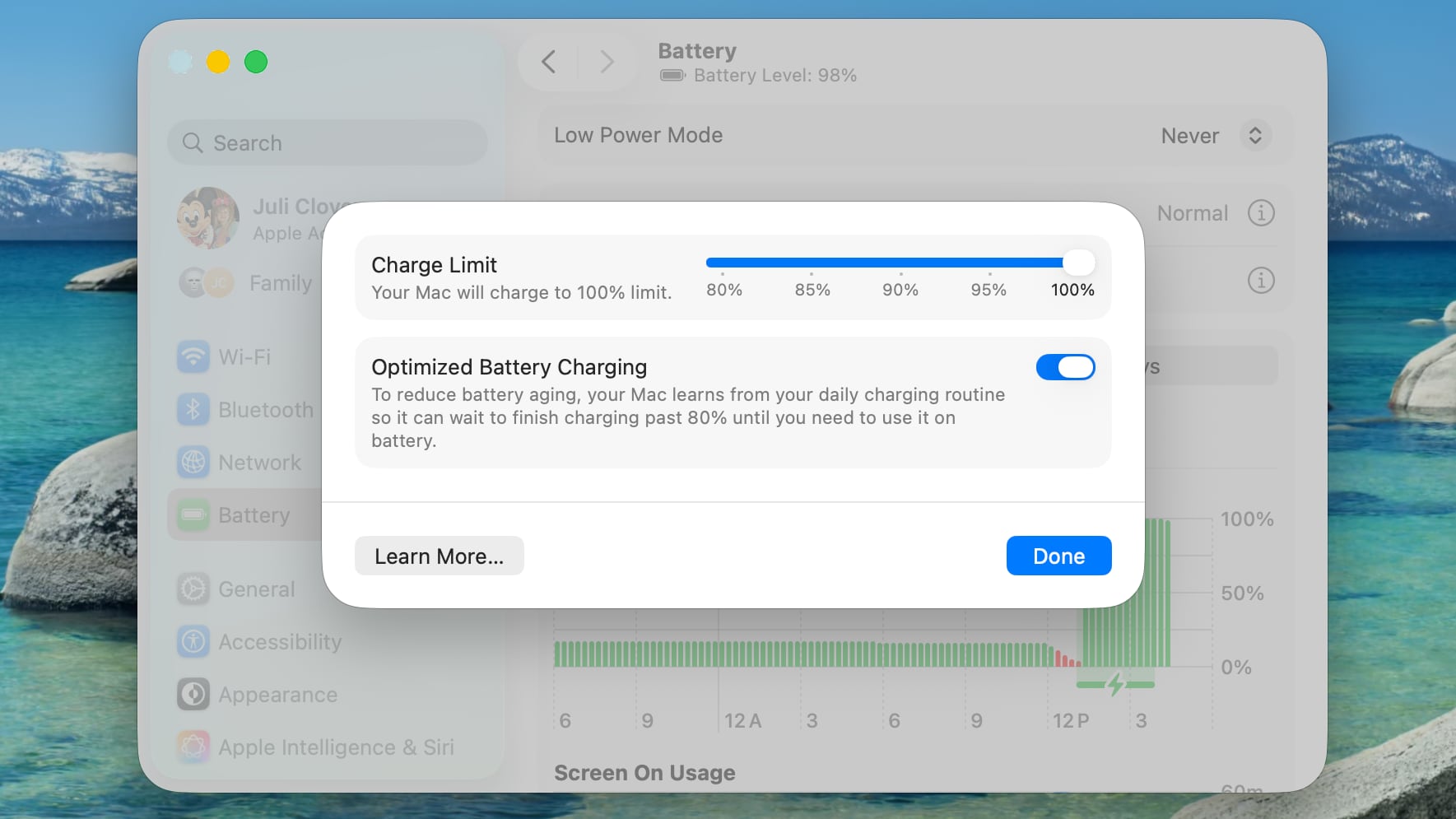
macos-26-4-charge-limit.jpg

Lithium-ion batteries generally degrade fastest when held at a high state of charge, which means keeping your iPhone or your Mac's battery at 100 percent accelerates the chemical wear that permanently reduces its actual capacity over time.

To mitigate this on iPhone 15 and newer models, Apple lets you set a Charge Limit that prevents your device from charging beyond 80, 85, 90, 95, or 100 percent. And in macOS Tahoe 26.4, Apple has brought over the same Charge Limit feature to Macs for the first time.

This option differs from Optimized Battery Charging, which learns your daily routine and delays charging past 80 percent until you're likely to need a full battery. Depending on your usage, however, your Mac may still regularly reach 100 percent.

Setting a charge limit prevents that. Obviously a lower charge cap means less time you'll be able to work away from a power outlet. But if you mostly sit at a desk with your MacBook plugged in, the trade-off is worth the long-term battery gains. That said, if you regularly rely on your Mac away from power, then you may want to opt for a higher cap, which should hopefully still curb battery wear without leaving you completely stranded. Either way, here's how to set the feature:

Set a MacBook Battery Charge Limit in macOS

  1. Click the Apple symbol () in your Mac's menu bar and open System Settings....
  2. Click Battery in the sidebar.
  3. Click the i button next to Charging.
  4. Drag the Charge Limit slider to your preferred level: 80%, 85%, 90%, 95%, or 100%, then click Done.
That's all there is to it. Your Mac will now stop charging once it hits the level you chose, and Optimized Battery Charging will continue to work in the background unless you switch it off in the same panel.

Note that even with Optimized Battery Charging set to a limit below 100%, your Mac will occasionally charge to 100% so that macOS can maintain accurate battery level estimates, but for the most part it will stick to the specified maximum level.

Article Link: Make Your MacBook Battery Last Longer With This Setting
 
I have never had any issues with charging to 100% my phones and macbooks for decades, not sure how much of a difference this would make.

Not denying this "Lithium-ion batteries generally degrade fastest when held at a high state of charge", but just that maybe the difference is not noticeable for most users? I'd like to see some stats/tests about how much more batteries degrade when fully charged vs 80% etc (any info/links are appreciated)
 
my iPhone 15 PM battery is at 70% health... so sure enough I wish I had used these settings back then.

Any idea what it should be set to on the Macbook airs? 90%
 
Wasn‘t there a real life experiment on MR with this setting on iPhone that concluded the trade off is not worth it at all? You lose 20% of your battery capacity but gain battery anxiety just to be almost exactly at the same point in the longterm like someone who conveniently used the complete battery capacity to its full extent. Battery degradation is completely natural even without charging so you can’t avoid it over the years by simply limiting yourself and your usage by 20%. Live your life to the fullest, use your devices to the fullest.
 
I have never had any issues with charging to 100% my phones and macbooks for decades, not sure how much of a difference this would make.

Not denying this "Lithium-ion batteries generally degrade fastest when held at a high state of charge", but just that maybe the difference is not noticeable for most users? I'd like to see some stats/tests about how much more batteries degrade when fully charged vs 80% etc (any info/links are appreciated)
There was an article here that had that test, do a search please. If I remember correctly, the difference was minimal.
 
Wasn‘t there a real life experiment on MR with this setting on iPhone that concluded the trade off is not worth it at all? You lose 20% of your battery capacity but gain battery anxiety just to be almost exactly at the same point in the longterm like someone who conveniently used the complete battery capacity to its full extent. Battery degradation is completely natural even without charging so you can’t avoid it over the years by simply limiting yourself and your usage by 20%. Live your life to the fullest, use your devices to the fullest.
Unsure but my launch day iPhone 16 Pro has 202 cycles and still at 100% capacity for charging it at 80%. No battery anxiety here.

If I trade-in this year or next I am hoping it holds.
 
I have never had any issues with charging to 100% my phones and macbooks for decades, not sure how much of a difference this would make.

Not denying this "Lithium-ion batteries generally degrade fastest when held at a high state of charge", but just that maybe the difference is not noticeable for most users? I'd like to see some stats/tests about how much more batteries degrade when fully charged vs 80% etc (any info/links are appreciated)
I charged iPhone 14 Pro to 80% during night, after basic usage it leaded to 40% battery at evening, so i must charge again....

now i charge to 100% and during basic usage it leads to 60% at evening, and next day i charge to full again so 100% leads to 2 days
 
Why are the window corners comically round?
I'll never stop complaining about this. It's ridiculous.
My guess it to make it match the computer corners and general style of this iPhone-influenced style to make the line-up and experience consistent.
...and why are things so rounded in iPhones?
My guess is that the new Liquid Glass, which costs a lot of resources to run smoothly and doesn't even look great or consistent, only looks decent with rounded corners.
...and why using such a dumb and demanding interface style?
My guess is that they have to make older phones run worse and also flex that their new phones have graphics effects that Android rivals who also sell cheaper phones could never imitate while running smoothly.
Basically, all of this is because making iOS different for marketing reasons is more important

Back when Mac OS X came out, it had slightly rounded corners that looked pretty good even on 800*600 displays, and it was the first time it was possible thanks to a revolutionary anti-alias. It made the system look more friendly.
All attempts at imitating that were pretty funny to look at and felt childish.
I clearly remember laughing at Real Player making windows that were supposed to contain rectangles with a video with massive borders and huge rounded corners. It felt like they completely missed the point. But it was understandable, they were not Apple.
 
Wasn‘t there a real life experiment on MR with this setting on iPhone that concluded the trade off is not worth it at all? You lose 20% of your battery capacity but gain battery anxiety just to be almost exactly at the same point in the longterm like someone who conveniently used the complete battery capacity to its full extent. Battery degradation is completely natural even without charging so you can’t avoid it over the years by simply limiting yourself and your usage by 20%. Live your life to the fullest, use your devices to the fullest.
Personally I never saw the point in stressing when your phone would charge to 80% battery, in order to prevent battery capacity dropping to 80% slightly quicker lol. A phone or laptop is a tool, not a priceless piece of art. Just give apple £80-100 or however much they gouge you for for a new battery. I doubt a few extra percent will encourage a buyer to pay much more second hand, and if you trade in, then the % is moot anyway.
 
I doubt a few extra percent will encourage a buyer to pay much more second hand, and if you trade in, then the % is moot anyway.
A few extra percent might not make a difference. Personally I always ask for the degradation numbers when I buy battery powered Apple devices second hand and would not buy one that is significantly below 90 percent.
 
Useful to have and has replaced the AlDente app for me. I am starting to think that the "don't charge to 100%" advice is starting to go into the "must completely discharge the battery once per month" category of out of date advice - there seem to be so many data points of people charging to 100% for long periods with little drop in battery health and people who religiously keep the state of charge between 20-80% who have the standard battery health drops.

Given the large batteries on Macs I would say setting this to 90-95% is probably a good set & forget option - you probably won't notice the loss of that 5-10% or the loss of a few extra % of battery health unless you routinely thrash you Mac (at which point you're probably having to charge during the day anyway). This setting makes more sense on a Phone where a drop in battery health to the low 80%s does have a noticeable impact on battery life and phone stability in cold weather.
 
my iPhone 15 PM battery is at 70% health... so sure enough I wish I had used these settings back then.

Any idea what it should be set to on the Macbook airs? 90%
Mine’s on 83%. I’m wondering the same. Then again, I charge nightly over MagSafe, so I expected it to take a bigger hit than charging by cable.
 
  • Like
Reactions: RMMediccc
A few extra percent might not make a difference. Personally I always ask for the degradation numbers when I buy battery powered Apple devices second hand and would not buy one that is significantly below 90 percent.
Same here - I tend to buy refurbished for me & my family and will aim for a minimum battery health depending on the age of the device. For me (who buys 1-2 year old phones) I look for 90-95% depending on the age and for my wife (who isn't fussed by phones and typically gets a 3-4 year old phone) I look for 87% minimum.

The large phone resellers are terrible as they tend to just list phones based on cosmetic grade and put in a line about a guarantee of >80% BH, which is no good to me!
 
  • Like
Reactions: reinem85
Register on MacRumors! This sidebar will go away, and you'll see fewer ads.