
Got a tip for us?
Let us know
Become a MacRumors Supporter for $50/year with no ads, ability to filter front page stories, and private forums.
Make Your MacBook Battery Last Longer With This Setting
- Thread starter MacRumors
- Start date
- Sort by reaction score
You are using an out of date browser. It may not display this or other websites correctly.
You should upgrade or use an alternative browser.
You should upgrade or use an alternative browser.

Astuces iOS
macrumors 68030
I'm faster than you MacRumors, already posted this user tip in the French Apple Support Communities


GeorgeRussell
macrumors newbie
From Battery University:I have never had any issues with charging to 100% my phones and macbooks for decades, not sure how much of a difference this would make.
Not denying this "Lithium-ion batteries generally degrade fastest when held at a high state of charge", but just that maybe the difference is not noticeable for most users? I'd like to see some stats/tests about how much more batteries degrade when fully charged vs 80% etc (any info/links are appreciated)
I've therefore set 65% as the charge limit on Battery Toolkit.
Last edited:

ikramerica
macrumors 68020
The logic is flawed on phones: artificially limit yourself to 80% now and forever to prevent being limited to 80% sometime in the far future.Wasn‘t there a real life experiment on MR with this setting on iPhone that concluded the trade off is not worth it at all? You lose 20% of your battery capacity but gain battery anxiety just to be almost exactly at the same point in the longterm like someone who conveniently used the complete battery capacity to its full extent. Battery degradation is completely natural even without charging so you can’t avoid it over the years by simply limiting yourself and your usage by 20%. Live your life to the fullest, use your devices to the fullest.
Batteries are huge nowadays, most devices able to hold charge for hours at 80%. And charge options are almost everywhere. Still, I find there's a psychological impediment to that, like I'm not using 100% of the device I purchased.
So … why not rebrand the battery percentage? Instead of 80%, it's now 100%, as in "this battery is as full as is safe for a long effective life. 100% instead becomes 120%, as in "this battery is boosted past its safe charge level by 20%, allowing more life today at the cost of some future recharge cycles."
If you don't want to mess with numbers, do it with colors & iconography. A battery at 80% looks full in the task bar. A battery at 100% looks overfull, maybe it's colored an overly bright lime green.
So … why not rebrand the battery percentage? Instead of 80%, it's now 100%, as in "this battery is as full as is safe for a long effective life. 100% instead becomes 120%, as in "this battery is boosted past its safe charge level by 20%, allowing more life today at the cost of some future recharge cycles."
If you don't want to mess with numbers, do it with colors & iconography. A battery at 80% looks full in the task bar. A battery at 100% looks overfull, maybe it's colored an overly bright lime green.

turbineseaplane
macrumors Penryn
Batteries are huge nowadays, most devices able to hold charge for hours at 80%. And charge options are almost everywhere. Still, I find there's a psychological impediment to that, like I'm not using 100% of the device I purchased.
So … why not rebrand the battery percentage? Instead of 80%, it's now 100%, as in "this battery is as full as is safe for a long effective life. 100% instead becomes 120%, as in "this battery is boosted past its safe charge level by 20%, allowing more life today at the cost of some future recharge cycles."
If you don't want to mess with numbers, do it with colors & iconography. A battery at 80% looks full in the task bar. A battery at 100% looks overfull, maybe it's colored an overly bright lime green.
Exactly what has been done on many EV batteries.

code-m
macrumors 601
Seems to be helping me in my use-case with expected limits.completely worthless gimmick on iphones, doesn’t help with battery life at all.
code-m
macrumors 601
When charge limits are active, the battery will calibrate itself to 100% from time-to-time, it’s normal functionality."Depending on your usage, however, your Mac may still regularly reach 100 percent."
This M1 Air always charges to 100%. That feature never worked on it. The iPad does stop at 80%.
When 27.1 comes out I'll see if it finally does work on the MBA.
DEMinSoCAL
macrumors 603
My MBP16 M1 Pro is mostly plugged in when I use it. Battery health is 97%. Not sure constant charging has affected my battery much.Laptops were designed to run on battery power, not power adapters. Constant charging will affect battery life, and charging from 20% to 80% wastes 40% of the battery's capacity, causing more charging cycles which puts more stress on battery performance. 10% to 90% charging is much more efficient and occasional draining to 0% or spiking to 100% do no damage at all.

golfnut1982
macrumors 6502a
Mine has been at 92% for a while now....I have the opposite issue. I want my M1 Pro MBP to finally drop below 80% before my AppleCare+ renewal in October but it's just not happening! At this point I feel like they stop it from dropping further intentionally
That feature never worked well for me. I would unplug it and use the battery for a bit, then plug it in and it would just go to 100% when I still wanted it to go to 80%. most of the time 80% is fine on my laptop, even when I use the battery I don't need the full 100% so it makes sense to just hard lock it at 80% and let me charge it to 100% in the rare cases I want the full charge available.As far as I've noticed, my macbook has learned my usage patterns and is stopping at 80% on its own when it estimates I won't unplug it. So does my iphone. Both on <before the low contrast UI> OS versions.
I suppose Tahoe needs battery care more because the stupid special effects use a lot more GPU and thus more battery...
Yeah, long all day roadtrips where the phone is plugged in after starting the day off fully charged because I charge every night is just hard on the battery. I'd love to set that to 80 or even 70% for those days.It depends on how you are using your devices. There definitely are scenarios where setting a lower charging limit is very useful. I'm thinking about long periods of desk work with a MacBook or charging your phone for hours every day in a car.
Surprisingly, my iPhone 12 Pro bought at launch is still rocking it's original battery and shows 83% health. But it has lost a LOT of capacity so I wonder how accurate that number really is. It still makes it through a day of light use, but any heavier days I'm looking for a charger part way through.I don’t think that the vast majority of people do, or are aware you can check. I’ve never hobbled my battery and the lowest I’ve ever had a battery go after two years was 93%

Ileskovar
macrumors newbie
That is great, because some of us use macbook in office and at home, so it is actualy all the time pluged in charger, and all the time on 100% charge, what is devastating for battery. There was app called AlDente with similar functionality, but had to be turned on every time after restart.

You are not causing more cycles on the battery with 20%-80% setting. Yes you may charge it up more often, but you are in the sweet spot of the battery where the charging is least damaging, and 1 cycle is considered a full 100% to 0% to 100% cycle. So doing 50% to 0% to 50% twice is still one cycle with respect to the battery.Laptops were designed to run on battery power, not power adapters. Constant charging will affect battery life, and charging from 20% to 80% wastes 40% of the battery's capacity, causing more charging cycles which puts more stress on battery performance. 10% to 90% charging is much more efficient and occasional draining to 0% or spiking to 100% do no damage at all.
This was the post I was looking for before saying it myself.Charging to 100% isn't the problem. Leaving it charged at 100% for days on end is the problem. If you primarily use your laptop plugged in like a desktop, might as well limit it and only charge it to 100% when you are taking it out of the house. For road warriors who are always on battery, you should just charge it to 100%.
Right now my MBP14 M5 is most of the time connected by USB-C to external displays. And when it isn’t it easily lasts a whole day on battery even from 80%.
There’s absolutely zero inconvenience from me keeping it at 80%. So it’s worth whatever microscopic gain I’m getting out of it.
Edit: My iPhone 17 pro max I always charge to 100%, though. But I never leave it charging over night. I just don’t need to.
Last edited:

davidg4781
macrumors 68040
I've had this turned on with iPhone after a few weeks into owning my 17 Pro. I also turned it on on my 2020 TBMBP.
What I've noticed is with rapid charging to 80%, it's basically rapid charging to full. Throughout the day with my iPhone, I rarely get to 30% off the charger and back on the charger to 80%. So it's staying within that range all day. My MBP stays plugged in all the time so keeping this 80% limit keeps me from keeping it fully charged all the time.
As far as battery longevity, if iOS and macOS is doing battery bypass, the battery will slowly discharge on its own instead of using cycles.
I think for the average user, this may prolong battery life. After time as the battery capacity degrades, we may need to go to charging to 90% to get through the day. Then later on we may need to charge up to 100%. For power users, setting the 80% limit might cause them to run out of battery during the day or not be beneficial as they use and charge their battery throughout the day.
What I've noticed is with rapid charging to 80%, it's basically rapid charging to full. Throughout the day with my iPhone, I rarely get to 30% off the charger and back on the charger to 80%. So it's staying within that range all day. My MBP stays plugged in all the time so keeping this 80% limit keeps me from keeping it fully charged all the time.
As far as battery longevity, if iOS and macOS is doing battery bypass, the battery will slowly discharge on its own instead of using cycles.
I think for the average user, this may prolong battery life. After time as the battery capacity degrades, we may need to go to charging to 90% to get through the day. Then later on we may need to charge up to 100%. For power users, setting the 80% limit might cause them to run out of battery during the day or not be beneficial as they use and charge their battery throughout the day.
ignatius345
macrumors G3
Stumbled across this incredibly infomative and methodical breakdown of Apple batteries and charging on Daring Fireball recently. The info was beautifully presented in a very digestible way.
A key bit here below, but I recommend reading the whole thing.

I follow the “charge it at your own convenience as you see fit” school of thought, personally, but it’s still good to know exactly what usage patterns are harder or easier on battery chemistry.
A key bit here below, but I recommend reading the whole thing.
I follow the “charge it at your own convenience as you see fit” school of thought, personally, but it’s still good to know exactly what usage patterns are harder or easier on battery chemistry.
Last edited:

1rottenapple
macrumors 603
Darn, I want the feature but I don't want tahooooo 🙄. Guess I'm staying put haha
I do have my iphone air set to 95%. It often stays plugged when I'm in the car or on the wireless charger so no need to sit at 100% for hours. Its fine.
I do have my iphone air set to 95%. It often stays plugged when I'm in the car or on the wireless charger so no need to sit at 100% for hours. Its fine.
Just download AlDente.Darn, I want the feature but I don't want tahooooo 🙄. Guess I'm staying put haha


BigMcGuire
macrumors G4
Ever since I started using AlDente (from the days it was a GitHub project and free) - my MacBook batteries have benefited.
I work at a desk and in the past I used to travel a handful of times per year, so a desktop was not an option. Which meant, my laptops spent most of their time in clamshell mode. At Apple's 100% charge level, the battery would visibly suffer within a 2 year period (often around 83% health).
AlDente changed this... I was able to keep the laptop at 60% or even 70%, and ... I will let the results speak for themselves.
My 2021 16' MBP (purchased in early 2022), thanks to Covid, has spent most of its life as a desktop:
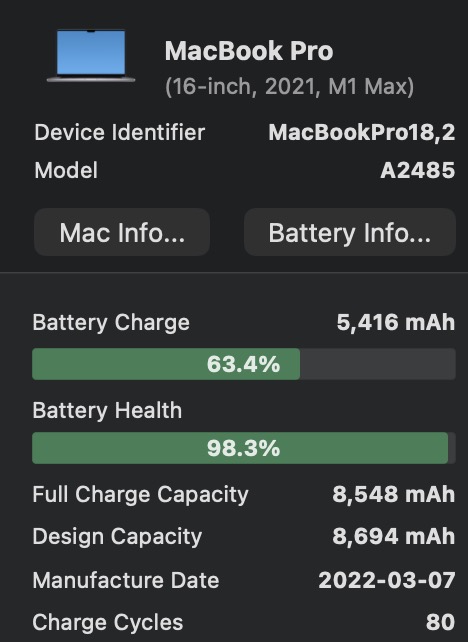
98% health.
My wife's 14' MBP purchased same time, had battery drop below 80% in the same timeframe (she doesn't use AlDente and is far more mobile).
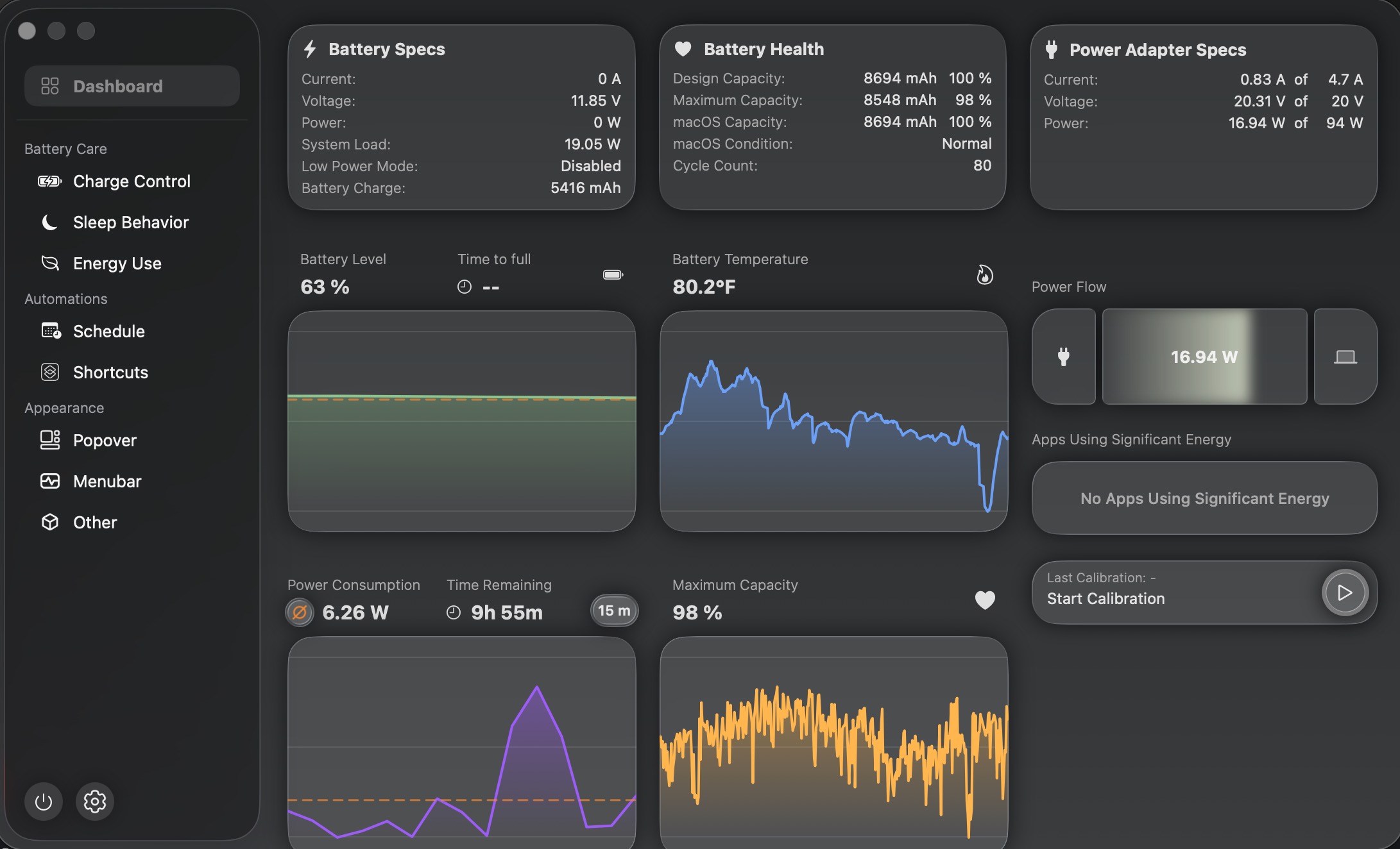
AlDente has come a long long way from its GitHub days. I highly recommend it:
I work at a desk and in the past I used to travel a handful of times per year, so a desktop was not an option. Which meant, my laptops spent most of their time in clamshell mode. At Apple's 100% charge level, the battery would visibly suffer within a 2 year period (often around 83% health).
AlDente changed this... I was able to keep the laptop at 60% or even 70%, and ... I will let the results speak for themselves.
My 2021 16' MBP (purchased in early 2022), thanks to Covid, has spent most of its life as a desktop:
98% health.
My wife's 14' MBP purchased same time, had battery drop below 80% in the same timeframe (she doesn't use AlDente and is far more mobile).
AlDente has come a long long way from its GitHub days. I highly recommend it:

groove-agent
macrumors 68020
Great article MR! It never occurred to me to do this given my MBP is always plugged in at my desk. I only charge to 80% with my EV so it makes sense to do this with my laptop as well. 🙂
BigMcGuire
macrumors G4
Wasn‘t there a real life experiment on MR with this setting on iPhone that concluded the trade off is not worth it at all? You lose 20% of your battery capacity but gain battery anxiety just to be almost exactly at the same point in the longterm like someone who conveniently used the complete battery capacity to its full extent. Battery degradation is completely natural even without charging so you can’t avoid it over the years by simply limiting yourself and your usage by 20%. Live your life to the fullest, use your devices to the fullest.
I believe this was a "study" done on iPhones. Which don't spend a lot of time plugged in like MacBooks do - which is why I believe MacBooks benefit from this significantly more than a phone, which often spends most of its life unplugged for most people.There was an article here that had that test, do a search please. If I remember correctly, the difference was minimal.
Last edited: