
Got a tip for us?
Let us know
Become a MacRumors Supporter for $50/year with no ads, ability to filter front page stories, and private forums.
MP 1,1-5,1 Manually Configured OpenCore on the Mac Pro
- Thread starter cdf
- WikiPost WikiPost
- Start date
- Sort by reaction score
You are using an out of date browser. It may not display this or other websites correctly.
You should upgrade or use an alternative browser.
You should upgrade or use an alternative browser.
- Status
- The first post of this thread is a WikiPost and can be edited by anyone with the appropiate permissions. Your edits will be public.
If you don’t want fans and disks to spin up during sleep, go to energy preferences and disable “wake for network access”.
Your computer is periodically turning on to sync things like iMessage and eMail.
Your computer is periodically turning on to sync things like iMessage and eMail.


startergo
macrumors 603
For those of you interested in running Windows in EFI mode:
I have been testing recently a Toughbook CF-31 trying to install El Capitan on it. This laptop has no UEFI support (Arrandale CPU) in the BIOS. So my Windows was installed in CSM mode. As expected the Windows boot entry did not appear in the OC boot picker. My drive needed to be converted to GPT so I did that with the help of Mini Tool Partition Magic. After the conversion from MBR to GPT the Windows could not boot on its own and some squares appeared on the display. the OC was installed on a USB drive with duet bootloader for my non-UEFI boot. When I booted through OC on my USB the Windows option appeared in the OC bootpicker and it booted normally after reinstalling the appropriate drivers. Of course the activation is broken and it may be preserved by specifying the original UUID in the NVRAM/SMBIOS settings as explained in the OC manual. Also in my case the EFI is the first partition (on the USB) and if you want to move the OC to the EFI on the Windows disk it may need to be rearranged.

I have been testing recently a Toughbook CF-31 trying to install El Capitan on it. This laptop has no UEFI support (Arrandale CPU) in the BIOS. So my Windows was installed in CSM mode. As expected the Windows boot entry did not appear in the OC boot picker. My drive needed to be converted to GPT so I did that with the help of Mini Tool Partition Magic. After the conversion from MBR to GPT the Windows could not boot on its own and some squares appeared on the display. the OC was installed on a USB drive with duet bootloader for my non-UEFI boot. When I booted through OC on my USB the Windows option appeared in the OC bootpicker and it booted normally after reinstalling the appropriate drivers. Of course the activation is broken and it may be preserved by specifying the original UUID in the NVRAM/SMBIOS settings as explained in the OC manual. Also in my case the EFI is the first partition (on the USB) and if you want to move the OC to the EFI on the Windows disk it may need to be rearranged.
Thank you @startego.For those of you interested in running Windows in EFI mode:
I have been testing recently a Toughbook CF-31 trying to install El Capitan on it. This laptop has no UEFI support (Arrandale CPU) in the BIOS. So my Windows was installed in CSM mode. As expected the Windows boot entry did not appear in the OC boot picker. My drive needed to be converted to GPT so I did that with the help of Mini Tool Partition Magic. After the conversion from MBR to GPT the Windows could not boot on its own and some squares appeared on the display. the OC was installed on a USB drive with duet bootloader for my non-UEFI boot. When I booted through OC on my USB the Windows option appeared in the OC bootpicker and it booted normally after reinstalling the appropriate drivers. Of course the activation is broken and it may be preserved by specifying the original UUID in the NVRAM/SMBIOS settings as explained in the OC manual. Also in my case the EFI is the first partition (on the USB) and if you want to move the OC to the EFI on the Windows disk it may need to be rearranged.
View attachment 900542
Does your W10 goes through update without any problem?
I think last time the issue with UEFI W10 only occured during update in which caused it to boot without OC hence the NVRAM protection provided by OC is not loaded.
startergo
macrumors 603
on my cMP while the regular Windows updates are without issue I can't upgrade to a major version. Nevertheless I never lost OC boot.Does your W10 goes through update without any problem?
[automerge]1584932661[/automerge]
My OC is on a USB and not on the EFI partition of Windows where it may try to override the bootX64.efi file of OC of its own during system upgrade.
Last edited:

h9826790
macrumors P6
My OC is installed on the MacOS drive EFI partition. The EFI Windows (on another separates SSD) can also update properly. However, I am not sure if I can do that big update properly via the native way.
My Windows almost never receive that big update, and I need to manually download the Windows updater for that, not sure if that makes any difference.
My Windows almost never receive that big update, and I need to manually download the Windows updater for that, not sure if that makes any difference.
My OC is installed on the MacOS drive EFI partition. The EFI Windows (on another separates SSD) can also update properly. However, I am not sure if I can do that big update properly via the native way.
My Windows almost never receive that big update, and I need to manually download the Windows updater for that, not sure if that makes any difference.
Thank you, have you tried the big update by manually downloading windows updater and the update went smoothly?
If yes than making sure the big update didn't run automatically can be a safer alternative.
on my cMP while the regular Windows updates are without issue I can't upgrade to a major version. Nevertheless I never lost OC boot.
[automerge]1584932661[/automerge]
My OC is on a USB and not on the EFI partition of Windows where it may try to override the bootX64.efi file of OC of its own during system upgrade.
I wonder will W10 override the EFI folder in other SSD e.g. on Mojave SSD (my W10 is in separate SSD).
So what I'm afraid of is: if update on W10 (be it minor or major) will try to male the Mac-Pro boot to W10 directly without going through OC even when the OC is located on different SSD EFI partition.
I try to update Windows via VMWare whenever possible. This could be an approach.
h9826790
macrumors P6
Have to wait for the next big update, and see what will happen.Thank you, have you tried the big update by manually downloading windows updater and the update went smoothly?
If yes than making sure the big update didn't run automatically can be a safer alternative.
theMotoMan
macrumors member
I recently got everything working on my Mac Pro, Open Core, AMD Hardware Acceleration, Boot Screen. EFI Protection for windows is good news. I've erased my legacy Windows 10 on my 2.5 SSD. However, when installing via USB with EFI, I get errors after the partitioning Windows 10 for installation. Is this because of opencore? I don't want to disable opencore and try to install windows 10 in EFI because of the boot Cert issue. Any methods of installing Windows 10 EFI with opencore safely?
Update:
Okay, I found out why the Windows 10 Installation was failing when trying to install. I got Windows 10 EFI installed by, Booting my Mac with opencore on a usb stick. Right Before I would do a custom install and partition the drive I would disconnect my OpenCore USB Stick. Windows now would install when I select my 2.5 SSD. I had to delete the partition and click next. Windows would now proceed installing without erroring out. When windows asked to restart the the computer, I would plug my Opencore USB stick back in. Windows 10 is now installed Successfully.
A few questions regarding your Windows 10 install:
1. What version of Windows 10? 1909 or 1709?
2. Were you getting the error where after partitioning, Windows couldn't install to the partition?
3. Is there any reason why we can't put OpenCore on the Windows 10 usb drive?
Thanks!
ironmanny1
macrumors member
A few questions regarding your Windows 10 install:
1. What version of Windows 10? 1909 or 1709?
2. Were you getting the error where after partitioning, Windows couldn't install to the partition?
3. Is there any reason why we can't put OpenCore on the Windows 10 usb drive?
Thanks!
1. Latest Version Windows 10 1909
2. Once I got to the partition screen with the EFI partition scheme, the setup would not let me proceed when I chose the SSD to install. I would delete the partition with an unallocated partition scheme and hit next. It would appear to install but errors out. Sorry "I didn't screen shot the exact error message."
3. There seems to be an issue with Windows 10 install and USB devices connected while trying to install. So, I had to boot opencore via usb, choose the windows 10 usb stick installer, When it reaches the main page, I would remove my opencore usb stick. Go through the whole partition setup, hit next and finally it would install. I had to monitor the install since I had the usb unplugged. Then when it finishes and prompts for restart, I would plug in the opencore usb before the restart. Then my mac would auto boot to the usb and i would choose the windows 10 choice. Viola it works.

Macschrauber
macrumors 68040
The thing is, the config already includes -no_compat_check. Having to add it directly to the NVRAM indicates that you are actually booting without OpenCore.
Yes, I tried one thing with an untouched Mac Pro:
Plugged a spinner in with already blessed OpenCore and Catalina.
Called the boot picker (EFI GPU),
Control-Selected EFI BOOT,
OpenCore menu came up,
selected Catalina,
and it booted Catalina.
Never did a nvram setting on that machine.
So it might be interesting that all to do was to insert a Disk / SSD and select EFI BOOT to get OpenCore and Catalina to boot.
Last edited:
Hey all again.
I am now able to install OC with gtx680 uefi gop flashed rom. I lost boot screen but okay, now it works with uefi windows with no problem.
Now i am trying to get bootpicker screen. I have no luck trying the conf files and suggestions that you posted :/
What should i do to troubleshoot?
I am now able to install OC with gtx680 uefi gop flashed rom. I lost boot screen but okay, now it works with uefi windows with no problem.
Now i am trying to get bootpicker screen. I have no luck trying the conf files and suggestions that you posted :/
What should i do to troubleshoot?
startergo
macrumors 603
Normally you should install the debug version and set Target=65. Use this app to download and compile debug version and replace your folder (except config file). After you boot with the debug version and Target=65 you can post generated log file.What should i do to troubleshoot?
Normally you should install the debug version and set Target=65. Use this app to download and compile debug version and replace your folder (except config file). After you boot with the debug version and Target=65 you can post generated log file.
Just now i was doing that, will add debug here.
edit: I have added my config file, the log file that booted with gt120 alone then alone with gtx680, and the rom that I am using on gtx680
edit2: I checked that gpu rom on GOPupd and it seems it has GOP. but as I understand from log file it doesn't or my config file is. too raw needs to be tweaked.
I used the config.plist from 1st post and tweaked that a bit.
don't know what to do more. I have tested the config.plist you have on the posts but no luck.
Attachments
Last edited:
startergo
macrumors 603
GTX-680 log:Just now i was doing that, will add debug here.
edit: I have added my config file, the log file that booted with gt120 alone then alone with gtx680, and the rom that I am using on gtx680
edit2: I checked that gpu rom on GOPupd and it seems it has GOP. but as I understand from log file it doesn't or my config file is. too raw needs to be tweaked.
I used the config.plist from 1st post and tweaked that a bit.
don't know what to do more. I have tested the config.plist you have on the posts but no luck.
Code:
GOP exists on ConsoleOutHandle and has 0 modes
06:913 00:015 OCC: Looking for GOP replacement due to invalid mode count
06:929 00:015 OCC: Alternative GOP status is - Not Found
06:944 00:015 OCC: Missing compatible GOP - Not Found
Gt-120 log:
Code:
06:630 00:007 OCC: GOP exists on ConsoleOutHandle and has 1 modes
06:637 00:007 OC: Requested resolution is 0x0@0 (max: 1) from Max
06:644 00:007 OCC: Requesting 0x0@0 (max: 1) resolution, curr 0, total 1
06:652 00:007 OCC: Mode 0 - 1680x1050:1
06:659 00:007 OCC: Current mode matches desired mode 0
06:666 00:007 OC: Changed resolution to 0x0@0 (max: 1) from Max - Success
If you notice a valid EFI vbios does not need even a replacement as is the case with the GT-120. Your GTX-680 has no valid EFI rom from what it looks like. Can you get a boot picker without OC with that card? If not it means your GOP signature or something else during the modification of the vbios broke your GOP. You might need to flash the original GOP vbios to the GTX-680.
GTX-680 log:
Code:GOP exists on ConsoleOutHandle and has 0 modes 06:913 00:015 OCC: Looking for GOP replacement due to invalid mode count 06:929 00:015 OCC: Alternative GOP status is - Not Found 06:944 00:015 OCC: Missing compatible GOP - Not Found
Gt-120 log:
Code:06:630 00:007 OCC: GOP exists on ConsoleOutHandle and has 1 modes 06:637 00:007 OC: Requested resolution is 0x0@0 (max: 1) from Max 06:644 00:007 OCC: Requesting 0x0@0 (max: 1) resolution, curr 0, total 1 06:652 00:007 OCC: Mode 0 - 1680x1050:1 06:659 00:007 OCC: Current mode matches desired mode 0 06:666 00:007 OC: Changed resolution to 0x0@0 (max: 1) from Max - Success
If you notice a valid EFI vbios does not need even a replacement as is the case with the GT-120. Your GTX-680 has no valid EFI rom from what it looks like. Can you get a boot picker without OC with that card? If not it means your GOP signature or something else during the modification of the vbios broke your GOP. You might need to flash the original GOP vbios to the GTX-680.
I have one more vbios to test, will try that one as well. See what i got then. Will post the results.
edit: 2nd option didn't work as well. still no GOP. think I am not able to work with GTX680.
Last edited:
You might need to get a vbios from here based on the GPU Device Id.
Wil try that but all the compatible bios’ don’t support UEFI, is that a matter?
startergo
macrumors 603
They don't have UGA but not necessarily GOP. for OC you need GOP even if it is not working properly like on the cMP firmware. But even with a GOP card if someone is tinkering with the vbios GOP may be broken which is of no help. So you need unmodified original vbios for your card.Wil try that but all the compatible bios’ don’t support UEFI, is that a matter?
They don't have UGA but not necessarily GOP. for OC you need GOP even if it is not working properly like on the cMP firmware. But even with a GOP card if someone is tinkering with the vbios GOP may be broken which is of no help. So you need unmodified original vbios for your card.
I tried zotac's original Vbios flashing but didn't work. I still gets same log from OC.
startergo
macrumors 603
Try this config fileI tried zotac's original Vbios flashing but didn't work. I still gets same log from OC.
Attachments
no luck same situation.Try this config file
log added.
Attachments
startergo
macrumors 603
Gtx680 has no original bios that supports UEFI
maybe flashing gtx 770 gives a chance.
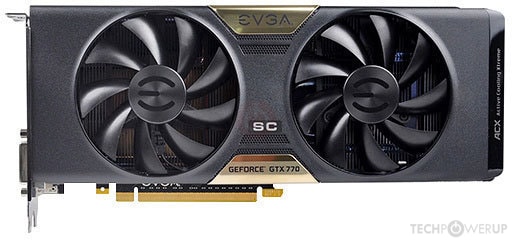
Dont know if this rom works.
maybe flashing gtx 770 gives a chance.
Dont know if this rom works.