Become a MacRumors Supporter for $50/year with no ads, ability to filter front page stories, and private forums.

mindfulmonk

macrumors newbie
Original poster
I've recently purchased two Asus XG27JCG to see how my current macs would cope. I did not expect dual 5k 120hz to work, but dual 5k 60hz shouldn't have been a problem, as the specs page says dual 6k 60hz is supported.

For cables:
  • Ugreen displayport 2.1 to usb-c
  • The displayport cable that came with the monitor
  • Anker hdmi 2.1
For docks:
  • Caldigit ts5 plus
  • Anker thunderbolt 5 dock
For macs:
  • mac mini m4
  • macbook air
  • macbook pro m2
Only the mac mini was able to drive the monitors when connected directly, with one monitor at 60hz and the other up to 165hz.

Both of the macbooks could only drive 1 monitor at a time.

Both docks could run only 1 monitor at a time. Caldigit page actually calls out this might not work:

* Dual 5K monitors must be Thunderbolt 4 or Apple Studio Displays. Dual LG UltraFine 5K monitors are not supported unless M5 Max is the host. 6K monitors can be a Thunderbolt 4 monitor or an Apple Pro Display XDR. DSC (Display Stream Compression) support is required for 6K and 8K resolutions.
So next time you read:

Simultaneously supports full native resolution on the built-in display at 1 billion colors and:

Up to two external displays with up to 6K resolution at 60Hz

Thunderbolt 4 digital video output

Support for native DisplayPort 1.4 output over USB-C

Remember that it requires thunderbolt 4 capable monitors.

Apple should probably improve their documentation with a matrix of supported protocols/hz/resolutions.

If anyone knows the technical reason for this that would be great to hear, as I'm still a bit confused why the mac mini worked but not the macbooks.

Those getting a m5 pro/max you are in luck as this seems to be now supported
  • One display up to a native resolution of 8K at 60Hz or 5K at 120Hz or 4K at 240Hz plus a second display up to a native resolution of 5K at 120Hz or 4K at 200Hz
  • Supports up to three external displays over a single Thunderbolt port
 
Same experience with my Mac Mini M4. Except tried it with one 5k 16Hz Monitor (ASUS) and one 4K 144hz monitor. Only could ever get one above 60hz. Definitely limitation to M4. I could do two 4k Monitors at 120hz with the M4 Mac Mini but not with the 5K. Guess when they eventually update mac mini with M5 or M6 is when I will upgrade.
 
Have you tried the KVM? I have an M4 Mac Mini and soon to have an M5 MBA that I want to run off the KVM.
 
No, I have a tb5 dock next to my MBA and mac mini, so I find switching out the cable faster than dealing with the usual kvm issues and limitations. (plus the power delivery on the asus is not great)
 
Any feedback that you can provide comparing the Asus to the Studio Display XDR? I know price-wise they are in different leagues, just wondering if there is any strong justification for it. I already have the Pro Display XDR, and am familiar with the premium fit and finish. My strongest interest is the 120 Hz refresh rate because I love having that on my iPad Pro and iPhone Pro and feel it makes a significant difference in the user experience. Not sure how that translates to the Mac desktop though.
 
Last edited:
I only saw the Studio Display XDR in the apple shop next to a regular Studio Display. As someone coming from dual 4k 60hz monitors, 120hz is the first thing you notice and while not necessary it just feels "premium". 5k is a great overall constant upgrade. Mini-led or HDR I would say mostly a consideration if you need it and watch a lot of media or have other use-cases for it.

You can get dual XG27JCG, a mac mini, a ts5 plus dock and probably a keyboard, mouse etc. and that will still be just the single price of a XDR.

Given that some mini leds 5k 120hz dual resolution are coming out and if they are only 200$ or so more than the asus then its worth to wait.

If I had the Pro XDR 6k 32inch I would not even look at the Studio XDR.
 
  • Like
Reactions: citivolus
@mindfulmonk were you able to drive the monitor at 165Hz with your Mac? was it noticeably better than 120Hz?
also how quickly did it respond to waking up when your Mac woke up from sleep?
 
One huge problem - even if a monitor is able to run at a supported lower refresh rate, if it is capable of a resolution/refresh rate that the computer will only support one monitor - you're stuck with one monitor.

I have a 5K 120 Hz display and a 4K 240 Hz display. My Mac Studio M1 Max doesn't support the "max limits" on them, so it runs 5K 60 and 4K 60 at the same time no problem.

My work MacBook Pro M4 Pro, however, supports each of the two at their "full spec". But only as a single display. That means if I plug one in, the other will not work. Even if I turn the setting down. The fact that the single monitor is capable of the higher refresh rate means the M4 Pro refuses to allow the second monitor to connect.

The trick I'm using is that my 5K monitor supports "Picture by picture" mode. I split it to be 20%/80%, which drops it to a low enough resolution that the M4 Pro will let me connect a second monitor. Then when I plug in the 4K 240 Hz, it works capped at 120 Hz. (But if I plug in the 4K first, it "takes it all" and won't let me plug in the 5K, even in 20/80 split. Heck, if I plug the 4K 240 Hz in first, it won't even let me connect a 1080p/60.) In my case, my 5K connects via Thunderbolt, and has a Thunderbolt-out port, so I connect the 4K to that Thunderbolt-out port, so I have everything on a single cable, and the 5K always connects first.

Edit: I just tested my wife's brand new MacBook Air M5 (non-Pro) and it behaves the same as my work M4 Pro. It only supports the first monitor I connect (when 5K is not in 80/20 mode)
 
Last edited:
One huge problem - even if a monitor is able to run at a supported lower refresh rate, if it is capable of a resolution/refresh rate that the computer will only support one monitor - you're stuck with one monitor.

I have a 5K 120 Hz display and a 4K 240 Hz display. My Mac Studio M1 Max doesn't support the "max limits" on them, so it runs 5K 60 and 4K 60 at the same time no problem.

My work MacBook Pro M4 Pro, however, supports each of the two at their "full spec". But only as a single display. That means if I plug one in, the other will not work. Even if I turn the setting down. The fact that the single monitor is capable of the higher refresh rate means the M4 Pro refuses to allow the second monitor to connect.

The trick I'm using is that my 5K monitor supports "Picture by picture" mode. I split it to be 20%/80%, which drops it to a low enough resolution that the M4 Pro will let me connect a second monitor. Then when I plug in the 4K 240 Hz, it works capped at 120 Hz. (But if I plug in the 4K first, it "takes it all" and won't let me plug in the 5K, even in 20/80 split. Heck, if I plug the 4K 240 Hz in first, it won't even let me connect a 1080p/60.) In my case, my 5K connects via Thunderbolt, and has a Thunderbolt-out port, so I connect the 4K to that Thunderbolt-out port, so I have everything on a single cable, and the 5K always connects first.

Edit: I just tested my wife's brand new MacBook Air M5 (non-Pro) and it behaves the same as my work M4 Pro. It only supports the first monitor I connect (when 5K is not in 80/20 mode)

Quick question: what happens when you plug your m1 max mac just to the 5k 120hz asus?
I imagine it will run in displayport alt-mode, but is it still capped at 60hz or does it run at 120hz?

Thanks!
 
I have this monitor now, really impressed so far. At first when I connected my Dell 7450 via USB-C I was only able to get 5k 60hz, however there is a handy setting in the monitor that allows you to toggle between USB 2.0 and 3.2 bandwidth on the USB-C port. Reducing the bandwidth to 2.0 allows my Dell 7450 to now run at 5k 120hz.

IMG_0664.jpeg
 
  • Like
Reactions: thenewepic and plek
I think M5 Pro is going to be what is needed to run both 5K monitors at 120hz. According to Apples documentation, M4 can run 5K at 120hz and the second 5K at only 60Hz.
 
I have this monitor now, really impressed so far. At first when I connected my Dell 7450 via USB-C I was only able to get 5k 60hz, however there is a handy setting in the monitor that allows you to toggle between USB 2.0 and 3.2 bandwidth on the USB-C port. Reducing the bandwidth to 2.0 allows my Dell 7450 to now run at 5k 120hz.

View attachment 2614587
What spec is your Mac Mini? Are you able to get 120hz+ refresh rates with it?
Tempted by the monitor, after comparing to others but not sure if my M3 Pro MBP will be able to run at higher rates, or if it will be limited to 60hz. 🤔
 
What spec is your Mac Mini? Are you able to get 120hz+ refresh rates with it?
Tempted by the monitor, after comparing to others but not sure if my M3 Pro MBP will be able to run at higher rates, or if it will be limited to 60hz. 🤔

Base M4 runs this monitor at 165hz.

Screenshot 2026-03-26 at 18.41.37.png
 
  • Like
Reactions: plek
I have this monitor now, really impressed so far. At first when I connected my Dell 7450 via USB-C I was only able to get 5k 60hz, however there is a handy setting in the monitor that allows you to toggle between USB 2.0 and 3.2 bandwidth on the USB-C port. Reducing the bandwidth to 2.0 allows my Dell 7450 to now run at 5k 120hz.

View attachment 2614587
I saw your review on Amazon yesterday. Shame it didn't work out for you.
Your points about the matte coating led me down a rabbithole, reading about the nano-texture Studio Displays, only to see similar negative opinions about that from the odd review. 🤷‍♂️
 
I saw your review on Amazon yesterday. Shame it didn't work out for you.
Your points about the matte coating led me down a rabbithole, reading about the nano-texture Studio Displays, only to see similar negative opinions about that from the odd review. 🤷‍♂️

Will have to see what we get later in the year for miniLED glossy screens.
 
Quick question: what happens when you plug your m1 max mac just to the 5k 120hz asus?
I imagine it will run in displayport alt-mode, but is it still capped at 60hz or does it run at 120hz?

Thanks!

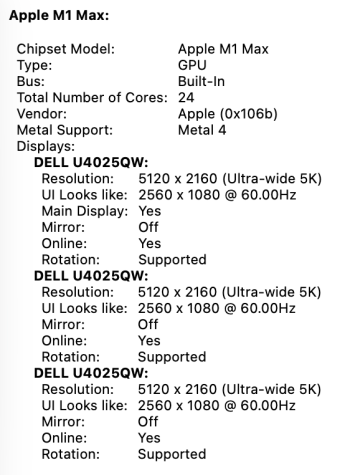
Sorry for the delay, finally got around to testing it. I tested multiple ports. First listed will be Mac Studio (M1 Max) output port, second is input port on the display. I used "direct cables" for all, and all cables are 8K capable. All tests performed when the 5K display is the only display connected.

Thunderbolt 3 -> Thunderbolt 4: Full resolution (5120 x 2160; defaults to Retina scaling 2560 x 1080-equivalent) at 60 Hz or Variable 48-60 Hz; with or without High Dynamic Range. Using a Thunderbolt 4 cable.

Thunderbolt 3 in DP-alt -> DisplayPort: Full resolution (same as above) at 60 Hz or Variable 48-60 Hz; with or without HDR. Using a USB-C to DisplayPort cable.

HDMI -> DisplayPort: HDMI output on the Mac to the DisplayPort on the monitor supports full resolution (5Kx2K) at 60 Hz. Using an HDMI -> DisplayPort cable.

Thunderbolt 3 -> TB3 dock -> Dock's DisplayPort -> HDMI: Full 5Kx2K at 60 Hz. This is my usual use, using the same HDMI -> DisplayPort cable in the other direction, connected to the DisplayPort output of my Thunderbolt 3 dock.

HDMI -> HDMI: Full resolution (5120x2160) at 30 Hz, or 4096 x 2160 at 60 Hz; with or without HDR. Using an HDMI to HDMI cable. It's only if both ends are HDMI that this computer has this problem. And yes, this same HDMI cord works fine at full 5K on my Windows desktop. (At 120 Hz even.)

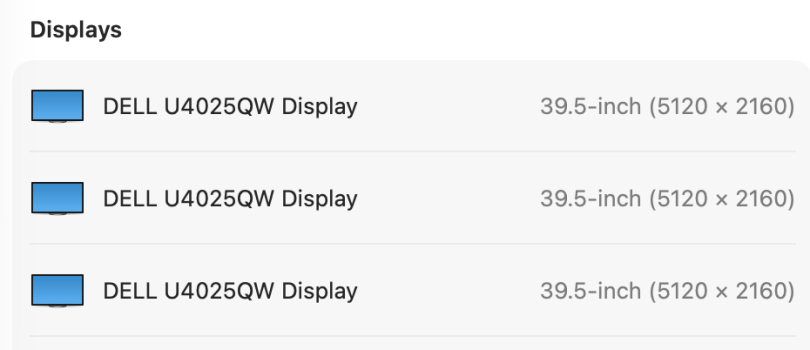
And just for giggles, I plugged in TB3->TB4, TB3->Dock->DP->HDMI, and USB-C->DP at the same time, and it happily is willing to run three 5Kx2K at 60 Hz. Of course, since it's only physically one monitor, I'd have to switch inputs on the monitor to see the other "displays."

So M1 Max seems to have a hard cap at 60 Hz when above 4K. (My 4K 240 Hz display works at 120 Hz on a Thunderbolt/USB-C connection. HDMI output on the Mac Studio only supports 60 Hz.)

Lastly, I can daisy-chain the 4K display through the Thunderbolt-out port on the 5K display, and it works at 4K 60 Hz.

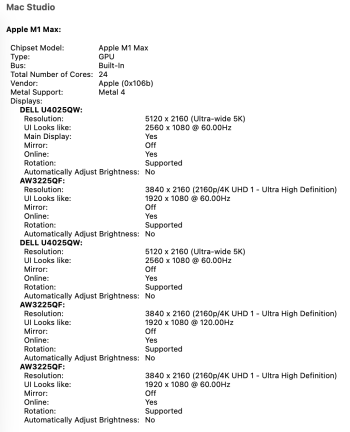
I can even go completely wacky and have the 5K connected twice and the 4K connected three times, with one 4K connection at 120 Hz, the rest at 60 Hz. (Mac Studio M1 supports a maximum of five displays, four over the Thunderbolt/USB-C ports, one over HDMI. This has the 5K display via Thunderbolt 4, with one of the 4K 60 daisy-chained to the Thunderbolt-out on the display; the other 5K display is via daisy-chain Thunderbolt-out on my Thunderbolt 3 dock, with the 4K 120 connection using the Thunderbolt 3 dock's DisplayPort out port; with the one of the 4K 60 Hz connections over direct HDMI.)
 

Attachments

  • Three 5K.png
    Three 5K.png
    44 KB · Views: 20
  • 5K60.png
    5K60.png
    106.3 KB · Views: 16
  • SoManyDisplays.png
    SoManyDisplays.png
    219.7 KB · Views: 18
HDMI -> HDMI: Full resolution (5120x2160) at 30 Hz, or 4096 x 2160 at 60 Hz; with or without HDR. Using an HDMI to HDMI cable. It's only if both ends are HDMI that this computer has this problem
HDMI port on the M1 Max Mac Studio is 2.0 so this behaviour is totally expected.
HDMI -> DisplayPort: HDMI output on the Mac to the DisplayPort on the monitor supports full resolution (5Kx2K) at 60 Hz. Using an HDMI -> DisplayPort cable
I'm curious what the name of the cable you're using?
 
it says unidirectional (DisplayPort to HDMI,) but it seemed to work for me in both directions
The only problem is that this is technically impossible. Conversion HDMI->DisplayPort (unlike reverse DisplayPort->HDMI) requires an active adapter/cable. A basic passive DisplayPort->HDMI cable cannot be used in the reverse direction.
Also as I said earlier HDMI port on the M1 Max Mac Studio is 2.0 so it cannot drive resolutions larger than 4K@60.
So I think there was some misunderstanding. Are you sure this test:
HDMI -> DisplayPort: HDMI output on the Mac to the DisplayPort on the monitor supports full resolution (5Kx2K) at 60 Hz. Using an HDMI -> DisplayPort cable.
was performed correctly? Maybe there was another cable connected to the mac at the same time?
 
Register on MacRumors! This sidebar will go away, and you'll see fewer ads.