Become a MacRumors Supporter for $50/year with no ads, ability to filter front page stories, and private forums.

SAVAGE5

macrumors member
Original poster
I've had my Mac say 4 days...I got my SSD today and went to install. I took out old HDD put in SSD booted from OSX CD and everything went fine. Turned off to install 8GB Ram and then the folder with question mark comes up next boot..even when I hold alt and boot from SSD it doesn't work. Any ideas?
 
Try a reinstall, if that doesn't work, RMA the drive.

Sweet I just re-installed and apps so it's going well I am about to restart to make sure. Would it have anything to do with me making 2 partions from the disk utility before install?
 
Sweet I just re-installed and apps so it's going well I am about to restart to make sure. Would it have anything to do with me making 2 partions from the disk utility before install?

Shouldn't. I have done that plenty of times and I have never had a problem.

It might just be a bad drive.

(I was going to say "bad apple" but that seemed a bit heavy handed.)
 
Now my SSD is only running at 3Gb/s...should I update firmware? I can't find nutttttin!


Screenshot2011-06-14at75133PM.png
w/510


Screenshot2011-06-14at81604PM.png
w/regular 750


Am I missing something?
 
Last edited:
Check what system profiler says. Make sure you're looking at the hard drive bay and report back on what the link speed is.
 

Attachments

  • screen-capture.png
    screen-capture.png
    123.9 KB · Views: 107
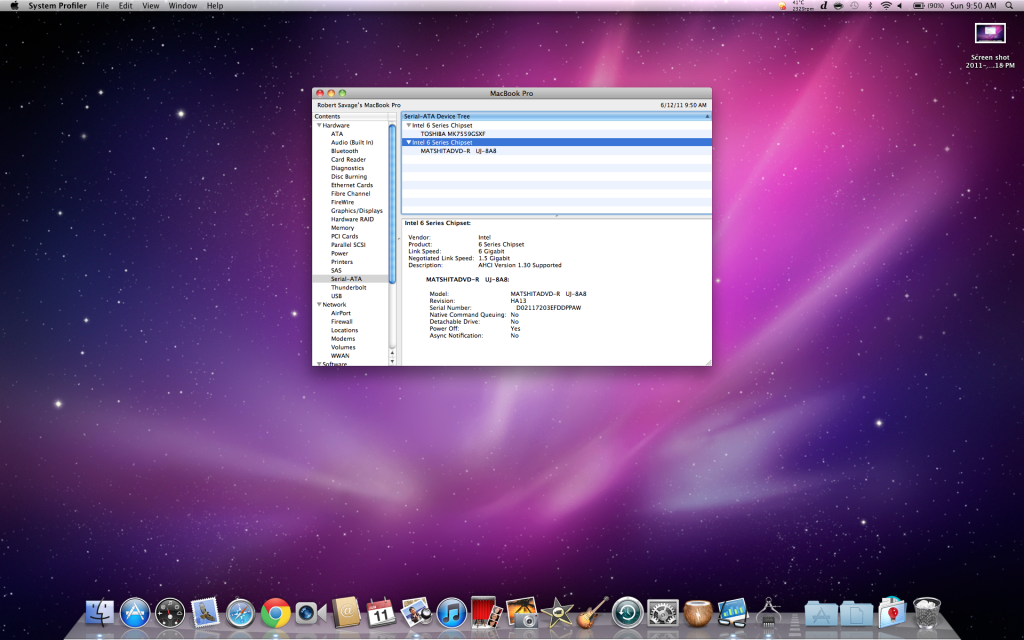
Yea it's 2011 and I check using about this mac...and then Serial-ATA

Both of my ports are SATA-III

Screenshot2011-06-12at95014AM.png

Screenshot2011-06-12at94707AM.png
 
So that is a screenshot of your dvd drive and your 750GB HDD. Where does it say you have a Intel 510 SSD running at 3Gbps?
 
So that is a screenshot of your dvd drive and your 750GB HDD. Where does it say you have a Intel 510 SSD running at 3Gbps?

I took it out already so I could at least have a working computer but from the read/write you can tell and when I checked while it was running for a little it was at 3Gb/s.

In my first screenshot posts with the two different backgrounds the first is the Intel 510, second is 750GB.
 
There are reports that even though the optical bay has a link speed of 6Gbps, for some reason it'll still only run at 3Gbps. Is your SSD in your optical bay?

What leads you to believe it was running at 3Gbps?
 
There are reports that even though the optical bay has a link speed of 6Gbps, for some reason it'll still only run at 3Gbps. Is your SSD in your optical bay?

What leads you to believe it was running at 3Gbps?

No that's the crazy part. I did everything correct, it installed correct, then on a reboot everything stops working. And when working I checked system profiler and ran Xbench and it shows as 3Gb/s. Is that a driver/SSD issue or should I go ask apple?
 
I just can't boot it flashes I want to say like a caution sign and apple sign flickering then a folder with a question mark just blinks. Even when I try booting regular and holding down alt then clicking it to boot it will not work. Tried twice. I put regular HDD in and boots just fine.
 
SSD failure. Question mark folder means the computer can't find the OS. I've had two failed Intel SSDs. Return it.
 
What a fail. I can't even return it I can replace it. Is there a chance I will get a working one? Lol
 
I'm sure you will get a working one. There have been very very few reports of failed Intel SSDs. But, there are always going to be an unlucky few.... welcome to the club.😀

Edit: Your sig says you have SSD and HDD. Optibay? Did you have the SSD in the optical bay or the hard drive bay?
 
I just ordered the optibay it hasn't been delivered yet. I had it in the regular location by the battery.

Edit: This club sucks. Lol hopefully I get a better one next time.
 
Register on MacRumors! This sidebar will go away, and you'll see fewer ads.