
Got a tip for us?
Let us know
Become a MacRumors Supporter for $50/year with no ads, ability to filter front page stories, and private forums.
Need MacBook with 2.5TB storage.
- Thread starter ZBoater
- Start date
- Sort by reaction score
You are using an out of date browser. It may not display this or other websites correctly.
You should upgrade or use an alternative browser.
You should upgrade or use an alternative browser.

I was at the Apple Store today. That 13" MacBook Pro non retina is a nice laptop. If it had the Intel 5000 video I would have bought it. But I have a MBA now and taking a step back in video (I use a TB display) is a bridge too far.
I guess I'm stuck using external drives for my media. Ratz.
I guess I'm stuck using external drives for my media. Ratz.

RoastingPig
macrumors 68000
So my research has led me to a used MacBook or a new MacBook Pro 13" with the old body style that Apple still sells. Put 500GB SSD and a 2TB spinning drive where the SuperDrive is.
Anyone here done that?
http://www.amazon.com/Seagate-Momen...e=UTF8&qid=1415485784&sr=8-1&keywords=2.5+2tb
this 2tb fits in the macbook
As an Amazon Associate, MacRumors earns a commission from qualifying purchases made through links in this post.
http://www.amazon.com/Seagate-Momen...e=UTF8&qid=1415485784&sr=8-1&keywords=2.5+2tb
this 2tb fits in the macbook
Does that need some sort of caddy to replace the SuperDrive?
As an Amazon Associate, MacRumors earns a commission from qualifying purchases made through links in this post.

Tobias Funke
macrumors 6502a
I went from 500gb+SuperDrive to 256gb ssd+1.5tb hd to 2tb hd plus superdrive! 😀
Storage and cd drive was more important to me than speed! 😀
Storage and cd drive was more important to me than speed! 😀

CanadaRAM
macrumors G5
Does that need some sort of caddy to replace the SuperDrive?
Yes, any superdrive replacement will need an appropriate bracket to hold it in place and convert the SATA connector pinouts
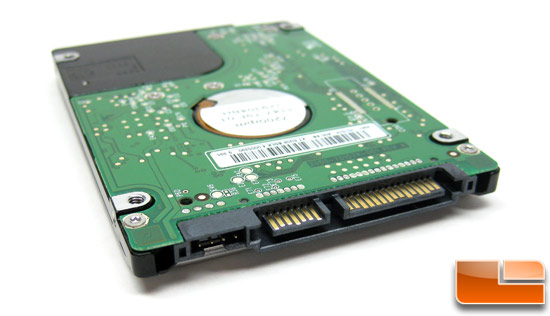
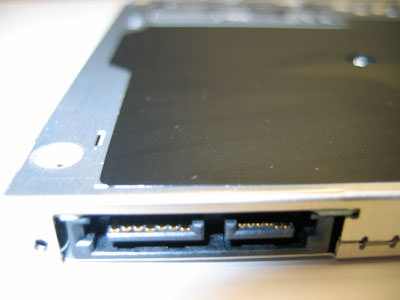
I went from 500gb+SuperDrive to 256gb ssd+1.5tb hd to 2tb hd plus superdrive! 😀
Storage and cd drive was more important to me than speed! 😀
I can live without the SuperDrive, and I have an external one for my MBA. I can't go back to spinning disks on my main drive. The MBA spoiled me. But a SSD / big spinning drive combo would work, but I'm not sure whether to get a new 13" MacBook Pro or buy a slightly used one with better graphics, 15 or 17.

simonsi
Contributor
I can live without the SuperDrive, and I have an external one for my MBA. I can't go back to spinning disks on my main drive. The MBA spoiled me. But a SSD / big spinning drive combo would work, but I'm not sure whether to get a new 13" MacBook Pro or buy a slightly used one with better graphics, 15 or 17.
Remember the "better" graphics in 2011 15" and 17" models suffer GPU failures like no tomorrow...

KUguardgrl13
macrumors 68020
Remember the "better" graphics in 2011 15" and 17" models suffer GPU failures like no tomorrow...
Yep be really careful buying used. If you need that much internal storage and can't live with external drives, I'd go with a refurbished mid-2012 MBP. No sense in paying new prices for old tech.
I was at the Apple Store today. That 13" MacBook Pro non retina is a nice laptop. If it had the Intel 5000 video I would have bought it. But I have a MBA now and taking a step back in video (I use a TB display) is a bridge too far.
I guess I'm stuck using external drives for my media. Ratz.
Have you thought of using a NAS?
I was at the Apple Store today. That 13" MacBook Pro non retina is a nice laptop. If it had the Intel 5000 video I would have bought it. But I have a MBA now and taking a step back in video (I use a TB display) is a bridge too far.
I guess I'm stuck using external drives for my media. Ratz.
Also if you have the 13" Macbook Air, the non-retina MBP is actually a step down in screen resolution (1440x900 vs 1280x800).
Have you thought of using a NAS?
Yes, I have a NAS. And a Seagate slim drive that goes with me. I'm testing having two iTunes libraries. It's still a bit of a kludge.
If iTunes dealt with separate file locations for each of the media types (music, videos, apps, tones, podcasts, etc) a bit more elegantly, this would not be such an issue. As it stands now you get to specify a iTunes media folder location in an all or nothing deal. Solutions involve not having iTunes manage the library or having separate libraries with a persistent ID hack to allow your iPhone to sync to both of them.
The point of having the laptop is portability, and having to plug an external drive to access my media is inconvenient. And putting everything in "the Cloud" is not a viable option for me. In the pursuit of thinness I think Apple lost sight of what a "Pro" model is supposed to be.

Bending Pixels
macrumors 65816
I recall reading that the older MBP motherboards won't recognize a drive above 1TB. So......your better choice would be to use a 2 or 3 TB external drive.
Yes, I have a NAS. And a Seagate slim drive that goes with me. I'm testing having two iTunes libraries. It's still a bit of a kludge.
If iTunes dealt with separate file locations for each of the media types (music, videos, apps, tones, podcasts, etc) a bit more elegantly, this would not be such an issue. As it stands now you get to specify a iTunes media folder location in an all or nothing deal. Solutions involve not having iTunes manage the library or having separate libraries with a persistent ID hack to allow your iPhone to sync to both of them.
The point of having the laptop is portability, and having to plug an external drive to access my media is inconvenient. And putting everything in "the Cloud" is not a viable option for me. In the pursuit of thinness I think Apple lost sight of what a "Pro" model is supposed to be.
You have 2TB of media? I'd do remote access from an NAS. That would solve all your problems.
You have 2TB of media? I'd do remote access from an NAS. That would solve all your problems.
Remote access is not always practical for me. Im not always within reach of a high speed internet connection.
With many HD movies in the 1-2GB range, and adding music, apps, tv shows, podcasts, etc, getting to 2TB is not hard. i'm at 1.5TB now and I have a relatively small collection.
2TB drives are small and cheap enough to fit into most laptops. Except Apple's latest of course.
----------
I recall reading that the older MBP motherboards won't recognize a drive above 1TB. So......your better choice would be to use a 2 or 3 TB external drive.
I've read many people successfully upgrading to 2TB internal drives, but I'm not sure what year they are. If I bought an older MBP, it wouldn't be older than 2012. I am finding them for sale used, so I might make a project out of it.
----------
I think its one of these I'm after
MD103*/A or MD104*/A

Count Blah
macrumors 68040
I have a 15" 2012 cMBP. I put an SSD in the main storage area, and put a bigger HD in the optical bay. I just went with the OWC data doubler bracket, since I read several posts here with issues with brackets purchased on eBay.
Not too bad of an operation.
If you don't want to go 15" and you can't live with an HD4000, then you have no choice but continue with external storage.
Not too bad of an operation.
If you don't want to go 15" and you can't live with an HD4000, then you have no choice but continue with external storage.
Remote access is not always practical for me. Im not always within reach of a high speed internet connection.
With many HD movies in the 1-2GB range, and adding music, apps, tv shows, podcasts, etc, getting to 2TB is not hard. i'm at 1.5TB now and I have a relatively small collection.
2TB drives are small and cheap enough to fit into most laptops. Except Apple's latest of course.
----------
I've read many people successfully upgrading to 2TB internal drives, but I'm not sure what year they are. If I bought an older MBP, it wouldn't be older than 2012. I am finding them for sale used, so I might make a project out of it.
----------
I think its one of these I'm after
MD103*/A or MD104*/A
could you use an external usb 3 drive for media and copy over a movie or two to the ssd when you dont feel like keeping the external plugged in? I have a similar situation and am using a rmbp with 512 ssd and a usb 3 1.5tb drive. Itunes is on the 1.5TB drive, and I use my iphone for songs when I don't have the 1.5 TB drive plugged in.
If you really need an internal hd and ssd, id try to find a used or refurb 15" 2012 macbook pro.
Last edited:
could you use an external usb 3 drive for media and copy over a movie or two to the ssd when you dont feel like keeping the external plugged in? I have a similar situation and am using a rmbp with 512 ssd and a usb 3 1.5tb drive.
If you really need an internal hd and ssd, id try to find a used or refurb 15" 2012 macbook pro.
That's my current solution. 512GB SSD in my MBA and a 2TB Seagate Slimdrive. I created two iTunes libraries and am using the persistent ID hack to make my iPhone/iPad think they're the same one. I have all my music on one (on the SSD) and all my other media (movies, tv shows, apps, podcasts, etc) on my external drive. When I start iTunes I hold down the option key and choose which library I want to use.
Not pretty.
I also tried not having iTunes not manage my files but that creates a whole lot more manual work when bringing in new files. Also, the iOS apps have grown to over 40GB. It's insane.
Then there's the issue of having to tote that drive around when I'm on the go. Kinda defeats the purpose of a thin laptop.
----------
I have a 15" 2012 cMBP. I put an SSD in the main storage area, and put a bigger HD in the optical bay. I just went with the OWC data doubler bracket, since I read several posts here with issues with brackets purchased on eBay.
Not too bad of an operation.
If you don't want to go 15" and you can't live with an HD4000, then you have no choice but continue with external storage.
Yes, this is the same conclusion I am reaching. A 15" fat MBP or a 13" MBA and external USB drive.
Sigh. 🙁
Samuelsan2001
macrumors 604
There are some greta mobile storage solutions these days
So one of these and a 2TB external hardrive gives you mobile access to all your files on any wifi device.
http://www.amazon.co.uk/Kingston-Te...15611647&sr=8-2&keywords=kingston+mobile+lite
Or maybe this
http://www.amazon.co.uk/Seagate-STC...=UTF8&qid=1415612074&sr=8-2&keywords=wifi+HDd
So one of these and a 2TB external hardrive gives you mobile access to all your files on any wifi device.
http://www.amazon.co.uk/Kingston-Te...15611647&sr=8-2&keywords=kingston+mobile+lite
Or maybe this
http://www.amazon.co.uk/Seagate-STC...=UTF8&qid=1415612074&sr=8-2&keywords=wifi+HDd
As an Amazon Associate, MacRumors earns a commission from qualifying purchases made through links in this post.
That's my current solution. 512GB SSD in my MBA and a 2TB Seagate Slimdrive. I created two iTunes libraries and am using the persistent ID hack to make my iPhone/iPad think they're the same one. I have all my music on one (on the SSD) and all my other media (movies, tv shows, apps, podcasts, etc) on my external drive. When I start iTunes I hold down the option key and choose which library I want to use.
Not pretty.
I also tried not having iTunes not manage my files but that creates a whole lot more manual work when bringing in new files. Also, the iOS apps have grown to over 40GB. It's insane.
Then there's the issue of having to tote that drive around when I'm on the go. Kinda defeats the purpose of a thin laptop.
----------
Yes, this is the same conclusion I am reaching. A 15" fat MBP or a 13" MBA and external USB drive.
Sigh. 🙁
Ohh. There is an easy solution to this. Look up symbolic links. You could make the music folder in iTunes on the ssd and the movies and ios apps on the external HD with one iTunes library.
simonsi
Contributor
I created two iTunes libraries and am using the persistent ID hack to make my iPhone/iPad think they're the same one. I have all my music on one (on the SSD) and all my other media (movies, tv shows, apps, podcasts, etc) on my external drive. When I start iTunes I hold down the option key and choose which library I want to use.
If you need to choose which library when iTunes starts what purpose does the hack serve?
Agree symlinks looks like it would achieve what you want with less trouble.