
Got a tip for us?
Let us know
Become a MacRumors Supporter for $50/year with no ads, ability to filter front page stories, and private forums.
New to macOS - asking for suggestion for deletion app...
- Thread starter pax-eterna
- Start date
- Sort by reaction score
You are using an out of date browser. It may not display this or other websites correctly.
You should upgrade or use an alternative browser.
You should upgrade or use an alternative browser.


BrianBaughn
macrumors G4
I don't think there's any app that can guarantee to work like that on 100% of third-party apps. I've even seen uninstaller apps provided by the developer that failed in this regard.
Having said that I usually use AppCleaner…the one from here:
Having said that I usually use AppCleaner…the one from here:
cool, thanks for that. I will try it.I don't think there's any app that can guarantee to work like that on 100% of third-party apps. I've even seen uninstaller apps provided by the developer that failed in this regard.
Having said that I usually use AppCleaner…the one from here:
underthere
macrumors member

bogdanw
macrumors G3
There are a lot of threads about uninstalling apps on macOS, one of the more recent ones here https://forums.macrumors.com/threads/how-to-uninstall-app-store-apps-on-macos-26-tahoe.2463745/

MacGizmo
macrumors 68040
Another vote for AppCleaner. PearCleaner is pretty good too, I just prefer the simplicity of AppCleaner. One thing is for certain, you should not waste money on buying an app to do this—they don't do any better than the two free ones mentioned.
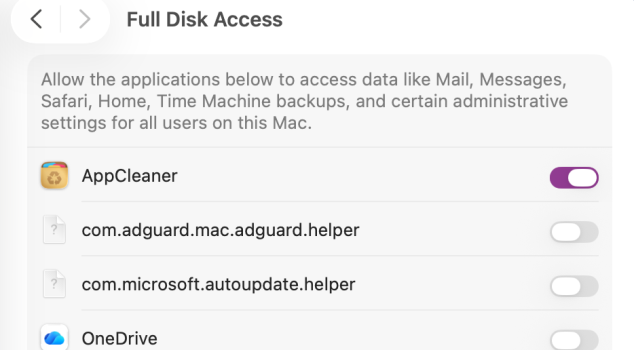
Just make sure you give the app full disk access under "Privacy and Security" otherwise you won't remove everything.I don't think there's any app that can guarantee to work like that on 100% of third-party apps. I've even seen uninstaller apps provided by the developer that failed in this regard.
Having said that I usually use AppCleaner…the one from here:
Just make sure you give the app full disk access under "Privacy and Security" otherwise you won't remove everything.
Thanks, but where is that option in the app? It does not appear to have a settings option.
bogdanw
macrumors G3
See Full Disk Access in "Change Privacy & Security settings on Mac" https://support.apple.com/en-jo/guide/mac-help/mchl211c911f/macThanks, but where is that option in the app? It does not appear to have a settings option.
I have already checked in privacy and security, sorry. There is nothing I can sees there that does the apps. But I will check the link, thanksSee Full Disk Access in "Change Privacy & Security settings on Mac" https://support.apple.com/en-jo/guide/mac-help/mchl211c911f/mac
See Full Disk Access in "Change Privacy & Security settings on Mac" https://support.apple.com/en-jo/guide/mac-help/mchl211c911f/mac
Ok I checked under those instructions and the AppCleaner App does not appear anywhere there, even under the Utilities sub folder.
You have to add the app... this is what it should look like.Ok I checked under those instructions and the AppCleaner App does not appear anywhere there, even under the Utilities sub folder.
Attachments

Ben J.
macrumors 65816
It might be different in Windows, but this is how I view this whole issue on mac:New to macOS, and want to ask if there are any single purchase apps that will completely remove an app and all associated data from macOS 26?
There is seldom any need to 'remove an app and all associated data'. If you don't want to see an app in the apps folder any longer, just drag it to the trash. 99% of apps will have only some settings and prefs files in the ~library folder, which take up almost no space, and cause no harm to performance or anything else.
This comes up every now and then, where people feel they should 'clean up' their computer, and install some 'cleaner app' - and it's easy to understand that one can experience a feeling of satisfaction after getting rid of all the 'junk files' as they often call it. Like after a house cleaning.
But it does nothing to the general 'health' of the computer. On the contrary, deleting lots of files in batches, might easily remove stuff that you might later find was actually needed.
Some apps install big files, often media libraries etc, but most often you will be aware of this. F.ex, I have a symphony orchestra plugin/app with 50GB of audio samples. The app settings lets me decide where to store it, and therefore I'm very aware of it's existence, and I can delete it manually.
If your main goal is to free up disk space, I can recommend DaisyDisk. It sorts all files on a disk by folder size, so it's very easy to quickly find what's taking up space, and delete by 'moving it to the collector' and delete the collector. (Don't pay too much attention to the fancy 'sector' graphics in the GUI, just use the horisontal 'path' line at the top, and the vertical list on the right, to navigate.)
Last edited:
I did add it (afaik) but it still does not show up, mebbe I need a reboot?You have to add the app... this is what it should look like.
It might be different in Windows, but this is how I view this whole issue on mac:
There is seldom any need to 'remove an app and all associated data'. If you don't want to see an app in the apps folder any longer, just drag it to the trash. 99% of apps will have only some settings and prefs files in the ~library folder, which take up almost no space, and cause no harm to performance or anything else.
This comes up every now and then, where people feel they should 'clean up' their computer, and install some 'cleaner app' - and it's easy to understand that one can experience a feeling of satisfaction after getting rid of all the 'junk files' as they often call it. Like after a house cleaning.
But it does nothing to the general 'health' of the computer. On the contrary, deleting lots of files in batches, might easily remove stuff that you might later find was actually needed.
Some apps install big files, often media libraries etc, but most often you will be aware of this. F.ex, I have a symphony orchestra plugin/app with 50GB of audio samples. The app settings lets me decide where to store it, and therefore I'm very aware of it's existence, and I can delete it manually.
If your main goal is to free up disk space, I can recommend DaisyDisk. It sorts all files on a disk by folder size, so it's very easy to quickly find what's taking up space, and delete by 'moving it to the collector' and delete the collector. (Don't pay too much attention to the fancy 'sector' graphics in the GUI, just use the horisontal 'path' line at the top, and the vertical list on the right, to navigate.)
Thanks for that nice explanation. Yeah in windows the Registry keeps getting cluttered with all these orphan files that after a time slow down the boot and other things. Hence the need to completely remove stuff. and most app uninstall routines always usually leave a bit of themselves hanging around, and can take quite some time to track down.
hjkuldbrot
macrumors newbie
Your answer is the correct one. "cleaner" apps are almost always unnecessary, and once in a blue moon they mess up and remove something they shouldn't.It might be different in Windows, but this is how I view this whole issue on mac:
There is seldom any need to 'remove an app and all associated data'. If you don't want to see an app in the apps folder any longer, just drag it to the trash. 99% of apps will have only some settings and prefs files in the ~library folder, which take up almost no space, and cause no harm to performance or anything else.
This comes up every now and then, where people feel they should 'clean up' their computer, and install some 'cleaner app' - and it's easy to understand that one can experience a feeling of satisfaction after getting rid of all the 'junk files' as they often call it. Like after a house cleaning.
But it does nothing to the general 'health' of the computer. On the contrary, deleting lots of files in batches, might easily remove stuff that you might later find was actually needed.
Some apps install big files, often media libraries etc, but most often you will be aware of this. F.ex, I have a symphony orchestra plugin/app with 50GB of audio samples. The app settings lets me decide where to store it, and therefore I'm very aware of it's existence, and I can delete it manually.
If your main goal is to free up disk space, I can recommend DaisyDisk. It sorts all files on a disk by folder size, so it's very easy to quickly find what's taking up space, and delete by 'moving it to the collector' and delete the collector. (Don't pay too much attention to the fancy 'sector' graphics in the GUI, just use the horisontal 'path' line at the top, and the vertical list on the right, to navigate.)
Appzapper

 appzapper.com
AppZapper - The uninstaller Apple forgot.
Introducing AppZapper. Simply drag one or more apps onto AppZapper. Then, watch as it finds the extra files and lets you delete them with one click.

Black_Mage
Contributor
I also recommend this app. It's free, easy to use, and works.I don't think there's any app that can guarantee to work like that on 100% of third-party apps. I've even seen uninstaller apps provided by the developer that failed in this regard.
Having said that I usually use AppCleaner…the one from here:

Starfia
macrumors 68000
No one else has mentioned ForkLift – it's not its main function, but deleting apps alongside their associated Library data is an included feature! A great app from an independent developer, especially if you need an alternate file browser or network file transfer utility.
Ben J's advice is good for anyone who needs it, and if your goal is actually just to reclaim disk space from large files in general, DaisyDisk is also my recommendation.
Ben J's advice is good for anyone who needs it, and if your goal is actually just to reclaim disk space from large files in general, DaisyDisk is also my recommendation.

Skwoodge
macrumors regular


auxbuss
macrumors 6502a
For completion: If you're comfortable with the command line, then
I don't completely agree with @Ben J. There are some apps that cache large amounts of data within
To find files related to an app, you can use the
ncdu is the go to tool for identifying space issues. It's also much faster than Finder for navigating around the file system. Take care with deletions, though, because the files are not moved to Trash.I don't completely agree with @Ben J. There are some apps that cache large amounts of data within
~/LibraryTo find files related to an app, you can use the
find command: find . -iname "*bit_of_filename_to_search_for*" The quotes and asterisks are required. (-iname is the case insensitive version of -name)
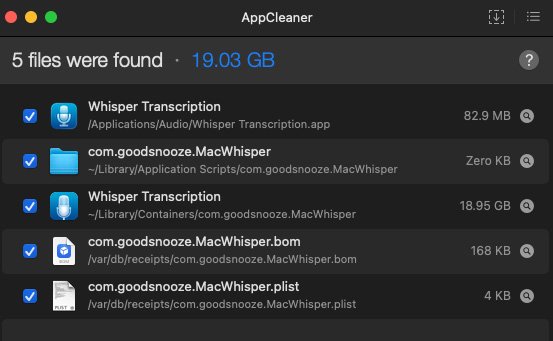
Skwoodge
macrumors regular
Combine this with Find Any File and you're golden.Sending just the app to Trash vs. AppCleaner
Vienna
View attachment 2624594
Whisper Transcription
View attachment 2624595
bogdanw
macrumors G3
Why would anyone pay $8 for Find Any File when all these are free?Combine this with Find Any File and you're golden.
Cling https://github.com/FuzzyIdeas/Cling
EasyFind https://www.devontechnologies.com/apps/freeware
find https://ss64.com/mac/find.html
AppCleaner https://freemacsoft.net/appcleaner/
Pearcleaner https://github.com/alienator88/Pearcleaner
MacOptimizers https://forums.macrumors.com/thread...ptimization-cleanup-feedback-welcome.2480305/