Become a MacRumors Supporter for $50/year with no ads, ability to filter front page stories, and private forums.

katie ta achoo

Blogger emeritus
Original poster


I hate alarm clocks. An annoying cacophony of buzzing and ringing that rips me from my blissful, relaxing, refreshing, wonderful sleep doesn't sit well with me. I've actually thrown an alarm clock across the room to shut it up. In addition to the annoying noise, setting the alarm is annoying. I have to contort my hand to hit about 3 different buttons at once, and the buttons tend to be so small that they don't register when I jam my finger on it. Joy.

The iPhone alarm is different, though. I wouldn't dare throw her across a room!

Read Full Article
 
I'm not a snooze person at all (why not just set the alarm for when you really need to get up, then enjoy the extra unbroken sleep?), so those issues don't affect me, but I'm really surprised to hear that you use the slider to turn off the alarm, I just hit the unlock button on the top, and poof alarm is gone. Is that not an option for you snoozers? (I have snooze turned off).
 
I like the review. Not many people give notice to the alarm on a phone. As well, no one like that damn things. I do agree that the iPhone's alarm is different. It's still an alarm, but one that does not piss me off so bad that I couldn't help but throw it.
 
the alarm is nowhere near as loud as I need it to wake me up. I even set it to that fog alarm setting when I had to get up, and i completely slept through it. Maybe I just have a pavlov's theory reaction to "A Night in Tunisia" - the song I chose on my old phone to wake me up. A high pitched soprano sax is the only way to move me out of bed, apparently.

I have a clocky though - a friend of mine got it for me for christmas, and it's a nice little bugger since I have to get up to go get it.
 
If you have the snooze enabled all you have to do to "hit the snooze" is press the sleep button on the top. That snoozes the alarm for nine minutes. To me that is much easier than stabbing at the screen.
 
The alarm works for me but it could use two things. First off it would be nice if it was a few volume clicks louder, i barely hear it if i am in a deep sleep when it goes off. Second, i would like other options for tones to wake me up. Switching tones every now and then makes it easier for me to wake up.
 
i like my iphones alarm alot better than using my regular alarm clock. I cant get mad at my iphone, so i usually wake up happy.
 
I think an Alarm puzzle would be cool.

I do not wake easily...

arn

An alarm puzzle's a GREAT idea!
I can't believe no one's implemented this yet.

I'm one of those people that doesn't wake easily either. Every time I try a new set-up (like taping the off button shut, or moving the alarm really far away), I somehow find a way to adapt to it and shut off the alarm while I'm still somewhat asleep.

Having to do a little puzzle would not only work better, but it would be such a fun way to wake up in the morning. Who could be cranky after having some fun with their iPhone?😀


Oh wait.... I don't have an iPhone. 🙁
 
I just took an airplane ride and was looking through the plane mall magazine. THere were a couple really interesting alarm clocks in there. There was this one that when the alarm went off it shot up a little remote helicopter type thing, that would hover around the room beeping and blooping until the tough-riserwoke up and chased it down. The other one which I thought was really funny was an alarm clock that sits on your night stand and is on two giant wheels. When the alarm goes off and the snoozer hits the snooze button, the alarm clock's wheels are activated and the alarm clock rolls right off the table and far away. Each time the snooze button is hit the thing runs farther and farther away! I thought that was a great idea, making you have to walk farther each time you need to hit the snooze button or just wake up.
 
the alarm is nowhere near as loud as I need it to wake me up. I even set it to that fog alarm setting when I had to get up, and i completely slept through it. Maybe I just have a pavlov's theory reaction to "A Night in Tunisia" - the song I chose on my old phone to wake me up. A high pitched soprano sax is the only way to move me out of bed, apparently.

I have a clocky though - a friend of mine got it for me for christmas, and it's a nice little bugger since I have to get up to go get it.

agreed. I've had three separate alarms set since the day I got the phone(each one set about 20 min. apart) and I've only been woken up by it about 5 or 6 times...

Luckily my internal clock gets me up before I'm ever drastically late.
 
so basically what you all are saying is that we all have different schedules and therefore a programmable alarm clock should inherit options for each to decide upon. hmmmm.🙄 :apple: what do you have to say? do you hear us? or should we just continue hacking away to get the features that should be there already.
 
Wake Up to the Harp

I love waking up to the "Harp" sound, it just lulls me into consciousness without the jarring alarm noises I've used before this... Love the iPhone alarm! It's crontab, for waking up! Oh, and it's easy to have a 3-minute snooze; just set yourself three sets of alarms at three-minute intervals...
 
I love waking up to the "Harp" sound, it just lulls me into consciousness without the jarring alarm noises I've used before this... Love the iPhone alarm! It's crontab, for waking up! Oh, and it's easy to have a 3-minute snooze; just set yourself three sets of alarms at three-minute intervals...

I've been doing almost exactly that.
First alarm: "Harp" (gentle awakening instead of jarring)
2nd alarm: "Marimba" (in case harp doesn't cut it)
3rd alarm: "Ascending" (just in case)

I've always set multiple alarms, though, even before I got an iPhone.
I still set an additional physical alarm clock at home as a backup. On the road I just use the iPhone now, and maybe a hotel clock as a backup.
 
I've been doing almost exactly that.
First alarm: "Harp" (gentle awakening instead of jarring)
2nd alarm: "Marimba" (in case harp doesn't cut it)
3rd alarm: "Ascending" (just in case)

I've always set multiple alarms, though, even before I got an iPhone.
I still set an additional physical alarm clock at home as a backup. On the road I just use the iPhone now, and maybe a hotel clock as a backup.

If you want to be SURE you wake up, set the sound to the "Alarm" tone.

You'll wake up thinking the Daleks are attacking!

be well
t

PS. Apologies to those of you who aren't Dr Who fans and have no idea what a Dalek is. One day your life will be complete!
 
The alarm and timer features of the iPhone are honestly two of my favorite applications ever, and I use them far more than I ever thought I would.
 
no repeat everyday

the only problem i have with the alarm is that you can only repeat for a specific day... you can't repeat Mon-Fri or everyday
 
I use the Xylophone tone for all my alarms. It is really pleasant and gets me up. I have six presets.

5:15 Uber-Early
5:30 Early
5:45 In The Middle
6:15 Later
7:40 Nice & Easy
9:15 Weekend

Not sure with or without snooze if the volume up or down buttons do anything. I don't mind the slider since I do use the snooze sometimes, but I would like the volume down to turn it off too.

Also, check out the Now & Zen clock
I think they are really cool.
 
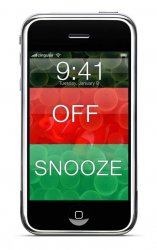
I think you should be able to choose "ALARM" for general alerts, but then you should have "SLEEP ALARM" which would leave the face unlocked so that when the alarm goes off, you reach over to the night stand and are presented with something like this... so that there's no unlocking and it's easy to go for the green when you need more sleep -- OH and the ability to designate EXACTLY how long you want the Snooze to be.... a must... WHO THE F DECIDED "9" was the magic number? 🙂
 

Attachments

  • iphone_alarm.jpg
    iphone_alarm.jpg
    54.2 KB · Views: 288
the only problem i have with the alarm is that you can only repeat for a specific day... you can't repeat Mon-Fri or everyday

It appears that way from the menu, but if you select more than one day it lets you. I selected Monday, Tuesday, Wednesday... etc. Then I clicked back. The screen then showed "Mon-Fri". Try it out. 😉
 
I like this thread, right spirit.

I agree. why can I not choose the snooze length? is this Jobs preferred snooze?

I also wish it had the calendar feature. I would like to set my alarm schedules a week at a time and not think about it.
A
 
Register on MacRumors! This sidebar will go away, and you'll see fewer ads.