Become a MacRumors Supporter for $50/year with no ads, ability to filter front page stories, and private forums.

MareLuce

macrumors 65816
Original poster
Am transitioning to new MacBook Pro from Thinkpad. I need to page up and page down hundreds (thousands?) of times each day in email, documents, presentations, spreadsheets.

Am used to page up or page down being a single keystroke without conscious thought:
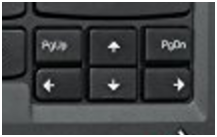
Thinkpad%20Keyboard%20PageDown_zpssvnlscnm.png


On the MacBook, I see I can page down by:
  • Press Function key with my fifth finger, left hand.
    Then, while holding the Function key held down, press Down Arrow key with my right hand.

    Problem: This
    - Doubles the number of keystrokes for something I do hundreds (thousands?) of times each day
    - Makes me move both hands off the keyboard, not just 1 hand
    - Requires conscious thought, at least right now

I realize I can scroll downward by:
  • Swipe 2 fingers up. However, this is not really equivalent to a page down. It’s easy to go too far down and miss spreadsheet rows or paragraphs.


Question:
How could I make it possible to page up or page down in 1 keystroke or touchpad gesture, preferably with my right hand?


Ex: Could I define a 3-finger tap to be Page Down? (and something else to be Page Up?)

Would a 3'rd party tool do this?
 
Last edited:
Thank you @anson42 I just donated to their open source effort.

This is one of the 2 friction points I need to figure out before I make this laptop my main work and personal laptop.

I'm thinking about remapping as follows:

Right side Option key = Page Down
Right side Command key = Page Up

What could be the unintended consequences of doing that?
 
I don't think it is universal, but in Apple native apps like Safari, page up down can be done by option+up/down. The right side option key is literally adjacent to the arrow keys, I can do this with one hand easily.
 
  • Like
Reactions: MareLuce
Thank you @anson42
I'm thinking about remapping as follows:

Right side Option key = Page Down
Right side Command key = Page Up

What could be the unintended consequences of doing that?

If the software allows mapping the right side modifier keys separate from the left side ones then I can't think of any. I almost never use the right side ones myself because the Control key is missing so I tend to only use modifies on the left side. I might consider doing that you're thinking, too.

As @Chancha indicated, the right side modifiers are right next to the arrow keys so technically you do page up/down via Option-Up/Down one handed but only for some applications, because the general mapping is Function-Up/Down.
 
  • Like
Reactions: MareLuce
spacebar and shift spacebar are page up and page down in a bunch of stuff

i know it's not as good as the real thing haha, but until you figure it out
 
Question:
How could I make it possible to page up or page down in 1 keystroke or touchpad gesture, preferably with my right hand?


Ex: Could I define a 3-finger tap to be Page Down? (and something else to be Page Up?)

Would a 3'rd party tool do this?

Better Touch Tool can do exactly this, assigning touchpad gestures of your choice to act as those keystrokes. For instance, you could use a 3-finger tap at the top of the pad to be Page Up, and one at the bottom to be Page Down.
 
  • Like
Reactions: MareLuce
Better Touch Tool can do exactly this, assigning touchpad gestures of your choice to act as those keystrokes. For instance, you could use a 3-finger tap at the top of the pad to be Page Up, and one at the bottom to be Page Down.

IT WORKS IT WORKS IT WORKS!!! Such a relief!

@Murgatroyd314 , You ROCK !!!
Developer of Better Touch Tool, You ROCK!

Ta Da..... !!!

BetterTouchTools%20Result_zpsv7xtzi1v.png

I wish I could make clean-looking key stickers like what I created above on the photo with SnagIt.

Plus I wish I could make a little nibbit above my fancy new page down key so I can find it a little more easily... like a braille thing or like the nibbit that Apple puts on the J and F keys...

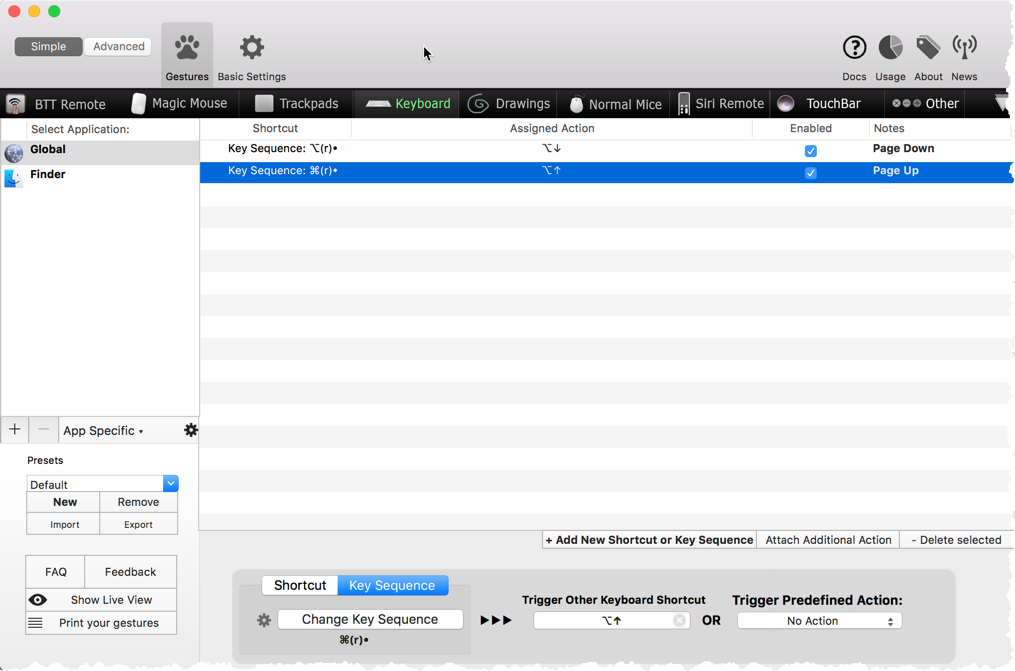
Below shows the Better Touch Tools screen - and how I mapped
new Shortcut (key sequence Option (right)) to Assigned Action Option Down Arrow.

At first I entered them in reverse from below and didn't think it worked. But once I put them in the right order it worked swimmingly!


BetterTouchToolWORKS_zpsqejkz18m.png


Here's how to buy it:
https://sites.fastspring.com/boastr/product/bettertouchtool

The developer just charges $6.50 with option to pay more.
So I paid him/her $15.00 for my license and still feel like I'm being cheap.
What an awesome tool!
 
Last edited:
  • Like
Reactions: anson42
Register on MacRumors! This sidebar will go away, and you'll see fewer ads.