Become a MacRumors Supporter for $50/year with no ads, ability to filter front page stories, and private forums.
I think if you picked up the M4 Max now you would not have to replace it for YEARS.
You are correct since that's usually is the way for most consumers who decide to buy an expensive item like the Mac Studio. But regardless if the new model offers more features or performance, it won't be any cheaper than the existing model. As I mentioned before, no-one can foretell what the future will bring in relation to one's health, economic status, and so on. Then the new model will need some time before all the OS and component glitches are "ironed out".

Consumers are still buying and using the M1, M2, and M3 Macks for several years already, and some of these models (depending on internal specifications relating to RAM, SSD, etc.) are quite expensive. The way I see it: if you can afford it, buy it now and enjoy it as long as you can for there is no telling what tomorrow will bring.
 
Last edited:
  • Like
Reactions: rb2112
Was shopping for a M4 Pro Mini to replace my M1 Pro MacBook Pro which has served me well for several years, but my workflow has slowly outgrown. Lucked into a heavily discounted, upgraded Studio from MicroCenter this weekend. Yolo! It's an absolute beast of a machine. More than I need, for sure, but I doubt I'll need to even think about replacing it for years to come. I already appreciate the extra ports, which I would have had to work around with the Mini.
 
You want a Mac Pro with Dual W6800 Duo setup and Xeon W3275M. That uses power! ;) It can be over 400w.

But it is also very fast at the things I need it to do. It runs from stored solar power, the whole house does so I barely pay anything for electricity aside from connection/admin type fees.
How can you stop at only 3?
 
Was shopping for a M4 Pro Mini to replace my M1 Pro MacBook Pro which has served me well for several years, but my workflow has slowly outgrown. Lucked into a heavily discounted, upgraded Studio from MicroCenter this weekend. Yolo! It's an absolute beast of a machine. More than I need, for sure, but I doubt I'll need to even think about replacing it for years to come. I already appreciate the extra ports, which I would have had to work around with the Mini.

What are the specs and what did you pick it up for?

I wasn't aware until recently, that MicroCenter was another source of used Macs. I need to remember to use them instead of Amazon since they price match. There is one close to me in Houston.
 
Last edited:
What are the specs and what did you pick it up for?

I wasn't aware until that MicroCenter was another source of used Macs. I need to remember to use them instead of Amazon since they price match. There is one close to me in Houston.

16/40 core, 64GB, 2TB. Brand new for $2900. It's new, not used, although you're right that MicroCenter does have refurb/used machines. Individual stores also sometimes stock custom configured new Macs, too, often at a discount. The store local to me even has a bunch of M3 Ultra builds with beastly specs right now. If you can get lucky to find the combination you want at your local store, it's a great way to get a new machine for refurb-like prices. I love MicroCenter.
 
  • Like
Reactions: Non-Euclidean
16/40 core, 64GB, 2TB. Brand new for $2900. It's new, not used, although you're right that MicroCenter does have refurb/used machines. Individual stores also sometimes stock custom configured new Macs, too, often at a discount. The store local to me even has a bunch of M3 Ultra builds with beastly specs right now. If you can get lucky to find the combination you want at your local store, it's a great way to get a new machine for refurb-like prices. I love MicroCenter.
Yeah. I need to spend more time checking stuff out there. I can do it when I drop the wife off for therapy, and get some therapy of my own…

My store has the same specced model for $2969.
 
Last edited:
  • Love
Reactions: cateye
I did buy the Spigen stand, but I would have like a similar but about an inch taller. The filter is "ok," but it won't prevent dust and smaller particles from getting inside the Studio. Also, unlike the top of the stand above the filter, the filter's frame below does not have a silicone seal all around its edge. If you look at the air intake ports on the Studio, you will notice that the very small holes aren't much larger than the small holes in the Spigen filter. Yes, the Spigen stand and filter are well designed. The filter will stop lint, pet hair or fur, and this is good. I like it:)
I think just getting the air intake off the table helps a fair bit with keeping dust out of it lol. I had this problem with my trash can mac pro; a ring of dust would accumulate around it lol. But the mac pro was easy to take the top off of and use an electric blower on!
 
I think just getting the air intake off the table helps a fair bit with keeping dust out of it lol. I had this problem with my trash can mac pro; a ring of dust would accumulate around it lol. But the mac pro was easy to take the top off of and use an electric blower on!
Agree with both comments! Also, I will figure a way to reduce the amount of fine dust particles from entering the Studio by using a fine mesh pre-filter, but this pre-filter installed on the outer walls by the base of the stand. In reality, the case design of the Studio makes no sense to me, although I do understand the reasons for Apple designing it that way. In this case Apple reduces construction costs (less materials used) and the buyer can decide if he or she wants or needs a stand for it :)
 
Yeah, I was deep in Photoshop and Illustrator for work projects all day yesterday and just loved the fact that A. I didn't wind up in level 2 or 3 memory pressure like I did all the time on my 32GB MacBook Pro, and B. Not even the slightest stutter or slow down at any point, and not even a whisper of fan noise. Such a great machine.
 
16/40 core, 64GB, 2TB. Brand new for $2900. It's new, not used, although you're right that MicroCenter does have refurb/used machines. Individual stores also sometimes stock custom configured new Macs, too, often at a discount. The store local to me even has a bunch of M3 Ultra builds with beastly specs right now. If you can get lucky to find the combination you want at your local store, it's a great way to get a new machine for refurb-like prices. I love MicroCenter.
I brought my Studio m4 in March with same specs but 1TB from Apple for £2999 so you did well 👍 :D
 
I got the 40 model. The specs listed are:

Read Speed 14700 Megabytes Per Second
Media Speed 13400 Megabytes Per Second
Data Transfer Rate 14700 Megabytes Per Second

I figured 40G would cover that. I also didn't see the 80G model on Amazon.

OK, looking at OWC site. Only $219 for the empty chassis! Barely more than the SSD card!
I think I'll wait a bit and attempt to endure the 40G model. But, man, so much pretty hardware from OWC.
What?! Don't expect those speeds! I don't know where you found those numbers, but here are OWC's: https://www.owc.com/solutions/express-1m2
I have the 1M2 80GB and I get less than half those speeds via TB5 !
 
  • Like
Reactions: Non-Euclidean
Recent setup, but not quite done yet.
I need to stop being lazy and get the Satechi working for both the PC and Mac so I can more/repurpose the DAS keayboard.
It's been a month...how are you liking the new machine? Did you go with the 1M2 for external storage?
 
  • Like
Reactions: maflynn
It's been a month...how are you liking the new machine? Did you go with the 1M2 for external storage?
I am loving it. A bunch of it is the speed, upgrading from an i7-5820K to an M4 Max. I also like the interface and am enjoying a new (to me) O/S. I have kept it on Sequoia and have no intentions of upgrading past it currently.

So far my biggest issues have been the keyboard mapping and the external drives.

I started out trying to use the CMD key for cut and paste. After a few days I said screw this and just remapped CMD to CTRL. I have been programmed since 1983 (college) to use the CTRL key, either from PC or from mainframe (EMACS editor), so why not make it easier for my muscle memory?

I am still annoyed by END not going to EOL.

I spent some time, but probably not enough reorganizing the dock.

The unresolved issues I need to deal with:

1) Fixing external drive sleep error messages. It happens to the spinning rust (1 APFS that Time Machine writes to, 1 ExFAT) and the SSDs (3). I bought Ejectify and I don't know if it is helping as much as it should. There doesn't seem much to do to configure it. After enough time coming back after sleep and clearing error messages, the external HDDs icons are gone and I can't find them in Finder and need to disconnect/reconnect their USB connection to bring them back. There is probably something else I could do, but I haven't discovered that yet. I just did that a few minutes ago to move some files over and now TM is backing up again. I can see the gaps in the list of backups.

I have 2 1M2 externals now, 1 40 and 1 80. Given what I see is happening with memory/storage prices due to AI data center demands, I decided to pull the trigger on a WD SN850X 8T SSD. That went into the 1M2 80 and the 1M2 40 has a Samsung 9100 2T. The SN850X is the dedicated Games drive, maybe more later. The 9100 is the primary working drive (Handbrake), leaving the internal for O/S and software installs.

2) I need to find out if there is something else I need to do to install non-App store packages. Most are happy, but a few become uninstalled? on reboot and I need to reinstall. I look at the launchpad and there is a question mark for VLC, Gimp and Brave. But Brave is working OK, it just takes a bunch more time whenever it fires up.

3) Occasionally the TS5 stops sending a monitor signal. It has happened twice, no recovery after waking up Mac for monitor #3. Under System Settings | Display there are only 2 monitors available. Is there any way to tell the TS5 to redisplay without a power cycle? I tried unplugging/plugging but no effect. It isn't noticeably hot, so I don't think its the monitor blanking when overheating issue I see reported for the TS5. Going to RTFM and check the TS5 thread(s) here. That monitor is using a DP cable and a DP mini to Tbolt adapter.

EDIT: Bingo. There is a 64.1 firmware update for the TS5 (for monitor and USB stability), mine is currently on 62.1. I'll do this after work today.

Overall I have successfully migrated anything I did on the PC to the Mac, with a couple minor, games related exceptions. I am working on finding out how to do that.

 
Last edited:
  • Like
Reactions: rb2112
I started out trying to use the CMD key for cut and paste. After a few days I said screw this and just remapped CMD to CTRL. I have been programmed since 1983 (college) to use the CTRL key, either from PC or from mainframe (EMACS editor), so why not make it easier for my muscle memory?
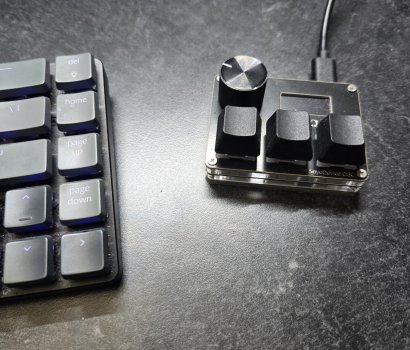
I copy and paste so often I attached a 3-button programmable keypad (cut , paste, return) instead of reprogramming the keyboard.
 

Attachments

  • 20251130_215457.jpg
    20251130_215457.jpg
    693.1 KB · Views: 3
Overall I have successfully migrated anything I did on the PC to the Mac, with a couple minor, games related exceptions. I am working on finding out how to do that.
I wish I had the talent to create content in Youtube because one thing that is sorely lacking is videos of people using Macs as regular computers.

Per Youtube, every single Mac use is an "artist" but nobody else uses a Mac as a regular computer.
 
I copy and paste so often I attached a 3-button programmable keypad (cut , paste, return) instead of reprogramming the keyboard.

Interesting.....
How do you map the buttons, and can any function be mapped?
Could use one myself for common Final Cut Pro tools/shortcuts....
 
Interesting.....
How do you map the buttons, and can any function be mapped?
Could use one myself for common Final Cut Pro tools/shortcuts....
IIRC you plug in the usb, then navigate to a sayodevice webform or something, and select which macros you want. It is a one time programming. If I wanted to reprogram the keys I would have to do the process over again. I believe any keypress combination can be programmed. It seemed simple at the time.

Ergonomically it is comfortable since the hotkeys can be placed away from the keyboard wherever your hand naturally rests.
 
  • Like
Reactions: Ifti
Register on MacRumors! This sidebar will go away, and you'll see fewer ads.