Become a MacRumors Supporter for $50/year with no ads, ability to filter front page stories, and private forums.

Synap

macrumors newbie
Original poster
Happy New Year folks. I was having fun over the holidays trying to project the performance of the M5 Max and M5 Ultra based on the various past performance ratios we have seen from Apple. Except for the AI race, Apple seems to be managing performance improvements on a rather consistent geometric pace.

I based my projections on geekbench.com and geekbench.ai published numbers. Thank you to Geekbench and all the folks that have uploaded their system benchmarks. BTW, don't forget to benchmark your laptop when it is plugged into a power source and otherwise idle for consistency.

I have read that the M5's 16 neural processors are much faster (~4x) than the M4 in a variety of operations. So my logic was to use scale up the M5 performance for the M5 Max and M5 Ultra based on the M4 to Max & Ultra ratios.

My thinking is that Apple will maintain for (i) M5 to M5 Max and (ii) M5 Max to M5 Ultra:
  • the memory bandwidth improvement ratios
  • the increase in the number of CPU and GPU processors
Below is the result of my work:

CPUCPUCPUGPUGPUGPUNeuralNeuralNeural
Single
CPU
Multi
CPU
MetalSingle
Precision
Half
Precision
QuantizedSingle
Precision
Half
Precision
QuantizedSingle
Precision
Half
Precision
Quantized
Computation:Projection:
M5 x M4 Max / M4M5 Max4,55127,375245,9126,49610,4488,01536,14263,79858,1606,43242,28056,610
M5 x M4 Max / M4 x M3 Ultra / M3 MaxM5 Ultra4,63637,431394,2117,46011,8319,10138,93968,45662,5227,20243,04857,094

Consistent baselines for all inputs:
  • All AI benchmarks were using the Core ML
  • All MacOS versions were 26.2 or 26.3.
Here is the input data that I used for my computations:

CPUCPUCPUCPUCPUGPUGPUGPUNeuralNeuralNeural
ModelModel IDCPU ModelO/SSingle CPUMulti CPUMetalSingle PrecisionHalf PrecisionQuantizedSingle PrecisionHalf PrecisionQuantizedSingle PrecisionHalf PrecisionQuantized
Mac Studio (2025)Mac15,14M3 UltraMacOS 26.2 (Build 25C56)3,25028,359230,3645,3898,6416,78221,40123,83522,2625,25830,18132,784
MacBook Air (13-inch, 2025)Mac16,12M4MacOS 26.2 (Build 25C56)3,74915,28854,8914,9127,9116,2948,91410,48010,3054,94336,18650,716
MacBook Pro (14-inch, Nov 2023)Mac15,3M3MacOS 26.3 (Build 25D5087f)3,16911,53246,3472,6114,2233,2598,38210,0558,6365,72837,08050,210
MacBook Pro (14-inch, 2025)Mac17,2M5MacOS 26.2 (Build 25C56)4,31917,87175,2435,3288,6996,90513,61925,48424,4155,35041,59957,122
MacBook Pro (14-inch, Nov 2023)Mac15,10M3 MaxMacOS 26.2 (Build 25C56)3,19020,740143,7034,6937,6315,97319,86422,21320,7094,69629,64232,506
MacBook Pro (16-inch, 2024)Mac16,6M4 MaxMacOS 26.2 (Build 25C56)3,95023,418179,3975,9899,5027,30623,65626,23624,5485,94336,77850,261
Mac Studio (2025)Mac16,9M4 MaxMacOS 26.2 (Build 25C56)4,08926,652179,3976,0289,6067,44921,42824,03822,3656,01736,46949,202

Hope you find this interesting and potentially useful.
 
Last edited:
For readers that cannot read the charts- change your browser to night mode (black background). The text of the charts is rendered in white text which is not visible if your browser is using a white background.
 
For readers that cannot read the charts- change your browser to night mode (black background). The text of the charts is rendered in white text which is not visible if your browser is using a white background.
Thank you Smash1!

I hate light mode so I didn’t notice that the paste from Numbers was white text and invisible in Light mode. I put my system in Light mode and then edited the text in Pages.

I can now read in both Light and Dark mode.
 
Predicted:


CPUCPUCPUGPUGPUGPUNeuralNeuralNeural
Single
CPU
Multi
CPU
MetalSingle
Precision
Half
Precision
QuantizedSingle
Precision
Half
Precision
QuantizedSingle
Precision
Half
Precision
Quantized
Computation:Projection:
M5 x M4 Max / M4M5 Max4,55127,375245,912

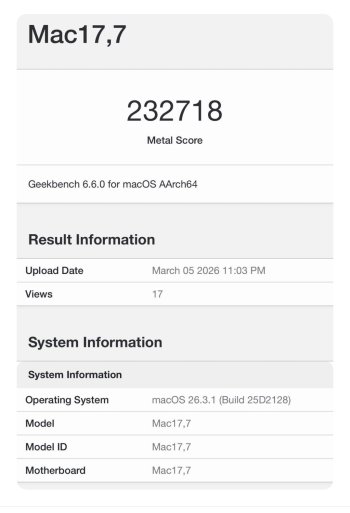
Based on early results it looks like the M5 Max scores are:
Single CPU = ~4,300
Multi CPU = ~29,000
Metal = ~230,000

So the M5 Max appears less improved over the M5 than the M4 Max is improved over the M4 except for the Multi CPU performance.
 
  • Like
Reactions: lapstags
IMG_2921.jpeg
 
M3 Ultra and M4 Max performance is similar to desktop RTX 4060 based on Cyberpunk 2077 max options so we'll see how M5 Max performs.

But I wouldn't expect high performance as long as Apple limited memory bandwidth, TBDR rendering, and limited power consumption.
 
M3 Ultra and M4 Max performance is similar to desktop RTX 4060 based on Cyberpunk 2077 max options so we'll see how M5 Max performs.

But I wouldn't expect high performance as long as Apple limited memory bandwidth, TBDR rendering, and limited power consumption.
Apple's memory bandwidth is actually quite good for its compute size and TBDR rendering is a performance multiplier rather than a hinderance for most applications, including games. The main issue for Mac vs PC desktops is the third one you list - these are mobile chips and while Apple's CPU is so good they can do that and still offer competitive desktop performance, the Apple GPU simply doesn't have that level of advantage over its peers. Add in that most games are ports and to get Apple's best GPUs you are tied into also getting its best CPUs and so forth (high base VRAM), then the value proposition for gaming isn't great.
 
Apple's memory bandwidth is actually quite good for its compute size and TBDR rendering is a performance multiplier rather than a hinderance for most applications, including games. The main issue for Mac vs PC desktops is the third one you list - these are mobile chips and while Apple's CPU is so good they can do that and still offer competitive desktop performance, the Apple GPU simply doesn't have that level of advantage over its peers. Add in that most games are ports and to get Apple's best GPUs you are tied into also getting its best CPUs and so forth (high base VRAM), then the value proposition for gaming isn't great.
Apple GPU still lacks 1TB/s grade and beyond like 80/90 series and workstation GPU, still using TBDR which isn't great for complexed 3D works, too limited power consumption, Metal optimization, and more.

The hardware itself is still limited so far compared to highend GPU.
 
  • Haha
Reactions: OptimusGrime
Apple GPU still lacks 1TB/s grade
You have to compare bandwidth size to compute size. Apple's bandwidth is easily commensurate with the size of their GPUs.

and beyond like 80/90 series and workstation GPU,

Apple's high end Ultra GPUs are great at workstation tasks due to their high VRAM capacity which consumer Nvidia chips lack. Unfortunately this rarely comes up in standard benchmarks since standard benchmarks want to run on consumer hardware and simply having it not run isn't useful for most people. That said, Apple GPUs do top out at smaller core counts with lower clock speeds. They are still performant regardless, they just can't quite close the gap to their desktop Nvidia counterparts in all but a few applications.

still using TBDR which isn't great for complexed 3D works,

That's the opposite: TBDR is actually better for complex 3D workflows, it's simple 3D scenes that you can't get any benefit out of it - the fewer things on screen that are occluding each other, the less benefit you get.

too limited power consumption,
Yes, for desktops
Metal optimization,
No idea what this means, that most apps aren't optimized for Metal? If so, true.
and more.

The hardware itself is still limited so far compared to highend GPU.
Citation needed.
 
Last edited:
You have to compare bandwidth size to compute size. Apple's bandwidth is easily commensurate with the size of their GPUs.
Tell that to GPUs with faster than 1TB/s of bandwidth.

Apple's high end Ultra GPUs are great at workstation tasks due to their high VRAM capacity which consumer Nvidia chips lack. Unfortunately this rarely comes up in standard benchmarks since standard benchmarks want to run on consumer hardware and simply having it not run isn't useful for most people. That said, Apple GPUs do top out at smaller sizes with lower clock speeds.
VRAM is just a size of the memory, not the GPU performance itself. It only allows to work with big projects, nothing more. Even M3 Ultra and M4 Max are only as good as RTX 4060, that's all. Where is 5090 or workstation grade GPU?

That's the opposite: TBDR is actually better for complex 3D workflows, it's simple 3D scenes that you can't get any benefit out of it - the fewer things on screen that are occluding each other, the less benefit you get.
Wrong, TBDR is mobile based rendering because it can not handle complex and high performance. That's where IMR is needed and Nvidia has proven faster.

No idea what this means
CUDA is a standard while Metal is Apple's proprietary standard while only few are taking advantages. Besides, who even use Mac for 3D works?.
 
Last edited by a moderator:
  • Haha
Reactions: OptimusGrime
Tell that to GPUs with faster than 1TB/s of bandwidth.
Those GPUs are also bigger ... hence the bigger bandwidth ...
VRAM is just a size of the memory, not the GPU performance itself. It only allows to work with big projects, nothing more. Even M3 Ultra and M4 Max are only as good as RTX 4060, that's all. Where is 5090 or workstation grade GPU?

That's part of what makes a good workstation GPU ... if you can't work on big projects ... not a lot of point to having a 5090 for workstation tasks is there?

Apple's workstation GPU is the Ultra.

Wrong, TBDR is mobile based rendering because it can not handle complex and high performance. That's where IMR is needed and Nvidia has proven faster.
That's simply not true. Do you know what TBDR actually is?
CUDA is a standard while Metal is Apple's proprietary standard while only few are taking advantages. Besides, who even use Mac for 3D works?
If so, then why are you bothering to compare them?
 
Last edited by a moderator:
Those GPUs are also bigger ... hence the bigger bandwidth ...
Then why do you bother to compare? You just admitted the problem then.

That's part of what makes a good workstation GPU ... if you can't work on big projects ... not a lot of point to having a 5090 for workstation tasks is there?

Apple's workstation GPU is the Ultra.
And Apple is the one who ditched workstation itself, Mac Pro. Mac Studio is far from being a workstation.

That's simply not true. Do you know what TBDR actually is?
TBDR has been used since PowerVR era and the main reason of using TBDR on mobile is due to the power consumption and limited GPU performance as a mobile device. Even Mac was using IMR until they got Apple Silicon.

If so, then why are you bothering to compare them?
You are not realizing the limitation after all.
 
Last edited by a moderator:
  • Haha
Reactions: OptimusGrime
Register on MacRumors! This sidebar will go away, and you'll see fewer ads.