Went from macOS Sonoma to Sequoia yesterday and it had the same dark pattern screen, defaulting to auto updates on unless you clicked the tiny obscured text to opt out like it was previously set.

Got a tip for us?
Let us know
Become a MacRumors Supporter for $50/year with no ads, ability to filter front page stories, and private forums.
PSA: iOS 26.2 Turns on Automatic Software Updates for Some Users
- Thread starter MacRumors
- Start date
- Sort by reaction score
You are using an out of date browser. It may not display this or other websites correctly.
You should upgrade or use an alternative browser.
You should upgrade or use an alternative browser.


Mr_Ed
macrumors 68000
🤣Forgot about that episode. Thank you!apple owns it, you only have a license to use it. you should really read the terms and conditions before clicking yes
Mr_Ed
macrumors 68000
Thanks for the heads-up. Will be paying attention on the 18.7.3 update.Don’t like that Apple is using Dark Patterns with their updates. They also released 18.7.3 yesterday and when you go to update Apple takes you to its 26 page and you need to unintuitively click the back button to get the 18.7 update.


Bazza1
macrumors 65816
Yup. Happened here. So it's gonna become part of a list of things I check after each update to ensure it's still how I want it - not how Nanny Apple wants it. No change here with AI / Siri. Still off. And mostly disabled Liquid Glass, too.

Astuces iOS
macrumors 68040
Yeah this is very important 👍Yes. If they want to inform the users just do a notification in the settings. If there is a need to turn on some settings for a new feature don’t turn them on automatically. Just inform the user. Like they do with access to camera for apps.

turbineseaplane
macrumors Penryn
Went from macOS Sonoma to Sequoia yesterday and it had the same dark pattern screen, defaulting to auto updates on unless you clicked the tiny obscured text to opt out like it was previously set.
I just made a thread in the Sequoia area about how VERY careful you have to be.
They flat out lie to you on the front page area of Software Update and it's only discovered if you click the little "i" and dig into what they are actually about to install (Tahoe).
Even worse (if that's possible), if your manually selected Sequoia update fails for any reason and you start again, it reverts to opting you into the Tahoe upgrade you specifically un-selected.
This company is rotten to the core under Tim Cook.
I'm so excited for a major shake up at Apple.
Thread:
15.7.3 - Be very careful updating. Dark pattern pushing Tahoe
And if your manually selected update fails, and you start again, they RE-SELECT the macOS 26 "upgrade". This indefensible behavior by Apple.
 forums.macrumors.com
platinumaqua
macrumors 65816
Like iCloud settings that keeps resetting to “on” after a major update despite it being off originallyAlready on my list of things to check after updates that might have ‘mysteriously’ changed.

Robert.Walter
macrumors 68040
Most folks probably don’t care.I want neither automatic updates nor automatic downloads.
The switch to turn these off is now for you!

DENZIE
macrumors 6502
no my 12 mini went up to 26.1 the other night (from 18.7.2) even when I’d said no to the software update popup the day beforeMigrating to major new releases (iOS 26 to iOS 27) is still a user decision. These automatic updates are just for the minor releases in between major releases.
Correct me if I'm wrong.
Last edited:
Mr_Ed
macrumors 68000
So, I looked in my 15PM and 18.7.3 was not available to me at all (I’m currently on 18, automatic updates and/or downloads OFF). Only 26.2 was offered to me so I decided to try your suggestion. Turning on “iOS 18 Developer Beta” in “Beta Updates”, then hitting “Back” instantly showed 18.7.3.Pro Tip.
If you NEVER want Apple forcing 26 on any of your devices it’s NOT enough to turn off “Automatic Updates” in Settings. You must sign up for the “Beta Developer” account at Apple.com. Once your do that either turn off your devices and turn them on again or log out and log back in to your Apple account and go back into Settings on your devices. Go to “General”. “Software Update”. Look for “Beta Updates”. Turn that “ON”. Now you will see the options for Betas of either 26 or 18 for iOS or for “15 Sequoia” or “26 Tahoe”. Choose iOS 18 for your phone and 15 Sequoia for your MacBook. It will cycle for a second and voila !!….you will only see updates to either iOS 18 or MacOS 15 forever until Apple stops sending out updates for those versions or until YOU choose to update to 26 or higher.
Let the masses be the continual beta testers for 26. I’m not touching 26 until it’s call 27.1
At this point this is looking like a pretty underhanded thing on Apple’s part. If patching vulnerabilities is really that important, why hide 18.7.3 at all?
I just checked and it did it on my phone. Thanks to this article for putting the info out so I could turn that off again.

jchap
macrumors 6502a
That CrowdStrike screwup stranded me at the airport waiting in line for seven hours, and separated me from my loved ones for four days after a death in the family.One business that I can think of that learned their lesson on this fundamental rule the hard way actually happened just last year - CrowdStrike at a mere cost of $5.4B

CrowdStrike global outage to cost US Fortune 500 companies $5.4bn
Banking and healthcare firms, major airlines expected to suffer most losses, according to insurer Parametrixwww.theguardian.com
I still don't understand exactly how a simple software update process could possibly bring the U.S. airport network to its knees, but countless people were affected by this foolish oversight.
Not that this has anything to do with Apple's choice to single-mindedly disqualify a user setting for an update without their consent, but just saying.
no my 12 mini went up to 26.1 the other night (from 18.7.2) even when I’d said no to the software update popup the day before
I think they did more than just mess with checking user permissions for the update procedure, they also removed some of the security requirements for it. A few minutes ago I checked my iPad 9 and it said I had yet another dev beta update scheduled for late tonight, but when I clicked through to tell it to go ahead and do it now, it just made me agree to terms. It did not make me enter my PIN number like every previous time I've manually told it to update.
An-apple-a-day
macrumors regular
This is slightly off-topic but certainly related... MacOS 15.7.3 update quietly enabled auto-update. Not very nice. It appears that Apple is trying hard to push the v26 OS upgrades.

turbineseaplane
macrumors Penryn
iOS 26 continues to be quite "popular".


Howard2k
macrumors 604
This is slightly off-topic but certainly related... MacOS 15.7.3 update quietly enabled auto-update. Not very nice. It appears that Apple is trying hard to push the v26 OS upgrades.
This didn't happen to me for either iOS 26.2 or MacOS 15.7.3.
Agree, this has been for years and is still annoyingHasn’t it been doing this for a long time? I remember having several updates where I got that screen, I don’t think this is new
It’s nice to just shout something out and to point fingers without having to proof anything, isn’t it?For the moment until Apple pulls the plug on that!

Max Webb
macrumors member
Apples automatics usually wait a few weeks to a month before they actually download. Nothing happens straight away.Some people, such as myself, prefer to wait a bit before doing an update. Lots of businesses don’t want to jump on day one for obvious reasons.
I guess you don't understand the point of a PSA. It's only a matter of time before Apple pushes automatic updates for security purposes.It’s nice to just shout something out and to point fingers without having to proof anything, isn’t it?

FeliApple
macrumors 603
So in that hypothetical case it would be forced? They would update everything I have, forcefully, and there would be nothing I can do?I guess you don't understand the point of a PSA. It's only a matter of time before Apple pushes automatic updates for security purposes.
I’d go to Android immediately if that were the case. I update nothing. It would just make iOS pointless if that were to happen.
no_brag_just_fact
macrumors newbie
After installing iOS 26.2, if you're just tapping through screens, you could miss the update turning on automatic software updates.
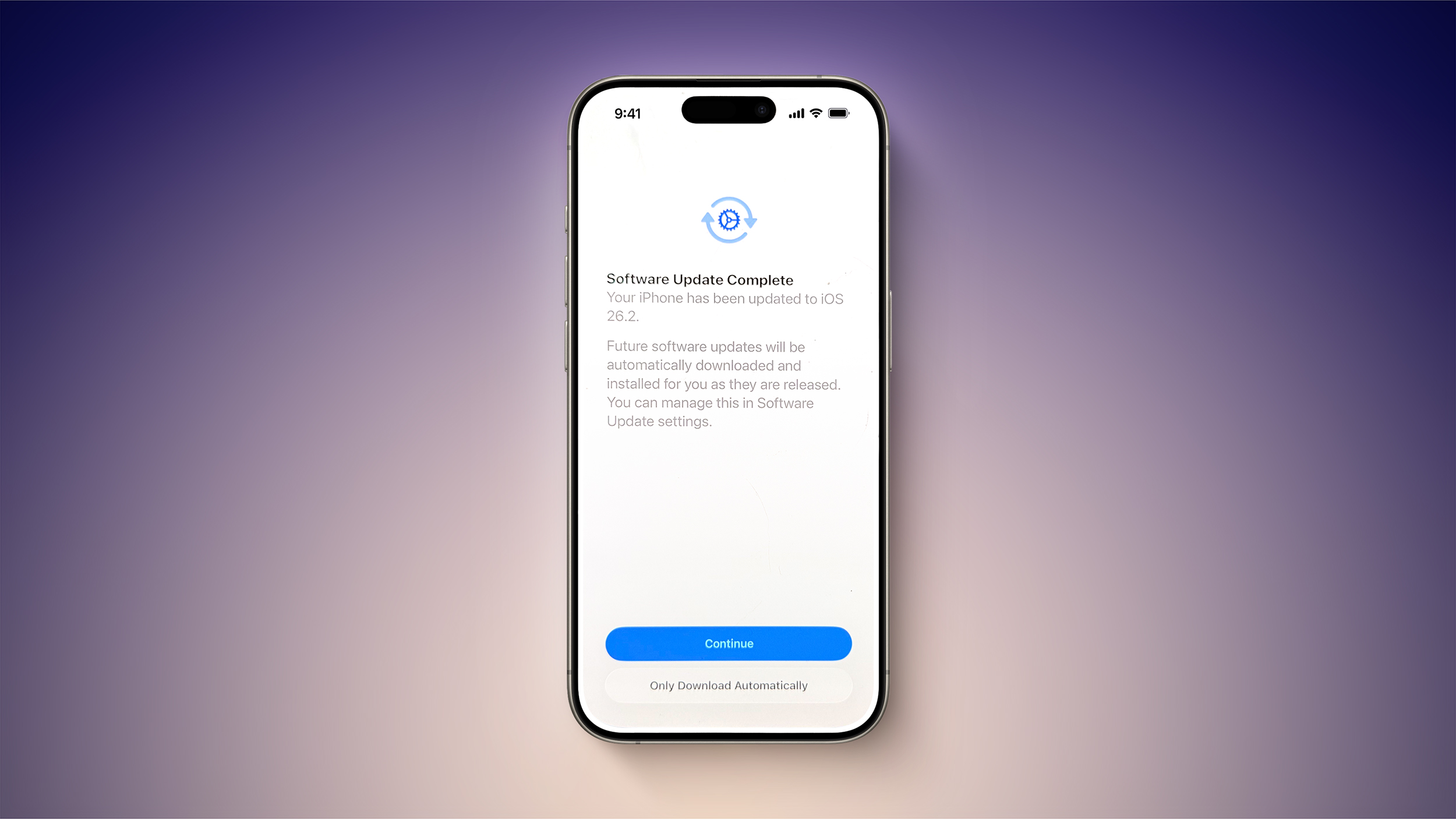
At the "Software Update Complete" stage where you normally tap on continue to get to the Home Screen, there might be an extra little bit of information. Some users are seeing a warning that future updates will be automatically downloaded and installed, with the option toggled on automatically if the Continue button is tapped. There's a subtle "Only Download Automatically" option that does not opt you into automatic updates if you're paying attention, but it's easy to miss.
You won't see iOS 26.2 turn on automatic software updates if you already have them on, and it doesn't even seem to be showing up for all users that have automatic update installation turned off. You might want to double check your settings just in case, and even if iOS 26.2 didn't turn on automatic software updates, it's worth knowing about the possibility because it's an option that Apple can sneak into any update. If you've ever had an update mysteriously install on your device when you didn't manually do it, it's probably because automatic software updates was quietly turned back on.
If you did install iOS 26.2 and accidentally turned on automatic updates, you can undo it by going to General > Software Update > Automatic Updates and toggling the option off. From there, you can choose to allow updates to automatically download, and toggle off the automatic installation of system files.
Article Link: PSA: iOS 26.2 Turns on Automatic Software Updates for Some Users

After installing iOS 26.2, if you're just tapping through screens, you could miss the update turning on automatic software updates.
At the "Software Update Complete" stage where you normally tap on continue to get to the Home Screen, there might be an extra little bit of information. Some users are seeing a warning that future updates will be automatically downloaded and installed, with the option toggled on automatically if the Continue button is tapped. There's a subtle "Only Download Automatically" option that does not opt you into automatic updates if you're paying attention, but it's easy to miss.
You won't see iOS 26.2 turn on automatic software updates if you already have them on, and it doesn't even seem to be showing up for all users that have automatic update installation turned off. You might want to double check your settings just in case, and even if iOS 26.2 didn't turn on automatic software updates, it's worth knowing about the possibility because it's an option that Apple can sneak into any update. If you've ever had an update mysteriously install on your device when you didn't manually do it, it's probably because automatic software updates was quietly turned back on.
If you did install iOS 26.2 and accidentally turned on automatic updates, you can undo it by going to General > Software Update > Automatic Updates and toggling the option off. From there, you can choose to allow updates to automatically download, and toggle off the automatic installation of system files.
Article Link: PSA: iOS 26.2 Turns on Automatic Software Updates for Some Users
Attachments

no_brag_just_fact
macrumors newbie
They told me I saw this when I upgraded to ios 17.
I never saw it then, never saw it when ios 18 automatically updated
BEWARE.