Become a MacRumors Supporter for $50/year with no ads, ability to filter front page stories, and private forums.

dadders6

macrumors regular
Original poster
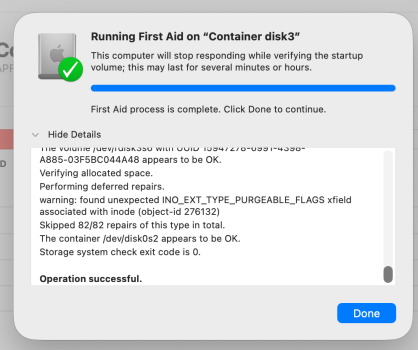
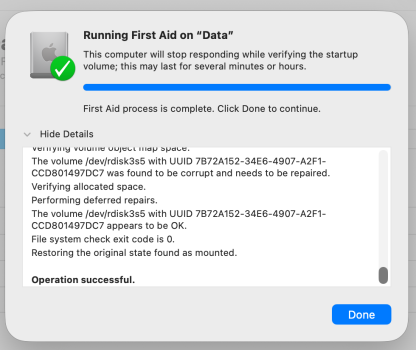
I have an M3 iMac, refurbed by apple. (about 2 months old) It's working fine, but when I run First Aid, I get several notices/warnings (screenshots). I then went to recovery mode, and ran First aid again, but it didn't fix those errors. Is the only way to clear these errors is to wipe/reinstall? I'm a bit squeamish about that level of messing-with-my-computer. I assume that my Time machine version of Tahoe has those same errors, so I'd have to download a clean version from the cloud? Should I first download a copy onto external drive/thumb, then attempt it? Then, if I manage to clean install and not screw up my mac, my Time machine backup would have all the programs I've paid for - photoshop etc? - Thanks in advance (all my photos/vids/docs etc are all externally backed up separately as well as time machine-d)
---
Some google answers sound like one can go Recovery Mode, then reinstall, but wouldn't the existing Tahoe have the errors I'm trying to get rid of?
 

Attachments

  • Corrupt_Data 2026-04-26.png
    Corrupt_Data 2026-04-26.png
    162.3 KB · Views: 22
  • iNode 82:82 container 3 Screenshot 2026-04-26.png
    iNode 82:82 container 3 Screenshot 2026-04-26.png
    175.3 KB · Views: 15
Is the only way to clear these errors is to wipe/reinstall?
If it keeps reoccuring after first aid, yes. If it occurs after a wipe, then you have a bad SSD.
I assume that my Time machine version of Tahoe has those same errors
Time Machine hasn't backed up the OS itself since Catalina, I believe. Restoring from TM won't restore the OS.
Should I first download a copy onto external drive/thumb, then attempt it?
Yes, I've found cloud recovery not to be the most reliable experience.
my Time machine backup would have all the programs I've paid for - photoshop etc?
As long as you didn't exclude them from time machine.
 
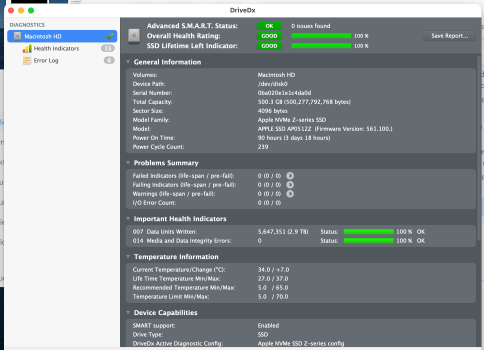
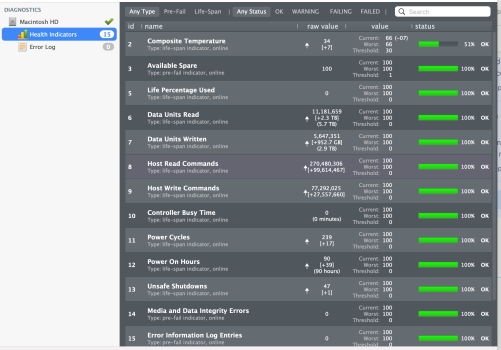
Oh, i forgot to mention that "DriveDX" shows all 'green', on the main screen and the sub-screen
 

Attachments

  • Drive X 2026-04-27.png
    Drive X 2026-04-27.png
    388.4 KB · Views: 3
  • SDrive DX 2 creenshot 2026-04-27 at 1.41.02 AM.png
    SDrive DX 2 creenshot 2026-04-27 at 1.41.02 AM.png
    413.5 KB · Views: 3
Manually unmount the volume before running First Aid from Recovery. Disk Utility sometimes doesn't do that.

Apple used to say “Repair volumes, then containers, then disks”, now it says "For each device that you're repairing, start by selecting the last volume on that device. In the example above, Macintosh HD - Data is the last volume."
https://support.apple.com/en-us/102611
 
Register on MacRumors! This sidebar will go away, and you'll see fewer ads.