Become a MacRumors Supporter for $50/year with no ads, ability to filter front page stories, and private forums.

nightshadeee

macrumors member
Original poster
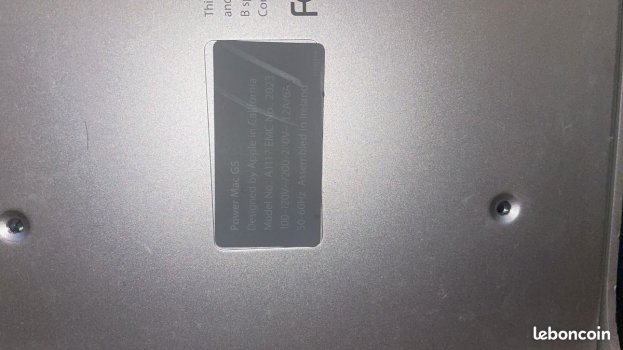
I just pulled the trigger on a "barn find" PowerMac G5 for only 10€. It’s a Late 2005 Dual Core (PCIe) model. I'm planning to restore it as a dedicated station for PlayerPro music tracking and some retro-coding.

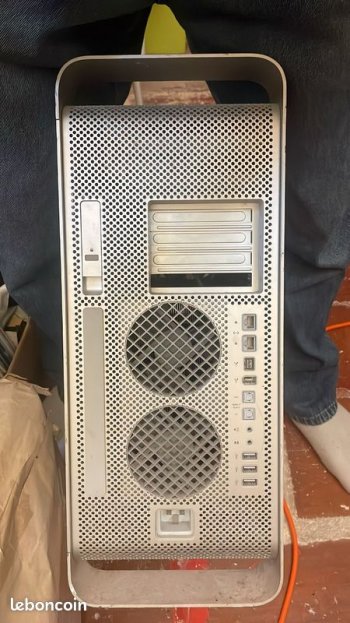
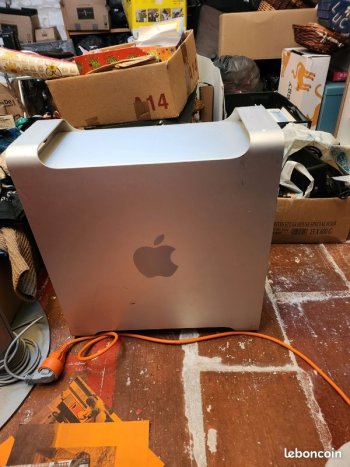
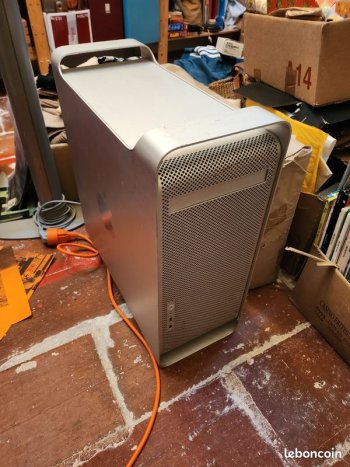
The seller (a guy from a rural area) had it sitting in a dry-ish attic, but looking at the pictures, I’m seeing some concerning signs of oxidation on the exterior chassis, specifically on the rails and front panel area.

The Plan:

  • Phase 1: Get the "GONG". I have a fresh 3.6V Tadiran battery and a C19 cable ready for a deep SMU reset.
  • Phase 2: GPU and Storage. It's missing the GPU, so I'll be hunting for an OEM Nvidia 6600 or similar.
  • Phase 3: Total cleanup and software setup (Leopard).
My concerns (and where I need your expertise):

  1. The Corrosion: Looking at the attached photos, does this white powdery residue on the lower rails look like "surface only" oxidation to you? I'm worried it might have crept inside the PSU or under the logic board.
  2. The "Clean" Interior: Interestingly, under the air deflector, the G5 heatsinks and the logic board look surprisingly dust-free and shiny. Is it common to have exterior corrosion with a pristine interior?
  3. Safety first: Before the first boot, should I be worried about the PSU exploding if it’s been in a humid environment? I have a multimeter ready to check the battery and some basic rails.
I'm attaching the photos from the listing. I'll be receiving the machine in about 2 weeks.

What do you guys think? Is this a diamond in the rough or a ticking corrosion bomb?

Thanks for the help!
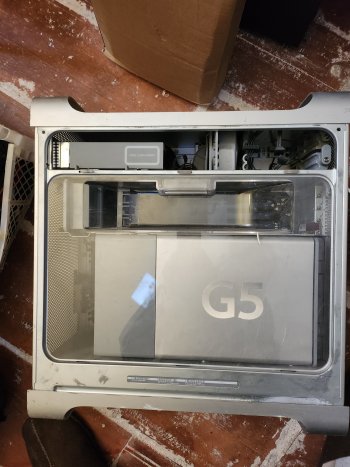
 
Here's some pics :
 

Attachments

  • aff1faa0-2fa0-11f1-a60e-f5ecac9749db.jpeg
    aff1faa0-2fa0-11f1-a60e-f5ecac9749db.jpeg
    1.6 MB · Views: 124
  • 3a6457d04a8b17e0b7d8ef84ead876a055512017.jpg
    3a6457d04a8b17e0b7d8ef84ead876a055512017.jpg
    88.7 KB · Views: 123
  • 1129ac1f7d29baf03c8c10863e70f0adf3a987f3.jpg
    1129ac1f7d29baf03c8c10863e70f0adf3a987f3.jpg
    87.1 KB · Views: 113
  • 2401359ed9c7573d72881aae08f7641e97f1d97c.jpg
    2401359ed9c7573d72881aae08f7641e97f1d97c.jpg
    102.5 KB · Views: 125
  • 60588ed6ec02fcc3f43bc6fe7546dbda7154fa1c.jpg
    60588ed6ec02fcc3f43bc6fe7546dbda7154fa1c.jpg
    127.6 KB · Views: 130
  • Like
Reactions: MisterAndrew
Congrats on getting a cool machine at such a low price.
From the pictures it looks good, but of course you will know better when it arrives.

I recommend using a variac (variable transformer) on first power up if it hasn't been on in a long time. Basically plug the Mac into the variac and the variac into the wall. Then start at 0V and ramp it up to 110 or 220/240V (depending on your location) over a 5 second period.

Then hit the power button.

This is a sort of 'soft start' procedure that I use for anything that hasn't been powered up for a year or more.
 
Thanks for the advice! I don't have a Variac on hand, but I'll definitely do a visual inspection of the PSU caps and let it sit plugged in for a while before the first boot.

Though, I'm a bit hesitant to pull the PSU right away since it involves removing the CPU heatsinks. I'll start with a thorough visual inspection using a bright flashlight through the mesh and vents to check for any obvious leakage or debris.
 
  • Like
Reactions: ID_Field_Blank
I recommend using a variac (variable transformer) on first power up if it hasn't been on in a long time. Basically plug the Mac into the variac and the variac into the wall. Then start at 0V and ramp it up to 110 or 220/240V (depending on your location) over a 5 second period. This is a sort of 'soft start' procedure that I use for anything that hasn't been powered up for a year or more.
Undervoltage is one of the worst things you can do to modern electronics, so I wouldn't recommend doing that. If a capacitor is going to blow it's going to do that regardless of whether you give it 120V immediately or gently scale it up.

In the case of a PowerMac G5, the biggest problem are the power supplies. As I recall, they don't damage the computer, the power supply just stops working.
 
  • Like
Reactions: NC12
Hmm that is hard to pin down. It was in a barn so exposure to a decent amount of moisture seems entirely possible. My first guess on the corrosion is that it’s from humidity as it’s above the psu. If the caps in the psu were bad or leaking, that corrosion would be on the bottom of the case, not above the psu unless it was stored on its side. In that scenario, leaky caps would potentially drip and crea more corrosion in that area. I lean towards humidity from what I see though. The tops of the feet look more like dirt/dust than corrosion in the pics but they’re not great.

As far as the psu, if you are concerned that it could damage your logic board, you can disconnect it and the jump it with a paper clip or piece of wire by inserting each end in (blue)pin 4 & pin 5(green). If it’s going to fail, likely it would then and the fans won’t spin up. At that point you’d know you need to buy a new PSU or recap the psu you have.

*Added*

What do you guys think? Is this a diamond in the rough or a ticking corrosion bomb?

There is some exploration to do.
1.) Is the psu good?
Yes - Do fans power up?
No - Buy replacement psu or recap.
2.) Is the logic board good?
Yes- Does it chime? Buy a gpu.
No - Check & reseat ram in matched pairs per manual.
No - are the CPUs not seated correctly? Reseat CPU+heatsink.
No - any obviously missing or blown capacitors? Replace with new.
No - Buy new logic board. Buy a gpu
3.) Does the pcie video slot work? Does it produce a picture?
Yes - buy ssd and install ssd and macos
No - is the gpu an apple gpu? Is it bad? Replace/repair the gpu

There is a lot unseen and unknown with this purchase and a lot of money to spend potentially in a worst case scenario to rebuild but at a minimum, you get a cool case for a pc build.

But for 10 Euro + the cost of an apple gpu, it could be fun to see if it “just works” as is out of the barn 😀

Good luck.
 
Last edited:
Okay ! Happy to learn from you guys, helps a lot.

I'll try the jumper idea, looks like a really great thing to do to clear all doubts about the PSU. 🙂
 
Undervoltage is one of the worst things you can do to modern electronics, so I wouldn't recommend doing that. If a capacitor is going to blow it's going to do that regardless of whether you give it 120V immediately or gently scale it up.

In the case of a PowerMac G5, the biggest problem are the power supplies. As I recall, they don't damage the computer, the power supply just stops working.
I agree that running at low voltage is harmful, but ramping up over 5 seconds before powering up isn't an under voltage condition.

Assuming a split phase mains, if you just plug it in and power it up when the AC is at zero crossing, that's the best case scenario and has the least chance of causing failure. That happens 60 times or 50 times a second depending on location.

If at the moment you power up the waveform happens to be at a peak, that's the worse case scenario and carries the biggest risk of a cap or a MOV on the primary side going pop.

There is zero risk to an SMPS or LPS doing what I suggest.
 
Last edited:
Thanks everyone for the amazing feedback! Special thanks to Certificate of Excellence for the breakdown on gravity-fed corrosion—that makes me feel a lot better about the PSU's health. I'll definitely go with the safety pin/paperclip jump on pins 4 & 5 to test the PSU in isolation first.

I don’t have a Variac, so I’ll stick to a very thorough visual inspection and let the caps "warm up" while plugged in (but powered off) for a couple of hours before the first attempt.

Since the G5 is arriving in about two weeks, I want to be fully prepared. What should be my "Day 1" checklist once I get the box?

Here is what I have planned so far:

  1. External Cleanup: Remove the white oxidation from the rails (brush/vacuum).
  2. Visual Inspection: Looking for leaking caps on the logic board or debris inside the PSU mesh.
  3. PRAM Battery: Installing a fresh 3.6V Tadiran.
  4. The "Jump": Testing the PSU with the paperclip method.
  5. The GONG attempt: Minimal boot (1 pair of RAM, no drives).
Am I missing any critical steps? Specifically, should I be worried about the thermal paste on the CPUs after 20 years, or should I leave the heatsinks alone if it boots?

Thanks again for the help, this community is awesome!
 
I have a fresh 3.6V Tadiran battery
The late 2005 PCIe models use a regular cr2032 coin cell. Good luck with the journey! These are beautiful machines and still very nice to use today. Eager to follow your progress.

I would certainly recommend changing the thermal paste if you can. Since taking the PSU out involves removing everything and taking the whole board out, repaste the U3 heatsink on the back of the motherboard if you can, it gets hot. The house of moth has a great article about this: https://thehouseofmoth.com/a-little...-mac-g5-and-what-to-do-with-this-information/
 
Last edited:
Thanks everyone for your replies, helps a lot, i'm getting the G5 in a week if everything goes well

I was asking myself, can the machine "bong" without a GPU ? because the G5 that i bought didn't come with an Apple CG and i was thinking that i could potentially buy a GT 6600 and flash it, but idk if it's doable as is.

I got myself a CR2032 instead of a Tadiran 3.6V battery too, and a multimeter, just in case.

I didn't invest in a thermal paste though, i'll be trying to check if the PSU is still alive before committing to buying a GPU and a thermal paste.

Thanks !
 
I was asking myself, can the machine "bong" without a GPU ? because the G5 that i bought didn't come with an Apple CG and i was thinking that i could potentially buy a GT 6600 and flash it, but idk if it's doable as is.
IIRC the PMG5 requires the gpu to post, so no gpu=no chime/bong. I could be wrong but that’s what my mushy brain recalls anyways. I’ll grab one of my PMG5s to verify.

Update*

This is completely untrue: both my a1117 & older a1047 will still chime without their gpus.
 
Last edited:
Hey everyone, thanks again for all the advice!

Quick update now that I have the machine in my hands. The G5 arrived but took a hit during shipping — one of the top aluminum handles is bent, and the chassis might be slightly twisted, though the side door still closes fine.

Here's what I found on first inspection:

PSU: Seems alive. I hear a relay click when I plug in the C19 cable, and I have standby voltage. Haven't done the paperclip jump yet but it's on the list.

PRAM battery: Tested the old one at 2.7V with my multimeter — already swapped it for a fresh CR2032 as suggested.

The bad news — no POST at all:
When I press the power button, the front white LED lights up, but the moment I release it, the machine cuts everything instantly. No fans, nothing. And I get **one red blink on internal LED #7 (Checkstop)**. The hardware protection kicks in within milliseconds.

Steps already tried with no result:
- Cleaned the RAM contacts with IPA (though looking at the sticks... I probably should have been more thorough, they were pretty dusty)
- Reset the SMU via the onboard button
- Manually simulated the air deflector switch
- Tested with just 2 RAM sticks

Current hypotheses:
1. The shipping shock moved the heavy CPU/heatsink assembly, causing a contact misalignment → immediate Checkstop. Reseating the CPU would require 3mm and 4mm extra-long Allen keys (150-200mm) that I don't have.
2. No GPU = no POST on this PCIe revision (seen mentioned here in this thread too — curious if anyone confirmed this?)

I'm waiting on a GeForce 6600 GT (PC version) that I plan to flash with a Mac ROM on Arch Linux. That'll be my first test before committing to the CPU reseat.

Any thoughts on the Checkstop #7 + instant cutoff combo? Is this classic CPU contact loss after a shock, or have you seen other culprits produce this exact symptom?
 
EDIT: An important detail I forgot to mention — the seller told me the machine was already dead before shipping. So the Checkstop #7 + instant cutoff symptom was most likely pre-existing, not caused by the shipping damage. The bent handle is just an extra "bonus" from the delivery.

This probably rules out the CPU contact misalignment theory from the shock. The root cause is something else entirely. Back to square one on diagnostics, but the GPU test is still the easiest first step.
 
EDIT 2: A couple more details after closer inspection:

The PSU seems to be in decent shape — I get the relay click on C19 plug-in, standby voltage is present, and most importantly, the fans briefly spin up for a fraction of a second before the machine cuts everything. So the main rails do come up, the SMU just kills it immediately after the Checkstop. I don't think the PSU is the culprit here.

Really curious to hear if anyone can confirm whether the PCIe G5 will refuse to POST entirely without a GPU — that would explain everything cleanly.
 
Then i think i need to reseat the CPU.... crap
Before you do that, reseat your ram. Ram getting jostled by the shipper kicking around your parcel will also cause led7.

Also it may be that one of your sticks died causing that fault. I’d drop down to one pair of ram and see if you can get the pm to chime.

To install ram, your pm has a top and bottom bank and the sticks must be installed in pairs from the inner most slot of each bank outward.

Here’s a video explanation for the visual learners reading this.
 
Last edited:
Unfortunately i already tried this, with a pair of 512MB of DDR2 ECC original Apple RAM, led7 still occurs 🙁

I'll be trying the other pair and another layout tomorrow, i reaaaally don't want to reseat the CPU as I will have to run the thermal calibration program and I need to buy screwdrivers.

Thanks tho !
 
Good news, LED #7 briefly coming on as the power button is pressed is normal and not indicative of any issue. If you can get a little bit more information out of the seller whether its processor was ever disconnected (as well as if they recall when it stopped working and what happened beforehand), that would hopefully also definitely rule out the possibility of any failure in the CPU and potentially offer a better lead of where to look, since disconnecting the CPU is risky anyway as it is very easy to damage the delicate pins in the socket.

On another note, if the screws securing the heatsink to the chassis are sufficiently tight, there's no chance the CPU daughterboard could have come undone as a consequence of the damage from transit. That was just because the handles are very fragile and the box was poorly packed. Because they absorbed most of the kinetic energy from the drop, they were bent out of shape, which is the same basic principle behind why cars are designed with crumple zones, so that when there is a crash the chassis gets destroyed instead of the occupants.

On a hunch though, I'm also skeptical that it is the CPU since the logic board should be throwing another LED besides #7 if the firmware detects any issue with the daughterboard. At a glance, its behavior sounds almost more like a short of some type; if the PSU were truly dead it probably wouldn't show any life at all, and the A1117 models also used very robust power supplies since for all these years I have never heard of one ever failing on its own. So you could also try disconnecting the hard drive and optical drive to rule a peripheral short out since I have actually heard of failed optical drives in particular preventing machines from booting in the past.

Using a paperclip to jumpstart the PSU also isn't going to be as straightforward as an ATX PC since on the Late 2005 models electricity is delivered through a combination of both screws and traditional ATX-style plugs, the wires on the latter of which are not color-coded, if I recall correctly, so it will be difficult to identify the PS-ON pin. Furthermore if it is jumpstarted without first being completely disconnected from the logic board (by also removing the screws beforehand), it may fry the board.

In the meantime, you could also try holding the SMU button in for at least 30 seconds while the system is plugged in, perhaps without the battery installed. I think I may have encountered some similar behavior to this on mine years ago, and that procedure (or some combination of it) was what resolved it. If that doesn't go anywhere, then I'm 70% sure it's a short of some type, and the power supply is functioning normally by trying to protect the system and shutting off.

The good news at least is that your model is a 2 GHz dual core and not a quad core, so this isn't being caused by a rupture in the liquid cooling system as was common on older models and also possible on the 2.5 GHz configuration, in which case the coolant used was highly corrosive and would thus almost always destroy the board.

On a side note, if you want an OEM GPU instead of attempting a flash, here's the card that shipped with your machine:


Let us know how it goes.
 
Last edited:
  • Like
Reactions: nightshadeee
Good news, LED #7 briefly coming on as the power button is pressed is normal and not indicative of any issue. If you can get a little bit more information out of the seller whether its processor was ever disconnected (as well as if they recall when it stopped working and what happened beforehand), that would hopefully also definitely rule out the possibility of any failure in the CPU and potentially offer a better lead of where to look, since disconnecting the CPU is risky anyway as it is very easy to damage the delicate pins in the socket. If the screws securing the heatsink to the chassis are sufficiently tight, there's no chance the CPU daughterboard could have come undone as a consequence of the damage from transit. That was just because the handles are very fragile and the box was poorly packed.

On a hunch though, I'm also skeptical that it is the CPU since the logic board should be throwing another LED besides #7 if the firmware detects any issue with the daughterboard. At a glance, its behavior sounds almost more like a short of some type; if the PSU were truly dead it probably wouldn't show any life at all, and the A1117 models also used very robust power supplies since for all these years I have never heard of one ever failing on its own. So you could also try disconnecting the hard drive and optical drive to rule a peripheral short out since I have actually heard of failed optical drives in particular preventing machines from booting in the past.

Using a paperclip to jumpstart the PSU also isn't going to be as straightforward as an ATX PC since on the Late 2005 models electricity is delivered through a combination of both screws and traditional ATX-style plugs, the wires on the latter of which are not color-coded, if I recall correctly, so it will be difficult to identify the PS-ON pin. Furthermore if it is jumpstarted without first being completely disconnected from the logic board (by also removing the screws beforehand), it may fry the board.

In the meantime, you could also try holding the SMU button in for at least 30 seconds while the system is plugged in, perhaps without the battery installed. I think I may have encountered some similar behavior to this on mine years ago, and that procedure (or some combination of it) was what resolved it.

The good news at least is that your model is a 2 GHz dual core and not a quad core, so this isn't being caused by a rupture in the liquid cooling system as was common on older models and also possible on the 2.5 GHz configuration, in which case the coolant used was highly corrosive and would thus almost always destroy the board.

On a side note, if you want an OEM GPU instead of attempting a flash, here's the card that shipped with your machine:


Let us know how it goes.
Thank you so much for this detailed reply, this is really reassuring!

Very interesting to know that LED #7 briefly lighting up at startup might be normal behavior, that changes things quite a bit. I was convinced it was a definitive hardware fault indicator. Could you elaborate a bit on why LED #7 briefly flashing isn't necessarily a concern in my case? I want to make sure I understand what it actually means when it lights up momentarily vs. when it would be a real red flag.

To clarify the exact behavior I'm seeing:
- Brief press: front white LED and LED #7 both light up and turn off together, fans barely twitch for a fraction of a second
- Long press (~1 second): front white LED stays on while I hold the button, fans briefly spin, LED7 flashes once and goes off, but not the white LED

Regarding your short circuit theory: there is no hard drive connected at all, but the optical drive (DVD) is still plugged in. I'll disconnect it and test again, that's definitely worth trying before anything else.

Also worth noting: as far as I know, the previous owner never touched the CPU. So a CPU reseat being the cause seems less likely, though not impossible.

I'll also try the extended SMU reset (30 seconds while plugged in, without the PRAM battery) as you suggested.

As for the OEM GPU, unfortunately being based in France makes importing from US eBay quite expensive with shipping and customs fees. I actually have a PC GeForce 6600 GT on the way, and I'm planning to flash it with a Mac ROM on Arch Linux to get the boot screen. I know it's more involved than just buying the OEM card but I'm up for the challenge!

I'll report back once I've disconnected the optical drive and done the SMU reset. Thanks again for taking the time!
 
Last edited:
  • Like
Reactions: z970
Thank you so much for this detailed reply, this is really reassuring!

Very interesting to know that LED #7 briefly lighting up at startup might be normal behavior — that changes things quite a bit. I was convinced it was a definitive hardware fault indicator. Could you elaborate a bit on why LED #7 briefly flashing isn't necessarily a concern in my case? I want to make sure I understand what it actually means when it lights up momentarily vs. when it would be a real red flag.

Regarding your short circuit theory: there is no hard drive connected at all, but the optical drive (DVD) is still plugged in. I'll disconnect it and test again — that's definitely worth trying before anything else.

Also worth noting: as far as I know, the previous owner never touched the CPU. So a CPU reseat being the cause seems less likely, though not impossible.

I'll also try the extended SMU reset (30 seconds while plugged in, without the PRAM battery) as you suggested.

As for the OEM GPU, unfortunately being based in France makes importing from US eBay quite expensive with shipping and customs fees. I actually have a PC GeForce 6600 GT on the way, and I'm planning to flash it with a Mac ROM on Arch Linux to get the boot screen. I know it's more involved than just buying the OEM card but I'm up for the challenge!

I'll report back once I've disconnected the optical drive and done the SMU reset. Thanks again for taking the time!

As the label says, it's a checkstop to verify the CPU status before bootstrapping the rest of the machine. Flashing once at startup is the intended behavior since that shows that it's communicating with the CPUs, and if all is well, it turns off. If it stays on however, then it's not receiving a response back, in which case LED #1 would turn on as well to formally communicate that an error has occurred.

When I first got my machine (which is the exact same model as yours), I initially came to the same conclusion as you and thought that it needed to be reseated. It's been 10 years since then though, and in that span of time it has by far been the most rock solid computer I've ever used. Which makes sense since they are server-grade workstations expressly designed for commercial and enterprise usage; every part they are built with is much higher quality than you might have found in a contemporary retail PC. As such, I have a feeling this one might come around sooner or later.

Anyway, more info here:


Re: GPU, gotcha. I would suggest reading some of the guides on The Mac Elite before flashing however, so that there is no chance of encountering an unexpected issue midway:


Also... I don't mean to be blunt, but I would be much more comfortable talking to you instead of ChatGPT. 🙂

EDIT:

The behavior you're getting when the button is long-pressed is a very good sign, particularly if the white LED remains illuminated for however long it's held in (even for 5 seconds). Between the standby voltage, circuit relay, brief fan spin, LED #7, and absence of LED #1, I'm almost certain both the PSU and CPU are fine. They do not sound dead at all. That is by no means a guarantee, but it is my gut reaction.

While they do use a PMU instead of an SMU, various models in the Power Mac G4 Quicksilver and MDD family can exhibit the exact same behavior after an adverse power event of lighting up when the power button is pressed but not actually turning on, and only after ensuring that their PMU has been fully reset (which can be affected by the presence of a PRAM battery), they almost always boot up normally afterward. I'll bet it's a similar situation here.
 
Last edited:
As the label says, it's a checkstop to verify the CPU status before bootstrapping the rest of the machine. Flashing once at startup is the intended behavior since that shows that it's communicating with the CPUs, and if all is well, it turns off. If it stays on however, then it's not receiving a response back, in which case LED #1 would turn on as well to formally communicate that an error has occurred.

When I first got my machine (which is the exact same model as yours), I initially came to the same conclusion as you and thought that it needed to be reseated. It's been 11 years since then though, and in that span of time it has by far been the most rock solid computer I've ever used. Which makes sense since they are server-grade workstations expressly designed for commercial and enterprise usage; every part they are built with is much higher quality than you might have found in a contemporary retail PC. As such, I have a feeling this one might come around sooner or later.

Anyway, more info here:


Re: GPU, gotcha. I would suggest reading some of the guides on The Mac Elite before flashing however, so that there is no chance of encountering an unexpected issue midway:


Also... I don't mean to be blunt, but I would be much more comfortable talking to you instead of ChatGPT. 🙂

EDIT:

The behavior you're getting when the button is long-pressed is a very good sign, particularly if the white LED remains illuminated for however long it's held in (even for 5 seconds). Between the standby voltage, circuit relay, brief fan spin, LED #7, and absence of LED #1, I'm almost certain both the PSU and CPU are fine. They do not sound dead at all. That is by no means a guarantee, but it is my gut reaction.

While they do use a PMU instead of an SMU, various models in the Power Mac G4 Quicksilver and MDD family can exhibit the exact same behavior after an adverse power event of lighting up when the power button is pressed but not actually turning on, and only after ensuring that their PMU has been fully reset (which can be affected by the presence of a PRAM battery), they almost always boot up normally afterward. I'll bet it's a similar situation here.
That's great !!

By the way i'm indeed using LLM to help me write down my stuff, as i'm not a very good english speaker, it helps me organise what i want to say in a clear and concise manner (I think ?). I totally understand though, i'll stop 🙂

Thanks for all the ressources you provided too, I'll try everything you told me about tomorrow morning, as it's already 1 AM here in France unfortunately and my bed feels comfy.

I just needed a bit more informations concerning the PMU reset, especially about the exact procedure I need to do :

1. I remove the PRAM battery
2. I hold the reset button next to it for 30 seconds with the power cable plugged in
3. I reinsert the PRAM battery ? (even if it's not a new one, like, the old one which shows 2.7V ?)

Because i did try to do just a click on the reset button while the power cable plugged off, didn't changed anything.

Oh and I've been struggling with removing the PRAM battery with my hands, definitely got to get my hands on some tweezers someday..
 
Register on MacRumors! This sidebar will go away, and you'll see fewer ads.