Become a MacRumors Supporter for $50/year with no ads, ability to filter front page stories, and private forums.
That's great !!

By the way i'm indeed using LLM to help me write down my stuff, as i'm not a very good english speaker, it helps me organise what i want to say in a clear and concise manner (I think ?). I totally understand though, i'll stop 🙂

Thanks for all the ressources you provided too, I'll try everything you told me about tomorrow morning, as it's already 1 AM here in France unfortunately and my bed feels comfy.

I just needed a bit more informations concerning the PMU reset, especially about the exact procedure I need to do :

1. I remove the PRAM battery
2. I hold the reset button next to it for 30 seconds with the power cable plugged in
3. I reinsert the PRAM battery ? (even if it's not a new one, like, the old one which shows 2.7V ?)

Because i did try to do just a click on the reset button while the power cable plugged off, didn't changed anything.

Oh and I've been struggling with removing the PRAM battery with my hands, definitely got to get my hands on some tweezers someday..

Your English is far better than my French, and you're doing a wonderful job organizing everything already. Just keep going, and before you know it you will be able to write far better than any LLM ever can in no time. I believe in you! 🙂

The only real function that the PRAM battery serves is to keep date and time, Open Firmware settings, and a few other preferences, but anecdotally it can also sometimes interfere when you are trying to completely clear the PMU / SMU. Almost none of these systems need one in order to boot, and it is entirely possible to run a machine without it installed at all (I never use PRAM batteries in my G4 MDD, and the laptops also don't use them at all in favor of the system battery), so eliminating that variable would simplify what we're trying to do here.

On the steps you outlined to reset the SMU, you've got it, although as mentioned there is no real need to reinstall the PRAM battery until the system is running normally, so we can leave it out for now to make things easier. But since it has had one installed for all this time, what you can also try if that doesn't work is to fully drain the capacitors to ensure that the firmware is working with a completely fresh slate. Which would be the following:

1. Unplug the power cable
2. Press and hold the power button for 30 seconds
3. Reconnect the power cable, and then reset the SMU once more by holding the reset button for another 30 seconds (all without the PRAM battery)

Then, all you have to do is cross your fingers and hope for the best. Though in the unlikely event that all of this still doesn't work, I would circle back to attempting to get more information about the machine's history from the seller (like exactly how long it's been in this attic), but we'll cross that bridge when we come to it.

And yes, the CR2032 holster in these models is relatively difficult to manipulate. I usually have success removing a battery by very carefully holding the top lead up off of the battery (maybe with needlenose pliers if you have those), then wedging something small and flat, like a small flathead screwdriver, between the battery and the back of the holster, and carefully pulling it out that way. Just be gentle because those holsters can break.

Anyway, keep us posted. And good night! 🙂
 
Last edited:
  • Like
Reactions: nightshadeee
You're a godsend, thanks for these kind words and reassuring procedures.


Be right back tomorrow with good news i hope 🤞
 
  • Like
Reactions: z970
if the PSU were truly dead it probably wouldn't show any life at all, and the A1117 models also used very robust power supplies since for all these years I have never heard of one ever failing on its own
Some of these did actually have power supply issues and were elligible for an extended warranty repair program as outlined on page 6 of the A1117 service manual. It might be worth checking if your serial number falls in the affected range. I have two dead ones.

Using a paperclip to jumpstart the PSU also isn't going to be as straightforward as an ATX PC since on the Late 2005 models electricity is delivered through a combination of both screws and traditional ATX-style plugs, the wires on the latter of which are not color-coded, if I recall correctly, so it will be difficult to identify the PS-ON pin
I have one disassembled right here. PS_ON is the brown wire on the leftmost 6 pin connector. I don't know if these PSUs require an additional resistor on a sense line to remain on like the G4 MDD power supplies.
 
Last edited:
  • Like
Reactions: z970
Hello !

Some bad news here (i think), none of the procedures worked for the G5, i tried removing the PRAM entirely + DVD drive, do the capacitors emptying + SMU reset for 30 seconds, still the same issue, i don't know if i can send some sort of video on this forum, but i could give you a tour of the machine and its symptoms.

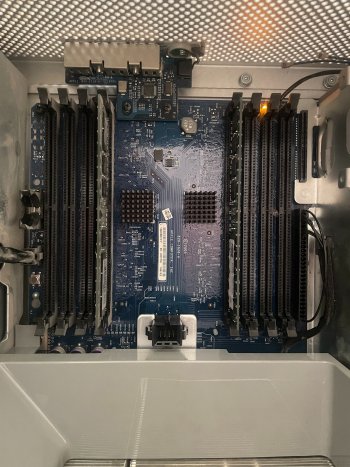
I also tries removing, reseating the RAM, changing them other sticks, but none of it seemed to resolve the issue.
 
As for the background of this G5, the previous owner had this machine to just do the checkstop light randomly one day, without knowing why, then he proceeded to put it in an attic for 10 years and sold it to me.

He also said that he's scavenged the GPU and that he doesn't remember what he exactly did with it.
 
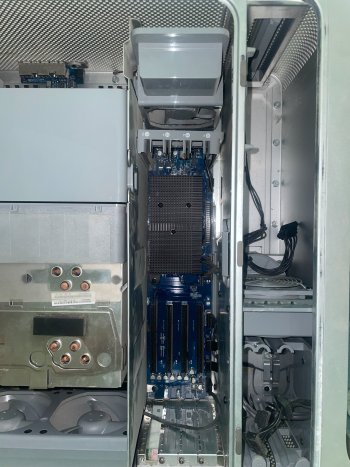
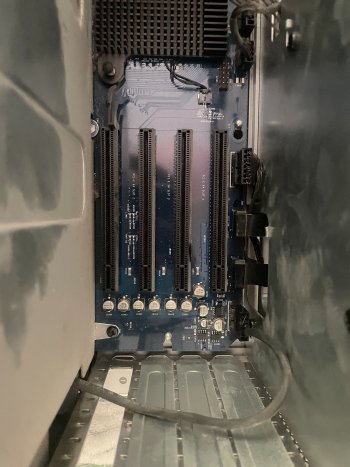
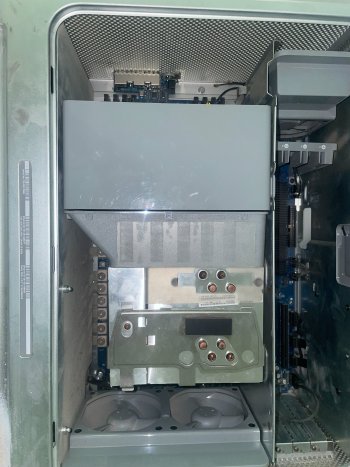
Here's some pictures and a video showing the behavior, in the video i click once and then i do a click + hold + release on the button. I figured out that the white led lights up when i RELEASE the hold on the button


Attachments

  • IMG_5096.jpeg
    IMG_5096.jpeg
    2 MB · Views: 42
  • IMG_5099.jpeg
    IMG_5099.jpeg
    2.1 MB · Views: 54
  • IMG_5097.jpeg
    IMG_5097.jpeg
    2.2 MB · Views: 35
  • IMG_5098.jpeg
    IMG_5098.jpeg
    2.3 MB · Views: 42
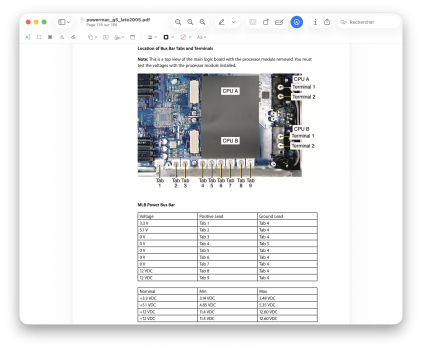
I'm planning to do these verifications with a multimeter to check if the voltages are good.
 

Attachments

  • Capture d’écran 2026-04-12 à 13.33.11.png
    Capture d’écran 2026-04-12 à 13.33.11.png
    2.4 MB · Views: 49
Interesting thing here, please don't take my poor accent for granted !

 
Ohh, that is very interesting. This means that it has the 1 kW power supply from a quad core model, instead of the 710 W supply that originally came with dual core models such as yours.

The 1 kW PSU has terminals for a second CPU which aren't needed in your case, hence they are loose. I wonder if it has been serviced before.
 
I have one disassembled right here. PS_ON is the brown wire on the leftmost 6 pin connector. I don't know if these PSUs require an additional resistor on a sense line to remain on like the G4 MDD power supplies.

My mistake, I must have confused it with the A1047 models. Thanks for the correction.

@nightshadeee So according to the previous owner, it randomly started illuminating the checkstop light and then wouldn't turn on afterward? Was this after pressing the button as normal, or did it randomly come on and stay on while the system was running? Does he remember if it suddenly froze and stopped responding? Because if it's the latter, that would seemingly point to the CPU as per the service manual, but that still wouldn't explain why the logic board isn't reporting a CPU issue if the board is good and the CPU is bad. Maybe it could have been a false positive and the board is the one that spontaneously failed, as unlikely as that is.

In any case, I think we are slowly whittling it down. We now know that the issue is not the firmware (as it sometimes can be), it is not the peripherals, it is not the RAM, it is probably not the CPU, and the PSU voltages are all OK, so it is almost certainly not that either, especially if it has already been replaced, which it looks like it may have been.

Your video is very informative (and your accent is fine!). If the white LED is illuminating in sync when the button is pressed, but sustaining longer only after the button has been held in though, then that is of course being caused by something different from what was previously expected; it's like there's a latency delay of some sort. I would say it's the front panel board itself, but since LED #7 is coming on, that means it is in fact communicating with the logic board. And since the standby LED is also coming on when the air deflector is removed when the system is plugged in, I'm hesitant to say that the logic board is bad altogether.

It probably won't do anything, but just to truly cover all bases, you might also try disconnecting all cables from the logic board (except for the front panel board and PSU), double-check the PSU screws are fully tightened, and verify there are no visibly abnormal signs of damage anywhere on the logic board; a broken-off resistor, burnt resistor, cut pathway, bulging capacitor, etc. If everything everywhere looks good, then it could be a loose solder joint somewhere causing these gremlins, which has happened in the past and people have been able to resolve by reflowing the joints.

Ideally, I would want more definitive evidence pointing to a fault somewhere in the board though before resorting to that...
 
Here's some news on video, I didn't see any signs of poor components or burnt ones, and i don't quite see what you are referring to when you're talking about PSU screws but the aluminium plate over it seems pretty loose, check this video

Also, the yellow led doesn't light up anymore, nor when i put the air deflector in or out, weird too


FYI i changed the power outlet on which the machine is plugged in, maybe that's why the yellow led doesn't show up
 
EDIT : Pluged the AC cord again with air deflector out and got the yellow led again, weird behavior but it's ok i guess..

It still doesn't lead me to some sort of located cause but yeah.. Now i'm afraid to pull the AC cord out of the PSU again

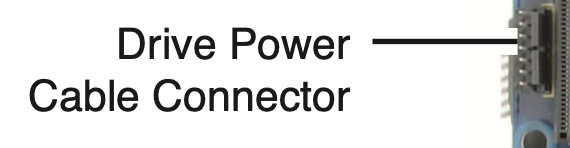
EDIT 2 : The trickle power led wouldn't come ON because i had the drive power cable connector unplugged (the one near the SATA connectors).
 
Last edited:
My mistake, I must have confused it with the A1047 models. Thanks for the correction.

@nightshadeee So according to the previous owner, it randomly started illuminating the checkstop light and then wouldn't turn on afterward? Was this after pressing the button as normal, or did it randomly come on and stay on while the system was running? Does he remember if it suddenly froze and stopped responding? Because if it's the latter, that would seemingly point to the CPU as per the service manual, but that still wouldn't explain why the logic board isn't reporting a CPU issue if the board is good and the CPU is bad. Maybe it could have been a false positive and the board is the one that spontaneously failed, as unlikely as that is.

In any case, I think we are slowly whittling it down. We now know that the issue is not the firmware (as it sometimes can be), it is not the peripherals, it is not the RAM, it is probably not the CPU, and the PSU voltages are all OK, so it is almost certainly not that either, especially if it has already been replaced, which it looks like it may have been.

Your video is very informative (and your accent is fine!). If the white LED is illuminating in sync when the button is pressed, but sustaining longer only after the button has been held in though, then that is of course being caused by something different from what was previously expected; it's like there's a latency delay of some sort. I would say it's the front panel board itself, but since LED #7 is coming on, that means it is in fact communicating with the logic board. And since the standby LED is also coming on when the air deflector is removed when the system is plugged in, I'm hesitant to say that the logic board is bad altogether.

It probably won't do anything, but just to truly cover all bases, you might also try disconnecting all cables from the logic board (except for the front panel board and PSU), double-check the PSU screws are fully tightened, and verify there are no visibly abnormal signs of damage anywhere on the logic board; a broken-off resistor, burnt resistor, cut pathway, bulging capacitor, etc. If everything everywhere looks good, then it could be a loose solder joint somewhere causing these gremlins, which has happened in the past and people have been able to resolve by reflowing the joints.

Ideally, I would want more definitive evidence pointing to a fault somewhere in the board though before resorting to that...
The owner doesn't remember the exact circumstances when it happened unfortunately, he just told me the G5 was from his mother that used it for her corporate job years ago, and one day it wouldn't boot anymore.

I suspect the owner to have touched something somewhere, as the whole inside feels a bit clunky (PCI Divider part has some play, PSU plate too when i move the AC cord in its outlet (i know it's bad))

This is really frustrating because it just feels like it could be a dumb issue that i'm not familiar with..
 
EDIT : Pluged the AC cord again with air deflector out and got the yellow led again, weird behavior but it's ok i guess..

It still doesn't lead me to some sort of located cause but yeah.. Now i'm afraid to pull the AC cord out of the PSU again

EDIT 2 : The trickle power led wouldn't come ON because i had the drive power cable connector unplugged (the one near the SATA connectors).
I think it could be weird that the simple fact that i unplug this connector cause the trickle power led to shut OFF completely, idk

+, the little connectors/pins for this connector looks a little bit "blue-ish", idk if it's juste me and my eyes but.... yeah
 

Attachments

  • Capture d’écran 2026-04-12 à 20.46.22.png
    Capture d’écran 2026-04-12 à 20.46.22.png
    43 KB · Views: 42
Last edited:
I got tired of theorizing, so I dug out my machine to compare with yours.

The connector you're referring to is actually the hard drive bay temperature sensor, and removing it likewise disables the trickle LED on mine as well, so that reaction appears to be normal. Play in the PCI divider plate is also normal, however play in the PSU plate is not normal and should be solid. This could be a clue that perhaps the PSU isn't fully installed properly. I can also confirm that your machine is using a Quad PSU rather than what it would have originally shipped with, as mine lacks the CPU B terminals in front of the rear fans altogether; it is just an uncovered blank area in the logic board.

And to clarify, by 'PSU screws', I mean the large flat circular screws at the bottom of the logic board and above the PSU. They are labeled with such phrases as 'GND' and '5V'. They should be completely firm against the board to rule out any connection issue.

Other than that, I'm almost foxed. This is honestly a bizarre problem, and it's difficult to pin down whether it's definitively having to do with the PSU or logic board based on the symptoms it's exhibiting. I'm half-wondering if both are technically fine, but maybe the higher-spec PSU isn't compatible with the logic board since that isn't the original configuration...

But then that doesn't make any sense as the only other difference between the dual core and quad core models was the addition of CPU B (and clock speed / FSB speed), which shouldn't interfere with power delivery. Plus the owner said that it just stopped booting one day, which implies that it was previously functioning as expected for some length of time. Statistically-speaking, power supplies are more likely to randomly stop functioning than logic boards, but anything is possible I suppose.

The good news is that there are a few A1117 power supplies and at least one logic board available on eBay (though shipping is another matter), either of which could just be returned if there's no difference in behavior. Whether this is all worth the additional time, labor, and monetary expense though is going to depend on how much more you want to put into this and how important this particular model is to you as the final / relative fastest PowerPC-based system.
 
I got tired of theorizing, so I dug out my machine to compare with yours.

The connector you're referring to is actually the hard drive bay temperature sensor, and removing it likewise disables the trickle LED on mine as well, so that reaction appears to be normal. Play in the PCI divider plate is also normal, however play in the PSU plate is not normal and should be solid. This could be a clue that perhaps the PSU isn't fully installed properly. I can also confirm that your machine is using a Quad PSU rather than what it would have originally shipped with, as mine lacks the CPU B terminals in front of the rear fans altogether; it is just an uncovered blank area in the logic board.

And to clarify, by 'PSU screws', I mean the large flat circular screws at the bottom of the logic board and above the PSU. They are labeled with such phrases as 'GND' and '5V'. They should be completely firm against the board to rule out any connection issue.

Other than that, I'm almost foxed. This is honestly a bizarre problem, and it's difficult to pin down whether it's definitively having to do with the PSU or logic board based on the symptoms it's exhibiting. I'm half-wondering if both are technically fine, but maybe the higher-spec PSU isn't compatible with the logic board since that isn't the original configuration...

But then that doesn't make any sense as the only other difference between the dual core and quad core models was the addition of CPU B (and clock speed / FSB speed), which shouldn't interfere with power delivery. Plus the owner said that it just stopped booting one day, which implies that it was previously functioning as expected for some length of time. Statistically-speaking, power supplies are more likely to randomly stop functioning than logic boards, but anything is possible I suppose.

The good news is that there are a few A1117 power supplies and at least one logic board available on eBay (though shipping is another matter), either of which could just be returned if there's no difference in behavior. Whether this is all worth the additional time and labor expense though is going to depend on how much more you want to put into this.
I mean, if the PSU isn't seated properly, it could possibly cause interferences and maybe cause the system not to POST ? This is some really weird issue here and it's getting on my nerves actually cause i feel so close to getting this issue resolved.

I don't really have the budget to replace PSU + logic board, because, like, everything seems to work ok i got good leds, so why wouldn't it POST, or at least make the fans spin up..

And why would i have a 1000W power supply too ? that just seems strange

I'll try to tighten these PSU screws though, but yup.. It's weird
 
I don't have those screws on the bottom of the logic board and on top of the PSU plate though.

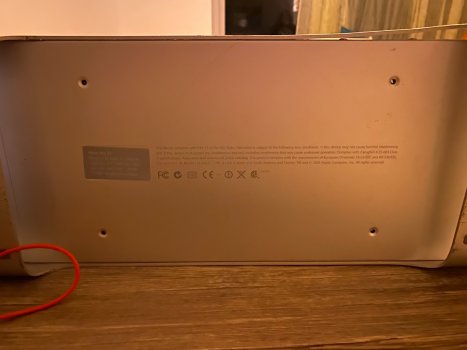
Altought, on the bottom exterior just beneath the computer, it seems that there are some holes with missing screws ?

Look at the attachment
 

Attachments

  • 26-04-12 21-43-23 4552.jpg
    26-04-12 21-43-23 4552.jpg
    1.4 MB · Views: 30
I mean, if the PSU isn't seated properly, it could possibly cause interferences and maybe cause the system not to POST ? This is some really weird issue here and it's getting on my nerves actually cause i feel so close to getting this issue resolved.

I don't really have the budget to replace PSU + logic board, because, like, everything seems to work ok i got good leds, so why wouldn't it POST, or at least make the fans spin up..

I'll try to tighten these PSU screws though, but yup.. It's weird

In theory yes, but my issue is if that's the case, then how could it have been running normally for all of that time before it spontaneously failed and was then placed in storage as-is for 10 years (unless the original owner tampered with it further since that time)? Yet both the logic board and PSU seem to be alive now?

It's a silly idea, but have you tried blasting the PSU and logic board with compressed air in case there is some foreign object causing a mysterious short somewhere?

Otherwise, I share your frustrations. Often in these circumstances it can also be beneficial to walk away for a little while and marinate on the situation. If nothing else, sometimes hidden solutions could suddenly become apparent, or we might randomly think of something new that could potentially turn the needle.

Here are the screws highlighted in red - they function as power lines feeding the system:

imageedit_1_8331780649.png


Actually, there are definitely supposed to be screws in those empty holes on the bottom of the case as well. Maybe it is plausible that if the replacement PSU was not properly secured and the machine was moved or jostled one day, that could cause the strange intermittency problems we are seeing now. It's a shot in the dark, but a possible lead nonetheless.
 
In theory yes, but my issue is if that's the case, then how could it have been running normally for all of that time before it spontaneously failed and was then placed in storage as-is for 10 years (unless the original owner tampered with it further since that time)? Yet both the logic board and PSU seem to be alive now?

It's a silly idea, but have you tried blasting the PSU and logic board with compressed air in case there is some foreign object causing a mysterious short somewhere?

Otherwise, I share your frustrations. Often in these circumstances it can also be beneficial to walk away for a little while and marinate on the situation. If nothing else, sometimes hidden solutions could suddenly become apparent, or we might randomly think of something new that could potentially turn the needle.

Here are the screws highlighted in red - they function as power lines feeding the system:

View attachment 2621932

Actually, there are definitely supposed to be screws in those empty holes on the bottom of the case as well. Maybe it is plausible that if the replacement PSU was not properly secured and the machine was moved or jostled one day, that could cause the strange intermittency problems we are seeing now. It's a shot in the dark, but a possible lead nonetheless.
I don't have compressed air in my hands rn but i'll try getting one, a graphics card is also already on its way by the way but if i can't POST without it already it looks a bit useless.

By the way, the screws you are highliting are CLEARLY not properly screwed enough as i was getting some play with them when moving the PSU outlet around a little bit, but i don't have the required screwdriver for those actually.
And voltages were ok on them when i measured them with my multimeter, according to the manual grid.

The idea of the PSU getting replaced is really quite impossible, as the seller would've told me, i think it's important enough to be told (i think). I'm thinking maybe, because the original owner was his mother, maybe her company made some changes to the G5 and included another PSU because it needed more power ? But it seems really weird, why would a company do that in the first place ?

The ultimate plan at this point would be to :

1. Re-tighten the PSU screws with the appropriate screwdriver head (T10 Torx)
2. Check if putting a GPU changes anything and if i get a video output or a POST per chance
3. Remove the heatsink to check on the PSU and reseat the CPU appropriately

This case is really totally weird i'm completely lost already, i really want this machine to work but buying replacements ATM is complicated for me as i'm POOR.

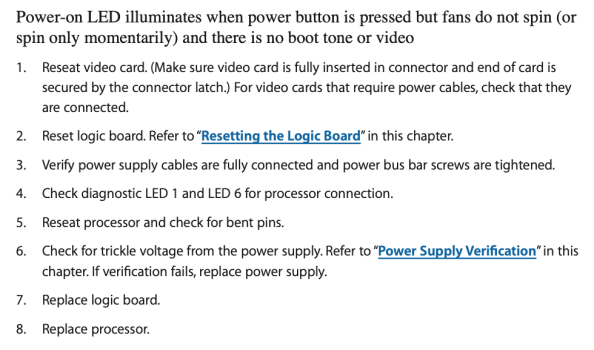
My case, which most closely matches the one in the Apple maintenance manual, looks like the one in the attachment, and indicates that the first step to take is to check the graphics card but i dont know if it's relevant or not.

Maybe some G5 of my model require a GPU to POST ? Or to get at some more advanced point ? I. Don't. Know...

Do you know which screws are supposed to be on the bottom part of the case ? You know, the ones that i'm missing.

Appart of that, i'd like to thank you for all your support so far, it's really encouraging, i don't want this thread to become DEAD and seeing that you are actively helping me is really great for my mind lmao.
 

Attachments

  • Capture d’écran 2026-04-12 à 22.11.04.png
    Capture d’écran 2026-04-12 à 22.11.04.png
    118.5 KB · Views: 37
Last edited:
  • Like
Reactions: z970
I just think this whole case is stupid, i get to stupid conclusions in my head cause this whole situation is stupid, so the problem MUST be a stupid problem
 
I still suspect the PSU. It’s the wrong one for that a1117, its mounting screws are missing on the bottom of the Powermac (so it’s not secured to the chassis, rather just sitting in it) & the plate that covers the top of the psu is also loose leading me to believe that someone was absolutely in there likely because of a believed faulty oem psu, put the 1k acbel psu in there and didn’t properly resecure it. Now it might be fine and not the root of your problems but at a minimum, it sounds like your psu connections are loose and the unsecured psu likely is why. Folks did upgrade to 1k psus when needed with these, so that isn’t unsurprising to me but the lack of screws & loose bits leads me to think that the swap was at a minimum not done well and to be blunt, not everyone is honest about history or maybe his mom had the swap done before seller received the pm and he was unaware of it. This doesn’t however mean that it did not occur at some point in its life.

If it was me, I’d scrutinize the heck out of that psu, pull it out and reinstall it correctly. Visually, the rest of the machine looks pretty good aside from it getting squashed by ham fisted couriers 🙁

As z970 stated, maybe take a break from it for a while and look for retro pc or Mac groups in your area. There is one in my area and we get together every quarter or so. Anyways they’re out there 🙂 and maybe one of them has a lab/tools or working specimen or parts etc you can leverage to help trouble shoot and diagnose your Powermac so you’re not sinking additional and potentially significant money (psu/logicboard/gpu/etc into chasing ghosts in the hopes that it starts working.

Good luck.
 
Last edited:
  • Like
Reactions: z970 and Matias_
Register on MacRumors! This sidebar will go away, and you'll see fewer ads.