
Got a tip for us?
Let us know
Become a MacRumors Supporter for $50/year with no ads, ability to filter front page stories, and private forums.
"RSS" look request
- Thread starter MacBH928
- Start date
- Sort by reaction score
You are using an out of date browser. It may not display this or other websites correctly.
You should upgrade or use an alternative browser.
You should upgrade or use an alternative browser.



If that could be setup as an option, I sure don't mind, but I would not want that to be the default with no option to change it.thats better but more like this
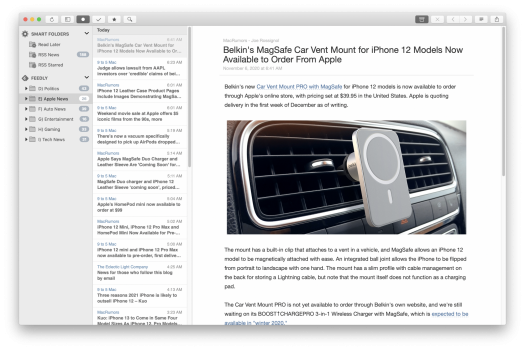
Maybe you would be better served by just using an RSS app? Here is a shot of how things look in ReadKit app.
Attachments


Apple_Robert
Contributor

If that could be setup as an option, I sure don't mind, but I would not want that to be the default with no option to change it.
Maybe you would be better served by just using an RSS app? Here is a shot of how things look in ReadKit app.
I recommend using News Explorer. It is an excellent RSS app and it will display like you want, OP.
Doesn't have to be the default, just an option specially for paid users its an extra perk. I know about RSS readers but I don't want to launch a dedicated RSS reader app just to read Macrumors. I rather have it as a website from where I can also visit other sections of the site including the forums. If there is like a website that offers rss feed look maybe that could be better, like rss.macrumors.com.
Apple_Robert
Contributor
I am not aware of any website offering that ability.Doesn't have to be the default, just an option specially for paid users its an extra perk. I know about RSS readers but I don't want to launch a dedicated RSS reader app just to read Macrumors. I rather have it as a website from where I can also visit other sections of the site including the forums. If there is like a website that offers rss feed look maybe that could be better, like rss.macrumors.com.
If there is like a website that offers rss feed look maybe that could be better, like rss.macrumors.com.
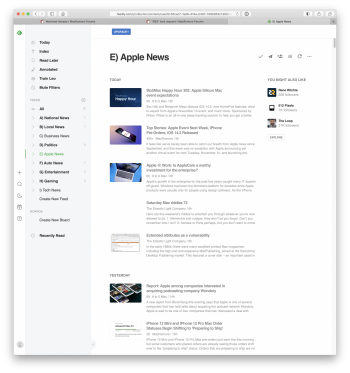
You could do this with RSS feeds and a free Feedly account. See my screenshot of the same RSS feeds as my other screenshot using the RSS app.
Attachments

We have this: http://feeds.macrumors.com/MacRumors-All
But it probably shows too much. a truncated version would be easy, though
arn
But it probably shows too much. a truncated version would be easy, though
arn
I remember there was a time maybe mid late 2000s there was a dedicated RSS version of news sitesI am not aware of any website offering that ability.
This could workYou could do this with RSS feeds and a free Feedly account. See my screenshot of the same RSS feeds as my other screenshot using the RSS app.
We have this: http://feeds.macrumors.com/MacRumors-All
But it probably shows too much. a truncated version would be easy, though
arn
Yes something like this without the mammoth images and few lines of each article would be great or without, it could work.
I recently realised you are the site founder, I am humbled that you are replying to me personally.We have this: http://feeds.macrumors.com/MacRumors-All
But it probably shows too much. a truncated version would be easy, though
arn

I’m not sure I follow.I found a look I like with InoReader, although I wish for the feed to be in the center of the screen as it is to my left now. I suggest to add a similar look to macrumors at least for paid users. @arn

OP's screenshots is cropped; this is how the reader they like looks:I’m not sure I follow.
I'm guessing they don't want the section on the right that shows selected articles. They want the RSS view to take up the whole page.

Runs For Fun
macrumors 65816
Wouldn't that be an issue with InoReader? I don't think a website can do anything about that. I'm not familiar with InoReader, but there must be an option to hide that pane? I know you can with Reeder5.OP's screenshots is cropped; this is how the reader they like looks:
View attachment 1811414
I'm guessing they don't want the section on the right that shows selected articles. They want the RSS view to take up the whole page.
Yeah, OP's saying that they wouldn't want the left/right split on a MR version of this RSS view—not InoReader itself.Wouldn't that be an issue with InoReader? I don't think a website can do anything about that. I'm not familiar with InoReader, but there must be an option to hide that pane? I know you can with Reeder5.

inkhorn
macrumors regular
Personally, I love to use RSS with miniflux, it's super easy to use, and has a nice clean look.
https://miniflux.app

https://miniflux.app
I’m not sure I follow.
OP's screenshots is cropped; this is how the reader they like looks:
View attachment 1811414
I'm guessing they don't want the section on the right that shows selected articles. They want the RSS view to take up the whole page.
Wouldn't that be an issue with InoReader? I don't think a website can do anything about that. I'm not familiar with InoReader, but there must be an option to hide that pane? I know you can with Reeder5.
Yeah, OP's saying that they wouldn't want the left/right split on a MR version of this RSS view—not InoReader itself.
Apologies for the confusion. This thread originally started as I was looking for an RSS look option for the homepage of MacRumors which currently displays each article to take the full page with humongous images and could be a nice feature for paid users. I am adding that the InoReader look is the kind that I want except for the articles to be in the center of the page not to the side.
Personally, I love to use RSS with miniflux, it's super easy to use, and has a nice clean look.
https://miniflux.app
View attachment 1811596
this is a nice look too but I would like to see a small thumbnail too. I also hate the clutter below Star, External Link, Unread. I must look to see how to install this but I always prefer not to use 3rd party apps, the less software the less clutter.