
Got a tip for us?
Let us know
Become a MacRumors Supporter for $50/year with no ads, ability to filter front page stories, and private forums.
Safari Keeps Reloading Tabs
- Thread starter lexus
- Start date
- Sort by reaction score
You are using an out of date browser. It may not display this or other websites correctly.
You should upgrade or use an alternative browser.
You should upgrade or use an alternative browser.

stuartmack1974
macrumors member
Agreed! I'm assuming this behavior is a bug and not a feature. This is extremely annoying beahvoir, and actually makes working with Safari more difficult.
For example, I like to keep a tab open of my eBay watch list so I can refer to prices at a specific time (of opening a tab) over a day or two. Now when I come back to the Safari window and select the tab, instead of seeing the list as a quick reference as I left it, the page tries to reload, destroying the temporal nature of what the prices were at the time when I opened the tab; depending on how long it's been, it may bring up the ebay log-in window instead of just showing me the page as I last left it.
Give Apple your feedback on this behavior here:
http://www.apple.com/feedback/safari.html
For example, I like to keep a tab open of my eBay watch list so I can refer to prices at a specific time (of opening a tab) over a day or two. Now when I come back to the Safari window and select the tab, instead of seeing the list as a quick reference as I left it, the page tries to reload, destroying the temporal nature of what the prices were at the time when I opened the tab; depending on how long it's been, it may bring up the ebay log-in window instead of just showing me the page as I last left it.
Give Apple your feedback on this behavior here:
http://www.apple.com/feedback/safari.html
Last edited:
gentlefury
macrumors 68030
I haven't had this happen to me on any of my macs....how much ram do you have? How much storage do you have left?

MBHockey
macrumors 601
I have 4 GB of ram on a 2010 core i7 MBP with a 160 GB SSD that has 60 GB free. I do think it is intended behavior, unfortunately. This is how iOS frees up ram on iPads/iPhones/iPod touches. Why they have moved this "feature" to the desktop space is very questionable. it only happens when I have ~8 or more tabs open.
Last edited:
gentlefury
macrumors 68030
I have 4 GB of ram on a 2010 core i7 MBP with a 160 GB SSD that has 60 GB free. I do think it is intended behavior, unfortunately. This is who iOS frees up ram on iPads/iPhones/iPod touches. Why they have moved this "feature" to the desktop space is very questionable. it only happens when I have ~8 or more tabs open.
I haven't had this happen once and I have a Mac Pro with 10GB ram, a Mac Mini with 8GB ram and a MacBook Air with 4GB ram....not sure why this is happening to you.

paulsalter
macrumors 68000
Unable to find out what exactly triggers it to do this (is the machine low on free ram when this happens?)
But in Safari 5.1 if it thinks a tab is no longer being actively used, it removes it from RAM, this is why why you go back to it it reloads it
as someone else mentioned above, this is how iOS does it and it has been brought to the desktop
But in Safari 5.1 if it thinks a tab is no longer being actively used, it removes it from RAM, this is why why you go back to it it reloads it
as someone else mentioned above, this is how iOS does it and it has been brought to the desktop
I haven't had this happen to me on any of my macs....how much ram do you have? How much storage do you have left?
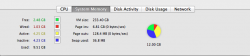
Just happened to me again. Here's a shot of my Activity Monitor from right when it reloaded all the tabs. I've got a total of 12GB RAM, with 2.5GB free and another 4+GB inactive. Very frustrating.
Attachments
Major issue
I keep experiencing this issue several times each day. This started as soon as I upgraded to Lion. It can't possibly be a RAM issue, I have plenty (8GB). I, like many other users, keep multiple Safari windows open so I can view multiple sites at the same time and quickly toggle back and forth... now I find Safari is constantly reloading all pages simultaneously for no apparent reason. Even when I'm just switching focus from one Safari window to another. I also notice that the load time for some pages will randomly hang up, sometimes even causing other pages to reload. Its getting to the point where I'm going to switch to Firefox or even Chrome for my primary browser... anyone know what the cause could be?
I keep experiencing this issue several times each day. This started as soon as I upgraded to Lion. It can't possibly be a RAM issue, I have plenty (8GB). I, like many other users, keep multiple Safari windows open so I can view multiple sites at the same time and quickly toggle back and forth... now I find Safari is constantly reloading all pages simultaneously for no apparent reason. Even when I'm just switching focus from one Safari window to another. I also notice that the load time for some pages will randomly hang up, sometimes even causing other pages to reload. Its getting to the point where I'm going to switch to Firefox or even Chrome for my primary browser... anyone know what the cause could be?

qap
macrumors 6502a
Same here after 5.1 update on both SL and Lion 😡
But is NOT "random" I found when it reload a page, this is my video of the bug-reload not wanted!
http://www.youtube.com/watch?v=Dg4Z6aDVUOY
this is very annoying because when you typing a message all the content..puff disappears 😡
But is NOT "random" I found when it reload a page, this is my video of the bug-reload not wanted!
http://www.youtube.com/watch?v=Dg4Z6aDVUOY
this is very annoying because when you typing a message all the content..puff disappears 😡

Stormchild
macrumors newbie
Even worse -- when this happens, not only does every tab get reloaded, all downloads in progress are interrupted as well.
Extremely annoying.
Extremely annoying.
Stormchild
macrumors newbie
I did some digging around, and I'm pretty sure this is happening because of a new feature in Safari 5 (more specifically, it's new to Webkit2) called "multi-process windows". You can read some info about it here, but the essential point is that Safari now runs on two separate processes -- one for the user interface (the "UI process"), and one for the content (the "web process"). If any page misbehaves, it can crash the web process, but instead of causing the entire application to quit (which is what would have happened in Safari 4 and earlier), Safari now just silently restarts the web process and then reloads all the tabs you had open.
That's great in theory, but for whatever reason, the web process seems to crash or hang quite often; I see Safari 5 suddenly reloading tabs far more frequently than outright crashes used to occur in earlier versions. The net effect is that this feature that's meant to make Safari more stable has so far caused a lot more problems than it has actually solved.
Anyway, if you enable the Debug menu in Safari (you can do this with TinkerTool or any of several other similar apps), there's an option in that menu called "Use multi-process windows". I haven't tested it yet (I don't have time at the moment), but disabling that option might stop this "spontaneously reloading tabs" nonsense from happening. I'll look into it later and post a blog entry if I can confirm that this solves the issue (in which case I'll come back and post a link to it in this thread).
That's great in theory, but for whatever reason, the web process seems to crash or hang quite often; I see Safari 5 suddenly reloading tabs far more frequently than outright crashes used to occur in earlier versions. The net effect is that this feature that's meant to make Safari more stable has so far caused a lot more problems than it has actually solved.
Anyway, if you enable the Debug menu in Safari (you can do this with TinkerTool or any of several other similar apps), there's an option in that menu called "Use multi-process windows". I haven't tested it yet (I don't have time at the moment), but disabling that option might stop this "spontaneously reloading tabs" nonsense from happening. I'll look into it later and post a blog entry if I can confirm that this solves the issue (in which case I'll come back and post a link to it in this thread).
moderngamenewb
macrumors 6502
I agree. It's very annoying. At least several times a day (and counting) it keeps reloading. Either a page will freeze and then go back to normal after a few seconds, or every single tab will reload for bit when I'm in the middle of doing something, which makes it really annoying when I'm trying to watch Netflix. Ever since I upgraded to Lion it's been doing that. I hope that this bug is fixed in Safari 5.2, or in Lion 10.7.2
Stormchild
macrumors newbie
Quick follow-up: disabling "Use Multi-process Windows" (in the Debug menu) does indeed stop the unexpected reloading of tabs. After you disable this option, close any Safari windows you have open. New windows/tabs created after that point should say "Untitled [SP]" (where SP = single process).
You can confirm this fixes the problem by loading a couple of web pages into tabs, then selecting "Crash Web Process" from the Debug menu. This would normally trigger the reload behavior, but it will not cause any tabs in an [SP] window to reload.
You can confirm this fixes the problem by loading a couple of web pages into tabs, then selecting "Crash Web Process" from the Debug menu. This would normally trigger the reload behavior, but it will not cause any tabs in an [SP] window to reload.
I ran into this issue when I was debugging a friends website.
It turns out it had something to do with his fonts. He was converting fonts and it was making safari reload the page and any pages that were in the tabs.
Specifically it was a select list he tried converting the font type in.
As soon as I changed the font type to a web capable font, the problem went away.
It's Safari, but it has something to do with the web page that you're on.
I hope that helps.
It turns out it had something to do with his fonts. He was converting fonts and it was making safari reload the page and any pages that were in the tabs.
Specifically it was a select list he tried converting the font type in.
As soon as I changed the font type to a web capable font, the problem went away.
It's Safari, but it has something to do with the web page that you're on.
I hope that helps.
Stormchild
macrumors newbie
As promised, I wrote a blog post that explains how to stop this annoying behavior in Safari 5:
http://stormchild.tumblr.com/post/10414883514/
http://stormchild.tumblr.com/post/10414883514/
qap
macrumors 6502a
As promised, I wrote a blog post that explains how to stop this annoying behavior in Safari 5:
http://stormchild.tumblr.com/post/10414883514/
Thanks again, but unfortunately I need 1password 🙁 I hope for a real fix by Apple!