Standard external drives (not SSD).
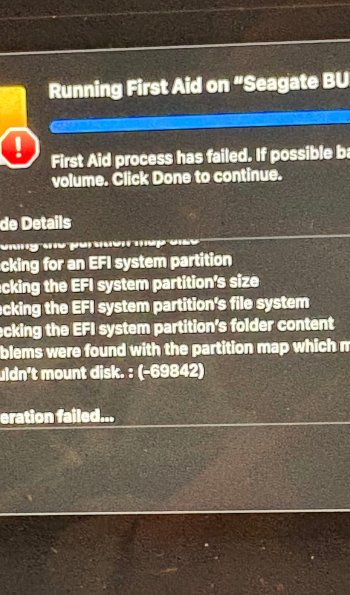
Last week, an external drive started sounding click-y. I ran disk utility and it spit out the "First Aid process has failed. If possible back up the data on this volume and click continue" I believe there were a few details making reference to the partition/map might prevent booting, but I cannot find a picture of that error that I did take. I've had TWO drives do this in less than a week. So, I went out and made a new purchase as I made the assumption they both were sketchy now and I just didn't want to mess with it. Brand new out of the box....same error. Disk utility in recovery. How does this happen? It sounds just way too weird to actually be the drives themselves. I do have an SSD that has not had this issue...at all. I've swapped cords...still getting the error. I reformated....still error. So there is three drives. I plugged in another older one that just has been empty with no issues. There is the error. I can still, though, access files on the ones that are spitting this error. I had somewhat of a similar experience a few years ago on my 2019 Macbook Pro (I am now running a 2025 Macbook Air). With the Pro, it turned out to be the power adapter zapping the drives completely dead. Once I had that port replaced, it was fine. I am afraid to even plug the SSD in now because I have no idea what is causing this. Please help! Thx!
Last week, an external drive started sounding click-y. I ran disk utility and it spit out the "First Aid process has failed. If possible back up the data on this volume and click continue" I believe there were a few details making reference to the partition/map might prevent booting, but I cannot find a picture of that error that I did take. I've had TWO drives do this in less than a week. So, I went out and made a new purchase as I made the assumption they both were sketchy now and I just didn't want to mess with it. Brand new out of the box....same error. Disk utility in recovery. How does this happen? It sounds just way too weird to actually be the drives themselves. I do have an SSD that has not had this issue...at all. I've swapped cords...still getting the error. I reformated....still error. So there is three drives. I plugged in another older one that just has been empty with no issues. There is the error. I can still, though, access files on the ones that are spitting this error. I had somewhat of a similar experience a few years ago on my 2019 Macbook Pro (I am now running a 2025 Macbook Air). With the Pro, it turned out to be the power adapter zapping the drives completely dead. Once I had that port replaced, it was fine. I am afraid to even plug the SSD in now because I have no idea what is causing this. Please help! Thx!