
Become a MacRumors Supporter for $50/year with no ads, ability to filter front page stories, and private forums.

spetznatz

macrumors regular
Original poster
I need to search for multiple target strings in a text document. I work with .srt files in Text Edit. I need search for the strings ' os ', 'éis', 'áis', 'vosotr' and 'vuestr' to identify if the files are in European or Latin-American Spanish. I'd just like to paste a string containing all of those targets, rather than having to type them out individually each time.

After googling, I tried using grep in the terminal, using the command grep -Ei " os |áis|éis|vosotr|vuestr" and dragging the .srt file into the Terminal window. But when I press 'Return' nothing happens it just goes to a newline and returns to the Terminal prompt... Any ides..?
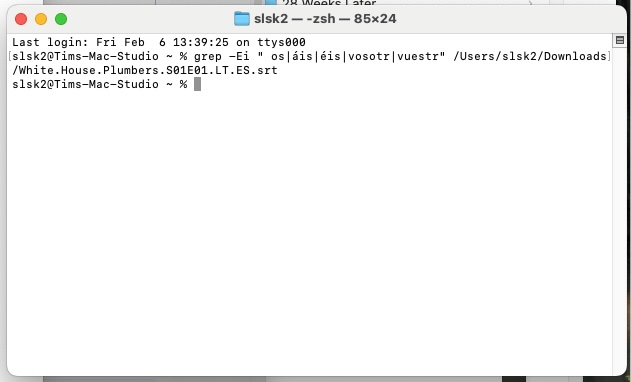
grep.jpg


(MaOS Sequoia 15.3)
 

Attachments

  • grep.jpg
    grep.jpg
    32.3 KB · Views: 43
Last edited:
Ignore me. I'm an idiot. I hadn't put a space between the grep command and the filename... (How do I delete posts on here)..???
 
I'm sorry to be that person, but it works on my machine. I copied and pasted the text from your command into a text document and typed some random letters around them, and grep found every line.

Your second screenshot shows no space between the end of the expression and the filename. grep is just waiting for you to type something. Press ctrl-C or ctrl-D to get out of it.

My guess for the first one is that the srt file is not in UTF-8 format. That opens up a whole can of worms especially since you're dealing with foreign characters. You'll need to identify which format it's using, my guess is UTF-16. Then you'll need to find a way to convert it (google tells me iconv) then pass it to grep. Like so:

Bash:
iconv -f UTF-16 -t UTF-8 input.srt | grep -Ei " os |áis|éis|vosotr|vuestr"

This works. You can check the text encoding with file filename.srt
 
  • Like
Reactions: Slartibart
Register on MacRumors! This sidebar will go away, and you'll see fewer ads.