Become a MacRumors Supporter for $50/year with no ads, ability to filter front page stories, and private forums.
Mechcozmo said:
Erm. Not always. Security updates can apply to any 10.4 version sometimes, or any 10.3 version sometimes, or any 10.2 version sometimes.
I'd go against saying that security updates are micro OS updates.

Sure there can always be exceptions. But for once I said "apply only to the latest free version of the OS", by which I meant 10.2.8, 10.3.9, 10.4.3 etc.

And security updates update part of the OS (rarely they update only GUI applications, and I consider roughly speaking all non-GUI stuff from Apple installed on a default system as being part of the OS), therefore, they are, by definition, OS updates.
 
Beware!

This update broke my system!

After restarting, when the Finder comes up, I have about 10 seconds before a kernel panic occurs. Haven't seen one in a year! Still working out what's wrong. (I'm typing this on my wife's iMac.)

I'll get back when I've tracked down the issue.
 
I finished the install and everything works good, Mac OS X Server works a lot better now, I am not getting any issues when it rebooted.
 
My 2.5 Dual KP'd hard on restart, just between the grey and the login.

A restart seems to have sorted it out, although the desktop took its time to settle.
 
Laser47 said:
Updated and my machine passes
Also I havent had any kp's.
Ok, my Safari is officially broken... 🙁

Which is no problem, what so ever, since I use Firefox... 😀

Still a bit odd that "my" Safari didn't pass the test and "your" did... 😕

Edit: Figured it out... 😱 😱 😱 I had disabled plugins (which is how I always did surf with Safari). When plugins are enabled in Safari preferences -> Security -> Web Content it passes with flying colours 🙂)):
 

Attachments

  • Picture 8.png
    Picture 8.png
    7.9 KB · Views: 98
kernel panic

I got a kernel panic while installing the update, but I'm not sure if it just crashed during System optimization or during the actual installation. The receipt is in my Library/receipts folder, and my system build is 8F46. Can anyone confirm if that's the system build number for this security update, or did it even change?

I'm going to try running the standalone installer to see what it does.
 
andrewm said:
You neglect to consider that this 'rock-solid stability' comes, by most accounts, from the BSD/UNIX underbelly of Mac OS X--combined with an amazingly high-level, secure, and both extensive and extensible programming architecture called Cocoa, all of this imported from Apple's acquisition of NeXT.

Much else of what exists in OS X is written in Carbon, which hasn't nearly the security, yadda yadda yadda, of the NeXT stuff, but was coughed up ( in a magical hairball, no less 😉 ) to allow legacy code to be ported over to OS X with less fuss. Steve Jobs, as a show of good faith to old-school programmers, had things like iTunes and the Finder (which already had a pre-existing Cocoa version)--and portions of the underlying operating system--ported into this Carbon language...

File management is handled largely with Carbon operations, on some level. Shouldn't we be a bit more wary of claiming that restarts due to garbage are unnecessary--*yet*--until we've ditched Carbon file-handling and Apple's aging, case-insensitive HFS+ (which has been around since System 8.1) and either invented some new file system or latched onto another existing one, such as the UFS that Apple also offers in its installers?
Wow... Not sure how any of this ties back to system crashes but it sounds like you've netted a grand conspiracy of some sort!

Is there a MacGuides page on Cocoa/Carbon yet? Maybe something that explains they're both interfaces to the same underlying system layer?


If your system is crashing daily, it's almost certainly a piece of hardware somewhere or a kernel extension you've installed. Check your system logs and maybe you can see what went bad. I think 10.4 gives a crash report when it reboots from a kernel panic now.
 
Also Destroyed My system!

pianojoe said:
This update broke my system!

After restarting, when the Finder comes up, I have about 10 seconds before a kernel panic occurs. Haven't seen one in a year! Still working out what's wrong. (I'm typing this on my wife's iMac.)

I'll get back when I've tracked down the issue.

Four consecutive cases of kernal panic within a few minutes of each other. Had reinstall 10.4 and am now downloading 187 MB worth of updates (mac osx combined, Java 1.3. & 1.4.2, quicktime 7.0.3, and dvd 4.6) on my dialup. What a waste!
 
runs faster

improved the speed of my connection; much quicker - suscom cable modem
------
iBook G4 1.2 Ghz
10.4.3
 
a restart? hmmm, I'll wait on this one, I'm in the middle of rendering something important.

anyway, Security Updates are always good, I like to feel like my security blanket gets washed frequently
 
Just installed it. No problems whatsoever. After the restart I opened Safari and with one bounce of the dock icon it was up and running. (Acid test was also passed successfully.)

..and for the ones that like to know I have 10.4.3 Tiger installed...
 
Airport 802.11b connection intermittent

Since I applied this last round of security update, upon reboot my airport connection to my airport Xpress (forced to 802.11b) is intermitent, making it useless...

I switched my Airport Xpress to be 802.11b/g compatible and it seems to do the trick. I am not sure what this is all about...

I am pretty sure the problem is linked directly to the update because I applied the update on my powerbook, my wife didn't on hers and she did not experience the connectivity issues I was experiencing.
 
Wireless No Longer Works!

I just installed the update on my iBook with OS X 10.3.9 Since the reboot I haven't been able to connect to any wireless networks. Okay, let me rephrase that. I can connect, or at least it looks like I'm connected, but I can't pull up any webpages or check my e-mail. Very strange. I've never had a problem with an update before.
 
Works fine

No problems on my PowerMac G5 , alway's happy with a security-update from Apple.Keep's things safe 🙂


"Yesterday is history ,
tomorrow is mystery ,
today is a gift ,
that's why they call it present ..."
 
No apparent problems here. 12" powerbook 1Ghz, 768MB RAM running 10.4.3.

Airport Express(es) still working fine, no kernel panics yet, Mail still works, Safari still works. No weird "haxies" installed, so no need to do reinstallation of anything.
 
andrewm said:
Shouldn't we be a bit more wary of claiming that restarts due to garbage are unnecessary--*yet*--until we've ditched Carbon file-handling and Apple's aging, case-insensitive HFS+ (which has been around since System 8.1) and either invented some new file system or latched onto another existing one, such as the UFS that Apple also offers in its installers?
If you're going to go to a new filesystem, why not SGI's XFS?
 
I failt to understand why Apple's servers hate me with new software updates not showing up in my software updater. I hate having to go to the Apple Download's page to get an update.
 
Mechcozmo said:
Erm. Not always. Security updates can apply to any 10.4 version sometimes, or any 10.3 version sometimes, or any 10.2 version sometimes.

I'd go against saying that security updates are micro OS updates.


Time for an [[uptime]] MacGuide page?


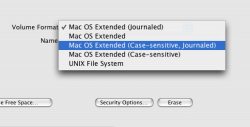
There is a case-sensitive version of HFS+. When you install Tiger's Disk Utility supports it. Be warned-- programers have not yet updated their programs to work with the 'real' filename and often times programs will not work correctly. This can be fixed by you manually rename files to what the program is looking for.

HFS+ has its roots in HFS, found in System 3. HFS+ was just an extension added on. If you have fewer than 65,000 files in a folder (or was it a disk?) and have the allocation blocks set correctly you can sometimes read HFS+ disks in System 7. It is a bit hit or miss, though. 😕 But HFS+ is needed because it allows for much greater support of the data/resource forks, a valuable part of the operating system.

I was already going on a bit verbose, but yes, I'm using HFSX (in a two-drive RAID, no less) on my G5. Generally it's the Carbon items such as Myst IV: Revelation and Adobe CS 2 that cause the problems (I should say, the *installer* for Myst IV--I had to move some items manually into the package bundle, masochist that I am).

Edit: I'm personally not having a great deal of trouble, to be fair, and if you can net a twenty-seven day uptime, I salute you! but I do tend to find myself rebooting at least once every few days, perhaps from hardware as some have said (coupled with my file system?)--but it happens, whatever the cause.

That did sort of stray off-topic. What a romp!
 
Huh?

marmanold said:
I just installed the update on my iBook with OS X 10.3.9 Since the reboot I haven't been able to connect to any wireless networks. Okay, let me rephrase that. I can connect, or at least it looks like I'm connected, but I can't pull up any webpages or check my e-mail. Very strange. I've never had a problem with an update before.

Isnt 10.4.2 or higher required? Maybe it isnt, but thats just what I thought.
 
skythefly13 said:
Isnt 10.4.2 or higher required? Maybe it isnt, but thats just what I thought.
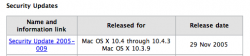
Nope... if you go to Apple's site linky, then you'll notice this (see screenshot):

Anyhow, I'm a little nervous about installing this so I'll wait a bit.
 

Attachments

  • Picture 2.png
    Picture 2.png
    12.6 KB · Views: 108
Oh no...

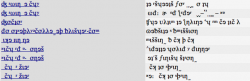
Well, I ran the update, restarted, repaired permissions, ran mac janitor. went to check my email at mail.vidette.ilstu.edu, and my fonts were substituted into something funky... it only occurs in safari, and has been spotted on several websites. please help. i'm fearing a need for a system restore. i should have run ccc when i had the chance. dang it! please help.

attached: bad - font substitution (safari), good: correct display (camino)
 

Attachments

  • good.png
    good.png
    20.8 KB · Views: 130
  • bad.png
    bad.png
    35.4 KB · Views: 150
case sensitive HFS+

andrewm said:
File management is handled largely with Carbon operations, on some level. Shouldn't we be a bit more wary of claiming that restarts due to garbage are unnecessary--*yet*--until we've ditched Carbon file-handling and Apple's aging, case-insensitive HFS+ (which has been around since System 8.1) and either invented some new file system or latched onto another existing one, such as the UFS that Apple also offers in its installers?

I have no problems using case sensitive HFS+. Just format the volume as such with Disk Utility and viola!
 

Attachments

  • Picture 1.png
    Picture 1.png
    29.7 KB · Views: 125
Register on MacRumors! This sidebar will go away, and you'll see fewer ads.