Become a MacRumors Supporter for $50/year with no ads, ability to filter front page stories, and private forums.

nampramos

macrumors 6502
Original poster
Guys, am I the only one?
Come on, it has been 2 days not and I still can't send e-mails through my new @me.com account.
Theres's no way to edit the outgoing server.
Is Apple fixing this? Do they recognize it?
I know some people have no problems at all.
But how many actually do have problems?
 
Guys, am I the only one?
Come on, it has been 2 days not and I still can't send e-mails through my new @me.com account.
Theres's no way to edit the outgoing server.
Is Apple fixing this? Do they recognize it?
I know some people have no problems at all.
But how many actually do have problems?

Go to the iCloud forums. There are bunches of people (myself included) who cannot send emails.

I don't think it was smart for Apple to release 3 major software updates in one day.
 
Guys, am I the only one?
Come on, it has been 2 days not and I still can't send e-mails through my new @me.com account.
Theres's no way to edit the outgoing server.
Is Apple fixing this? Do they recognize it?
I know some people have no problems at all.
But how many actually do have problems?

I set my NEW @me.com email up to sign into iCloud and I used Mail to check my email. All I had to do was add my Name, email address, and provide the password. It set everything else up automatically. Granted, I'm on Lion so, not sure about what your setup is.

EDIT: Well, I just tried to send and it states that iCloud is offline. Maybe they are waiting or something. I have a second added and I did send through it.
 
I am on Lion and it set up automatically, like everyone else.
So the problem must be on Apple servers.
But 2 days after and still problem isn't a good start for Apple.
 
I've just sent and received from my Mobile Me account with no problem, so maybe it's just new iCloud accounts, not all .me accounts
 
I've just sent and received from my Mobile Me account with no problem, so maybe it's just new iCloud accounts, not all .me accounts

I don't have a Mobile Me account, I'm new with iCloud and it's not working, so.. Not sure. I'm thinking server issues on their side.
 
I get "Server not responding" and "Server rejected this account....." quite often in Mail on Mac. But I can access emails from the browser.
 
I have a really old .mac account and I use it to sign in icloud.
I couldn't use the email at all.
When I try to email my email I got a rejected email back.
 
I'm going to just turn off my @me address for a few days. This is too annoying. The rest of "the cloud" is fine. In fact, it was awesome to go to apple today and get my new phone and log in to my appleID and bam, I have everything I need. You can even stand there and do your full sync of your stuff from the apple store.
 
I'm simply not getting emails pushed to my me.com account or my gmail account for that matter. I don't know what's going on. I have to actually go into the mail app for it to update. This sucks.
 
Change from specific SMTP to generic one

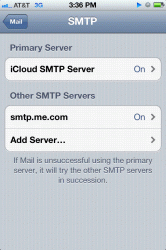
I found a fix that works very well for the sending mail issues. Change your iCloud SMTP server from a specific p##-smtp.me.com to smtp.me.com. You can add a "backup server" to your devices and computers that will send if the primary fails. To add it on iOS, go to Settings>iCloud>Account>Advanced Mail>SMTP and add smtp.me.com to the list of servers.
 
I found a fix that works very well for the sending mail issues. Change your iCloud SMTP server from a specific p##-smtp.me.com to smtp.me.com. You can add a "backup server" to your devices and computers that will send if the primary fails. To add it on iOS, go to Settings>iCloud>Account>Advanced Mail>SMTP and add smtp.me.com to the list of servers.

Does not work!
 

Attachments

  • photo 1.GIF
    photo 1.GIF
    68 KB · Views: 125
  • photo 2.GIF
    photo 2.GIF
    67.3 KB · Views: 112
I deleted my iCloud email, went into the iCloud system preference and started over, and for some reason, it's been working all day.
On my iPhone I started over too. deleted everything email wise, and started over at the iCloud setting. that's been working too. Dunno.
 
I noticed that when I sent e-mails that had the first line as a URL rather than text, it would timeout. However, when I put my intro in the line above the URL, all e-mail sent fine.

My guess is Apple's SMTP server does queuing to check for spam and it's flagging something in the e-mail.
 
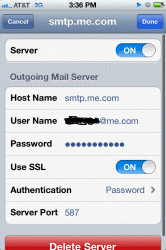
Do your settings mirror mine like on the attached pics?


Mine doesn't lett me edit host, username, password etc.

I have only:

Host: Server SMTP iCloud
Username: optional
Password: optional
Use ssl: yes
Autenthication: Token Apple
Port: 587

And email does work. I cna send and recieve.
 
Wirelessly posted (Mozilla/5.0 (iPhone; CPU iPhone OS 5_0 like Mac OS X) AppleWebKit/534.46 (KHTML, like Gecko) Version/5.1 Mobile/9A334 Safari/7534.48.3)

My wife's me.com email is still not working. Sending or reviving. Everything else on iCloud works fine for her.
When I try to send her an email from my iPhone I get a popup that says: ..was rejected by the server because the user is unknown. What's the deal. It's been 2 days
 
Apple this is not good. It has nearly been 3 days and I still can't send email. I have problems of not seeing the server and not recognising my username and/or password. I have tried different SMTP servers and it works for a few minutes then stops.

And what is worse, they don't even acknowledge there is a problem on the iCloud Service Status support page. I have always had good experiences with Apple products but this one just annoys me.
 
I'm having huge problems sending e-mail as well. I sent two e-mails last night but the recipients never received them!

What just worked for me was adding a new SMTP manually:

smtp.me.com
587
Use SSL
Username: xxxxxx (without the @me.com)
 
So far I've lost my mac.com e-mail address that I've had for years and now set up a me.com one that won't send any e-mails to notify everybody who only has the old one. Way to go Apple, very impressive
 
Register on MacRumors! This sidebar will go away, and you'll see fewer ads.