liked this selfhost one.Self-hosted:

GitHub - epoupon/lms: Lightweight Music Server. Access your self-hosted music using a web interface.
Lightweight Music Server. Access your self-hosted music using a web interface. - epoupon/lmsgithub.com

Got a tip for us?
Let us know
Become a MacRumors Supporter for $50/year with no ads, ability to filter front page stories, and private forums.
Spotify for PowerPC
- Thread starter Mercedes33
- Start date
- Sort by reaction score
You are using an out of date browser. It may not display this or other websites correctly.
You should upgrade or use an alternative browser.
You should upgrade or use an alternative browser.

barracuda156
macrumors 601
What are you talking about?. It depends on terminal i guess? Since it works perfectly on mine.
I didn’t mean something was wrong. Anyway, I will give it a try soon.

dannyherrmann
macrumors newbie
I’ve been working on a project called TigerTunes that let's you stream Spotify from your PowerPC Mac 10.4+. I just released the beta version today. It works great on my 800MHz iMac G4. If anyone here has a Spotify premium account, an Apple Silicon Mac, and a vintage machine (G3, G4, or G5) and wants to help me "sanity check" the build, I'd love to hear how it performs for you! here is a demo of the application.
you would need to:
you would need to:
- install the TigerTunesBridge application on an Apple Silicon Mac (it's ARM64 only for now - working on a headless raspberry pi version).
- Run the TigerTunes legacy client on any vintage PowerPC or Intel Mac (10.4+).
Attachments

barracuda156
macrumors 601
dannyherrmann
macrumors newbie
I'm working on an AirPlay app for PowerPC right now that will be very similar. The idea is you connect to a "TigerTunes" AirPlay device within Apple Music and the audio will come out of your PowerPC machine. I've gotten this working but need to finalize it. The legacy AirPlay client will be much more bare bones tho since AirPlay doesn't share a full interactive database like Spotify Connect, the legacy client will basically act as a "Now Playing" receiver. I should be able to pull in the album art and metadata, but you won't be able to skip tracks + seek directly from the vintage Mac-you'll handle all the "DJing" from your phone or modern computer.I wonder if it is possible to make something like this for Apple Music.

Sr.Freson
macrumors newbie
I’m willing to test this!!!I'm working on an AirPlay app for PowerPC right now that will be very similar. The idea is you connect to a "TigerTunes" AirPlay device within Apple Music and the audio will come out of your PowerPC machine. I've gotten this working but need to finalize it. The legacy AirPlay client will be much more bare bones tho since AirPlay doesn't share a full interactive database like Spotify Connect, the legacy client will basically act as a "Now Playing" receiver. I should be able to pull in the album art and metadata, but you won't be able to skip tracks + seek directly from the vintage Mac-you'll handle all the "DJing" from your phone or modern computer.
dannyherrmann
macrumors newbie
@Sr.Freson @barracuda156 I recently pushed a new release of TigerTunes to GitHub that added a new legacy AirPlay client so apple music is now supported! would really appreciate you testing it out. see instructions below:I’m willing to test this!!!
1. from github release download the TigerTunesBridge-Installer.dmg DMG on your modern arm64/apple silicon mac , mount it, and move Tiger Tunes Bridge to your Applications
2. start Tiger Tunes Bridge app on modern mac, enter the name of your Legacy Mac, and then click the "AirPlay Device - receiver mode" button.
3. from github release download the TigerTunes-AirPlay-v1.0.0-RC1.dmg DMG on your legacy mac, move Tiger Tunes Receiver to your Applications and then start the Tiger Tunes Receiver application on legacy mac
4. on your modern phone or modern laptop open any AirPlay enabled application like Spotify or Apple Music and you should see an airplay device with the name of your legacy mac, connect to it and start playing music.
5. the Tiger Tunes Receiver app on legacy mac should then start playing the music out of its speakers and you should see album art, track title, and artist name in the user interface.
a couple others are helping me test on VintageApple reddit, see link below. have only had 2 users test the spotify controller so this would be huge help if you could confirm AirPlay is working or not.
Sr.Freson
macrumors newbie
Hi!@Sr.Freson @barracuda156 I recently pushed a new release of TigerTunes to GitHub that added a new legacy AirPlay client so apple music is now supported! would really appreciate you testing it out. see instructions below:
1. from github release download the TigerTunesBridge-Installer.dmg DMG on your modern arm64/apple silicon mac , mount it, and move Tiger Tunes Bridge to your Applications
2. start Tiger Tunes Bridge app on modern mac, enter the name of your Legacy Mac, and then click the "AirPlay Device - receiver mode" button.
3. from github release download the TigerTunes-AirPlay-v1.0.0-RC1.dmg DMG on your legacy mac, move Tiger Tunes Receiver to your Applications and then start the Tiger Tunes Receiver application on legacy mac
4. on your modern phone or modern laptop open any AirPlay enabled application like Spotify or Apple Music and you should see an airplay device with the name of your legacy mac, connect to it and start playing music.
5. the Tiger Tunes Receiver app on legacy mac should then start playing the music out of its speakers and you should see album art, track title, and artist name in the user interface.
a couple others are helping me test on VintageApple reddit, see link below. have only had 2 users test the spotify controller so this would be huge help if you could confirm AirPlay is working or not.
I’ve just tried but, even when both devices (m4 mac and g4 imac) appeared as connected , my iphone couldn’t see the legacy mac as an airplay receiver 🙁
To be honest, I missunderstood your new app purpose, as I expected it to be just an airplay receiver app for power pc devices (without the need to use a newer arm mac in beetween), but anyway feel free to ask to check whatever you could need!
Thanks for your work and greetings from Spain
dannyherrmann
macrumors newbie
I totally understand the confusion! It would be a dream to run this natively on the G4! The Bridge is required because modern streaming protocols (like Spotify Connect and AirPlay) now use heavy AES-128 encryption and HTTPS/TLS 1.3 security layers.Hi!
I’ve just tried but, even when both devices (m4 mac and g4 imac) appeared as connected , my iphone couldn’t see the legacy mac as an airplay receiver 🙁
To be honest, I missunderstood your new app purpose, as I expected it to be just an airplay receiver app for power pc devices (without the need to use a newer arm mac in beetween), but anyway feel free to ask to check whatever you could need!
Thanks for your work and greetings from Spain
A G4 processor lacks the hardware instructions to 'decipher' these modern streams in real-time. If the G4 tried to do it natively, its CPU would hit 100% just trying to 'unlock' the data, leaving no power left to actually play the music. By offloading the decryption and transcoding to the M4 Bridge, your G4 receives a 'clean' audio stream it can play effortlessly at 3% CPU.
Sorry AirPlay didn't work for you on first try! I wonder if you iPhone is on a different wifi frequency or a guest network that is blocking it from finding the airplay device. I would try restarting the bridge app on your M4, go into Airplay mode and then open the "Music" app on your M4 Mac and attempt to find the AirPlay device and play the music from your M4 computer instead of your iPhone. do you see the device on your M4? let me know!
thanks again for being willing to test this out.
barracuda156
macrumors 601
liked this selfhost one.
Besides, how did you set it up in your case?
Sr.Freson
macrumors newbie
I’ve tested to cast from my mac, but it won’t find the legacy mac as an airplay receiver either (even when the bridge appears as established)I totally understand the confusion! It would be a dream to run this natively on the G4! The Bridge is required because modern streaming protocols (like Spotify Connect and AirPlay) now use heavy AES-128 encryption and HTTPS/TLS 1.3 security layers.
A G4 processor lacks the hardware instructions to 'decipher' these modern streams in real-time. If the G4 tried to do it natively, its CPU would hit 100% just trying to 'unlock' the data, leaving no power left to actually play the music. By offloading the decryption and transcoding to the M4 Bridge, your G4 receives a 'clean' audio stream it can play effortlessly at 3% CPU.
Sorry AirPlay didn't work for you on first try! I wonder if you iPhone is on a different wifi frequency or a guest network that is blocking it from finding the airplay device. I would try restarting the bridge app on your M4, go into Airplay mode and then open the "Music" app on your M4 Mac and attempt to find the AirPlay device and play the music from your M4 computer instead of your iPhone. do you see the device on your M4? let me know!
thanks again for being willing to test this out.
dannyherrmann
macrumors newbie
@Sr.Freson I think I might know why your m4 Mac can't see the Bridge airplay device.I’ve tested to cast from my mac, but it won’t find the legacy mac as an airplay receiver either (even when the bridge appears as established)
Modern macOS (Monterey and later) has a feature called 'AirPlay Receiver' that hijacks the same network port TigerTunes uses for AirPlay 1. If this is on, the Bridge app is basically trying to shout through a megaphone that Apple is already using.
Try this 30-second fix:
1. On your M4 Mac, go to System Settings > General > AirDrop & Handoff.
2. Find 'AirPlay Receiver' and toggle it OFF.
3. Restart the TigerTunes Bridge app.
4. Select AirPlay device mode
Once that port is free, your M4 (and your iPhone) should suddenly see the bridge airplay device in the AirPlay list. Let me know if that works! If it does, I’ll work on handling this in the application so people don’t have to disable AirPlay receiver.
dannyherrmann
macrumors newbie
@Sr.Freson I have a good feeling Mac's "AirPlay Receiver" setting is the culprit. I reproduced this on my own 2020 M1 MacBook Air, see screenshots below. When I have AirPlay Receiver enabled in system settings and I start the AirPlay device in tiger tunes bridge I see a fatal error in the "Technical Logs" section of the Tiger Tunes Bridge app and thus am not able to find the bridge airplay device in my mac's airplay device list in Music app. once I toggle off "AirPlay Receiver" in system settings and restart the bridge I'm then able to find the tiger tunes bridge airplay device in my mac's airplay device list in Music app. let me know if you see the same.


Sr.Freson
macrumors newbie
@Sr.Freson I have a good feeling Mac's "AirPlay Receiver" setting is the culprit. I reproduced this on my own 2020 M1 MacBook Air, see screenshots below. When I have AirPlay Receiver enabled in system settings and I start the AirPlay device in tiger tunes bridge I see a fatal error in the "Technical Logs" section of the Tiger Tunes Bridge app and thus am not able to find the bridge airplay device in my mac's airplay device list in Music app. once I toggle off "AirPlay Receiver" in system settings and restart the bridge I'm then able to find the tiger tunes bridge airplay device in my mac's airplay device list in Music app. let me know if you see the same.
View attachment 2614659
View attachment 2614660
Hi! Nice progress has been done. After turning airplay receiver off in my m4 mac, as you mentioned, legacy mac appears as airplay device.
After sending some audio to it via airplay, album cover and song’s name appears on the tigertunes app, and it sounds !!!
Currently the only issue I’ve seen is that album cover does not get refreshed when you play a different song. It always displays the cover from the previous song.
Thanks, this is great!
Last edited:
dannyherrmann
macrumors newbie
awesome!! glad this is working for you now! yes, I've also noticed AirPlay artwork is buggy at the moment, I plan to play around with this to make it better. I've also added a bug issue to the github to fix the AirPlay Receiver problem. Thank you so much for testing this it has really helped.Hi! Nice progress has been done. After turning airplay receiver off in my m4 mac, as you mentioned, legacy mac appears as airplay device.
After sending some audio to it via airplay, album cover and song’s name appears on the tigertunes app, and it sounds !!!
Currently the only issue I’ve seen is that album cover does not get refreshed when you play a different song. It always displays the cover from the previous song.
Thanks, this is great!
barracuda156
macrumors 601
This is perhaps a bit off, but anyway: Does the reverse work? I probably do not have a use case to stream from a modern Mac to PowerPC one, but I have a case of streaming from PowerPC Mac to an Airport Express, for example.
dannyherrmann
macrumors newbie
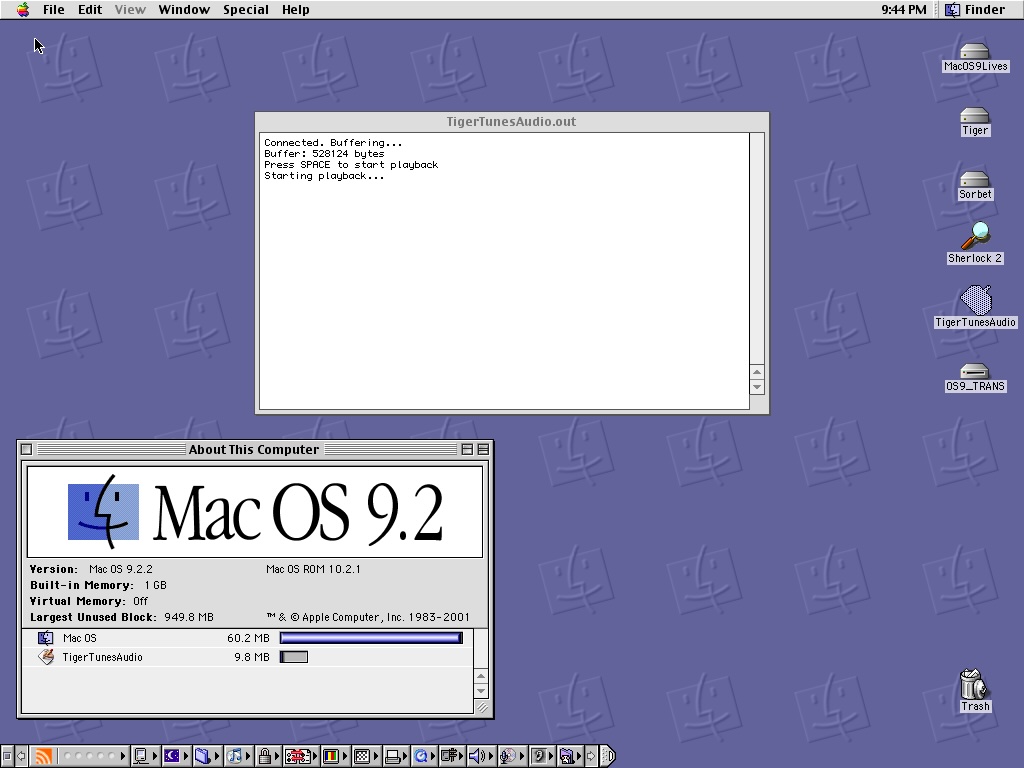
I got Spotify audio output working on Mac OS 9 !!! I'm beyond shook. I was banging my head against the wall trying to get this work all weekend. I can't believe it works. I'll work on adding OS9 support to TigerTunes now.

Slix
macrumors 68000
Wow, this is super cool! I was looking for an app (and trying to make some AppleScripts and other stuff to no avail) that basically does what you did: show album artwork on a PowerPC Mac, and this is way better! I typically always AirPlay music around my house from my Mac and not my phone anyway, so this is cool, I'll give it a try. Any chance you can change the port that is used so we don't have to disable AirPlay Receiver on the Mac it's running on?
@barracuda156 AirPort Express AirPlay works on iTunes on PowerPC Macs, at least the AirPlay 1 AirPorts do, since they came out during the lifespan of the PowerPC Mac era (2004 onwards). Unless you're meaning something else specifically?
@barracuda156 AirPort Express AirPlay works on iTunes on PowerPC Macs, at least the AirPlay 1 AirPorts do, since they came out during the lifespan of the PowerPC Mac era (2004 onwards). Unless you're meaning something else specifically?
Last edited:
barracuda156
macrumors 601
@barracuda156 AirPort Express AirPlay works on iTunes on PowerPC Macs, at least the AirPlay 1 AirPorts do, since they came out during the lifespan of the PowerPC Mac era (2004 onwards). Unless you're meaning something else specifically?
Do we have a Spotify app on powerpc with airplay support? (Just woke up, I may not remember something.)

srp
macrumors regular
You can use AquaCenter for this but shairport-sync doesn't work on 10.6.Do we have a Spotify app on powerpc with airplay support? (Just woke up, I may not remember something.)
barracuda156
macrumors 601
but shairport-sync doesn't work on 10.6.
Do you know specifically what is the issue? We could probably fix it, with upstream help or by ourselves.
srp
macrumors regular
I think it's something to do with the network stack? When I tried on my PowerBook G4, it does broadcast on my network as an AirPlay device (e.g. I see "AquaCenter Receiver" in my Spotify devices list), and I can even connect to it, but no audio ever plays back.
I have a big update for AquaCenter coming out soon which kinda overhauls the way AirPlay works, and I was going to sit down with a 10.6 install and try to get some more logs about what's failing. It very well could just be an issue with my implementation and not strictly a shairport issue, although I'm not sure if anyone else has built a shairport client that will run on Snow Leopard yet.
I have a big update for AquaCenter coming out soon which kinda overhauls the way AirPlay works, and I was going to sit down with a 10.6 install and try to get some more logs about what's failing. It very well could just be an issue with my implementation and not strictly a shairport issue, although I'm not sure if anyone else has built a shairport client that will run on Snow Leopard yet.
barracuda156
macrumors 601
although I'm not sure if anyone else has built a shairport client that will run on Snow Leopard yet.
I was kinda maintaining the shairport itself (updating and fixing), but never actually used it. Do we have some examples of apps using it on macOS? If yes, we could test them and see if the issue is specific to 10.6, to legacy systems in general or to AquaCenter.
dannyherrmann
macrumors newbie
hey @Slix I just created a new release of TigerTunes on GitHub that starts AirPlay on port 5004 to avoid port conflict with macOS AirPlay receiver on port 5000. hope this helps!Wow, this is super cool! I was looking for an app (and trying to make some AppleScripts and other stuff to no avail) that basically does what you did: show album artwork on a PowerPC Mac, and this is way better! I typically always AirPlay music around my house from my Mac and not my phone anyway, so this is cool, I'll give it a try. Any chance you can change the port that is used so we don't have to disable AirPlay Receiver on the Mac it's running on?
@barracuda156 AirPort Express AirPlay works on iTunes on PowerPC Macs, at least the AirPlay 1 AirPorts do, since they came out during the lifespan of the PowerPC Mac era (2004 onwards). Unless you're meaning something else specifically?
I'm still working on the classic OS9 client for TigerTunes - I'm thinking OS9 support will be part of next release. as part of latest v1.0.0 release I made some changes to the apple silicon bridge app that will be necessary for OS9 support. still tweaking OS9 audio playback/client. classic mac OS development is annoying lol
Slix
macrumors 68000
Nice! I'm testing it out now. It appears to work, but I think there's a bit of a delay (maybe 5-10 seconds) before changes get sent from my AirPlay device to the G4 I'm using for this, including song changes and volume changes. Made it a bit tricky to test at first since I didn't want to blow out my speakers haha. Thanks for your hard work on this!hey @Slix I just created a new release of TigerTunes on GitHub that starts AirPlay on port 5004 to avoid port conflict with macOS AirPlay receiver on port 5000. hope this helps!
I'm still working on the classic OS9 client for TigerTunes - I'm thinking OS9 support will be part of next release. as part of latest v1.0.0 release I made some changes to the apple silicon bridge app that will be necessary for OS9 support. still tweaking OS9 audio playback/client. classic mac OS development is annoying lol