Become a MacRumors Supporter for $50/year with no ads, ability to filter front page stories, and private forums.

VPrime

macrumors 68000
Original poster
Hi,

I used text edit to save a file to iCloud on my iMac and it is not showing up in text edit on my macbook.

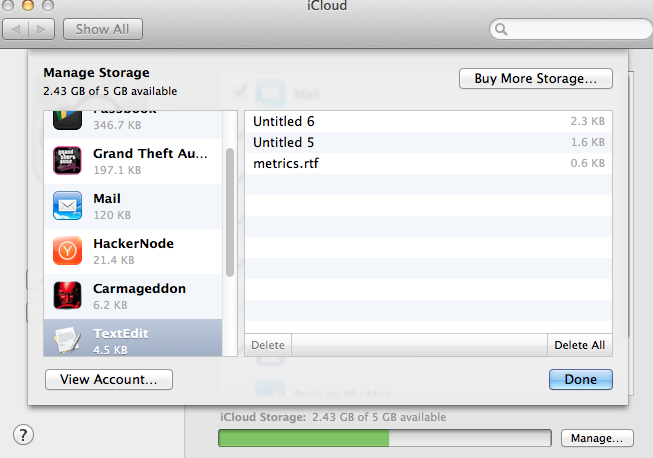
When I go to System Preferences> iCloud> Manage> Texedit
I can see my file.

Any idea on how I can download this text file? My iMac is being repaired and I don't have access to it right now.

Also, its not showing up in the iCloud folder in Library.

Thanks!
 
Any thoughts?

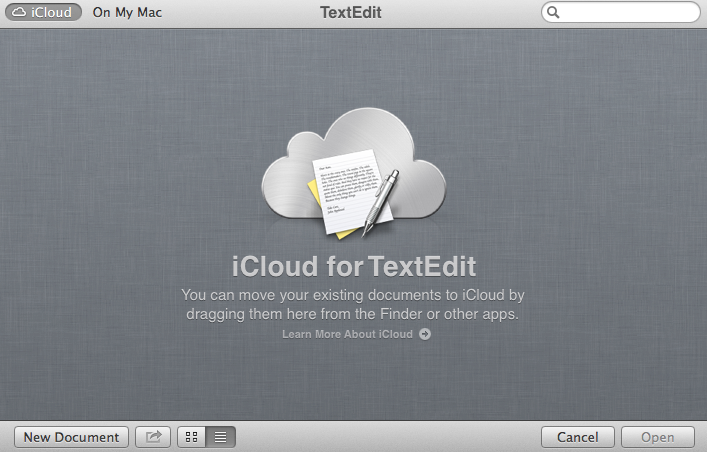
It seems textedit on my macbook is storing the files completely different iCloud than my iMac was.
 
Yes because if I go to iCloud in system preferences and go to manage I can see the file there as part of TextEdit.

What version of OS X are you on? I just got a new terms of service notice when I went to go manage my iCloud?

Remember that there's the iCloud tab and then On My Mac.
 
10.8.5

Yup I know that there is both. I normally save to my mac, but purposely saved this file to iCloud.

Here is the file showing up in iCloud (metrics.rtf) along with a couple other random text files. These were all saved on my iMac
ab01dmo.png


And here is what text edit sees on my macbook.
cLc22kL.png
 
Maybe.. Are you at least able to see the files? for me the files don't even show up.

I just got my iMac back, and the files show up on "icloud" when viewing on the iMac.

Weird. I guess I'll just stick with dropbox from now on.
 
Register on MacRumors! This sidebar will go away, and you'll see fewer ads.