
Become a MacRumors Supporter for $50/year with no ads, ability to filter front page stories, and private forums.

Contact_Feanor

macrumors 6502a
Original poster
Hey,
I've been a macOS user since the early days of the Mac OS X big cat era. MacOS has changed a lot since then, some for the better, some for the worse. Sometimes, for no reason at all, features go lost. What are the things "we"ve lost" that you are most sad or mad about. I'll give some (quaint) examples of mine:

• the colored finder sidebar (lost with Lion I think). I found it soooooo much easier when the folders in the sidebar had icons in full color. I mean: how nice is this:
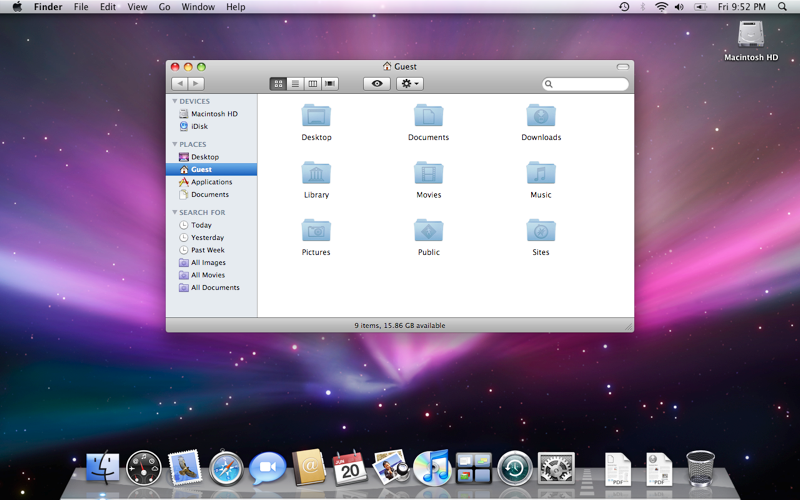
leopard.png

• the little folder or file icons on top of the window chrome (like the little house icon next to "guest" in that previous image) that you could drag and drop as if it was the folder or file. Now you have to hover and wait for it to appear.
• No longer being able to drop a file or photo on the messages icon to send it to someone... was so handy and so Mac-like. Suddenly with an update it stopped working....


so... what are yours?
 
>the little folder or file icons on top of the window chrome

Those are called proxy icons. I think you can still enable it in accessibility or with some defaults command?
 
>the little folder or file icons on top of the window chrome

Those are called proxy icons. I think you can still enable it in accessibility or with some defaults command?
thanks! I used a terminal script in one of the previous version, but when that suddenly stopped working I thought it was gone forever; activated again 🙂 thank you, kind stranger!
 
I used and miss Dashboard. It was a nice place to have widgets.

I didn’t realize I’d started using LaunchPad as much as I had until Tahoe removed it. LaunchOS app does a pretty good job of providing similar functionality as LaunchPad with the benefit of additional settings/features.

I miss 32-bit compatibility for a few games and apps that have sentimental value. Would be cool to have an optional “32-bit subsystem for macOS” type of download.

I will miss Rosetta for mainly one little app. Not sure why it can’t just remain a sandboxed optional download in the future.

I miss iTunes. Everyone complained about bloat and other things at the time, but I believe a large amount of users would agree that the way in which Apple broke things up (especially Apple Music which in many ways is still inferior to iTunes) made things worse rather than better. Two non-music features that were cool was being able to archive iPhone app files so you could always have an older version on hand to load or revert to. Another feature was seeing all your pages of apps on your phone at one time and being able to drag and drop apps between pages and organize entire phone. It was so much more convenient (or efficient at least) than dragging things around with finger on the device.
 
My 2-cents on what's been mentioned here:
  • The proxy icons are still there (as an option).
  • Dragging a file to the messages icon is gone, but right clicking and hitting share does the same thing (albeit with an additional step).
  • LaunchPad and Dashboard were pretty divisive features. Some people loved them some found them completely useless. I never used them, so I don't miss them - but I'm glad they at least replaced it with something (the new Spotlight functionality) and desktop widgets.
  • 32-bit compatibility I don't want. It's a giant PITA on Windows and I don't want it on the Mac.
  • Rosetta was a nice "bridge" for a long time, but again I refer to Windows where nothing ever gets deprecated and the entire OS is just a gian clustermuck because every update has to still support virtually every other app and feature they've every had.
  • iTunes was indeed a bloated mess. BUT, the music portion worked nearly flawlessly (for me anyway). The new Music on the other hand is just a mess of non-working features and mysterious anomalies without the other syncing bloat.
 
My 2-cents on what's been mentioned here:
  • The proxy icons are still there (as an option).
  • Dragging a file to the messages icon is gone, but right clicking and hitting share does the same thing (albeit with an additional step).
  • LaunchPad and Dashboard were pretty divisive features. Some people loved them some found them completely useless. I never used them, so I don't miss them - but I'm glad they at least replaced it with something (the new Spotlight functionality) and desktop widgets.
  • 32-bit compatibility I don't want. It's a giant PITA on Windows and I don't want it on the Mac.
  • Rosetta was a nice "bridge" for a long time, but again I refer to Windows where nothing ever gets deprecated and the entire OS is just a gian clustermuck because every update has to still support virtually every other app and feature they've every had.
  • iTunes was indeed a bloated mess. BUT, the music portion worked nearly flawlessly (for me anyway). The new Music on the other hand is just a mess of non-working features and mysterious anomalies without the other syncing bloat.
Yeah I wouldn’t want Apple to keep 32-bit compatibility and Rosetta as part of the default macOS install, it just would be cool to have optional downloadable components (like Windows does with things like Windows Subsystem for Linux, Print to PDF, or Telnet, etc). In fact, Rosetta installs only if you launch an Intel app on Tahoe. And even if they made some generic virtual environment (maybe a subset of Parallels frameworks) that ran 32-bit code in a sandbox that would be good enough for me. I was able to run 32-bit apps in a Mojave VM on Sequoia on my 2019 16” Intel MBP but I couldn’t bring that VM over to my M5 Max.

I want macOS to continue to evolve and move forward and wouldn’t want it bogged down by lots of legacy code, but a couple optional components for virtualized 32-bit and Intel apps for example wouldn’t be a huge effort or overhead and wouldn’t impact any macOS user unless they specifically installed the optional features/components.
 
Yeah I wouldn’t want Apple to keep 32-bit compatibility and Rosetta as part of the default macOS install, it just would be cool to have optional downloadable components (like Windows does with things like Windows Subsystem for Linux, Print to PDF, or Telnet, etc). In fact, Rosetta installs only if you launch an Intel app on Tahoe. And even if they made some generic virtual environment (maybe a subset of Parallels frameworks) that ran 32-bit code in a sandbox that would be good enough for me. I was able to run 32-bit apps in a Mojave VM on Sequoia on my 2019 16” Intel MBP but I couldn’t bring that VM over to my M5 Max.

I want macOS to continue to evolve and move forward and wouldn’t want it bogged down by lots of legacy code, but a couple optional components for virtualized 32-bit and Intel apps for example wouldn’t be a huge effort or overhead and wouldn’t impact any macOS user unless they specifically installed the optional features/components.
Yeah, I don't have a problem if they can put all the functionality into an optional downloadable app. I just don't want it to be "built-in" when I don't use any 32-bit apps, nor do I need Rosetta for anything.

Like you, I want the OS to continue to evolve and not hang on to the past for too terribly long. If that means I have to pay for an upgrade for an app I use, or even find an alternative, I'm more than happy to do so to avoid dealing with System bloat for years and years.
 
Things that I've lost/miss: app icons that aren't encased in a squircle.

Also, the green traffic light button on the window title bar that zoomed the window and nothing more; I'm annoyed at how it was "enhanced" a few macOS releases ago to be full screen by default and show a popup on hover with different window arrangement options. Yes, I know that I can hold the Option key while clicking to zoom, but I would have much preferred if a new button was added on the right-hand side of the title bar for full screen/arrange window options.
 
  • Love
Reactions: turbineseaplane
the old "About This Mac" would show the OS's logo (the same one from the installer icon) like the Mojave desert for 10.14 or the Catalina cliffs for 10.15. they replaced it with the device icon in Ventura. I think until Mavericks or El Captain they just had the Apple logo in there ? I do not remember anymore as I wasn't looking there much.
 
Register on MacRumors! This sidebar will go away, and you'll see fewer ads.