Become a MacRumors Supporter for $50/year with no ads, ability to filter front page stories, and private forums.

Natalia22

macrumors member
Original poster
Nov 12, 2022
66
116
Second month of using the 5090 graphics card in my MacPro

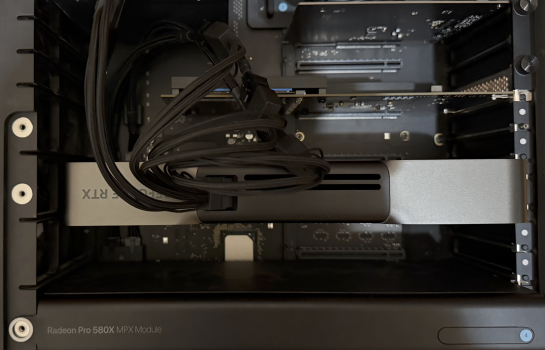
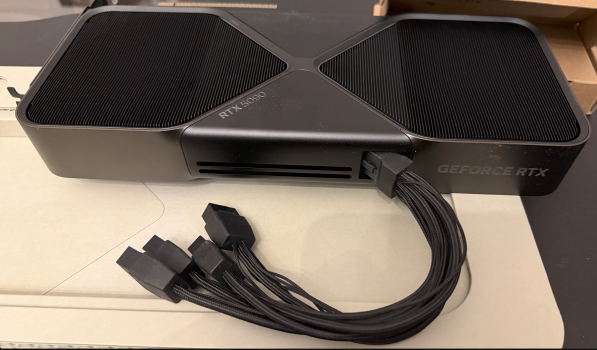
I finally decided to buy the RTX 5090 FE. I regret not doing so sooner, as I had doubts due to rumors of problems with burning connectors/cables. I also couldn't find any real-world examples of installing and using the 5090 on a Mac Pro 2019 on the forums.
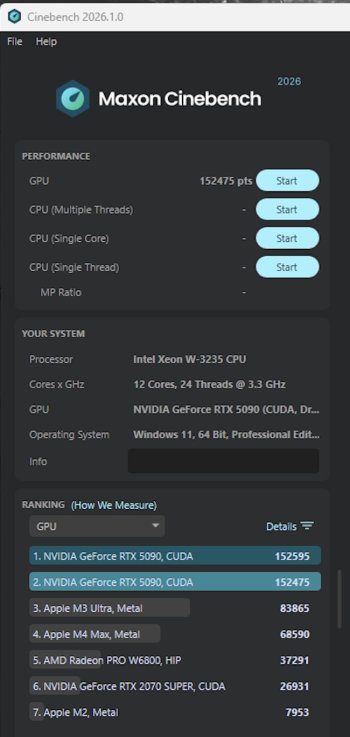
I'm very pleased with the performance on Windows 11 25h2 (I'm a beginner here), despite the limitations of the outdated 12-core processor and PCIe-3.
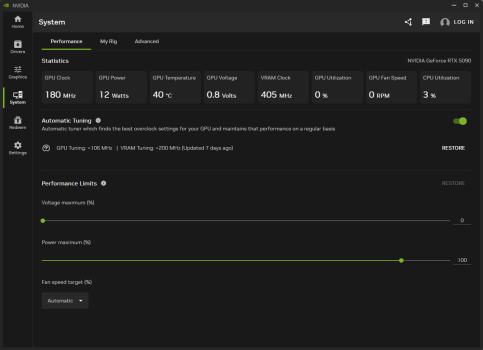
I installed the new Nvidia Studio driver, automatic settings, and tested the GPU only in Cinebench 2026.
The temperatures are not excessive for my tasks.
I installed the Amphetamine sleep utility on MacOS.
Any tips on debugging and settings, as well as cable fire safety, are welcome.

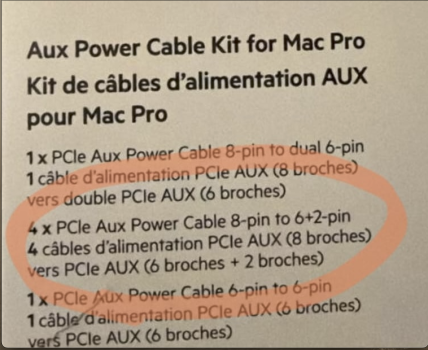
UPD: I used the original cable from the box + four cables from the Belkin Mac Pro kit. It might be a questionable decision, but I couldn't find any definitive information about which cable is safer for the Mac Pro.
 

Attachments
  • 22.JPG
    22.JPG
    162.2 KB · Views: 6
  • 11.png
    11.png
    2.6 MB · Views: 6
  • 33.png
    33.png
    2.9 MB · Views: 5
  • 44.png
    44.png
    1 MB · Views: 5
Last edited:
I finally decided to buy the RTX 5090 FE. I regret not doing so sooner, as I had doubts due to rumors of problems with burning connectors/cables. I also couldn't find any real-world examples of installing and using the 5090 on a Mac Pro 2019 on the forums.
I'm very pleased with the performance on Windows 11 25h2 (I'm a beginner here), despite the limitations of the outdated 12-core processor and PCIe-3.
I installed the new Nvidia Studio driver, automatic settings, and tested the GPU only in Cinebench 2026.
The temperatures are not excessive for my tasks.
I installed the Amphetamine sleep utility on MacOS.
Any tips on debugging and settings, as well as cable fire safety, are welcome.

Nice, I've been debating turning my Mac Pro into a full Windows machine for gaming with a 5090, but the aging CPU/RAM/PCIe Speed had me debating.

I am going to get a Mac Studio M5 Ultra (or Max) when it comes out this year for my actual day to day work and maybe turn my 2019 MP to a full windows machine vs building a new PC.

BTW which AUX/power cables did you use? Have you run GPU stress tests?
 
BTW which AUX/power cables did you use? Have you run GPU stress tests?
Thanks for the question. I used the original cable from the box 5090 + four cables from the Belkin Mac Pro kit (I'll add to the first post). It might be a questionable decision, but I couldn't find any definitive information about which cable is safer for the Mac Pro.

I didn't run any stress tests; I immediately started exploring ComfyUI, and only last week I ran Cinebench. What tests should I run?
 
  • Like
Reactions: SDAVE
Thanks for the question. I used the original cable from the box 5090 + four cables from the Belkin Mac Pro kit (I'll add to the first post). It might be a questionable decision, but I couldn't find any definitive information about which cable is safer for the Mac Pro.

I didn't run any stress tests; I immediately started exploring ComfyUI, and only last week I ran Cinebench. What tests should I run?

Try running Furmark, Prime95, 3dMark and gaming benchmarks long term (like Cyberpunk if possible on loop) for 12 hours to see if there's artifacts (or if system freezes) and see how it performs and at the same time run a Monitor that checks wattage/Mhz/temperatures and if all tests pass then you're solid. The 5090 is a beefy card that can run at high wattage. The MP has a 1280 Watt power supply so it's no slouch, and each 8pin on the mobo has 150W of power, including 75W from the PCIe slot. The RAM is much slower than the latest DDR5 and CPU is also slower.

Interestingly enough, there's a video that shows the difference on the 5090 on PCIe 5.0 (which is what it's running on) and PCIe 3.0. It seems that it's not a huge difference, but there is a difference. So you will get good performance with the 2019 MP even though it's an aging architecture.
 
Last edited:
Probably some undervolting is also possible to save some energy.
Thanks, I'll look into undervolting.

I saw that you can also reduce power consumption in the Nvidia App, but maybe that will also reduce performance?
 

Attachments

  • IMG_7436.PNG
    IMG_7436.PNG
    71.5 KB · Views: 9
Last edited:
Try running Furmark, Prime95, 3dMark and gaming benchmarks long term (like Cyberpunk if possible on loop) for 12 hours to see if there's artifacts (or if system freezes) and see how it performs and at the same time run a Monitor that checks wattage/Mhz/temperatures and if all tests pass then you're solid. The 5090 is a beefy card that can run at high wattage. The MP has a 1280 Watt power supply so it's no slouch, and each 8pin on the mobo has 150W of power, including 75W from the PCIe slot. The RAM is much slower than the latest DDR5 and CPU is also slower.

Interestingly enough, there's a video that shows the difference on the 5090 on PCIe 5.0 (which is what it's running on) and PCIe 3.0. It seems that it's not a huge difference, but there is a difference. So you will get good performance with the 2019 MP even though it's an aging architecture.
Okay, I'll try running some tests. I'm not sure which utility to use to monitor wattage/MHz/temperatures?
 
  • Like
Reactions: SDAVE
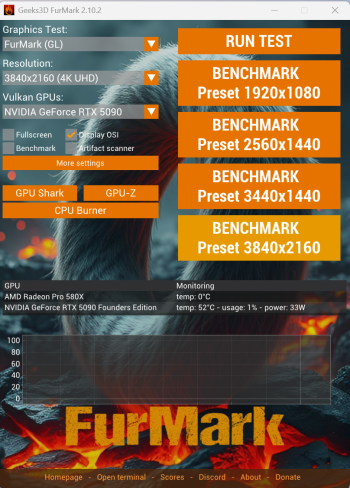
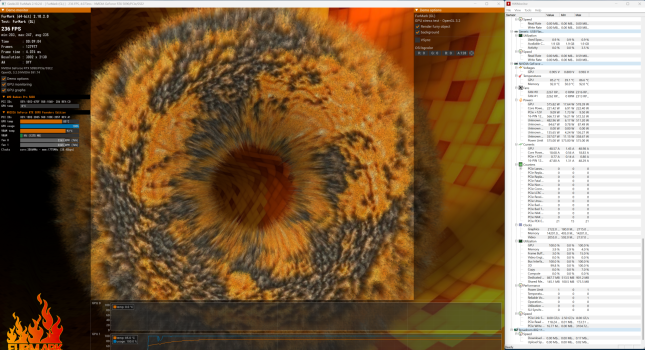
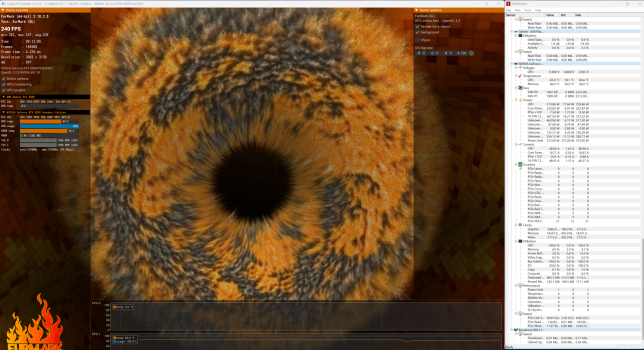
Furmark test, 15-minute. Check the temperature. Should I continue testing?
I selected 3840x2160 4K resolution in the settings, but for some reason it's displaying 3002x2160 during the test...

Upd: Got it, I should have opened Furmark full screen for full resolution. I'm a terrible tester.
 

Attachments

  • 01.png
    01.png
    904 KB · Views: 3
  • 02.png
    02.png
    2.6 MB · Views: 4
  • 03.png
    03.png
    2.6 MB · Views: 3
Last edited:
Furmark test, 15-minute. Check the temperature. Should I continue testing?
I selected 3840x2160 4K resolution in the settings, but for some reason it's displaying 3002x2160 during the test...

Upd: Got it, I should have opened Furmark full screen for full resolution. I'm a terrible tester.

See if you can run it for some hours and keep an eye on the temperatures in HWMonitor

From the looks of it, you are hitting 85C on the GPU and ~90C on memory, which all looks ok. I bet the system fans kick in and it gets louder, correct? It also seems to be pulling more than 575Watts from the AUX pins, which seems pretty normal, since it's a beefy card. The max from each 8pin AUX is 150 Watts so there's plenty of head room.

The point here is to maximize the power pull from MP Power Supply and see if it freezes the system or shows any glitches. I used to do heavy benchmarking when I used to build PCs, this is the best way to see if your GPU is not playing well with the system. FurkMark heats up the GPU
 
Last edited:
3dMark and Cyberpunk are paid, I won't buy them for testing.

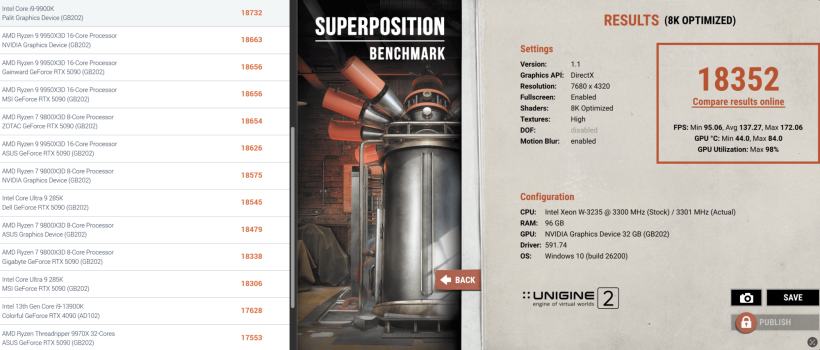
Unigine Superposition 8K benchmark.
Online comparison with other PCs:

There's a free version of 3dMark:

Also if you have any games you purchased already, especially recent AAA games, worth trying to see if it causes any glitches in continuous gameplay, I don't see it causing any issues tbh.

My biggest concern for you is PCIe 3.0, I think in certain scenarios you will see -10/20% of performance drop especially with the lower RAM speeds that these systems come with. But I think these cards are so fast that that drop is negligible.


Remember that the higher the resolution you game in, the less your game relies on the CPU. So let's ray you're running something at 4k vs 1080p, you will see GPU utilization more so than the CPU.
 
Last edited:
  • Like
Reactions: keksikuningas
Thanks, next time I'll try a longer test and see if there are any graphical artifacts or stuttering.
 
  • Like
Reactions: SDAVE
There's a free version of 3dMark:

Also if you have any games you purchased already, especially recent AAA games, worth trying to see if it causes any glitches in continuous gameplay, I don't see it causing any issues tbh.

My biggest concern for you is PCIe 3.0, I think in certain scenarios you will see -10/20% of performance drop especially with the lower RAM speeds that these systems come with. But I think these cards are so fast that that drop is negligible.


Remember that the higher the resolution you game in, the less your game relies on the CPU. So let's ray you're running something at 4k vs 1080p, you will see GPU utilization more so than the CPU.
I'll install a game and play it on ultra settings (5K display, if that matters for gaming).

Yes, I've never had such a fast and powerful computer, so I won't notice any performance degradation due to the Mac Pro's limitations for a long time.
The "4K vs. 1080p" connection is interesting, thanks, I didn't know that.
 
  • Like
Reactions: SDAVE
I'll install a game and play it on ultra settings (5K display, if that matters for gaming).

Yes, I've never had such a fast and powerful computer, so I won't notice any performance degradation due to the Mac Pro's limitations for a long time.
The "4K vs. 1080p" connection is interesting, thanks, I didn't know that.

IDK if you can run any AAA game at 5k with RTX, I also game on my Studio Displays but my 6900XT is aging haha I usually run at 1440p with upscaled to 4k with FSR.

I bet you can run at 4k native without issues at 60Hz and with DLSS 4.5 perhaps enable frame gen to maybe run at 5k but I doubt it'll be at 60FPS locked. There's no way you can do RTX at 5k 100%. It's just too much data. 4k is fine for almost anyone and these monitors work well at 4k too.
 
  • Like
Reactions: Natalia22
I'll install a game and play it on ultra settings (5K display, if that matters for gaming).

Yes, I've never had such a fast and powerful computer, so I won't notice any performance degradation due to the Mac Pro's limitations for a long time.
The "4K vs. 1080p" connection is interesting, thanks, I didn't know that.

Cyberpunk is really cheap nowadays, and actually great benchmark...and a good game (if it's up your alley that is)
 
  • Like
Reactions: ikir and Natalia22
Nice, I've been debating turning my Mac Pro into a full Windows machine for gaming with a 5090, but the aging CPU/RAM/PCIe Speed had me debating.

I am going to get a Mac Studio M5 Ultra (or Max) when it comes out this year for my actual day to day work and maybe turn my 2019 MP to a full windows machine vs building a new PC.

BTW which AUX/power cables did you use? Have you run GPU stress tests?
I play so many games with my friends on macOS so consider that your M5 Max will be a best and much more efficiente also for gaming. Many titles can be run with CrossOver, due to anticheat software onlinegaming can have issues but single player and co-op usually works great.
 
I play so many games with my friends on macOS so consider that your M5 Max will be a best and much more efficiente also for gaming. Many titles can be run with CrossOver, due to anticheat software onlinegaming can have issues but single player and co-op usually works great.

Not a big fan of CrossOver personally, I like running things natively.

I bought CrossOver and have tested on my M1 Max, it's alright, but buggy/stuttery and as you said can't use any games that has anticheat.

The other big issue is the lack of TPM2.0 on Mac Pro's and a lot of AAA titles will start requiring that and there's no workaround really to avoid that. For example latest Call of Duty and Battlefield require TPM2.0 and it wouldn't even run for me.
 
Register on MacRumors! This sidebar will go away, and you'll see fewer ads.