Become a MacRumors Supporter for $50/year with no ads, ability to filter front page stories, and private forums.
I played Hogwarts for two hours and didn't experience any issues, including freezes or artifacts. But I'm not a gamer and don't know all the intricacies; I haven't played for over a year. I saw rain for the first time, and I forgot to take a screenshot because I was so overwhelmed by the graphics.
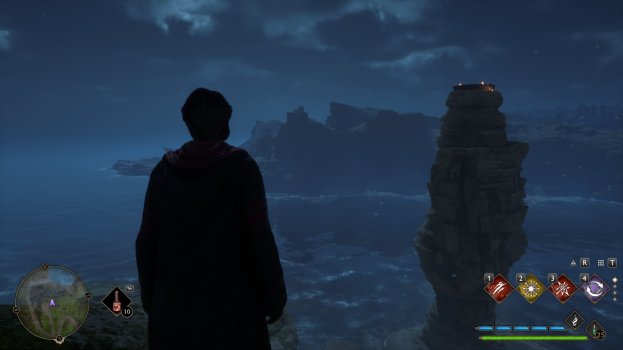
LG Ultrafine 5K monitors for Apple devices with Type-C connections and Belkin VR cables for DisplayPort. I took paired screenshots at the end of the game, static landscapes, on the RTX 5090 and AMD 6900 XT, all set to Ultra auto-settings.
The AMD 6900 XT was loaded to 100%, while the RTX 5090 was at 40%.
It's impossible to change the resolution above 4K in the game; there's simply no 5K option. In Windows, the monitors also display as 4K 60Hz.
 

Attachments

  • 1-RTX_5090.jpg
    1-RTX_5090.jpg
    543.3 KB · Views: 3
  • 1-AMD_6900.jpg
    1-AMD_6900.jpg
    416.4 KB · Views: 3
  • 2-RTX_5090.jpg
    2-RTX_5090.jpg
    141.9 KB · Views: 4
  • 2-AMD_6900.jpg
    2-AMD_6900.jpg
    145.9 KB · Views: 5
  • 3-RTX_5090.jpg
    3-RTX_5090.jpg
    129.2 KB · Views: 3
  • 3-AMD_6900.jpg
    3-AMD_6900.jpg
    137.3 KB · Views: 3
Last edited:
  • Like
Reactions: SDAVE
I played Hogwarts for two hours and didn't experience any issues, including freezes or artifacts. But I'm not a gamer and don't know all the intricacies; I haven't played for over a year. I saw rain for the first time, and I forgot to take a screenshot because I was so overwhelmed by the graphics.
LG Ultrafine 5K monitors for Apple devices with Type-C connections and Belkin VR cables for DisplayPort. I took paired screenshots at the end of the game, static landscapes, on the RTX 5090 and AMD 6900 XT, all set to Ultra auto-settings.
The AMD 6900 XT was loaded to 100%, while the RTX 5090 was at 40%.
It's impossible to change the resolution above 4K in the game; there's simply no 5K option. In Windows, the monitors also display as 4K 60Hz.

Very cool

You should be able to change Windows to display 5k, I do it on my end and run games at 4k. I set my display to 150% as well for scaling.
 
There's also no 5K option in the Windows display settings; 4K is the maximum, and scaling is also at 150%.
Just for your information, I don't think my displays are suitable for Windows, especially gaming. While playing Hogwarts, the FPS never exceeded 60 on the AMD, and now it's the same on the RTX, but that doesn't bother me too much; these monitors are fine for graphics work.
 
There's also no 5K option in the Windows display settings; 4K is the maximum, and scaling is also at 150%.
Just for your information, I don't think my displays are suitable for Windows, especially gaming. While playing Hogwarts, the FPS never exceeded 60 on the AMD, and now it's the same on the RTX, but that doesn't bother me too much; these monitors are fine for graphics work.

Looking at the specs of your monitor, it maxes out at 60Hz so your games will never go above that. As long as you constantly hit 60Fps at high settings at 4k you're good. 5k 120Hz monitors are rare and don't exist yet afaik.

You should be able to do 5k in Windows without issues. Try another port, I also have 2x Belkin VR cable (dual 5k Studio Displays) and I am able to do 5k 60hz with no issues. Check NVIDIA Control Panel (not the Gaming app) there might be something off there. You should also change to 10bit from 8bit to get better color.
 
Looking at the specs of your monitor, it maxes out at 60Hz so your games will never go above that. As long as you constantly hit 60Fps at high settings at 4k you're good. 5k 120Hz monitors are rare and don't exist yet afaik.

You should be able to do 5k in Windows without issues. Try another port, I also have 2x Belkin VR cable (dual 5k Studio Displays) and I am able to do 5k 60hz with no issues. Check NVIDIA Control Panel (not the Gaming app) there might be something off there. You should also change to 10bit from 8bit to get better color.
Oh, I didn't know there was a direct correlation between display Hz and FPS in games.

Yes, I just tried switching the cable to different ports and there's no change. NVIDIA Control also doesn't have a 5K option; 3840x2160 is the limit for my monitor. I found 10-bit color, though, thank you for the tips.
 
  • Like
Reactions: SDAVE
Oh, I didn't know there was a direct correlation between display Hz and FPS in games.

Yes, I just tried switching the cable to different ports and there's no change. NVIDIA Control also doesn't have a 5K option; 3840x2160 is the limit for my monitor. I found 10-bit color, though, thank you for the tips.

Hmm super interesting you can't do 5k. Keep looking, I'm sure there's an issue. Did you uninstall the previous drivers from AMD?

If you have time, uninstall all GPU drivers and start fresh with NVIDIA using DDU.

If you want to game at higher than 60fps you have to get a 120Hz monitor, at 4k, or 240Hz or whatever at 1440p
 
  • Like
Reactions: Natalia22
Okay, I'll try uninstalling the drivers and installing only Nvidia drivers to test and someday I'll buy a high-Hz display for gaming.
 
  • Like
Reactions: SDAVE
I admit this looks tempting and I was looking at some 5090 FEs new at expensive but reasonable prices.

I wonder how it would go with a W6800X 32GB MPX instead of the Radeon Pro 580...
 
  • Like
Reactions: Natalia22 and SDAVE
I admit this looks tempting and I was looking at some 5090 FEs new at expensive but reasonable prices.

I wonder how it would go with a W6800X 32GB MPX instead of the Radeon Pro 580...
My son got an OC MSI 5090 when it
reached their lowest price (after the release hype & before the AI boom).
This video card is in a class of its own. Paired with 32 GB 4000Mhz DDR4
RAM (priced before the AI boom) & a 13700K i9 CPU.
 
  • Love
Reactions: Natalia22
3dmark Demo, ran all tests in a row, indiscriminately, using automatic settings. How did the Apple + NVIDIA tandem perform?

The computer's sound was muted, the fans were making a slight noise in auto mode (it was a bit louder with Furmark, but not annoyingly so, just stable). The computer was less than 1.5 meters away.

UPD: Replaced the 6-Fire Strike screen, which was incorrectly displayed by HWMonitor.
 

Attachments

  • 2-Stell Nomad Light.png
    2-Stell Nomad Light.png
    789.5 KB · Views: 3
  • 1-Stell Nomad.png
    1-Stell Nomad.png
    779.4 KB · Views: 3
  • 3-Solar Bay.png
    3-Solar Bay.png
    842.6 KB · Views: 3
  • 4-Solar Bay Extreme.png
    4-Solar Bay Extreme.png
    852.2 KB · Views: 4
  • 5-Time Spy.png
    5-Time Spy.png
    916.3 KB · Views: 3
  • 7-Night Raid.png
    7-Night Raid.png
    937.6 KB · Views: 3
  • 6-Fire Strike.png
    6-Fire Strike.png
    848.3 KB · Views: 4
Last edited:
3dmark Demo, ran all tests in a row, indiscriminately, using automatic settings. How did the Apple + NVIDIA tandem perform?

The computer's sound was muted, the fans were making a slight noise in auto mode (it was a bit louder with Furmark, but not annoyingly so, just stable). The computer was less than 1.5 meters away.

UPD: Replaced the 6-Fire Strike screen, which was incorrectly displayed by HWMonitor.

Thank you for doing these, there aren't any people doing a 5090 test on MacPro.

Good to see you're not seeing glitches and crashes!
 
Thanks, guys, for your support, interesting and beautiful tests, and helpful tips!
I didn't and don't have any intention of promoting the 5090 for Mac Pro. I couldn't decide for a long time, but it was easier for me because I know so little about PCs).
For me, this was a very easy upgrade: I ordered a video card, cables, connected them, and voila, everything works.
 
Thanks, guys, for your support, interesting and beautiful tests, and helpful tips!
I didn't and don't have any intention of promoting the 5090 for Mac Pro. I couldn't decide for a long time, but it was easier for me because I know so little about PCs).
For me, this was a very easy upgrade: I ordered a video card, cables, connected them, and voila, everything works.

My only concern is lack of hardware TPM2.0 support for Mac Pro 2019, and most AAA games will start requiring that in 2027/2028 most likely with Call of Duty and Battlefield and Valorant already requiring it. I couldn't install either, so I asked for a refund for both. This is my only hesitation in getting the 5090 vs completely building a new PC with a 5090 (I don't want a full tower so I'm going to go with a small form factor PC) and then get an M5 Max/Ultra to replace the Mac Pro in 6-8 months when it comes out.

I have read that if you are on Windows 10, these games that require TPM2.0 will work, but support ended last year and these game developers have no incentive to keep supporting it since Windows 12 is around the corner.

I really have no use for Windows outside of gaming, 99% of my work is done in macOS.
 
Last edited:
  • Like
Reactions: Natalia22
My only concern is lack of hardware TPM2.0 support for Mac Pro 2019, and most AAA games will start requiring that in 2027/2028 most likely with Call of Duty and Battlefield and Valorant already requiring it. I couldn't install either, so I asked for a refund for both. This is my only hesitation in getting the 5090 vs completely building a new PC with a 5090 (I don't want a full tower so I'm going to go with a small form factor PC) and then get an M5 Max/Ultra to replace the Mac Pro in 6-8 months when it comes out.

I have read that if you are on Windows 10, these games that require TPM2.0 will work, but support ended last year and these game developers have no incentive to keep supporting it since Windows 12 is around the corner.

I really have no use for Windows outside of gaming, 99% of my work is done in macOS.
You're right, your choice is best for gaming and work; TPM2 is a serious obstacle in the Mac Pro.
My thinking was this: I need to try the 5090 in the Mac Pro; it's a gentle upgrade for me. If any issues arise, I can always remove the 5090 and build a new PC without losing anything. The CUDA count is more important to me; the 5090 almost doubles the 6900XT in performance for my work.
 
  • Love
Reactions: SDAVE
The temperature of the 5090 in Mac Pro when idle is about 30 degrees, the same temperature when the card is disabled in the device manager.

Снимок экрана 2026-01-23 150932.png
 
Last edited:
Register on MacRumors! This sidebar will go away, and you'll see fewer ads.