

Become a MacRumors Supporter for $50/year with no ads, ability to filter front page stories, and private forums.

MacRumors

macrumors bot
Original poster


Apple's software updates previewed during WWDC 2026 this week have followed a distinct pattern: introduce a handful of key new features, while maintaining a focus on refining the underlying platform architecture. watchOS 27 is no different in this respect, with the majority of changes being performance improvements under the hood.
watchos-27.jpg

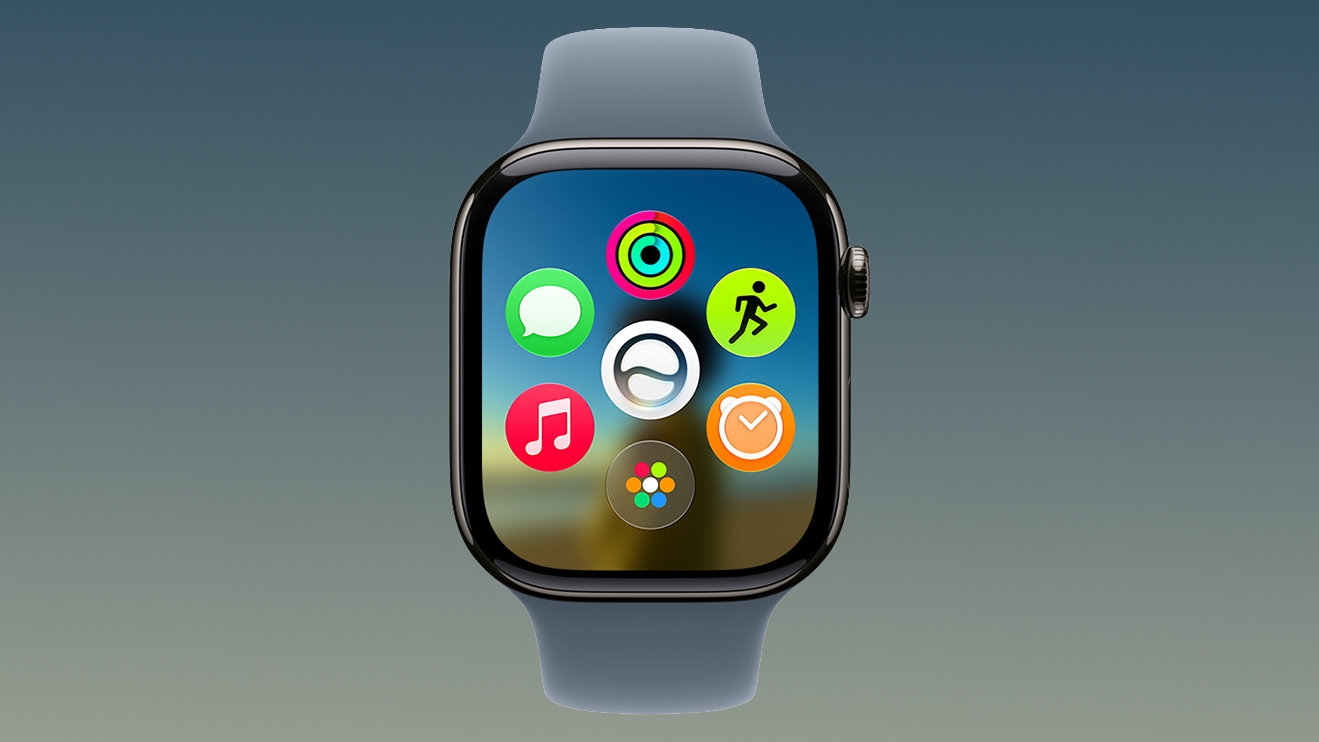
That said, one of the most obvious user-facing changes is a new dynamic app grid that surfaces and rearranges five apps based on your current context and general usage, with Siri as the centerpiece. Pressing the Digital Crown on your Apple Watch immediately invokes the grid, which appears whether you use the app grid or list view. If the dynamic grid doesn't surface the app you're looking for, a turn of the Digital Crown reveals your preferred view.

The change straddles the line between redesigned navigation and the efficiency-minded development that defines the rest of watchOS 27, since the grid aims to get you to the app you want, just faster. It's probably the most obvious change you'll actually see, but there are several others that happen out of sight. Apple says they include:
  • Better battery efficiency
  • Improved Wi-Fi connectivity
  • More efficient water detection
  • More accurate step tracking
  • Faster media playback
  • Faster app extension launches
As with the rest of Apple's software previews this week, though, you'll need reasonably recent hardware to see any of these enhancements.

watchOS 27 requires an iPhone 11 or later or iPhone SE (2nd generation or later) with iOS 27. The new software also requires one of the following Apple Watch models: Apple Watch SE 3, Apple Watch Series 9, 10, 11, and Apple Watch Ultra 2 or 3. In other words, ‌watchOS 27‌ drops support for the Apple Watch Series 6, Series 7, and Series 8, along with the original Ultra and SE 2. Apple will release the new software in the fall.

Article Link: watchOS 27 Improves Apple Watch Performance in Seven Ways
 
  • Haha
Reactions: Z-4195
The way Apple innovate for the Apple Watch these days, the improvement in battery efficiency is probably reducing the amount of times it samples your heart rate and spo2!
 
3 years ago I splurged on an $800 USD 1st Gen Ultra. I figured with the yearly update patterns I would enjoy a watch with a long life cycle and constant improvement. I've had multiple tickets open on it with Apple on slow launch times, connectivity issues and have submitted several UI improvement requests, one of which was to have quick launch of most common used apps (as well as ability to put playlist buttons on same launcher).

That they would abandon 1st Gen Ultra buyers like this will make me think twice on future purchases. I could care less about Siri on my wrist.

Apple: Backport the performance and usability enhancements to 26, please!
 
Release notes for Ultra 1:
  • Worse battery efficiency
  • Standard Wi-Fi connectivity
  • Not so efficient water detection
  • Not so accurate step tracking
  • Slower media playback
  • Slower app extension launches
For those to be ultra notes you’d have to have it for watch os 26.6 but I’d totally agree with them 26 killed it use to be fast and pretty good battery. My battery now is 90% to apples health and last 12 hrs max pretty bad


Apple's software updates previewed during WWDC 2026 this week have followed a distinct pattern: introduce a handful of key new features, while maintaining a focus on refining the underlying platform architecture. watchOS 27 is no different in this respect, with the majority of changes being performance improvements under the hood.

watchos-27.jpg

That said, one of the most obvious user-facing changes is a new dynamic app grid that surfaces and rearranges five apps based on your current context and general usage, with Siri as the centerpiece. Pressing the Digital Crown on your Apple Watch immediately invokes the grid, which appears whether you use the app grid or list view. If the dynamic grid doesn't surface the app you're looking for, a turn of the Digital Crown reveals your preferred view.

The change straddles the line between redesigned navigation and the efficiency-minded development that defines the rest of watchOS 27, since the grid aims to get you to the app you want, just faster. It's probably the most obvious change you'll actually see, but there are several others that happen out of sight. Apple says they include:
  • Better battery efficiency
  • Improved Wi-Fi connectivity
  • More efficient water detection
  • More accurate step tracking
  • Faster media playback
  • Faster app extension launches
As with the rest of Apple's software previews this week, though, you'll need reasonably recent hardware to see any of these enhancements.

watchOS 27 requires an iPhone 11 or later or iPhone SE (2nd generation or later) with iOS 27. The new software also requires one of the following Apple Watch models: Apple Watch SE 3, Apple Watch Series 9, 10, 11, and Apple Watch Ultra 2 or 3. In other words, ‌watchOS 27‌ drops support for the Apple Watch Series 6, Series 7, and Series 8, along with the original Ultra and SE 2. Apple will release the new software in the fall.

Article Link: watchOS 27 Improves Apple Watch Performance in Seven Ways
As of dev beta 1 definitely not haha.

But I trust 27 to deliver, it’s already made my iPhone more responsive.

That said, the Apple Watch is fast enough in my opinion but any speed boost is welcome.

However if they could prioritise power efficiency to give us an extra few hours of battery that would be amazing.
 
If it’s so efficient, why is my Ultra 2 informing me that I’m down to 2% battery when I wake up?

I’m normally at 25-30% in the morning.
 
It’s a shame Siri isn’t launching for it until a later Beta. I’m interested to know if it can access PCC over 5G by itself.
 
  • Like
Reactions: gustaw94
Series 7 so I won´t get the grid. But I don´t care since I have already the most used apps as complications in one of the faces and in the swipe up gesture for the others. This would be just a third way to present them.
 
Not supporting the Ultra 1 is insane and really unfortunate to people who bought the flagship model expecting years of support that Apple is typically known for.

If they're still supporting the iPhone 11 from 2019, I'm sure they could've figured out how to support the Apple Watch Ultra for at-least another 1-2 WatchOS releases.

I think I'm done with the Apple Watch after this one dies. I just can't see spending $800+ on something that will lose software support in less than 3 years.
 
Last edited:
Register on MacRumors! This sidebar will go away, and you'll see fewer ads.