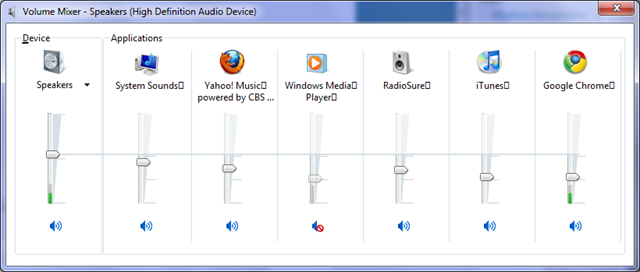
I concur with the window snapping. That's a great feature. I also wish OSX would copy the way Windows handles audio devices and sound mixing. I now have three discrete audio outputs with my Macbook when "docked" to my Thunderbolt Display. First the internal speaker, then the headphones jack, and third, the monitor speakers.
The way OSX now works means connecting a set of headphones switches audio from the internal speaker to the headphones, but with the monitor connected it has become the primary audio output, and that isn't switched. All open programs will still output sound to the monitor. OSX also likes to fiddle needlessly with the volume settings, meaning if I lower volume with headphones connected, it also lowers volume on the internal speaker, meaning it becomes too low when the 'phones are disconnected again.
And, with the monitor connected, Fn+F11/F12 on the keyboard adjusts monitor speaker volume...not headphones. That's OK if you have an Apple-compatible headset with a remote on the cord, but inconvenient otherwise.
This system (which isn't a system at all really) is really really fiddly and wonky. Preferably, ALL audio should either switch to headphones when they're connected, or ALL outputs should be entirely separate, with their own volume adjustments, and a proper sound mixer available like in Windows. This bizarre mix between both is plain bad.
Also, Windows supports 3D audio simulation for stereo speakers, with room effects layered on top, as well as realtime multichannel dolby digital (AC3) encode on SPDIF output. I have a sound system that could make use of 5.1 audio through my MBP's optical output, but OSX doesn't support it even though it has an AC3 license included out of the box; because of the DVD player app...
Also, who's the muppet knee-jerkingly downvoting virtually every post in this thread? Jackass...! 😛 OSX isn't perfect, and it doesn't do everything better than Windows. Anyone who states otherwise is a fool, or a troll, and I'm not sure which is worse.