
Become a MacRumors Supporter for $50/year with no ads, ability to filter front page stories, and private forums.
installed the ubuntu 26 beta on my smaller 2012 unibody. loving it, this thing still packs a punch.
catalina was giving me too many 'this is not supported anymore yadda yadda' nonsense.
Catalina does not play well with 2012 intels for some reason. both ny macbooks pro-air had spinning balls.

i am playing with my early intel mac now, since our weather is too balmy to pedal!
Mojave now is running a tad warm 168F cpu so macfans is cooling that down.
this is on the MBA2010 early intel as Mojave sems to be fine though Orion is losing this 2026 batlle.
Firefox 115.32.0esr (64-bit) still runs good on Mojave for now.

these computers still work well in 2026!
 
Hello
I wanted to reset my Mac back to factory settings and have somehow managed to go wrong…
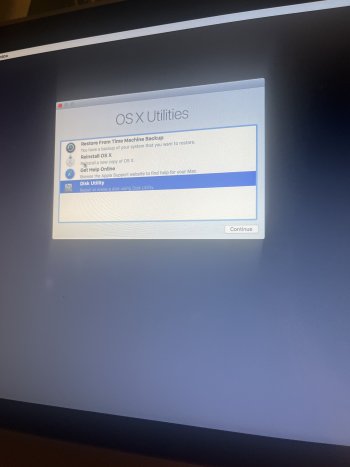
When I turn the Mac on now it goes straight to
OS X Utilities
If I click re install and follow the steps I get an error code 403?? And it won’t work
I’ve tried a few steps on disk utilities and I’ve also tried my Time Machine back up but nothing is working
My Mac is early 2008… looking at some helpful comments it seems @ https://forums.macrumors.com/members/weaselboy.46537/ seems a great help, but the threads are quite old so I’m not sure if I can get some advice
 
Current screen
 

Attachments

  • image.jpg
    image.jpg
    299 KB · Views: 71
Hello
I wanted to reset my Mac back to factory settings and have somehow managed to go wrong…
When I turn the Mac on now it goes straight to
OS X Utilities
If I click re install and follow the steps I get an error code 403?? And it won’t work
I’ve tried a few steps on disk utilities and I’ve also tried my Time Machine back up but nothing is working
My Mac is early 2008… looking at some helpful comments it seems @ https://forums.macrumors.com/members/weaselboy.46537/ seems a great help, but the threads are quite old so I’m not sure if I can get some advice
Try following this guide to get El Capitan up and running (which I believe is the latest OS compatible with a 2008 Mac)
 
  • Like
Reactions: MacInTO
Used my Mac Pro to burn a new CD for my Sony S2 that I use for jogging a few times per week. The nice part about these models is that it has a large cache and 2 modes of G-Protection so I don't get any skips.
wow how dinosaur!
i miss my disc players as sound and volume but not the battery/size of toting them around.
steve jobs improved everyone lives with the small player in 2001.

i do not miss cycling/racing 50 miles or more in the farm area of wisconsin
with my kenwood™ disc player with 4 CDs in my rear back pocket on the lycra jersey.

i still have all my ipods from 2006 but never use them on my road bikes since cars need to be heard.
now i use a sony walkman MP3 player since the batteries last days instead of hours.
 
Been on a bit of a tinkering/fixing mission with old Intel machines lately. ☺️

Stripped down and replaced the entire housing of a badly dented/broken 2011 MBP, planning to turn this into a very simple Linux install for my elderly mother to replace her old Windows 7 machine.
IMG_0030.jpg


Not sure this counts as an early Intel Mac, but I found my old 1st gen Apple TV when doing some spring cleaning, and installed the Leopard 10.5.8 ATV version from a few years ago. Just for fun. 256MB RAM, baby. 😎
IMG_0046.jpg
IMG_0047.jpg


And I had a hankering for another low-risk restoration project (for as and when I accidentally snap something off the logic board and break the thing completely), so just picked up a filthy, neglected old plastic MacBook 6,1 from eBay for £10. Already given the ruined rubber base a bit of a clean with a magic eraser, though fixing it back onto the metal shell is very much still a work in progress. 😩
IMG_0051.jpg


Will strip the whole thing down over the next week or so, give it a deep clean, then see about installing an SSD and probably some sort of lightweight Linux distro. Or maybe I’ll just keep it on Mavericks (which is what I had to hand to install on the old HDD to give it a quick systems check) for the retro-chic look.
 
Catalina does not play well with 2012 intels for some reason. both ny macbooks pro-air had spinning balls.
I have never had any problems with 2012 intels and Catalina. My 13" MacBook Air and 13" and 15" Pros always worked perfectly with it. The Air and the 15" MBP still run Catalina.
 
  • Like
Reactions: MBAir2010
I have never had any problems with 2012 intels and Catalina. My 13" MacBook Air and 13" and 15" Pros always worked perfectly with it. The Air and the 15" MBP still run Catalina.
that is great, maybe I typed too closed-minded as my Catalina difficulties was with Photos and some websites in 2019.
I also should have typed that I used a MacBook Air 4GB RAM with an i3 intel.
 
that is great, maybe I typed too closed-minded as my Catalina difficulties was with Photos and some websites in 2019.
I also should have typed that I used a MacBook Air 4GB RAM with an i3 intel.
I only reacted to the generalization that Catalina does not play well with 2012s. I do not believe that to be true based on my experience. But, I remember people commenting negatively about Catalina before, but I haven't encountered any problems I could complain about with it.

My MBA has 4GB RAM and i5 Intel. Of course, in retrospect, I should have bought it with 8GB when new but I didn't feel like paying that much and didn't expect to be using it still ~13 years later. The MBPs are better equipped but like I said, I've had no problems that bug me. For sure no spinning balls to annoy me, even today.
 
  • Like
Reactions: MBAir2010
Catalina does not play well with 2012 intels for some reason. both ny macbooks pro-air had spinning balls.
Strange...Catalina is one of my go-to installs, particularly on the older notebooks. I made the installer using @dosdude1 's Catalina Patcher software, and it has worked on older machines and those that have native support, ie 2012s. 4GB RAM is no barrier either, but then I do not push any of my machines hard.
I'm typing this on a 2010 Macbook 7,1 plastic Unibody. Core 2 Duo, 16GB RAM. Will try and get Catalina on it at some point - all that RAM will help a lot!
 
It is absurd that the 2010 MBP 17" i5/i7 do not accept more than 8GB RAM but the 2.5x cheaper C2D MBs do. View attachment 2600585
It's all down to the underlying architecture change. The Arrandale chips in the i5 and i7 CPUs used a very different architecture than the Penryn Core 2 Duos, and Intel only designed them with an upper limit of 8 GB of memory, presumably to keep costs and complexity down in the first iteration of the new architecture. Apple never officially supported 16GB in the Core 2 MacBooks either, though it does indeed work with the right modules.
 
  • Like
Reactions: roronl
Yes, I understand that it is about chipsets and what those architectures support and that Apple claimed much lower memory support (max 4GB) for the consumer machines so that the pro machines would look much more pro. I am sure Apple knew when the MB7,1 came out that it would support 8GB already, but they might not have known that later on they would even run 16GB.

But what a rotten luck for us MBP owners that there is no support for more than 8GB for our machines.
 
Last edited:
And I had a hankering for another low-risk restoration project (for as and when I accidentally snap something off the logic board and break the thing completely), so just picked up a filthy, neglected old plastic MacBook 6,1 from eBay for £10. Already given the ruined rubber base a bit of a clean with a magic eraser, though fixing it back onto the metal shell is very much still a work in progress. 😩
IMG_0051.jpg


Will strip the whole thing down over the next week or so, give it a deep clean, then see about installing an SSD and probably some sort of lightweight Linux distro. Or maybe I’ll just keep it on Mavericks (which is what I had to hand to install on the old HDD to give it a quick systems check) for the retro-chic look.

Sit rep 🙂
  • Spent the weekend taking the whole thing apart for a clean. Have disassembled and reassembled dozens of MBPs from this sort of era, but had to call on the iFixit guide a few times. Didn't realise how different the layouts were!
  • On the negative side, I managed to pull the wires out of one of the teeny tiny speaker connectors with my stupid clumsy fingers. 😒 I've taped it on as best I can, and at least I didn't snap the connector off the logic board, but not ideal!
  • On the positive side, I removed a large safety pin(!) from inside the optical drive, which hopefully explains why it wasn't accepting disks during my pre-teardown testing. 😅
  • I set myself a challenge not to spend more on repairs than I did on buying the unit, which is an issue when the MacBook cost £10! But after some trial and error with my box of old RAM, I've got two mis-matched 1067MHz sticks running for an upgrade to 6GB (I have 2x4GB sticks I thought were compatible, but got angry 'computer says no' noises when booting from those!). Not perfect, but given that it came with two mis-matched sticks in the first place, I'll call that a £0 upgrade.
  • Battery-wise, this one is unsurprisingly nearly toast. But I have a spare old one from when I did a battery replacement on my MacBook 7,1 somewhere. If I can find that it might improve things from 'Replace Now' to 'Service Recommended'. 😎
  • I have a spare SSD (£0 upgrade!). Having said I'd either run a lightweight Linux distro or Mavericks...why not both? I'll install Lubuntu alongside 10.9 on the SSD so I can have a play around with that (still very new to Linux, so any excuse to explore a new flavour!).
  • And, from early post-reassembly testing: The clumsy-fingered speakers still work! And the un-safetypinned optical drive now works as well! Woo!
  • The rubber base might be unsalvageable. I've hooked the rubber back onto the metal on one of these before using the end of a spudger, but here the rubber hasn't just come off, it's also been stretched out of shape. I'll maybe try some sort of tape/glue solution, but we're likely going to have to go with bare metal on the base. 😔
Non-tinkering chores have now intervened, but I'll pick this up tomorrow, get the SSD in and hopefully find that spare battery, and we should be good to go. 😀
 
but they might not have known that later on they would even run 16GB.
Almost certainly they did not. So often, Apple's upper RAM limits have been trashed by the later availability of bigger modules. It might look better for Apple, though, had they updated their specs to match what became known later.
 
  • Like
Reactions: ToniCH
Updated my Macbook Pro 2011 to OS X Mavericks from the great guide website Mavericks Forever. Plays well enough with my Mac Pro running lion in that I can run the same apps like Pages 4 but with a newer web browser.
 
Because i use none of those. And while the accounts I do use *could* be accessed via a webmail interface, it is slow and clunky. And, rightly or wrongly, a webmail interface is no place to do my small business work.
i'll probably put it back to MX Linux 25.1. Bang up to date, rock solid, and as secure as any OS out there.
If you upgraded to 10.7 lion, Wicknix’s email client in Brass Monkey would be on the table - most recent build published maybe three months ago? I’ve used it with El Cap and it worked great there. I also use Thunderbird in MX and it works perfectly for me. Set up a new gmail today actually which took all of two seconds to do.

MX 23/25 really does make everything so easy on these old Intel Macs.
 
Last edited:
I got the full set! 😂

Actually, I don't. I bought the 23" ACD for $30 for the power supply for the 20" ACD which I got for free without a power supply. I don't currently have a need for so many monitors but if I come across a cheap power supply, I will jump on it and then I will create a use for the third ACD! 😝

These monitors require some serious cable management as there are four leads from each monitor and as well as the power cable. I also discovered that I really like the USB port on the rear of the monitors because I can plug in a keyboard there instead of the computer.

IMG_2101.jpg
 
Non-tinkering chores have now intervened, but I'll pick this up tomorrow, get the SSD in and hopefully find that spare battery, and we should be good to go. 😀

And here she is. ☺️ A £10 MacBook 6,1 all cleaned, upgraded and up and running. With a fresh blob of thermal paste on the processor, 6GB RAM, a slightly used SSD and a considerably more used replacement battery. Dual-booting Mavericks 10.9.5 (with the Mavericks Forever updates/tweaks!) and Lubuntu 25.10. Runs both OSes buttery smooth for browsing, YouTubing, iTunes-ing, writing and a bit of retro gaming. Not quite Apple Silicon levels of performance, but plenty enough for a general internetting device. 🙂

IMG_0065.jpg
IMG_0066.jpg


The optical drive is reading disks again now that safety pin has been fished out. And the speakers are holding steady despite my incident with the connector wires during disassembly. Even looks like the 'new' battery will hold a couple of hours of charge, so I might take it for a walk down to my local coffee shop tomorrow. A lot of cosmetic dings, dents, cracks and scratches, but that’s just what happened to these beautiful white plastic MacBooks, sadly. 😢

IMG_0067.jpg


The only bit I’m not happy with is the base. I’ve managed to tape/glue the rubber back on to the metal frame, but as I said before, the rubber has clearly been stretched out of shape, so it’s very much not factory spec. I’ll keep an eye out on eBay for anyone selling off a replacement part for pennies, because she deserves better than a wonky superglued bottom. 😳 But it will do for now.

IMG_0068.jpg


And here’s the little plastic unibody MacBook family I now have. The repaired Late 2009 6,1 next to my Mid 2010 7,1 I got for £20 a couple of years back as a similar DIY fix-up project, currently running OCLP Sequoia with 16GB RAM and an SSD. 😱

IMG_0069.jpg
 
well the MacBook Pro either has a faulty RAM or not really-really snug.
I'm at 12GB which seems to be okay as I need to troubleshoot that 8GB stick another day.

the MBP 2012 Mojave works better on an external monitor than the MBA m1 for some reason.
 
Register on MacRumors! This sidebar will go away, and you'll see fewer ads.