
Got a tip for us?
Let us know
Become a MacRumors Supporter for $50/year with no ads, ability to filter front page stories, and private forums.
What's your favorite mouse?
- Thread starter JHNguyen
- Start date
- Sort by reaction score
You are using an out of date browser. It may not display this or other websites correctly.
You should upgrade or use an alternative browser.
You should upgrade or use an alternative browser.
I had an MX Revolution for maybe 3 days, my hand was killing me after using it. I found it to not be very ergonomic for me. I just got the VX Nano, and I have to say it is hands down one of the best mice I have ever used! It is perfect for my hands and I have large hands too. Also, the usb receiver on that thing is great. It's the size of a nickel and it hides perfectly in my apple keyboard (the new one). I highly recommend it.
A word on ergonomics, I wasn't sure how to figure out what I needed in a mouse. I know that the mighty mouse felt really good in my hand and I never had any pain. But when I went to the MX, I had terrible hand cramps. What I realized after what I needed in a mouse (which I read somewhere was ergonomically correct as well), was I need the back of my palm to rest on the surface of the desk. This made all the difference for me. The MX was too high for me.
A word on ergonomics, I wasn't sure how to figure out what I needed in a mouse. I know that the mighty mouse felt really good in my hand and I never had any pain. But when I went to the MX, I had terrible hand cramps. What I realized after what I needed in a mouse (which I read somewhere was ergonomically correct as well), was I need the back of my palm to rest on the surface of the desk. This made all the difference for me. The MX was too high for me.

GoKyu
macrumors 65816
When I first tried it, I really liked the Mighty Mouse, so when I got my Mac, I ordered the bluetooth model. After using it for a few weeks though, I'm finding I don't like it for Photoshop work...or anything else, for that matter.
So I went back to what I really like using - the Microsoft wireless mouse 6000, as part of the "Microsoft wireless desktop for Mac" set. Yep, that means I also switched out my thin aluminum keyboard too....much as I thought I liked it, the keys were too close together for me to type accurately without many errors.
-Bryan
So I went back to what I really like using - the Microsoft wireless mouse 6000, as part of the "Microsoft wireless desktop for Mac" set. Yep, that means I also switched out my thin aluminum keyboard too....much as I thought I liked it, the keys were too close together for me to type accurately without many errors.
-Bryan
I know I'm rare but I actually like my mighty mouse.
there are so few of us.

synth3tik
macrumors 68040
i dont care for wireless and all these other options..
i've been using the Microsoft 🙂eek: i know) IntelliMouse for about 8 years now and i freakin love this thing for everything from web browsing to playing games. i have 3 of them 😀
maybe one day long from now ill try a different mouse, but for now, im loving this thing!
i've been using the Microsoft 🙂eek: i know) IntelliMouse for about 8 years now and i freakin love this thing for everything from web browsing to playing games. i have 3 of them 😀
maybe one day long from now ill try a different mouse, but for now, im loving this thing!

Hello.there
macrumors 6502a
Another vote for the Logitech MX Revolution, by some distance the most suuuuuuperb mouse I've ever used.
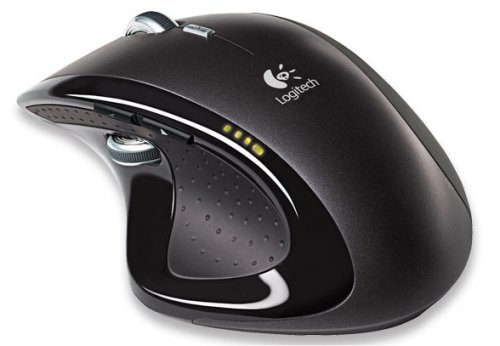

I recently got my first mac (a MacBook ^__^) and got a Logitecht VX Nano with it, absolutely loving it!! XD
It's small, looks awesome, has a tiny, tiny receiver and comes with a carrying 'case'/ bag. At first I thought the bag was a little sloppy but I now make use of that extra space to fit in my apple remote as well, ghehe.
It took a while for me to figure out how to switch to 'free-spin'-mode but now that I have it, it's heaven.
It's small, looks awesome, has a tiny, tiny receiver and comes with a carrying 'case'/ bag. At first I thought the bag was a little sloppy but I now make use of that extra space to fit in my apple remote as well, ghehe.
It took a while for me to figure out how to switch to 'free-spin'-mode but now that I have it, it's heaven.

Logitech MX500
I simply love this mouse. Had it for a few years and I bought a few, but I'm looking to buy a few more.
The thumb buttons control my iTunes volume, the top buttons change the tracks (prev, next), and the middle button displays dashboard. Click the scroll wheel and you see all your spaces. Definitely simplified my ability to multitask.
I listen to music or internet radio while i work, and it just helps my work flow.
I simply love this mouse. Had it for a few years and I bought a few, but I'm looking to buy a few more.
The thumb buttons control my iTunes volume, the top buttons change the tracks (prev, next), and the middle button displays dashboard. Click the scroll wheel and you see all your spaces. Definitely simplified my ability to multitask.
I listen to music or internet radio while i work, and it just helps my work flow.


avigalante
macrumors 6502
Not using a mouse is gangster...
but i'm kinda keen on the one that hides things under my bed 🙄
Oh I know of that mouse... 🙄

xraydoc
Contributor
Logitech Revolution VX (the little one; not the bigger MX). I just wish that it was available as...
1) in white (to match my Apple desktop aluminum keyboard)
2) bluetooth (for my laptop; the current black/gray color works)
For now, however, I'm using a Mighty Mouse on my desktop and a Logitech bluetooth mouse (not sure of the model # but its a dark slate/gray) with my laptop.
Yes, perhaps its a bit O.C.D. but I like things to be color coordinated.
1) in white (to match my Apple desktop aluminum keyboard)
2) bluetooth (for my laptop; the current black/gray color works)
For now, however, I'm using a Mighty Mouse on my desktop and a Logitech bluetooth mouse (not sure of the model # but its a dark slate/gray) with my laptop.
Yes, perhaps its a bit O.C.D. but I like things to be color coordinated.
PlaceofDis
macrumors Core
i like either the Logitech VX Revolution or the VX Nano.
right now the Nano is winning, i thought it'd be too small, but it works better than i thought.
right now the Nano is winning, i thought it'd be too small, but it works better than i thought.

puckhead193
macrumors G3

pastrychef
macrumors 601
I really like the Mighty Mouse (both the wireless and the wired). However, it's not without fault. Every so often, I have to rip it apart to clean out the rollers where the ball resides. The ability to scroll 360 degrees is great.