
Become a MacRumors Supporter for $50/year with no ads, ability to filter front page stories, and private forums.
Status
The first post of this thread is a WikiPost and can be edited by anyone with the appropiate permissions. Your edits will be public.
I think it is new feature, if you copy a text, the copied text will be showing up on your keyboard.
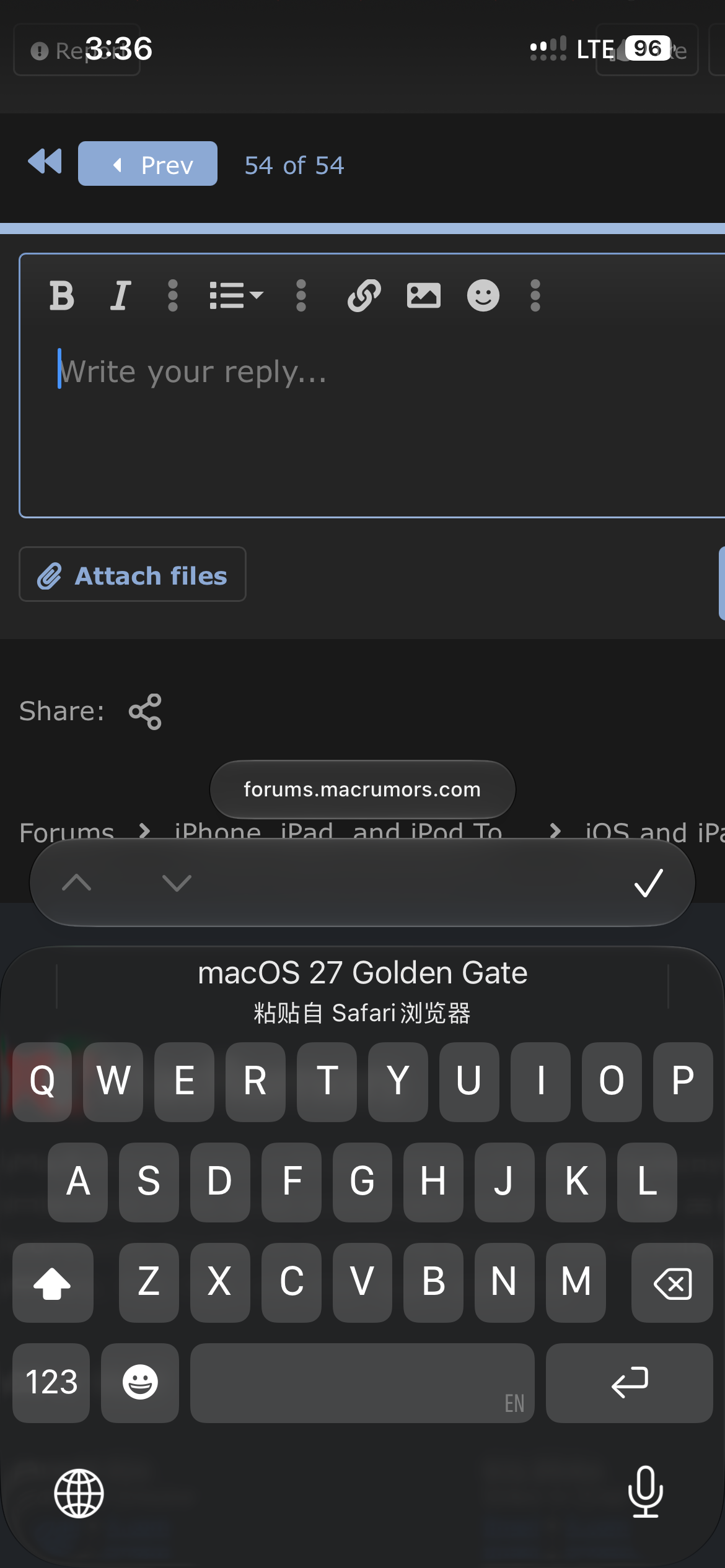
IMG_0458.png


I am pretty sure it is new and it is very convenient!
 
Has Mail badge syncing been improved? Does the badge on the app icon disappear when mails are marked as read on another device, or still only after entering the Mail app on each device?
 
  • Haha
Reactions: dk001
Has Mail badge syncing been improved? Does the badge on the app icon disappear when mails are marked as read on another device, or still only after entering the Mail app on each device?
No. There's no synchronisation of read/unread status.

It relies on polling your IMAP server which happens either when you open Mail or every 15 minutes (if you have Fetch set to every 15 minutes, of course).
 
No. There's no synchronisation of read/unread status.

It relies on polling your IMAP server which happens either when you open Mail or every 15 minutes (if you have Fetch set to every 15 minutes, of course).
It also happens with iCloud Mail which uses push notifications, not polling (and probably doesn’t use IMAP). It also happens with Exchange accounts, which aren’t IMAP either. New mail changes the badge instantly, so instant updates are possible, it just doesn’t happen for read/unread changes. The badge also doesn’t change after the polling interval, instead it remains for hours, until you open the Mail app.
 
Came across a random bug when long-pressing App Store icon. Usually there is a list of actions (Redeem, App Updates, Purchased, etc.). However, sometimes this list would not show, showing just the upper section (Edit Home Screen, Require Face ID and Remove App) and nothing else (see the pic). At the same time long-press options in other apps (Mail, Safari, Music) remain intact. Can’t see a clear pattern as yet, feedback submitted.
I have seen that bug in earlier iOS versions as well (at least iOS 26, if not earlier). I often search for app updates using the App Store context menu (or whatever it's officially called). Sometimes the menu is missing those particular actions. It can typically be fixed by opening the app itself. That brings the menu items back. Maybe it's an app initialization bug or a memory bug, hard to say.
 
  • Like
Reactions: one more
Pulling down from the top of the screen invokes Siri. You have to pull from top-right now to get the control centre and top-left for the notifications screen. Going to take some new muscle memories ...
I can’t get the top left to reveal notifications, no matter what I do. It just brings down the lock screen. Basically, I can’t figure out how to get to my notifications.
 
Is there anyone with iPhone 13 with iOS 27? Maybe because it is beta, the phone gets hot pretty quickly. Battery drains faster I believe.

This is a brand new iPhone 13 purchased at Walmart with 100% battery health.
 
The one thing that needs to be changed is the Siri swipe down on the 16/17e. The nice black drop animation ignores the notch completely and looks awfully silly as a result. It would be nice if it dropped down from the notch rather than right behind it.
I’d also love an option to be able to access Siri via home page (spotlight, center swipe) or button only. I wish I could disable the swipe from dynamic island.
 
I’d also love an option to be able to access Siri via home page (spotlight, center swipe) or button only. I wish I could disable the swipe from dynamic island.

Maybe I'm misunderstanding, but swiping down from the middle opens Siri (to type - click the microphone to talk).

it also works from the lock-screen (without the spotlight apps).

IMG_0806.jpeg
 

Attachments

  • IMG_0806.jpeg
    IMG_0806.jpeg
    87.9 KB · Views: 10
  • Like
Reactions: NBKindaGirl
Safari has a redesign. Tabs, bookmark, history etc. are moved on top, which makes easier for me. This is very nice design changes.


View attachment 2637760


Bug:

View attachment 2637764

Menu will go circle then revert back to traditional square
so weird cos my safari on IOS 27 is the same as IOS 26... i do not have shortcuts on the top like you have in the first image you posted ..
Edit : my bad it's the compact mode ... it look nice .
 
Last edited:
I'm on US Mobile with both Verizon and T-Mobile eSims. I switched to T-mobile just now and Wi-Fi calling popped in almost immediately.
If Wifi calling is presently not enabled, then enabling it won't work since the address screen for enabling wifi calling crashes when clicking into the address field.
 
Sitting at 96 hours with no Siri AI and still indexing. Genuinely starting to think something might be wrong here.
As Apple told developers that the first index could for some users be 1-2 weeks depending on device, usage and data it’s normal. Siri beta is hit and miss one account of mine still waiting from launch. Another one days ago and my wife got it within 2 hours of ios27 update yesterday all quite normal … more time not using your device and leaving it plugged in the better for index to finish
 
Register on MacRumors! This sidebar will go away, and you'll see fewer ads.