Become a MacRumors Supporter for $50/year with no ads, ability to filter front page stories, and private forums.

Reesche

macrumors member
Original poster
Hello you guys...

I have a problem with (2) of my MACS that are not communicating via a Ethernet cable.

The oldest Desktop is (OSX El Capitan 10.11.6) "Richard's MAC PRO 2" and the newer Desktop is (OS Mojave 10.14.6) "Richard's MAC PRO"

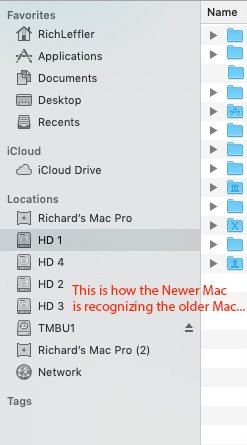
1. The Newer Desktop is (OS Mojave 10.14.6) is recognizing the older MAC fine on the side bar.

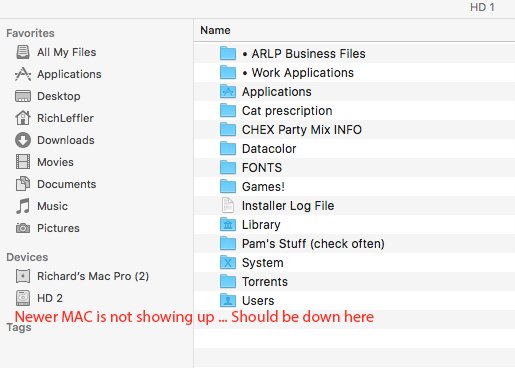
2. The Oldest Desktop is (OSX El Capitan 10.11.6) "Richard's MAC PRO 2" is NOT recognizing the newer MAC.

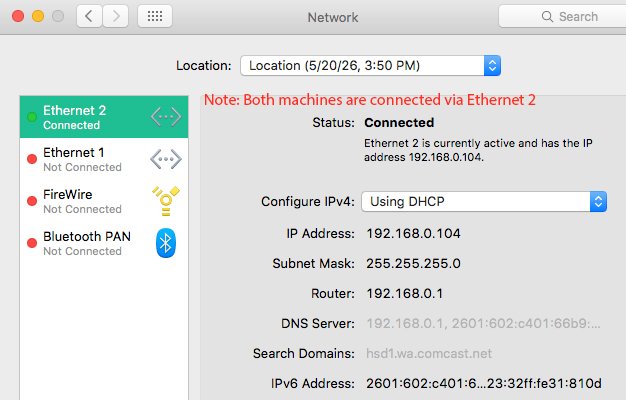
3. Both Desktops are hooked together via a hard wire Ethernet cord..... Ethernet 2 to Ethernet 2 on both machines.

Any help here would be appreciated!

See attachments below....
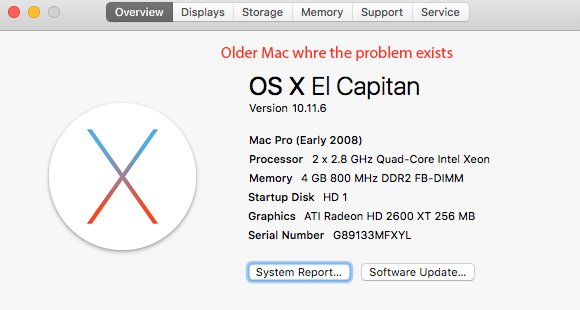
1 .jpg

2 Network-Devices.jpg

3 Network Preferances.jpg

4 Newer MAC Is Recognizing the Older MAC.jpg
 
Last edited:
If both Macs can connect to the Internet, your basic LAN is working, the problem resides in some Finder setting, Bonjour not scanning/displaying network shares. Meanwhile you can always connect to the other machine manually by going Finder -> Go -> Connect to Server.
 
Are these machines only connected to each other? No routers or other devices? Can the El Cap machine ping the Mojave machine? In terminal on the El Cap machine, "ping 192.168.0.xxx" with xxx being the Mojave machine address (by the looks of your screenshots it's not clear if 192.168.0.104 is the El Cap or the Mojave machine).

If El Cap can't ping Mojave, try turning off DHCP on both then manually configure Ethernet 2 on each machine.

Richard's Mac Pro - 192.168.0.1 / Subnet Mask: 255.255.255.0 / Router: <Leave Blank>
Richard's Mac Pro (2) - 192.168.0.2 / Subnet Mask: 255.255.255.0 / Router: <Leave Blank>

Also confirm that each machine has a different name. For example:

Richard's Mac Pro Terminal
"scutil --set ComputerName Richard1"
"scutil --set HostName Richard1"
"scutil dscacheutil -flushcache"
[Reboot]

Richard's Mac Pro (2) Terminal
"scutil --set ComputerName Richard2"
"scutil --set HostName Richard2"
"scutil dscacheutil -flushcache"
[Reboot]
 
Yes Only the (2) mac Machines connected by a hard wire Ethernet cable.

Ethernet 2 to Ethernet 2 on both machines.

I'm sorry I do not know enough about the Terminal App.... I do not understand it and never deal with it. And Network settings in System preferances.... not good with all of those numbers. Is there an easier way to acknowledge how the (2) Macs talk to each other via the Ethernet cable?
 
DHCP. It is the easiest way. This is where I have always set it on BOTH machines.

Here are 2 screen shots of both Network Settings as of now....

Richard's Mac Pro (2)

Network - Richard's Mac Pro (2).png


Richard's Mac Pro

Network - Richard's Mac.png
 
I just re-named both of the computers to Richard's Mac Pro and Richard's Mac Pro (2) under locations in Network Preferances. Hopefully, this will diferenciate them.

Again, there are (2) Ethernet jacks on the back of both machines. Ethernet 1 and Ethernet 2. Both machines are connected to (2). Does one machine need to be connected to Ethernet 1 and the other machine to Ethernet 2?
Screen Shot 2026-05-22 at 3.02.12 PM.png
 
I checked everything again this morning.

1. Richard's Mac Pro...... recognises BOTH of the computers.
2. Richard's Mac Pro (2).....Does NOT recognise Richard's Mac Pro

Any ideas here?
 
I'm sorry I do not know enough about the Terminal App....

That maybe a problem. We rely on your eyes and hands to communicate what you have/doing. You did not answer whether both boxes can currently talk to the Internet, because knowing that is the easiest way. If the answer is no then is more complicated, you will have to manually assign static IP for both machines and you *may* have to use a special cross-over cable.
 
  • Like
Reactions: conmee
We are able to use the internet on both machines.... what does this have to do with my problem?

1. Richard's Mac Pro...... recognizes BOTH of the computers.

Problem..... 2. Richard's Mac Pro (2).....Does NOT recognize Richard's Mac Pro

Attached....
On the side bar of Richard's Mac Pro..... Locations (is this accessible)? This is how it displays on Richard's Mac Pro computer. The second computer only shows Richard's Mac Pro (2) information.

Screen Shot 2026-05-23 at 10.54.10 AM.png
 
I just re-named both of the computers to Richard's Mac Pro and Richard's Mac Pro (2) under locations in Network Preferances. Hopefully, this will diferenciate them.

Again, there are (2) Ethernet jacks on the back of both machines. Ethernet 1 and Ethernet 2. Both machines are connected to (2). Does one machine need to be connected to Ethernet 1 and the other machine to Ethernet 2?
View attachment 2632065
That makes no difference. That only renames the configuration profile (you can have multiple network configuration profiles - one for VPN, one for Home, etc) for the same network card, but it doesn't rename the computer and won't help to differentiate the Mac Pros when trying to communicate with each other.

Good news is that all Intel based Macs have Auto-MDIX so it doesn't matter what cable you use (patch vs. crossover) unless you are using a 3rd party network card. You're using the Ethernet 2 on both Mac Pros so the cable is unlikely to be the problem.

Will try to make this as easy as possible for you.

Step 1: Just open a Terminal window on each Mac Pro. All you have to do is LOOK at the prompt. You want to confirm that each Mac Pro has a different name. In El Cap and Mojave, the default command line will show the computer name followed by user name. Here's an example:

01_Name.jpg


If the name is the SAME on both Mac Pros, you're going to need to issue a couple Terminal commands to change the El Cap computer name (I put the commands above in a previous post). For now, I'll assume the Mac Pros have different names. Fingers crossed.

Step 2: You do NOT need Terminal, but you DO need to change the Network settings on each Mac Pro. You need to pull down the menu that shows "Using DHCP" and you need to select "Manually". Once you do that, you're going to change the IP Address, Subnet Mask, and Router for each Mac Pro. Leave the Router field BLANK.

02_Manual.jpg


Settings or the Mojave Mac Pro:

03_Mojave.jpg


Settings for the El Cap Mac Pro:

04_ElCap.jpg


As long as both machines have different names and the cable is a good one (assuming yes on both of these), then your Mac Pro-to-Mac Pro network will work.
 
Hi Conmee..... Thanks for explaining all of this.

I finally had time to add your Network Manual Settings.

I went to (manual configuration) on both computers and added the numbers and hit Apply. Then, Restarted both computers and it all looks the same as before. Darn!

See screen shots below for both machines
.....

Let me know.....
Reesche

Richard's Mac Pro (2) - El Capitan .png


Pro (2) Side Bar - El Capitan .png


Richard's Mac Pro  - Mojave .png


Richard's Mac Pro  - Mojave Side Bar - Mojave.png
 
On the El Cap Mac Pro can you confirm the Finder Preferences. Make sure everything under Shared and Devices are checked (if it just has a line instead of a checkmark, click to remove the line and then click again to make sure it's a full checkmark).

If you click on Richard's Mac Pro (2) on the Mojave Mac Pro, are you able to browse the disk volumes/shares (can you see the filesystem on the El Cap Mac Pro from the Mojave Mac Pro?).

Finder.png
 
Thanks again for getting back to me on this issue!~

I will review and get back to you tomorrow morning OK?

Reesche
 
YES From Mac Pro I can see everything.... But not on #2 machine.

I just checked the Richard's Mac Pro 2 (the troubled child) and made sure all was checked..... Same read - out.... and no reading from R-Mac Pro side.

I just ordered a new Ethernet cord-30 feet to reach both of my machines.....as soon as it arrives in 4-days I will know more if it was the cable.

This is very confusing for me. Hard wired from both computers via Ethernet connection. It worked for years perfectly. And now all of this?

Stay with me Conmee!
 
  • Like
Reactions: conmee
I know this may be a no-brainer (and potentially obtuse), but:

Why the separate OS's?

It's been a loose handful of years since I actively had ElCap or Monty running on anything in the house, so I'm relying on memory here 😉
 
Not sure about OP, but before I sold my 6,1 I was running Monterey as it upgraded the Firmware to fix a few things. I'm running El Cap and Mojave in Parallels and taking screenshots from virtual machines at this point to try to help OP out. Guess we'll see if the new cable works or not.

Edit: Forgot OP is running older Mac Pros. It appears that El Cap is the last supported OS X for his Early 2008 Mac Pro.
 
Can you tell me what OP is exactly? And after COVID, why everyone want to get rid of all older MACS Operating Systems? ..... Greed?
 
“OP” original poster (aka person who started the topic). It’s in green next to your screen name. Don’t want to take liberties and just call you “Richard” or “reesche” for those who don’t read the entire thread. 🙂
 
And after COVID, why everyone want to get rid of all older MACS Operating Systems?

Time (and hardware) Marches-On, Brother!

When tiamo dropped the x64-muxing bomb on us weary MP 1,1 Travelers, Life was good for a while.

The Software became cumbersome, and we found New Choices.

Hours (Days and Months) of our time spent occupying attention to sleuthy-svelt software mods takes a toll . . . there comes a point when some folks decided to make choices...

In no way did I (personally) want to get rid of my older OS's . . . I just decided that my time was better-spent in other arenas 🙂
 
Ethernet Jacks on the Back of my MAC PROs........ As this thread indicates above..... I have 2 Mac Pros with different operating systems.

QUESTION: I have new Ethernet cable coming to see if the problem is the cable.

There are 2 Ethernet Jacks on both of my machines .... Ethernet 1 and Ethernet 2.

When I hook the new Ethernet cable to both machines do I use the same jacks on the back of my Macs? Ex: Ethernet 1 to Ethernet 1? But not Ethernet 1 to Ethernet 2....Right?

Thanks again.
 
Ethernet Jacks on the Back of my MAC PROs........ As this thread indicates above..... I have 2 Mac Pros with different operating systems.

QUESTION: I have new Ethernet cable coming to see if the problem is the cable.

There are 2 Ethernet Jacks on both of my machines .... Ethernet 1 and Ethernet 2.

When I hook the new Ethernet cable to both machines do I use the same jacks on the back of my Macs? Ex: Ethernet 1 to Ethernet 1? But not Ethernet 1 to Ethernet 2....Right?

Thanks again.
Based on the above screenshots, you’ve configured Ethernet 2 on both Mac Pros so plug the cable into Ethernet 2 on each Mac Pro. That should be how they are currently connected.
 
I hate to tell you this, but fix is very simple. You have two options, one, buy a simple ethernet switch, hook each computer to the switch with separate cables. This option will allow you to add more devices on your network, and keep all cables normal ethernet cables. Two, buy or have some one make a "crossover" cable. Ethernet operates on two pairs of wires in the cable, one for transmitting, one for receiving. The crossover cable needs to have the pairs reversed on ONE end, so that the transmitting pair is connected to the receiving pair of the other computer and the receiving pair is connected to the transmitting pair. Thats it. Now pick a non-routable IP Scheme, like 10.0.0.X or 192.168.0.X. Give each machine a different IP address, from 2 to 100. Any future network devices must follow the same scheme, with unique number in place of 'X' . Save '1' for possible router in the future.
 
Last edited:
Two, buy or have some one make a "crossover" cable. Ethernet operates on two pairs of wires in the cable, one for transmitting, one for receiving. The crossover cable needs to have the pairs reversed on ONE end, so that the transmitting pair is connected to the receiving pair of the other computer and the receiving pair is connected to the transmitting pair. Thats it.
Agree that a switch would also work, but this should be as simple as plugging in a cable between both Mac Pros and configuring each with a static IP address which OP has done. Unless there is something amiss with one of the Ethernet ports on the Mac Pros or the cable, this should work fine.

The Ethernet ports on his Mac Pros support Auto-MDIX so a crossover cable isn't necessary. A straight through patch cable will work, the ports will sense this and make the switch internally. Having said that, OP has ordered a new cable to rule out a cabling issue.
 
  • Like
Reactions: splifingate
Register on MacRumors! This sidebar will go away, and you'll see fewer ads.